1
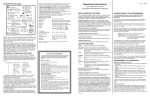
2. Select the desired starting time hour by pressing the ✞ or ✟
button. Be sure the AM or PM corresponds to the proper time.
3. Press and release the PROGRAM button to select the minutes.
4. Select the desired minute (if necessary) by pressing
the ✞ or ✟ button (in increments of 10 minutes).
5. Press and release the PROGRAM button. The heating or cooling setpoint will flash.
6. Select the desired heating or cooling setpoint by pressing the
✞ or ✟ button.
7. Press and release the MODE button to select the opposite
heating or cooling setpoint.
8. Select the desired heating or cooling setpoint by pressing the
✞ or ✟ button.
9. Press and release the PROGRAM button.
10. Continue until all the desired event start times and heating
and/or cooling setpoints have been programmed.
For situations where only Morning and Night programs are
required, refer to “Skipping an Event” to skip the Day and
Evening events.
11. Once you have set all of the weekday event start times, heating and/or cooling setpoints, press the PROGRAM button to
move to the weekend events, and SA SU will be displayed.
Constant Override
To maintain a temperature setting for an indefinite period of time,
press the HOLD button. The word HOLD will appear on the LCD.
The current scheduled setpoint will be maintained. To select a different setpoint, press the ✞ or ✟ button to raise or lower it. The
last setpoint selected (scheduled or new) will be maintained continuously until the RESUME button is pressed.
Replacing the Thermostat on Subbase
Off Mode
To turn off the heating or cooling system, press the MODE button
until the word OFF appears on the LCD. It will remain displayed
until the mode is changed. The OFF mode prevents the system
from being energized. Avoid using the OFF mode during extremely cold weather to prevent damage to the equipment from freezing.
You may lock the cover down to prevent
unauthorized access to the thermostat by
adding the plastic lock (included in the installation bag). Insert the plastic lock piece into
the bottom of the mounted base. The ends
of the lock piece fit snugly under the lock
pins extending from the bottom of the mounted base. The tab in the middle of the lock
piece extends down from the base.
To release the locking mechanism, press the
lock piece up and into the base while gently
prying open.
Auto Changeover Mode
To set the thermostat to automatically switch from heating to cooling mode press the MODE button until the word AUTO and both
the heating + and cooling ☛ icons appear on the LCD. The thermostat energizes the heating or cooling system based on the temperatures established for both modes.
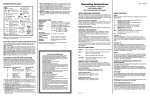
SET YOUR PERSONAL SCHEDULE
This blank list is for your own use. Start by selecting your
heat/cool temperature setpoints. Determine the times you want the
temperatures to be active. Write in the desired times in the appropriate location.
12. To program the weekend events simply repeat the steps used
to program the weekday events.
To exit programming at any time press and release the
RESUME button, or 2 minutes after pressing the last button
the display will automatically change to the normal display.
Skipping an Event (2 Methods)
Your personal schedule may not require the use of all 4 events on
a weekday. For example, if you wish to go from the Day event
directly to the Night event, skipping over the Evening event, there
are 2 methods you can apply:
A) - Press and release the PROGRAM button until you come to
the day and event hour on the day that you wish to skip.
A) - Press and hold down the PROGRAM button and at the same
time press and release the MODE button. In the time display
area you will see “ _ _ : _ _ ” indicating that the event is
skipped.
B) If any two or more events have the same start time, the latest
event in the day has priority.
Reviewing Scheduled Times and Setpoints
To review the program schedule press the PROGRAM button.
Each of the scheduled events is displayed starting with the weekday start times and temperatures. To cancel your review, press the
RESUME button, or wait 2 minutes for the thermostat to resume
the display automatically.
Viewing the Outdoor Temperature (Option)
If your thermostat has been installed with an electronic outdoor
remote sensor, you may view the outdoor temperature simply by
pressing the OUTDOOR button. Upon releasing the button, the
thermostat will once again display the indoor temperature.
Temporary Temperature Override
To temporarily change the scheduled setpoint during an event
without affecting the program, press the ✞ or ✟ buttons to lower
or raise the setpoints. The new setpoint will be retained for 3 hours
and will not affect the programming schedule. You may return to
the regular program schedule by pressing the RESUME button.
Temporary Temperature Override with Keypad Locked
With the keypad locked to prevent tampering you can temporarily
adjust the setpoint by ±3°C or 6°F of the programmed morning
setpoint without affecting the regular program. Press the ✞ or ✟
button to raise or lower the setpoint for a 1 hour period. This override may not be cancelled by pressing the RESUME button.
To not use a particular event,
select the event, hold the PROGRAM
button in at the hour or minute section,
then press the MODE button. Four dashes
will appear in the hour and minute section.
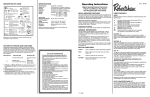
INSTALLATION INSTRUCTIONS
CAUTION
THIS DEVICE SHOULD BE INSTALLED BY A
QUALIFIED TECHNICIAN WITH DUE REGARD
FOR SAFETY, AS IMPROPER INSTALLATION
COULD RESULT IN A HAZARDOUS CONDITION
Location
To ensure proper operation, the thermostat should be mounted on
an inside wall in a frequently occupied area of the building. In
addition, its position must be at least 18" (46cm) from any outside
wall, and approximately 5' (1.5m) above the floor in a location with
freely circulating air of an average temperature. You should avoid
the following locations:
- behind doors or in corners where freely circulating air is
unavailable
- where direct sunlight or radiant heat from appliances might affect
control operation
- on an outside wall
- adjacent to, or in line with, conditioned air discharge grilles, stairwells, or outside doors
- where its operation may be affected by steam or water pipes or
warm air stacks in an adjacent partition space, or by an unheated/uncooled area behind the thermostat
- where its operation will be affected by the supply air of an adjacent unit
- near sources of electrical interference such as arcing relay
contacts.
1. Position the thermostat on the hinged tabs
at the top of the subbase.
2. Gently swing the thermostat down and
press on the bottom center until it snaps
into place.
Thermostat Cover Lock
Removing the Thermostat from the Subbase
1. Insert a flat blade screwdriver or a coin 1/8" into the slot located in the
bottom center of the thermostat case and twist 1/4 turn. When you feel
or hear a “click,” grasp the case from the bottom two corners and separate from the subbase. Some models require more force than others
when separating due to the number of terminals used.
2. Swing the thermostat out from the bottom.
3. Lift the thermostat up and off the subbase.
4. Place the rectangular opening in the subbase over the equipment control wires protruding from the wall and, using the subbase as a template,
mark the location of the two mounting holes. (Exact vertical mounting is
necessary only for appearance.)
5. Use the supplied anchors and screws for mounting on drywall or plaster;
drill two 3/16" (5mm) diameter holes at the marked locations; use a
hammer to tap the nylon anchors in flush to the wall surface and fasten
subbase using the supplied screws. (Do not overtighten!)
6. Connect the wires from your system to the thermostat terminals as
shown in the wiring diagrams. Carefully dress the wires so that any
excess is pushed back into the wall cavity or junction box. Ensure that
the wires are flush to the plastic subbase. The access hole should be
sealed or stuffed to prevent drafts from the wall affecting the thermostat.
7. Before the thermostat is reinstalled on the subbase, install the optional
clock/timer, indoor remote sensor and outdoor remote sensor, if used.
Refer to the installation instructions supplied with each option. Also
check the position of the DIP switches on the back of the thermostat.
Thermistor Mounting Instructions
When placing the thermostat on the backplate ensure the thermistor is not bent or
misaligned.
Ensure that the thermistor does not touch the thermostat case. The
thermistor should be placed horizontal to the wall. Ensure the thermistor is not pushed upward into the case.
The thermistor should be aligned so it is visible between the ribs on
the bottom of the subbase.
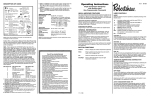
WIRING DIAGRAM
TERMINAL DESIGNATIONS
Note: If the 24V(c)
is not available from
the equipment, the
jumper may be
removed and a separate 24V transformer must then be
used to power the
thermostat. To
remove jumper
(labeled JP1) from
the printed circuit
board, pull straight
out.
W1 . . . .Energizes auxiliary heat as last stage heating or first
stage emergency heat
Y1 . . . .Energizes compressor #1 on a call for first stage
heating or cooling
G . . . . .Fan is energized with a call for heating or cooling or by
pressing the FAN button
R . . . . .Independent switching voltage
(for Release 3)
This thermostat
may be used with
24V DC. The negative side of the DC
supply must then be
wired to the 24V(c)
terminal.
Outdoor Hi & Lo Temperature Balance Points (Heat Pump Only)
With the optional electronic outdoor temperature sensor, you can
select the outdoor balance points to inhibit the auxiliary heat
and/or compressor.
HibP – Press and hold the OUTDOOR button, then press the
MODE button. HibP will appear on the display. Raise or lower the
HibP by pressing the ✞ or ✟ button to set the temperature above
which the auxiliary heat is locked out. Press the outdoor button
while showing the HibP and the thermostat will switch to show
LobP. LobP is used to lock out the compressor. Outdoor temperatures below the LobP will lock out the compressor. The factory
HibP and LobP setpoints are +48°C and -48°C.
24V . . .24 VAC hot and common to power the thermostat
24V(c)
O . . . . .Energizes the reversing valve continuously in cooling
mode
B . . . . .Energizes the reversing valve continuously in the
heating & off modes
RS2 . . .Use to connect up to 6 (SL-IDS) indoor and/or 1 (SL-ODT)
RS1
outdoor remote sensor/s.
RS+V . .When connected the thermostat will automatically use the
SL-IDS temperature sensor and not its own.
Refer to the instructions included with the sensor
LED1 . .Free status light when energized lights LED1. Also see Sw5
LED2 . .Free status light when energized lights LED2. Also see Sw6
(Installer should identify what the LEDs are being used for.)