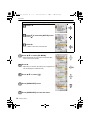
1
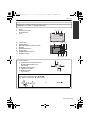
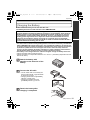
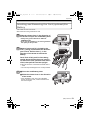
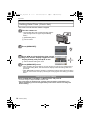
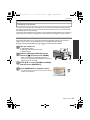
DMC-FP8~_eng.book 1 ページ 2009年7月6日 月曜日 午後2時52分 Basic Operating Instructions Digital Camera Model No. DMC-FP8 Before use, please read these instructions completely. Please also refer to Operating Instructions (PDF format) recorded on the CD-ROM containing the Operating Instructions (supplied). You can learn about advanced operation methods and check the Troubleshooting. VQT2F91 GN until 2009/7/31 DMC-FP8~_eng.book 2 ページ 2009年7月6日 月曜日 午後2時52分 Dear Customer, We would like to take this opportunity to thank you for purchasing this Panasonic Digital Camera. Please read these Operating Instructions carefully and keep them handy for future reference. Please note that the actual controls and components, menu items, etc. of your Digital Camera may look somewhat different from those shown in the illustrations in these Operating Instructions. Carefully observe copyright laws. • Recording of pre-recorded tapes or discs or other published or broadcast material for purposes other than your own private use may infringe copyright laws. Even for the purpose of private use, recording of certain material may be restricted. Information for Your Safety WARNING: TO REDUCE THE RISK OF FIRE, ELECTRIC SHOCK OR PRODUCT DAMAGE, • DO NOT EXPOSE THIS APPARATUS TO RAIN, MOISTURE, DRIPPING OR SPLASHING AND THAT NO OBJECTS FILLED WITH LIQUIDS, SUCH AS VASES, SHALL BE PLACED ON THE APPARATUS. • USE ONLY THE RECOMMENDED ACCESSORIES. • DO NOT REMOVE THE COVER (OR BACK); THERE ARE NO USER SERVICEABLE PARTS INSIDE. REFER SERVICING TO QUALIFIED SERVICE PERSONNEL. IF THE POWER CORD OF THIS EQUIPMENT IS DAMAGED, IT MUST BE REPLACED WITH AN ELECTRICALLY APPROVED POWER CORD. THE SOCKET OUTLET SHALL BE INSTALLED NEAR THE EQUIPMENT AND SHALL BE EASILY ACCESSIBLE. Product Identification Marking is located on the bottom of units. ∫ About the battery pack CAUTION Danger of explosion if battery is incorrectly replaced. Replace only with the same or equivalent type recommended by the manufacturer. Dispose of used batteries according to the manufacturer’s instructions. • Do not heat or expose to flame. • Do not leave the battery(ies) in an automobile exposed to direct sunlight for a long period of time with doors and windows closed. Warning Risk of fire, explosion and burns. Do not disassemble, heat above 60 xC or incinerate. 2 VQT2F91 (ENG) DMC-FP8~_eng.book 3 ページ 2009年7月6日 月曜日 午後2時52分 ∫ About the battery charger CAUTION! • DO NOT INSTALL OR PLACE THIS UNIT IN A BOOKCASE, BUILT-IN CABINET OR IN ANOTHER CONFINED SPACE. ENSURE THE UNIT IS WELL VENTILATED. TO PREVENT RISK OF ELECTRIC SHOCK OR FIRE HAZARD DUE TO OVERHEATING, ENSURE THAT CURTAINS AND ANY OTHER MATERIALS DO NOT OBSTRUCT THE VENTILATION VENTS. • DO NOT OBSTRUCT THE UNIT’S VENTILATION OPENINGS WITH NEWSPAPERS, TABLECLOTHS, CURTAINS, AND SIMILAR ITEMS. • DO NOT PLACE SOURCES OF NAKED FLAMES, SUCH AS LIGHTED CANDLES, ON THE UNIT. • DISPOSE OF BATTERIES IN AN ENVIRONMENTALLY FRIENDLY MANNER. • The battery charger is in the standby condition when the AC power supply cord is connected. The primary circuit is always “live” as long as the power cord is connected to an electrical outlet. ∫ Cautions for Use • Do not use any other AV cables except the supplied one. • Do not use any other cables except a genuine Panasonic component cable (DMW-HDC2; optional). • Do not use any other USB connection cables except the supplied one. In the event of abnormal operation (e.g. if the unit emits smoke or an unusual smell), immediately stop operating the unit and consult the Panasonic Customer Care Centre on 132600. Keep the camera as far away as possible from electromagnetic equipment (such as microwave ovens, TVs, video games etc.). • If you use the camera on top of or near a TV, the pictures and sound on the camera may be disrupted by electromagnetic wave radiation. • Do not use the camera near cell phones because doing so may result in noise adversely affecting the pictures and sound. • Recorded data may be damaged, or pictures may be distorted, by strong magnetic fields created by speakers or large motors. • Electromagnetic wave radiation generated by microprocessors may adversely affect the camera, disturbing the pictures and sound. • If the camera is adversely affected by electromagnetic equipment and stops functioning properly, turn the camera off and remove the battery or disconnect AC adaptor (DMW-AC5G; optional). Then reinsert the battery or reconnect AC adaptor and turn the camera on. Do not use the camera near radio transmitters or high-voltage lines. • If you record near radio transmitters or high-voltage lines, the recorded pictures and sound may be adversely affected. (ENG) VQT2F91 3 DMC-FP8~_eng.book 4 ページ 2009年7月6日 月曜日 午後2時52分 ∫ Care of the camera • Do not touch the lens or the sockets with dirty hands. Also, be careful not to allow liquids, sand and other foreign matter to get into the space around the lens, buttons etc. • Do not strongly shake or bump the camera by dropping or hitting it. Do not subject to strong pressure. The camera may malfunction, recording pictures may become impossible, or the lens, the LCD monitor or the external case may be damaged. • We strongly recommend you do not leave the camera in your trousers pocket when you sit down or forcefully insert it into a full or tight bag etc. Damage to the LCD monitor or personal injury may result. • Do not attach any other items to the hand strap that’s included with your camera. While being stored, that item can rest against the LCD monitor and damage it. • Be particularly careful in the following places as they may cause this unit to malfunction. – Places with a lot of sand or dust. – Places where water can come into contact with this unit such as when using it on a rainy day or on a beach. • This camera is not waterproof. If water or seawater splashes on the camera, use a dry cloth to wipe the camera body carefully. If the unit does not operate normally, please contact the dealer where you purchased the camera or the repair service centre. ∫ About Condensation (When the lens is fogged up) • Condensation occurs when the ambient temperature or humidity changes. Be careful of condensation since it causes lens stains, fungus and camera malfunction. • If condensation occurs, turn the camera off and leave it for about 2 hours. The fog will disappear naturally when the temperature of the camera becomes close to the ambient temperature. 4 VQT2F91 (ENG) DMC-FP8~_eng.book 5 ページ 2009年7月6日 月曜日 午後2時52分 ∫ About cards that can be used in this unit You can use an SD Memory Card and SDHC Memory Card. • When the term card is used in these operating instructions this refers to the following types of Memory Cards. – SD Memory Card (8 MB to 2 GB) – SDHC Memory Card (4 GB to 32 GB) More specific information about memory cards that can be used with this unit. • You can only use an SDHC Memory Card if using cards with 4 GB or more capacity. OK • A 4 GB (or more) Memory Card without an SDHC logo is not based on the SD Standard and will not work in this product. Please confirm the latest information on the following website. http://panasonic.jp/support/global/cs/dsc/ (This Site is English only.) 4 4 • Keep the Memory Card out of reach of children to prevent swallowing. (ENG) VQT2F91 5 DMC-FP8~_eng.book 6 ページ 2009年7月6日 月曜日 午後2時52分 -If you see this symbolInformation on Disposal in other Countries outside the European Union This symbol is only valid in the European Union. If you wish to discard this product, please contact your local authorities or dealer and ask for the correct method of disposal. 6 VQT2F91 (ENG) DMC-FP8~_eng.book 7 ページ 2009年7月6日 月曜日 午後2時52分 Contents Information for Your Safety ................................................................................................. 2 Before Use Standard Accessories ......................................................................................................... 8 Names of the Components ................................................................................................. 9 Preparation Charging the Battery ......................................................................................................... 11 Inserting and Removing the Card (optional)/the Battery................................................... 13 Setting Date/Time (Clock Set) .......................................................................................... 14 • Changing the clock setting.......................................................................................... 14 Setting the Menu............................................................................................................... 15 • Setting menu items ..................................................................................................... 15 Selecting the [REC] Mode ................................................................................................ 17 Basic Taking pictures using the automatic function (ñ: Intelligent Auto Mode)............................................................................................... 18 • Scene detection .......................................................................................................... 19 • AF Tracking Function.................................................................................................. 19 Taking pictures with your favourite settings (·: Normal Picture Mode)............................................................................................... 20 • Focusing ..................................................................................................................... 20 Playing back Pictures ([NORMAL PLAY]) ........................................................................ 21 Deleting Pictures............................................................................................................... 22 • To delete a single picture............................................................................................ 22 • To delete multiple pictures (up to 50) or all the pictures ............................................. 22 Others Reading the Operating Instructions (PDF format) ............................................................ 23 Specifications.................................................................................................................... 24 (ENG) VQT2F91 7 DMC-FP8~_eng.book 8 ページ 2009年7月6日 月曜日 午後2時52分 Before Use Before Use Standard Accessories Check that all the accessories are included before using the camera. Product numbers correct as of July 2009. These may be subject to change. 1 2 3 4 5 6 7 8 9 Battery Pack (Indicated as battery pack or battery in the text) Charge the battery before use. Battery Charger (Indicated as battery charger or charger in the text) AC Cable USB Connection Cable AV Cable CD-ROM • Software: 1 2 DMW-BCF10E 3 DE-A60A 4 Use it to install the software to your PC. CD-ROM • Operating Instructions Hand Strap Battery Case K2CJ29A00002 5 K1HA08AD0001 6 • SD Memory Card and SDHC Memory Card are indicated as card in the text. • The card is optional. You can record or play back pictures on the built-in memory when you are not using a card. • Consult the dealer or your nearest Service Centre if you lose the supplied accessories. (You can purchase the accessories separately.) K1HA08CD0027 7 8 VFF0527 9 VGQ0D56 8 VQT2F91 (ENG) VFC4297 DMC-FP8~_eng.book 9 ページ 2009年7月6日 月曜日 午後2時52分 Before Use Names of the Components 1 2 3 Flash Self-timer indicator AF assist lamp Lens 4 5 6 7 8 9 10 11 LCD monitor [MODE] button [REC]/[PLAYBACK] selector switch Speaker [MENU/SET] button Keypad light [Q.MENU]/Delete button [DISPLAY] button 1 2 4 3 56 7 8 12 1110 9 12 Cursor buttons A: 3/Exposure compensation/Auto Bracket/White balance fine adjustment B: 1/Flash setting button C: 2/Self-timer button D: 4/Macro Mode AF Tracking In these operating instructions, the cursor buttons are described as shown in the figure below or described with 3/4/2/1. e.g.: When you press the 4 (down) button or Press 4 (ENG) VQT2F91 9 DMC-FP8~_eng.book 10 ページ 2009年7月6日 月曜日 午後2時52分 Before Use 13 14 15 16 17 13 Camera ON/OFF switch Zoom lever Intelligent auto button Microphone Shutter button 16 18 [COMPONENT OUT] socket 19 [AV OUT/DIGITAL] socket 20 [DC IN] socket • Always use a genuine Panasonic AC • • • • 14 15 17 21 18 adaptor (DMW-AC5G; optional). 19 When using an AC adaptor, use the AC 20 cable supplied with the AC adaptor. This camera cannot charge the battery even when the AC adaptor (DMW-AC5G; optional) is connected to it. We recommend you use a battery with sufficient battery power or the AC adaptor when recording motion pictures. If while recording motion pictures using the AC adaptor the power supply is cut off due to a power cut or if the AC adaptor is disconnected etc., the motion picture being recorded will not be recorded. 21 Hand strap eyelet • Be sure to attach the hand strap when using the camera to ensure that you will not drop it. 22 Tripod receptacle • When you use a tripod, make sure the 22 tripod is stable when the camera is attached to it. 23 Card/Battery door 24 Release lever 23 24 10 VQT2F91 (ENG) DMC-FP8~_eng.book 11 ページ 2009年7月7日 火曜日 午後7時50分 Preparation Preparation Charging the Battery ∫ About batteries that you can use with this unit The battery that can be used with this unit is DMW-BCF10E. It has been found that counterfeit battery packs which look very similar to the genuine product are made available to purchase in some markets. Some of these battery packs are not adequately protected with internal protection to meet the requirements of appropriate safety standards. There is a possibility that these battery packs may lead to fire or explosion. Please be advised that we are not liable for any accident or failure occurring as a result of use of a counterfeit battery pack. To ensure that safe products are used we would recommend that a genuine Panasonic battery pack is used. • Use the dedicated charger and battery. • The camera has a function for distinguishing batteries which can be used safely. The dedicated battery (DMW-BCF10E) supports this function. The only batteries suitable for use with this unit are genuine Panasonic products and batteries manufactured by other companies and certified by Panasonic. (Batteries which do not support this function cannot be used). Panasonic cannot in any way guarantee the quality, performance or safety of batteries which have been manufactured by other companies and are not genuine Panasonic products. • The battery is not charged when the camera is shipped. Charge the battery before use. • Charge the battery with the charger indoors. • Charge the battery in a temperature between 10 oC to 35 oC. (The battery temperature should also be the same.) Attach the battery with attention to the direction of the battery. Connect the AC cable. • The AC cable does not fit entirely into the AC input terminal. A gap will remain as shown on the right. • Charging starts when the [CHARGE] indicator A lights green. • Charging is complete when the [CHARGE] indicator A turns off. Detach the battery after charging is completed. (ENG) VQT2F91 11 DMC-FP8~_eng.book 12 ページ 2009年7月6日 月曜日 午後2時52分 Preparation Note • After charging is completed, be sure to disconnect the power supply device from the electrical outlet. • The battery becomes warm after using it and during and after charging. The camera also becomes warm during use. This is not a malfunction. • The battery will be exhausted if left for a long period of time after being charged. • The battery can be recharged even when it still has some charge left, but it is not recommended that the battery charge be frequently topped up while the battery is fully charged. (Since characteristic swelling may occur.) • When the operating time of the camera becomes extremely short even after properly charging the battery, the life of the battery may have expired. Buy a new battery. • Do not leave any metal items (such as clips) near the contact areas of the power plug. Otherwise, a fire and/or electric shocks may be caused by short-circuiting or the resulting heat generated. ∫ The battery life Number of recordable pictures Approx. 380 pictures Recording time Approx. 190 min By CIPA standard in Normal Picture Mode Recording conditions by CIPA standard • CIPA is an abbreviation of [Camera & Imaging Products Association]. • Temperature: 23 oC/Humidity: 50% when LCD monitor is on.¢ • Using a Panasonic SD Memory Card (32 MB). • Using the supplied battery. • Starting recording 30 seconds after the camera is turned on. (When the optical image stabilizer function is set to [AUTO].) • Recording once every 30 seconds with full flash every second recording. • Rotating the zoom lever from Tele to Wide or vice versa in every recording. • Turning the camera off every 10 recordings and leaving it until the temperature of the battery decreases. ¢ The number of recordable pictures decreases in Auto Power LCD mode, Power LCD mode and High angle mode. The number of recordable pictures varies depending on the recording interval time. If the recording interval time becomes longer, the number of recordable pictures decreases. [e.g. When recording once every 2 minutes, the number of recordable pictures decreases to about 95.] Playback time Approx. 360 min The number of recordable pictures and playback time will vary depending on the operating conditions and storing condition of the battery. ∫ Charging Charging time Approx. 130 min • The indicated charging time is for when the battery has been discharged completely. The charging time may vary depending on how the battery has been used. The charging time for the battery in hot/cold environments or a battery that has not been used for long time may be longer than normal. 12 VQT2F91 (ENG) DMC-FP8~_eng.book 13 ページ 2009年7月6日 月曜日 午後2時52分 Preparation Inserting and Removing the Card (optional)/the Battery • Check that this unit is turned off. • We recommend using a Panasonic card. Slide the release lever in the direction of the arrow and open the card/battery door. • Always use genuine Panasonic batteries (DMW-BCF10E). • If you use other batteries, we cannot guarantee the quality of this product. Battery: Insert until it is locked by the lever A being careful about the direction you insert it. Pull the lever A in the direction of the arrow to remove the battery. Card: Push it fully until it clicks being careful about the direction you insert it. To remove the card, push the card until it clicks, then pull the card out upright. B: Do not touch the connection terminals of the card. • The card may be damaged if it is not fully inserted. 1:Close the card/battery door. 2:Slide the release lever in the direction of the arrow. • If the card/battery door cannot be completely closed, remove the card, check its direction and then insert it again. (ENG) VQT2F91 13 DMC-FP8~_eng.book 14 ページ 2009年7月6日 月曜日 午後2時52分 Preparation Setting Date/Time (Clock Set) • The clock is not set when the camera is shipped. Turn the camera on. • The [PLEASE SET THE CLOCK] message appears. (This message does not appear in [PLAYBACK] Mode.) OFF ON A [MENU/SET] button B Cursor buttons Press [MENU/SET]. Press 2/1 to select the items (year, month, day, hour, minute, display sequence or time display format), and press 3/4 to set. ‚: Cancel without setting the clock. Press [MENU/SET] to set. • After completing the clock settings, turn the camera off. Then turn the camera back on, switch to Recording Mode, and check that the display reflects the settings that were performed. • When [MENU/SET] has been pressed to complete the settings without the clock having been set, set the clock correctly by following the “Changing the clock setting” procedure below. Changing the clock setting Select [CLOCK SET] in the [REC] or [SETUP] menu, and press 1. • It can be changed in steps 3 and 4 to set the clock. • The clock setting is maintained for 3 months using the built-in clock battery even without the battery. (Leave the charged battery in the unit for 24 hours to charge the built-in battery.) 14 VQT2F91 (ENG) DMC-FP8~_eng.book 15 ページ 2009年7月6日 月曜日 午後2時52分 Preparation Setting the Menu The camera comes with menus that allow you to choose the settings for taking pictures and playing them back just as you like and menus that enable you to have more fun with the camera and use it more easily. In particular, the [SETUP] menu contains some important settings relating to the camera’s clock and power. Check the settings of this menu before proceeding to use the camera. Setting menu items This section describes how to select the Normal Picture Mode settings, and the same setting can be used for the [PLAYBACK] menu and [SETUP] menu as well. Example: Setting [AF MODE] from [Ø] to [š] in the Normal Picture Mode Turn the camera on. A [MENU/SET] button B [REC]/[PLAYBACK] selector switch C [MODE] button OFF ON Slide the [REC]/[PLAYBACK] selector switch to [!], and then press [MODE]. • When selecting the [PLAYBACK] Mode menu settings, set the [REC]/[PLAYBACK] selector switch to [(], and proceed to step 4. Press 3/4 to select [NORMAL PICTURE], and then press [MENU/SET]. Press [MENU/SET] to display the menu. • You can switch menu screens from any menu item by rotating the zoom lever. (ENG) VQT2F91 15 DMC-FP8~_eng.book 16 ページ 2009年7月6日 月曜日 午後2時52分 Preparation Switching to the [SETUP] menu Press 2. Press 4 to select the [SETUP] menu icon [ ]. Press 1. • Select a menu item next and set it. Press 3/4 to select [AF MODE]. • Select the item at the very bottom, and press 4 to move to the second screen. Press 1. • Depending on the item, its setting may not appear or it may be displayed in a different way. Press 3/4 to select [š]. Press [MENU/SET] to set. Press [MENU/SET] to close the menu. 16 VQT2F91 (ENG) DMC-FP8~_eng.book 17 ページ 2009年7月6日 月曜日 午後2時52分 Preparation Mode switching Selecting the [REC] Mode When the [REC] Mode is selected, the camera can be set to the Intelligent Auto Mode in which the optimal settings are established in line with the subject to be recorded and the recording conditions, or to the Scene Mode which enables you to take pictures that match the scene being recorded. Intelligent Auto Mode ¦ The subjects are recorded using settings automatically selected by the camera. ∫ To select a [REC] modes from the [REC] modes list Turn the camera on. A [MENU/SET] button B [REC]/[PLAYBACK] selector switch C [MODE] button OFF ON Slide the [REC]/[PLAYBACK] selector switch to [!]. Press [MODE]. Press 3/4 to select the mode. Press [MENU/SET]. ∫ List of [REC] Modes ! Normal Picture Mode The subjects are recorded using your own settings. My Scene Mode Pictures are taken using previously registered recording scenes. Û Scene Mode This allows you to take pictures that match the scene being recorded. $ Motion Picture Mode This mode allows you to record motion pictures with audio. (ENG) VQT2F91 17 DMC-FP8~_eng.book 18 ページ 2009年7月13日 月曜日 午後6時17分 Basic [REC] Mode: ñ Basic Taking pictures using the automatic function (ñ: Intelligent Auto Mode) The camera will set the most appropriate settings to match the subject and the recording conditions so we recommend this mode for beginners or those who want to leave the settings to the camera and take pictures easily. • The following functions are activated automatically. – Scene detection/[STABILIZER]/[INTELLIGENT ISO]/Face detection/Quick AF/ [I.EXPOSURE]/Digital Red-eye Correction/Backlight Compensation • The keypad light 3 lights when you turn this unit on 2. (It turns off after about 1 second.) (1: Shutter button) OFF ON Slide the [REC]/[PLAYBACK] selector switch to [!]. Press [¦] A. • Pressing [¦] again takes you back to the previous mode. Hold this unit gently with both hands, keep your arms still at your side and stand with your feet slightly apart. B Flash C AF assist lamp Press the shutter button halfway to focus. 1 • The focus indication 1 (green) lights when the subject is focused. • The AF area 2 is displayed around the subject’s face by the face detection function. In other cases, it is displayed at the point on the subject which is in focus. • The focus range is 5 cm (Wide)/30 cm (Tele) to ¶. 2 Press the shutter button fully (push it in further), and take the picture. • The access indication lights red when pictures are being recorded on the built-in memory (or the card). 18 VQT2F91 (ENG) DMC-FP8~_eng.book 19 ページ 2009年7月6日 月曜日 午後2時52分 Basic • Do not turn this unit off, remove its battery or card, or disconnect the AC adaptor (DMW-AC5G; optional) when the access indication is lit [when pictures are being written, read or deleted, or the built-in memory or the card is being formatted]. Furthermore, do not subject the camera to vibration, impact or static electricity. The card or the data on the card may be damaged, and this unit may no longer operate normally. If operation fails due to vibration, impact or static electricity, perform the operation again. Scene detection When the camera identifies the optimum scene, the icon of the scene concerned is displayed in blue for 2 seconds, after which its colour changes to the usual red. ¦ > [i-PORTRAIT] [i-SCENERY] [i-MACRO] [i-NIGHT PORTRAIT] • Only when [‡] is selected [i-NIGHT SCENERY] [i-BABY]¢ • [¦] is set if none of the scenes are applicable, and the standard settings are set. • When [ ], [ ] or [ ] is selected, the camera automatically detects a person’s face, and it will adjust the focus and exposure. (Face detection) • If a tripod is used, for instance, and the camera has judged that camera shake is minimal when the Scene Mode has been identified as [ ], the shutter speed will be set to a maximum of 8 seconds.Take care not to move the camera while taking pictures. • When [FACE RECOG.] is set to [ON], and the face similar to the registered face is detected, [R] is displayed in the top right of [ ], [ ] and [ ]. ¢ When [FACE RECOG.] is set to [ON], [ ] will be displayed for birthdays of registered faces already set only when the face of a person 3 years old or younger is detected. AF Tracking Function It is possible to set the focus to the specified subject. Focus will keep following the subject automatically even if it moves. 1 Press 3. • [ ] is displayed in the upper left of the screen. • AF Tracking frame is displayed in the centre of the screen. • Press 3 again to cancel. 2 Bring the subject to the AF tracking frame, and press 4 to lock the subject. • AF tracking frame will turn yellow. • An optimum scene for the specified subject will be chosen. • Press 3 to cancel. (ENG) VQT2F91 19 DMC-FP8~_eng.book 20 ページ 2009年7月7日 火曜日 午前9時49分 Basic [REC] Mode: · Taking pictures with your favourite settings (·: Normal Picture Mode) The camera automatically sets the shutter speed and the aperture value according to the brightness of the subject. You can take pictures with greater freedom by changing various settings in [REC] menu. Slide the [REC]/[PLAYBACK] selector switch to [!], and then press [MODE]. A [MODE] button B [REC]/[PLAYBACK] selector switch Press 3/4 to select [NORMAL PICTURE], and then press [MENU/SET]. C [MENU/SET] button Aim the AF area at the point you want to focus on. Press the shutter button halfway to focus. • The focus indication (green) lights when the subject is focused. • The focus range is 30 cm to ¶. Press the halfway pressed shutter button fully to take a picture. • The access indication lights red when pictures are being recorded on the built-in memory (or the card). Focusing Aim the AF area at the subject, and then press the shutter button halfway. A Focus B C When the subject is When the subject focused is not focused Focus indication On Blinks AF area White>Green White>Red Sound Beeps 2 times Beeps 4 times A Focus indication B AF area (normal) C AF area (when using the digital zoom or when it is dark) 20 VQT2F91 (ENG) DMC-FP8~_eng.book 21 ページ 2009年7月7日 火曜日 午後2時37分 Basic [PLAYBACK] Mode: ¸ Playing back Pictures ([NORMAL PLAY]) Slide the [REC]/[PLAYBACK] selector switch A to [(]. • Normal playback is set automatically in the following cases. – When the mode is switched from the [REC] to [PLAYBACK]. – When the camera is turned on while the [REC]/ [PLAYBACK] selector switch was at [(]. Press 2/1 to select the picture. 2: Play back the previous picture 1: Play back the next picture ∫ Fast forwarding/Fast rewinding Press and hold 2/1 during playback. 2: Fast rewind A B 1: Fast forward • The file number A and the picture number B only change one by one. Release 2/1 when the number of the desired picture appears to play back the picture. • If you keep pressing 2/1, the number of pictures forwarded/rewound increases. (ENG) VQT2F91 21 DMC-FP8~_eng.book 22 ページ 2009年7月6日 月曜日 午後2時52分 Basic [PLAYBACK] Mode: ¸ Deleting Pictures Once deleted, pictures cannot be recovered. • Pictures on the built-in memory or the card, that are being played back will be deleted. To delete a single picture Select the picture to be deleted, and then press [‚]. A [DISPLAY] button B [‚] button Press 2 to select [YES] and then press [MENU/SET]. To delete multiple pictures (up to 50) or all the pictures Press [‚]. Press 3/4 to select [DELETE MULTI] or [DELETE ALL] and then press [MENU/SET]. • [DELETE ALL] > step 5. Press 3/4/2/1 to select the picture, and then press [DISPLAY] to set. (Repeat this step.) •[ ] appears on the selected pictures. If [DISPLAY] is pressed again, the setting is cancelled. Press [MENU/SET]. Press 3 to select [YES] and then press [MENU/SET] to set. 22 VQT2F91 (ENG) DMC-FP8~_eng.book 23 ページ 2009年7月7日 火曜日 午前9時49分 Others Others Reading the Operating Instructions (PDF format) • You have practised the basic operations introduced in these operating instructions and want to progress to advanced operations. • You want to check the Troubleshooting. In these kinds of situations refer to Operating Instructions (PDF format) recorded on the CD-ROM containing the Operating Instructions (supplied). ∫ For Windows Turn the PC on and insert the CD-ROM containing the Operating Instructions (supplied). Select the desired language and then click [Operating Instructions] to install. (Example: When an English language OS) Double click the “Operating Instructions” shortcut icon on the desktop. ∫ When the Operating Instructions (PDF format) will not open You will need Adobe Acrobat Reader 5.0 or later or Adobe Reader 7.0 or later to browse or print the Operating Instructions (PDF format). Download and install a version of Adobe Reader that you can use with your OS from the following Web Site. http://www.adobe.com/products/acrobat/readstep2_allversions.html If using Windows 2000 SP4/Windows XP SP2 or SP3/Windows Vista and SP1 Insert the CD-ROM containing the Operating Instructions (supplied), click [Adobe(R) Reader(R)] and then follow the messages on the screen to install. ∫ To uninstall the Operating Instructions (PDF format) Delete the PDF file from the “Program Files\Panasonic\Lumix\” folder. • When the contents in the Program Files folder cannot be displayed, click the [Show the contents of this folder] to display them. ∫ For Macintosh Turn the PC on and insert the CD-ROM containing the Operating Instructions (supplied). Open the “Manual” folder in the CD-ROM and then copy the PDF file with the desired language inside the folder. Double click the PDF file to open it. (ENG) VQT2F91 23 DMC-FP8~_eng.book 24 ページ 2009年7月9日 木曜日 午後1時47分 Others Others Specifications Digital Camera: Information for your safety Power Source: DC 5.1 V Power Consumption: 1.1 W (When recording) 0.6 W (When playing back) Camera effective pixels: 12,100,000 pixels Image sensor: 1/2.33q CCD, total pixel number 12,700,000 pixels, Primary colour filter Lens: Optical 4.6kzoom, fl5.0 mm to 23 mm (35 mm film camera equivalent: 28 mm to 128 mm)/F3.3 to F5.9 Digital zoom: Max. 4k Extra optical zoom: Max. 9.1k Focus: Normal/AF Macro/Macro zoom/Face detection/AF Tracking/ 11-area-focusing/1-area-focusing (High speed)/ 1-area-focusing/Spot-focusing Focus range: Normal: 30 cm to ¶ Macro/Intelligent auto: 5 cm (Wide)/30 cm (Tele) to ¶ Scene mode: There may be differences in the above settings. Shutter system: Electronic shutteriMechanical shutter Motion picture recording: 1280k720 pixels (30 frames/second, only when using a Card)/ 848k480 pixels (30 frames/second, only when using a Card)/ 640k480 pixels (30 frames/second, only when using a Card)/ 320k240 pixels (30 frames/second) With audio Burst recording Burst speed: Approx. 2.3 pictures/second Number of recordable pictures: Max. 5 pictures (Standard), max. 3 pictures (Fine) Hi-speed burst Burst speed: Approx. 10 pictures/second (Speed priority) Approx. 6 pictures/second (Image priority) (3M (4:3), 2.5M (3:2) or 2M (16:9) is selected as the picture size.) Number of recordable pictures: Approx. 15 to 100 24 VQT2F91 (ENG) DMC-FP8~_eng.book 25 ページ 2009年7月6日 月曜日 午後2時52分 Others ISO sensitivity (Standard Output Sensitivity): Shutter speed: White balance: Exposure (AE): Metering mode: LCD monitor: Flash: Microphone: Speaker: Recording media: Picture size Still picture: Motion pictures: Quality: Recording file format Still Picture: Pictures with audio: Motion pictures: AUTO/80/100/200/400/800/1600 [HIGH SENS.] mode: 1600 to 6400 8 seconds to 1/1300th of a second [STARRY SKY] mode: 15 seconds, 30 seconds, 60 seconds Auto white balance/Daylight/Cloudy/Shade/Incandescent lights/ White set Programme AE Exposure compensation (1/3 EV Step, j2 EV to i2 EV) Multiple 2.7q TFT LCD (Approx. 230,000 dots) (field of view ratio about 100%) Flash range: [ISO AUTO] Approx. 30 cm to 5.5 m (Wide) AUTO, AUTO/Red-eye reduction, Forced flash ON (Forced ON/ Red-eye reduction), Slow sync./Red-eye reduction, Forced flash OFF Monaural Monaural Built-in Memory (Approx. 40 MB)/SD Memory Card/SDHC Memory Card When the aspect ratio setting is [X] 4000k3000 pixels, 3264k2448 pixels, 2560k1920 pixels, 2048k1536 pixels, 1600k1200 pixels, 640k480 pixels When the aspect ratio setting is [Y] 4000k2672 pixels, 3264k2176 pixels, 2560k1712 pixels, 2048k1360 pixels When the aspect ratio setting is [W] 4000k2248 pixels, 3264k1840 pixels, 2560k1440 pixels, 1920k1080 pixels 1280k720 pixels (Only when using a Card)/ 848k480 pixels (Only when using a Card)/ 640k480 pixels (Only when using a Card)/ 320k240 pixels Fine/Standard JPEG (based on “Design rule for Camera File system”, based on “Exif 2.21” standard)/DPOF corresponding JPEG (based on “Design rule for Camera File system”, based on “Exif 2.21” standard)r“QuickTime” (pictures with audio) “QuickTime Motion JPEG” (motion pictures with audio) (ENG) VQT2F91 25 DMC-FP8~_eng.book 26 ページ 2009年7月6日 月曜日 午後2時52分 Others Interface Digital: Analogue video/ audio: Terminal [COMPONENT OUT]: [AV OUT/DIGITAL]: [DC IN]: Dimensions: “USB 2.0” (High Speed) NTSC/PAL Composite (Switched by menu), Component Audio line output (monaural) Dedicated jack (10 pin) Dedicated jack (8 pin) Dedicated jack (2 pin) Approx. 95.7 mm (W)k59.6 mm (H)k20.2 mm (D) (excluding the projecting parts) Mass: Approx. 131 g (excluding card and battery) Approx. 153 g (with card and battery) Operating temperature: 0 oC to 40 oC Operating humidity: 10% to 80% 26 VQT2F91 (ENG) DMC-FP8~_eng.book 27 ページ 2009年7月7日 火曜日 午前10時1分 Others Battery Charger (Panasonic DE-A60A): Information for your safety Input: 110 V to 240 V Output: CHARGE 4.2 V 50/60 Hz, 0.2 A 0.65 A Battery Pack (lithium-ion) (Panasonic DMW-BCF10E): Information for your safety Voltage/capacity: 3.6 V/940 mAh (ENG) VQT2F91 27 DMC-FP8~_eng.book 28 ページ 2009年7月6日 月曜日 午後2時52分 • SDHC Logo is a trademark. • QuickTime and the QuickTime logo are trademarks or registered trademarks of Apple Inc., used under license therefrom. • Microsoft product screen shot(s) reprinted with permission from Microsoft Corporation. • Other names, company names, and product names printed in these instructions are trademarks or registered trademarks of the companies concerned. A VQT2F91 F0709RY0 Panasonic Corporation Web Site: http://panasonic.net Panasonic Corporation 2009