1
PROGRAMMING:
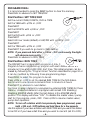
It is recommended to press the RESET button to clear the memory.
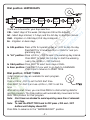
Press DIAL to advance to SET TIME/DAY
Dial Position: SET TIME/DAY
Set the current YEAR, MONTH, DAY & TIME.
Set the YEAR with +/ON or -/OFF
Press NEXT
Set the MONTH with +/ON or -/OFF
Press NEXT
Set the DAY with +/ON or -/OFF
Press NEXT
Select 24 hour mode (default) or AM/PM with +/ON or -/OFF
Press NEXT
Set the TIME with +/ON or -/OFF
Press NEXT if you wish to go back to YEAR setting.
NOTE: If you press and hold either +/ON or -/OFF continuously, the digits
will advance more quickly.
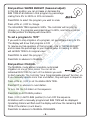
Press DIAL to advance to RUN TIME
Dial Position: RUN TIME
The DDCWP has 3 independent programs: A, B & C.
Program A has an initial start-up program with each station set for a 5
minute run time and a 0400 (AM) start time. This initial program can be
erased by following the “Program Erase” function described on page 10 or
it can be modified by following these programming steps.
Press PROG to select the program to be set.
Press +/ON or -/OFF to set the desired RUN TIME for the first station.
Run time is in one minute increments from 1 minute to 4 hours.
Press NEXT to advance to next station.
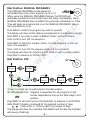
Continue to assign stations to a program by entering RUN TIMES for those
stations. Unselected stations in a program will remain OFF. Enabling /
Disabling MASTER VALVE: After the last station is the MASTER VALVE
position. The display will show “ON”. To disable the master valve / pump
start for this program, press -/OFF. Press +/ON to resume master valve /
pump start operation.
NOTE: To turn off a station which has previously been programmed, press
both +/ON and -/OFF buttons and hold them for a few seconds.
Use this option if you have a station with RUN TIME and you want this station
to be OFF or if you have a start time and you want to cancel it (set it to OFF).
-6-