1
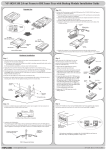
Power Cable
Colored Stripe
Mounting
Screws
IDE Data Cable
Mounting
Screws
Install the Drive in Drive Case
6. Secure the drive in place using the supplied mounting screws. Use the mounting
holes on the sides or bottom, depending on the design of the drive.
7. Slide the drive case cover back on. The hardware installation is complete. Your
Mobile Rack drive case is ready to use.
Mobile Rack Drive Case Ready for Use
Mobile Rack Installation Manual
7