Transcript
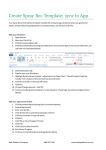
CORNERPOST (CP) Sync. Work. Send. Sync. Work. Send. Sync. Work. Send. Sync. Work. Send. Sync. Work. Send. Sync. Work. Send. Sync. Work. Send. Sync Sync. Work. Send. Your starting point is the CornerPost system, the cloud. This is where your data is stored, exactly half way between all of your devices (computers, apps etc) It doesn’t matter if you are on your computer or App, the same principle applies. Sync. Work. Send. Work Send Sync Work Send Sync Retrieve Send rPost Work On your computer 1. 2. 3. 4. 5. Open Adviser Click CornerPost Ensure Status column says Ready, Check Changes Available column Follow instructions to open file Changes available? YES Retrieve file from CornerPost Changes available? NO Open file Locally Work on file, continue when complete 6. 7. 8. Click File Click CornerPost Send file to CornerPost HelpDesk 1800 557 166 [email protected]