1
OSD Menu
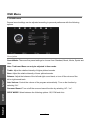
3. SOUND menu
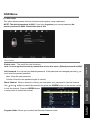
General sound settings can be adjusted according to personal preference with the following
options:
SPDIF MODE
PCM
Description
Sound Mode: There are five preset settings to choose from: Standard, Music, Movie, Sports and
OSD Menu
User.
Note: Treble and Bass can only be adjusted in User mode.
Treble: Adjust the relative intensity of higher pitched sounds.
Bass: Adjust the relative intensity of lower pitched sounds.
Multimedia
Operation
Balance: Adjust the balance of the left and right sound track, or turn off the volume of the
left or right sound track.
Auto Volume: Control the volume of the program automatically. Turn on the function by
selecting “On”.
Surround Sound: Turn on/off the surround sound function by selecting “off” / “on”.
Maintenance
and Service
Recording
Operation
SPDIF MODE: Select between the following options: Off, PCM and Auto.
17