1
Quick User Guide
Status
Transfer to phone
(call transfer)
During a call, press & hold Multifunction Key for 3 seconds. LCD
displays ‘BLUETOOTH’.
To transfer back to handsfree, press once again.
Redial the last number
In standby mode, press Multifunction Key twice. The last number
will be redialed. LCD displays ‘Dialing’.
Voice dial
In standby mode, press Multifunction Key once. LCD displays
‘Voice Call’. You will hear a tone from the handsfree. It indicates
the mobile phone is ready to receive voice tag. Speak the name
of the person you wish to call. Then the mobile starts the voice
dial automatically.
(Ensure the mobile phone supports Voice Control Dialing before
use.)
Mute microphone
To temporarily mute the microphone, click together the volume ‘+’
and ‘-’ buttons once. You will hear ‘do’ sounds. This will allow you
to hear the other side but the other side does not hear you. Press
‘+’ and ‘-’ again for un-mute.
Adjust volume
Press ‘+’ or ‘-’ button to control volume up or down. LCD displays
the volume level.
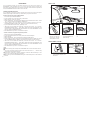
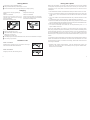
3. In the Bluetooth menu, select
'add device' or 'search device'.
Privacy call
Connect external headphone. This will allow you to hear the other
side but the other people inside the car cannot.
4. 'HF009' appears in the device
list, press 'yes'.
Disconnect with mobile
In standby mode, press & hold the ‘+’ for 2 seconds. This function
is for connecting the handsfree to another mobile. LCD displays
‘BLUETOOTH’.
To reconnect to the phone, click Multifunction Key once.
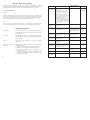
Operation
LED Indicator &
Sound
LCD Display
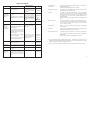
Switch On
Simply filp out the LCD from the
unit from off mode.
A low to high 'dodo' sound. Flashes blue every
5 seconds, indicates in
idle mode.
HF009
>
BLUETOOTH
Connect /
Reconnect
(with paired
phone)
In idle mode, press Multifunction
Key once
OR
Select paired device 'HF009' on
mobile phone, and then select
'Connect'.
Flashes blue every
second indicates
searching for paired
devices. If connected to
mobile with Handsfree
Profile, blue always on
indicates in standby
mode.
Connecting
>
BLUETOOTH
>
Display
Switch Off
Simply flip in the LCD.
LED indicator goes off
Pairing
(for the
first time
using the
handsfree)
1. Switch on the handsfree.
Flashes blue every 5
seconds, indicates in
idle mode.
2. Enable Bluetooth feature of the
mobile phone.
5. Enter fixed pass key '8888'.
Pairing completes.
6. Edit the device name if you
would like to personalize it.
,
-
If connected with
Handsfree Profile, blue
always on indicates in
standby mode.
Mobile phone
model name
>
Connecting
>
BLUETOOTH
Receive Call
When handsfree is ringing, press
Multifunction Key once.
-
Call number
>
Active Call
Reject Call
When handsfree is ringing, press
Multifunction Key twice.
-
BLUETOOTH
End Call
During a call, press Multifunction
Key once.
-
BLUETOOTH
Transfer to
phone
During a call, press & hold
Multifunction Key for 3 seconds.
To transfer back, press once
again.
-
BLUETOOTH
* Functions ‘Caller ID display’, ‘Redial the last number’, ‘Call waiting’ and ‘Call transfer’ are
supported by Handsfree Profile instead of Headset Profile. For using those functions, please
check if the mobile phone supports Handsfree Profile.
* Function ‘Volume Level Display’ is available if the phone supports ‘Remote Volume Control’.
6
11