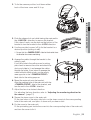
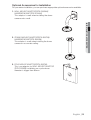
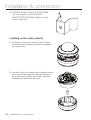
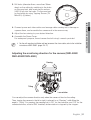
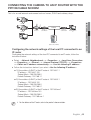
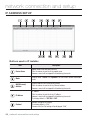
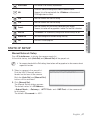
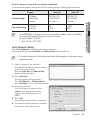
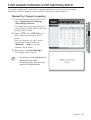
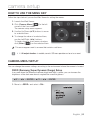
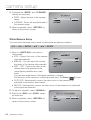
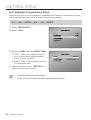
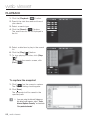
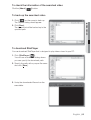
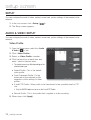
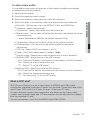
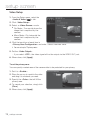
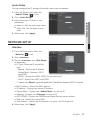
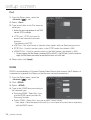
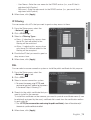
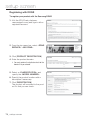
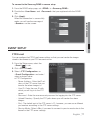
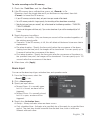
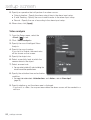
1
Network Camera SNB-5000/SND-5080/SND-5080F/SNV-5080 User Manual Before installing and operating this product, please read this manual thoroughly. English overview IMPORTANT SAFETY INSTRUCTIONS 1. Read these instructions. 2. Keep these instructions. 3. Heed all warnings. 4. Follow all instructions. 5. Do not use this apparatus near water. 6. Clean only with dry cloth. 7. Do not block any ventilation openings, Install in accordance with the manufacturer’s instructions. 8. Do not install near any heat sources such as radiators, heat reaisters, stoves, or other apparatus (including amplifiers) that produce heat. 9. Do not defeat the safety purpose of the polarized or grounding-type plug, A polarized plug has two blades with one wider than the other. A grounding type plug has two blades and a third grounding prong. The wide blade or the third prong are provided for your safety, If the provided plug does not fit into your outlet, consult an electrician for replacement of the obsolete outlet. 10. Protect the power cord from being walked on or pinched particularly at plugs, convenience receptacles, and the point where they exit from the apparatus. 11. Only use attachments/ accessories specified by the manufacturer. 12. Use only with the cart, stand, tripod, bracket, or table specified by the manufacturer, or sold with the apparatus. When a cart is used. Use caution when moving the cart/apparatus combination to avoid injury from tip-over. 13. Unplug this apparatus during lighting storms or when unused for long periods of time. 14. Refer all servicing to qualified service personnel. Servicing is required when the apparatus has been damaged in any way, such as power-supply cord or plug is damaged, liquid has been spilled or objects have fallen into the apparatus, the apparatus has been exposed to rain or moisture, does not operate normally, or has been dropped. 2_ overview WARNING TO REDUCE THE RISK OF FIRE OR ELECTRIC SHOCK, DO NOT EXPOSE THIS PROCUCT TO RAIN OR MOISTURE. DO NOT INSERT ANY METALLIC OBJECT THROUGH THE VENTILATION GRILLS OR OTHER OPENNINGS ON THE EQUIPMENT. Apparatus shall not be exposed to dripping or splashing and that no objects filled with liquids, such as vases, shall be placed on the apparatus ● OVERVIEW CAUTION CAUTION RISK OF ELECTRIC SHOCK. DO NOT OPEN CAUTION : TO REDUCE THE RISK OF ELECTRIC SHOCK. DO NOT REMOVE COVER (OR BACK). NO USER SERVICEABLE PARTS INSIDE. REFER SERVICING TO QUALIFIED SERVICE PERSONNEL. EXPLANATION OF GRAPHICAL SYMBOLS The lightning flash with arrowhead symbol, within an equilateral triangle, is intended to alert the user to the presence of “dangerous voltage” within the product’s enclosure that may be of sufficient magnitude to constitute a risk of electric shock to persons. The exclamation point within an equilateral triangle is intended to alert the user to the presence of important operating and maintenance (servicing) instructions in the literature accompanying the product. Class construction An apparatus with CLASS construction shall be connected to a MAINS socket outlet with a protective earthing connection. Battery Batteries(battery pack or batteries installed) shall not be exposed to excessive heat such as sunshine, fire or the like. English _3 overview Disconnection Device Disconnect the main plug from the apparatus, if it’s defected. And please call a repair man in your location. When used outside of the U.S., it may be used HAR code with fittings of an approved agency is employed. CAUTION These servicing instructions are for use by qualified service personnel only. To reduce the risk of electric shock do not perform any servicing other than that contained in the operating instructions unless you are qualified to do so. The BNC output port is used to monitor the installation process of the network camera. If you keep the BNC cable connected, a risk of lightening may cause damage or malfunction to the product. 4_ overview Please read the following recommend safety precautions carefully. Do not install on a surface where it is exposed to direct sunlight, near heating equipment or heavy cold area. Do not place this apparatus near. Do not attempt to service this apparatus yourself. Do not place a glass of water on the product. Do not install near any magnetic sources. Do not block any ventilation openings. Do not place heavy items on the product. User’s Manual is a guidance book how to use the products The meaning of the using sign in the book is following y Reference : In case of providing information for helping of product’s usages y Notice : If there’s any possibility to occur any damages for the goods and human caused by not following the instruction Ú Please read this manual for the safety before using of goods and keep it in the safe place. English _5 ● OVERVIEW Do not Place this apparatus on an uneven surface. overview This equipment has been tested and found to comply with the limits for a Class A digital device, pursuant to part 15 of the FCC Rules. These limits are designed to provide reasonable protection against harmful interference when the equipment is operated in a commercial environment. This equipment generates, uses, and can radiate radio frequency energy and, if not installed and used in accordance with the instruction manual, may cause harmful interference to radio communications. Operation of this equipment in a residential area is likely to cause harmful interference in which case the user will be required to correct the interference at his own expense. Samsung Techwin cares for the environment at all product manufacturing stages, and is taking measures to provide customers with more environmentally friendly products. The Eco mark represents Samsung Techwin’s devotion to creating environmentally friendly products, and indicates that the product satisfies the EU RoHS Directive. Correct Disposal of This Product (Waste Electrical & Electronic Equipment) (Applicable in the European Union and other European countries with separate collection systems) This marking on the product, accessories or literature indicates that the product and its electronic accessories (e.g. charger, headset, USB cable) should not be disposed of with other household waste at the end of their working life. To prevent possible harm to the environment or human health from uncontrolled waste disposal, please separate these items from other types of waste and recycle them responsibly to promote the sustainable reuse of material resources. Household users should contact either the retailer where they purchased this product, or their local government office, for details of where and how they can take these items for environmentally safe recycling. Business users should contact their supplier and check the terms and conditions of the purchase contract. This product and its electronic accessories should not be mixed with other commercial wastes for disposal. 6_ overview CONTENTS OVERVIEW INSTALLATION & CONNECTION 24 Important Safety Instructions Product Features Recomended PC Specifications What’s Included At a Glance (SNB-5000) At a Glance (SND-5080) At a Glance (SND-5080F) At a Glance (SNV-5080) 24 26 28 32 33 Installation (SND-5080) Installation (SND-5080F) Installation (SNV-5080) Mounting the Lens Inserting/Removing an SD Memory Card Memory Card Information (Not Included) Connecting with other Device 36 37 NETWORK CONNECTION AND SETUP 42 42 43 44 45 46 47 50 51 52 52 Connecting the Camera Directly to Local Area Networking Connecting the Camera Directly to a DHCP Based DSL/Cable Modem Connecting the Camera Directly to a PPPoE Modem Connecting the Camera to an IP Router with the PPPoE/Cable Modem IP Address Setup Static IP Setup Dynamic IP Setup Port Range Forward (Port Mapping) Setup Connecting to the Camera from a Shared Local PC Connecting to the Camera from a Remote PC via the Internet English _7 ● OVERVIEW 2 2 9 9 10 12 15 18 21 overview CAMERA SETUP 53 WEB VIEWER 62 SETUP SCREEN 70 APPENDIX 87 8_ overview 53 53 How to use the Menu Key Camera Menu Setup 62 63 64 66 67 68 Connecting to the Camera Login Installing Silverlight Runtime Using the Live Screen Using OSD Screen Menu Playback 70 70 73 77 83 Setup Audio & Video Setup Network Setup Event Setup System Setup 87 89 91 93 Camera Specification Network Specification Troubleshooting GPL/LGPL Software License PRODUCT FEATURES RECOMENDED PC SPECIFICATIONS y CPU : Pentium4 / 2.4GHz or higher y Operating System : Windows XP, VISTA, 7 Mac OS y Resolution : 1280X1024 pixels or higher y RAM : 1GB or higher y Web Browser : Internet Explorer 7.0 or higher Firefox, Google Chrome, Safari y Video Memory : 128MB or higher English _9 ● OVERVIEW y HD Video Quality Supports up to 1.3 mega pixels of HD video quality. y H.264/MPEG-4/MJPEG Multi-Streaming This network camera supports the H.264/MPEG-4/MJPEG codec and can display videos in different resolutions and qualities simultaneously with different Codecs. y Support various communication protocols Supports TCP/IP, UDP, RTP/RTSP, email, and FTP protocols as well as various internet protocols such as ARP, HTTP, HTTPS and DHCP. y Web Browser-based Monitoring Using the Internet web browser to display the image in a local network environment. y Alarm If an event occurs, the event-related video will be transferred to the FTP/email specified by the user or saved to the SD memory, or the event signal will be sent to the ALARM OUT port. y Intelligent Video Analysis Analyzes the event video according to the user-specified rules to recognize the event. y ONVIF (Spec 1.01) Compliance This product supports ONVIF Core Spec. 1. 01. For more information, refer to www.onvif.org. overview WHAT’S INCLUDED Please check if your camera and accessories are all included in the product package. Appearance 10_ overview Item Name Quantity Description Model Name User Manual/ IP Installer DVD 1 User Manual 1 Jack Modular 1 LAN cable gender Cable for the testing monitor 1 Used to test the camera connection to a portable display device Alarm Cable 1 Used to connect to Alarm I/O Template 1 Product installation guide SND-5080F SNV-5080 Iron Screw 3 Used for fixing to an iron plate SND-5080/5080F Dustproof Plate 1 Preventing dust inflow SND-5080 SNB-5000 SND-5080/5080F SNV-5080 SND-5080/5080F SNV-5080 Appearance Quantity Description C Mount Adapter Auto Iris Lens Connector 1 Used to install the camera lens Camera Holder (Mount) 1 Used to install the camera holder Camera Holder (Mount) Screws 2 Used to install the mount ASSY-Screw Tapping 4 Used for installation on the wall or ceiling L Wrench 1 Used to remove/fix the dome cover Plastic Anchor 4 For fixing a screw, Inserted in a hole (reinforced anchoring force) Tapping Screw 1 Model Name SNB-5000 ● OVERVIEW Item Name SNV-5080 SND-5080F Bracket Safety 1 Lens Options (not included) CS Lens Optional lens to be inserted in a camera SNB-5000 C Lens M The Test Monitor Cable is connected to a portable displayer and used for testing the camera. If you intend to use it for an actual monitoring camera, use the BNC cable instead. English _11 overview AT A GLANCE (SNB-5000) Front Side SNB-50 www.sam 00 sungcc tv.c om Item M Description Camera Holder (Mount) Holes Used when you mount the camera onto the bracket by fixing the camera holder (mount) adaptor with the bracket. Auto Iris Lens (Optional) Installed on the lens adaptor. Auto Iris Lens Connector Used to supply power and output signal to control the iris of the lens. Wipe out a dirty surface of the lens softly with a lens tissue or cloth to which you have applied ethanol. 12_ overview Rear Side AUDIO OUT AUDIO IN SD CARD SD SYSTEM POWER 1 2 3 4 5 1 : ALARM IN 4 : 2 : ALARM OUT 5 : GND 3 : ALARM COM Item SD Memory Card Compartment ● OVERVIEW VIDEO RESET NETWORK ACT LINK GND AC 24V DC 12V Description Compartment for the SD memory card. AUDIO OUT Terminal for audio output. AUDIO IN Terminal for audio input. Audio terminal ON : A memory card is inserted and operates normally. SD Flashing : Failed to record, insufficient space, or inserted abnormally. OFF : Camera is off, camera is restarting, or memory card is not in place. System, Power, SD Indicators ON : The camera is turned on and connected to the network properly. SYSTEM Blinking : During DDNS setup, or in case of setup failure, or in a state of unstable network connection OFF : When the system is rebooting, or turned off POWER ON : While the power is on OFF : If the power is off English _13 overview Reset Button Resets the camera settings to the default. Press and hold it for about 5 seconds to turn off the system indicator and restart the system. J Resetting the camera IP address, subnet mask, gateway address etc. requires the use of the IP Installer software application. Power Port Used to plug the power cable. GND Used for earth-grounding. Network Port Used to connect a PoE or LAN cable. ALARM IN Used to connect the alarm input signal. ALARM OUT Used to connect the alarm output signal. I/O Port ALARM COM Common port where the alarm output signal is connected. GND Video Out Port 14_ overview Used for earth-grounding. Video signal output port connected to the monitor. AT A GLANCE (SND-5080) Appearance ● OVERVIEW Item Description Dome Cover Dome cover for the lens and unit protection. Main unit Main unit includes the lens, switch board, PCB boards and screws. Power Port Used to plug the power cable. Video Out Port Video signal output port connected to the monitor. Network Port Used to connect a PoE or LAN cable. Audio In Jack Used to connect to a microphone. Audio Out Jack Used to connect to speakers. English _15 overview Inside 3 Item Alarm In / Out terminals SD Memory Card Compartment Reset Button 16_ overview Description ALARM IN Used to connect the alarm input signal. ALARM OUT Used to connect the alarm output signal. ALARM COM Common port where the alarm output signal is connected. GND Used for earth-grounding. Compartment for the SD memory card. Resets the camera settings to the default. Press and hold it for about 5 seconds to turn off the system indicator and restart the system. J Resetting the camera IP address, subnet mask, gateway address etc. requires the use of the IP Installer software application. Components 1 2 7 8 Item Description Inner Cover Cover for the main unit’s protection. Side wing hooks By lifting it while gently pressing the both ends, you can separate the inner cover. ZOOM lever Turn the barrel left or right to adjust the zoom, and turn the knob clockwise to lock the zoom. Focus lever Turn the barrel left or right to adjust the focus, and turn the knob clockwise to lock the focus. SD Memory Card Compartment Compartment for the SD memory card. Monitor Out Using the test monitor cable, you can connect to a mobile display for camera test. 7 Wiring Cover If you drill a hole in the wiring cover for wiring, remove the cover and attach the provided dustproof plate to it, and arrange the cables through the plate. The dust-proof plate is to prevent outside dust from inflow to the wiring compartment. 8 Lock Release To separate the bracket from the main unit for the installation or to separate the camera from an installed camera, push this release and turn the main unit in the marked direction of <UNLOCK>. 6 English _17 ● OVERVIEW 3 4 5 6 overview AT A GLANCE (SND-5080F) Appearance Item 7 Description Dome Cover Dome cover for the lens and unit protection. Main unit Main unit includes the lens, switch board, PCB boards and screws. Power Port Used to plug the power cable. Video Out Port Video signal output port connected to the monitor. Network Port Used to connect a PoE or LAN cable. Audio In Jack Used to connect to a microphone. Audio Out Jack Used to connect to speakers. 18_ overview Inside ● OVERVIEW 3 Item Description ALARM IN Alarm In / Out terminals ALARM OUT Used to connect the alarm output signal. ALARM COM Common port where the alarm output signal is connected. GND SD Memory Card Compartment Reset Button Used to connect the alarm input signal. Used for earth-grounding. Compartment for the SD memory card. Resets the camera settings to the default. Press and hold it for about 5 seconds to turn off the system indicator and restart the system. J Resetting the camera IP address, subnet mask, gateway address etc. requires the use of the IP Installer software application. English _19 overview Components 3 4 5 Item Description Inner Cover Cover for the main unit’s protection. Side wing hooks By lifting it while gently pressing the both ends, you can separate the inner cover. ZOOM lever Turn the barrel left or right to adjust the zoom, and turn the knob clockwise to lock the zoom. Focus lever Turn the barrel left or right to adjust the focus, and turn the knob clockwise to lock the focus. Monitor Out Using the test monitor cable, you can connect to a mobile display for camera test. 20_ overview AT A GLANCE (SNV-5080) Appearance ● OVERVIEW Item Description Dome Cover Dome cover for the lens and unit protection. Main unit Main unit includes the lens, switch board, PCB boards and screws. Power Port Used to plug the power cable. Video Out Port Video signal output port connected to the monitor. Network Port Used to connect a PoE or LAN cable. Audio In Jack Used to connect to a microphone. Audio Out Jack Used to connect to speakers. English _21 overview Inside 3 Item Description ALARM IN Alarm In / Out terminals ALARM OUT Used to connect the alarm output signal. ALARM COM Common port where the alarm output signal is connected. GND SD Memory Card Compartment Reset Button 22_ overview Used to connect the alarm input signal. Used for earth-grounding. Compartment for the SD memory card. Resets the camera settings to the default. Press and hold it for about 5 seconds to turn off the system indicator and restart the system. J Resetting the camera IP address, subnet mask, gateway address etc. requires the use of the IP Installer software application. Components 3 4 Item Description Inner Cover Cover for the main unit’s protection. Side wing hooks By lifting it while gently pressing the both ends, you can separate the inner cover. ZOOM lever Turn the barrel left or right to adjust the zoom, and turn the knob clockwise to lock the zoom. Focus lever Turn the barrel left or right to adjust the focus, and turn the knob clockwise to lock the focus. Monitor Out Using the test monitor cable, you can connect to a mobile display for camera test. English _23 ● OVERVIEW 5 installation & connection INSTALLATION (SND-5080) Precautions before installation Ensure you read out the following instructions before installing the camera: y Select an installation site (ceiling or wall) that can endure at least 5 times of the camera weight. y Stuck-in or peeled-off cables can cause damage to the product or a fire. y For safety purposes, keep anyone else away from the installation site. And put aside personal belongings from the site, just in case. Installing the camera 1. Hold down the bottom lock lever while removing the cover with the other hand. Removing the cover reveals the main unit and inner cover. 24_ installation & connection 2. To fix the camera position, hold down either hook of the inner cover and lift it up. ● INSTALLATION & CONNECTION 3. Push the release lock out while turning the main unit in the <UNLOCK> direction to remove the bracket. If this doesn't work, use the hole on the bottom of the bracket to turn the bracket in the <LOCK>direction. 4. Use the provided screws (x3) to fix the bracket to a desired position (ceiling or wall). Ensure that the <CAMERA FRONT> label on the bracket faces the direction for camera monitoring. 5. Arrange the cables through the bracket to the ceiling or wall. If you drill a hole in the ceiling cover for wiring, press hard to remove the cover and attach the dust-proof plate to it, and arrange the cables through the plate. If you intend to arrange the cables without drilling a hole, use the empty area opposite to the <CAMERA FRONT> label side for the wiring purpose. 6. Mount the main unit onto the bracket. Align the marking hole of the main unit with the <CAMERA FRONT> label of the bracket, and turn the unit in the <LOCK> direction. Wiring Cover 7. Adjust the lens in a desired direction. For adjusting the lens direction, refer to “Adjusting the monitoring direction for the camera”. (page 31) 8. Secure the inner cover to the main unit. Fit the two holes of the wing-side locks on the inner cover into the corresponding hole of the main unit, and press it down until you hear a click. 9. Fix the cover to the main unit. Fit the protruding part inside the cover into the corresponding hole of the main unit, and turn the cover to fix it. English _25 installation & connection INSTALLATION (SND-5080F) Removing the dome cover 1. Hold down the bottom lock lever while removing the cover with the other hand. Removing the cover reveals the main unit and inner cover. 2. To fix the camera position, hold down both hooks of the inner cover while lifting it up. Ceiling Mount 1. Use the provided template to drill one hole for the camera, and one for the screw (5 mm in diameter, at least 35 mm in depth), and insert the plastic anchor (HUR 5) to the end of the screw hole. 2. Connect and arrange the necessary cables (power, video, etc) lest that they should be damaged or caught while installing the camera. 26_ installation & connection 3. Insert the camera assembly into the hole so that it fits to the camera hole, and fix the assembly using the assembly screw tappings (TH, M4xL30). (x3) 4. Close the dome cover. ● INSTALLATION & CONNECTION 5. Fix the cover to the main unit. Fit the protruding part inside the cover into the corresponding hole of the main unit, and turn the cover to fix it. To add an alarm cable 1. For this, first you should remove the dome cover from the housing. 2. Pull out the protruding rubber bar as shown. 3. This will reveal a hole in the place of the rubber bar, through which you insert the cable, and connect it to the alarm terminal on the PCB. 4. Connect and arrange the necessary cables (power, video, etc) lest that they should be damaged or caught while installing the camera. Then, install the camera assembly in the reverse order of the disassembly. 5. Adjust the lens in a desired direction and close the dome cover. English _27 installation & connection INSTALLATION (SNV-5080) Disassembling To connect the alarm in/out, the dome cover and lens cover are to be separated. 1. Using the L-wrench provided, loosen 3 screws by turning them counterclockwise and separate the dome cover. 2. Lift up the inner cover while gently pressing its both ends to separate it from the unit. 28_ installation & connection Optional Accessories for Installation For your easier installation, you can purchase appropriate optional accessories available. 1. WALL MOUNT ADAPTOR(SCX-300WM)/ HANGING MOUNT(SCX-300HM) This adaptor is used when installing the dome camera onto a wall. ● INSTALLATION & CONNECTION 2. CEILING MOUNT ADAPTOR(SCX-300CM)/ HANGING MOUNT(SCX-300HM) This adaptor is used when installing the dome camera on a concrete ceiling. 3. POLE MOUNT ADAPTOR(SCX-300PM) This is an adaptor for WALL MOUNT ADAPTOR (SCX-300WM) installation on a pole whose diameter is bigger than 80mm. English _29 installation & connection 4. CORNER MOUNT ADAPTOR (SCX-300KM) This is an adaptor for WALL MOUNT ADAPTOR (SCX-300WM) installation on the corner of wall joint. Installing on the ceiling directly 1. Using the L-wrench provided, loosen 3 screws by turning them counterclockwise and separate the dome cover. 2. Loosen 3 screws by turning them counterclockwise, press both left and right lock releases inwards (in arrow direction) to unlock the stopper, and then separate the camera from the case. 30_ installation & connection 3. Drill holes (diameter 5mm, more than 35mm deep) on the ceiling by matching to the holes on the case bed, and insert plastic anchors (HUD 5) fully into the holes. Fix the case bed on the ceiling by using Tapping Screws (TH M4xL30). (4 places) 5. Adjust the lens aiming to your desired direction. 6. Assemble the Dome Cover. For waterproof purpose, fix and secure the bolt using L-wrench provided. M For the wall mounting installation and how to connect the alarm cables, refer to the installation instructions of SND-5080F. (pages 26~27) Adjusting the monitoring direction for the camera (SND-5080/ SND-5080F/SNV-5080) Panning Tilting Lens rotation You can adjust the camera direction only when the camera is fixed on the ceiling. Then, turning the camera to the left or right is referred to as “Panning”, while tilting the angle is “Tilting”. For panning, the panning limit is 220° for the clockwise, and 120° for the counterclockwise, a total of 340° enabled; further rotation is stopped by the stopper. English _31 ● INSTALLATION & CONNECTION 4. Connect power and video cables and arrange cable running not to damage or squeeze them, and assemble the camera unit in the reverse way. installation & connection MOUNTING THE LENS Disconnect the power before proceeding. M The C lens and CS lens are not included in the product package. It is recommended that megapixel lens are use on this camera to optimise performance. Mounting the CS lens Turn the optional CS lens clockwise to insert it. SNB-50 www.sam 00 sungcc tv.c om CS Lens Mounting the C lens Turn the C mount adaptor clockwise to insert it and do the same with the C lens. SNB-50 www.sam 00 sungcc tv.c om 32_ installation & connection C Lens Connecting the Auto Iris Lens connector Insert the lens connector into the corresponding hole of the camera. www.sam 00 sungcc tv.c om Focusing Turn the lens left or right to control the zoom and focus the lens so that you can view a clear, sharp object. INSERTING/REMOVING AN SD MEMORY CARD Inserting an SD Memory Card Push the SD memory card in the direction of the arrow shown in the diagram. 000 .com SNB-5msungcctv www.sa English _33 ● INSTALLATION & CONNECTION SNB-50 installation & connection J Do not insert the SD memory card while it’s upside down by force. Otherwise, it may damage the SD memory card. Removing an SD Memory Card Gently press down on the exposed end of the memory card as shown in the diagram to eject the memory card from the slot. 000 .com SNB-5msungcctv www.sa 34_ installation & connection ● INSTALLATION & CONNECTION J Pressing too hard on the SD memory card can cause the card to shoot out uncontrollably from the slot when released. To remove the SD memory card, set <Record> to OFF from <SD Record> and press [Apply]. (page 78) If you have saved data in the SD memory card, removing the SD memory card prior to setting <Record> to OFF will cause damage to the data stored in the card. If the SD memory is inserted, the SD LED indicator on the rear of the camera will turn on. If there occurs a problem in the SD memory, the SD LED indicator will blink. English _35 installation & connection MEMORY CARD INFORMATION (NOT INCLUDED) What is a memory card? The memory card is an external data storage device that has been developed to offer an entirely new way to record and share video, audio, and text data using digital devices. Selecting a memory card that’s suitable for you Your camera supports SDHC memory cards. You may, however, experience compatibility issues depending on the model and make of the memory card. For your camera, we recommend you use a memory card from the following manufacturers: SDHC/SD Memory Card : Sandisk, Transcend, Kingston Your camera supports 2GB to 32GB of memory card capacity. Playback performance can be affected depending on the speed of memory card, so use the high-speed memory card. To ensure proper recording of video data, we recommend you use a memory card that supports at least read/write speed 10Mbps and Class 6. Memory Card Use SD and SDHC memory cards feature a switch that disables writing data on to the media. Having this switch to the Lock position will prevent accidental deletion of data stored in the memory card but at the same time will also prevent you from writing data on to the media. ❖ Memory Card Components Contacts Lock Switch SD/SDHC 36_ installation & connection CONNECTING WITH OTHER DEVICE SD ● INSTALLATION & CONNECTION AUDIO OUT AUDIO IN Monitor SD CARD SYSTEM POWER VIDEO RESET 1 2 3 4 5 1 : ALARM IN 4 : 2 : ALARM OUT 5 : GND 3 : ALARM COM NETWORK ACT LINK GND AC 24V DC 12V Power Network Monitor Out Power Monitor Network English _37 installation & connection Connecting to the monitor Connect the [VIDEO] port of the camera to the video input port of the monitor. M In the initial installation of the camera, you can connect the camera to the monitor for checking the connection status. You must set <Video Output> to <ON> before the display screen can be activated. (page 72) Connect the monitor test cable to the output port of the monitor. Ethernet Connection Connect the Ethernet cable to the local network or to the Internet. Power Supply Use the screwdriver to connect each line (+, –) of the power cable to the corresponding power port of the camera. J Be careful not to reverse the polarity when you connect the power cable. M The instructions above are also applied to SND-5080/SND-5080F/SNV-5080. You can also use a router featuring PoE (Power over Ethernet) to supply power to the camera. 38_ installation & connection Connecting to Audio Input/Output Microphone Network 00 tv.com SNB-am50sungcc www.s Speaker Amp Amp Microphone Amp Microphone Microphone Speaker Amp English _39 ● INSTALLATION & CONNECTION PC installation & connection 1. Connect the AUDIO IN port of the camera with the microphone directly or LINE OUT port of the amplifier that the microphone is connected to. 2. Connect the AUDIO OUT port of the camera with the LINE IN port of the speaker. 3. Check the specifications for audio input. y Audio Codec G.711 PCM. μ-law 64kbps 8kHz sampling y Full duplex Audio y Audio in Used for mono signal line input (Max.2.4 Vpp) y Audio out Used for mono signal line output (Max.2.4 Vpp) y Line out impedance 600 Alarm I/O Wiring Diagram ALARM IN 1 ALARM OUT 2 ALARM COM 3 4 GND 5 40_ installation & connection (5mA sink) (30VDC 2A, 125VAC 0.5A MAX) Connecting to the I/O port box Connect the Alarm I/O signal to the corresponding port of the rear port box. AUDIO OUT AUDIO IN 1 2 3 4 5 SD CARD SD SYSTEM POWER RESET 1 2 3 4 5 1 : ALARM IN 4 : 2 : ALARM OUT 5 : GND 3 : ALARM COM 1 : ALARM IN 4 : 2 : ALARM OUT 5 : GND 3 : ALARM COM NETWORK ACT LINK GND AC 24V DC 12V <SNB-5000> 1 : ALARM IN 4 : 2 : ALARM OUT 5 : GND 3 : ALARM COM <SND-5080/SND-5080F/SNV-5080> y y y y ALARM IN : Used to connect the alarm input signal. ALARM OUT : Used to connect the alarm output signal. ALARM COM : Common port where the alarm output signal is connected. GND : Used for earth-grounding. English _41 ● INSTALLATION & CONNECTION VIDEO network connection and setup You can set up the network settings according to your network configurations. CONNECTING THE CAMERA DIRECTLY TO LOCAL AREA NETWORKING Connecting to the camera from a local PC in the LAN 1. Launch an Internet browser on the local PC. 2. Enter the IP address of the camera in the address bar of the browser. SNB-50 www.samsu00 ngcctv.com Camera INTERNET SNB-50 www.samsu00 ngcctv.com Camera Local PC External Remote PC Firewall DDNS Server (Data Center, KOREA) <Local Network> M A remote PC in an external Internet out of the LAN network may not be able to connect to the camera installed in the intranet if the port-forwarding is not properly set or a firewall is set. In this case, to resolve the problem, contact your network administrator. 42_ network connection and setup CONNECTING THE CAMERA DIRECTLY TO A DHCP BASED DSL/CABLE MODEM INTERNET SNB-50 www.samsu00 ngcctv.com DSL/Cable Modem External Remote PC Camera 1. Use the cross LAN cable to connect the network cable directly to your PC. 2. Run the IP Installer and change the IP address of the camera so that you can use the web browser on your desktop to connect to the Internet. 3. Use the Internet browser to connect to the camera. 4. Move to [Setup] page. 5. Move to [Network] – [DDNS] and configure the DDNS settings. 6. Move to [Network] – [Interface], and set the network type to [DHCP]. 7. Connect the camera, which was removed from your PC, directly to the modem. 8. Restart the camera. M For registering the DDNS settings, refer to “DDNS”. (page 74) For configuring the DDNS settings, refer to “Registering with DDNS”. (page 76) For setting the network type, refer to “Interface”. (page 73) English _43 ● NETWORK CONNECTION AND SETUP DDNS Server (Data Center, KOREA) network connection and setup CONNECTING THE CAMERA DIRECTLY TO A PPPOE MODEM INTERNET SNB-50 www.samsu00 ngcctv.com PPPoE Modem External Remote PC Camera DDNS Server (Data Center, KOREA) 1. Use the cross LAN cable to connect the network cable directly to your PC. 2. Run the IP Installer and change the IP address of the camera so that you can use the web browser on your desktop to connect to the Internet. 3. Use the Internet browser to connect to the camera. 4. Move to [Setup] page. 5. Move to [Network] – [DDNS] and configure the DDNS settings. 6. Move to [Network] – [Interface], and set the network type to [PPPoE]. 7. Connect the camera, which was removed from your PC, directly to the modem. 8. Restart the camera. M For registering the DDNS settings, refer to “DDNS”. (page 74) For configuring the DDNS settings, refer to “Registering with DDNS”. (page 76) For setting the network type, refer to “Interface”. (page 73) 44_ network connection and setup CONNECTING THE CAMERA TO AN IP ROUTER WITH THE PPPOE/CABLE MODEM This is for a small network environment such as homes, SOHO and ordinary shops. SNB-50 www.samsu00 ngcctv.com INTERNET www.samsu00 ngcctv.com Camera IP Router PPPoE or Cable Modem PPPoE or Cable Modem External Remote PC Local PC DDNS Server (Data Center, KOREA) Configuring the network settings of the local PC connected to an IP router Configuring the network settings of the local PC connected to an IP router, follow the instructions below. y Select : <Network Neighborhood> <Properties> <Local Area Connection> <Properties> <General> <Internet Protocol (TCP/IP)> <Properties> <Obtain an IP address automatically> or <Use the following IP address>. y Follow the instructions below if you select <Use the following IP address>: ex1) If the address (LAN IP) of the IP router is 192.168.1.1 IP address : 192.168.1.100 Subnet Mask : 255.255.255.0 Default Gateway : 192.168.1.1 ex2) If the address (LAN IP) of the IP router is 192.168.0.1 IP address : 192.168.0.100 Subnet Mask : 255.255.255.0 Default Gateway : 192.168.0.1 ex3) If the address (LAN IP) of the IP router is 192.168.xxx.1 IP address : 192.168.xxx.100 Subnet Mask : 255.255.255.0 Default Gateway : 192.168.xxx.1 M For the address of the IP router, refer to the product’s documentation. English _45 ● NETWORK CONNECTION AND SETUP Camera SNB-50 network connection and setup IP ADDRESS SETUP Buttons used in IP Installer Item Description Device Name Model name of the connected camera. Click the column to sort the list by model name. However, search will be stopped if clicked during the search. Mode Displays either <Static> or <Dynamic> for the current network connection status. MAC(Ethernet) Address Ethernet address for the connected camera. Click the column to sort the list by Ethernet address. However, search will be stopped if clicked during the search. IP Address IP address. Click the column to sort the list by IP address. However, search will be stopped if clicked during the search. The factory default is “192.168.1.100”. Protocol Network setting for the camera. The factory default is “IPv4”. Cameras with the IPv6 setting will be displayed “IPv6”. 46_ network connection and setup This function is not currently implemented. URL DDNS URL address enabling access from the external Internet. However, this will be replaced with the <IP Address> of the camera if DDNS registration has failed. IPv4 Scans for cameras with the IPv4 setting. IPv6 Scans for cameras with the IPv6 setting. Search Scans for cameras that are currently connected to the network. However, this button will be grayed out if neither IPv4 nor IPv6 is checked. Auto Set <IP Installer> will automatically configure the network settings for you. Manual Set You should configure the network settings manually. Exit Exits the IP Installer program. STATIC IP SETUP Manual Network Setup Run <IP Installer.exe> to display the camera search list. At the initial startup, both [Auto Set] and [Manual Set] will be grayed out. M For cameras found with the IPv6 setting, these buttons will be grayed out as the cameras do not support this function. 1. Select a camera in the search list. Find the MAC (Ethernet) address labeled on the rear of the camera. Both the [Auto Set] and [Manual Set] buttons will be activated. 2. Click [Manual Set]. The Manual Setting dialog appears. The default values of <IP Address>, <Subnet Mask>, <Gateway>, <HTTP Port> and <VNP Port> of the camera will be displayed. The default <Password> is 4321. English _47 ● NETWORK CONNECTION AND SETUP UPnP Status network connection and setup 3. In the <Address> pane, provide the necessary information. MAC (Ethernet) Address : The MAC (Ethernet) address of the applicable camera will be set automatically so you don't need to input it manually. If using an IP router y IP Address : Enter an address falling in the IP range provided by the IP router. ex) 192.168.1.2~254, 192.168.0.2~254, 192.168.XXX.2~254 y Subnet Mask : The <Subnet Mask> of the IP router will be the <Subnet Mask> of the camera. y Gateway : The <Local IP Address> of the IP router will be the <Gateway> of the camera. M The settings may differ depending on the connected IP router model. For more information, refer to the user manual of the applicable router. If not using an IP router For setting <IP Address>, <Subnet Mask>, and <Gateway>, contact your network administrator. 4. In the <Port> pane, provide necessary information. y HTTP Port : Used to access the camera using the Internet browser, defaulted to 80. Use the spin button to change the HTTP Port value. y VNP Port : Used to control the video signal transfer, defaulted to 4520. 5. Enter the password. This is the login password for the “admin” user who accesses the camera. The default password is “4321”. 6. Click [OK]. Manual network setup will be completed. 7. When the manual setup including <IP> is completed, the camera will restart. 48_ network connection and setup If the IP router has more than one camera connected Configure the IP related settings and the Port related settings distinctly with each other. Category Camera #1 Camera #2 IP Address Subnet Mask Gateway 192.168.1.200 255.255.255.0 192.168.1.1 192.168.1.201 255.255.255.0 192.168.1.1 Port related settings HTTP Port VNP Port 80 4520 10000 4530 M If the <HTTP Port> is set other than 80, you must provide the <Port> number in the address bar of the Internet browser before you can access the camera. ex) http://IP address : HTTP Port http://192.168.1.201:10000 Auto Network Setup Run <IP Installer.exe> to display the camera search list. At the initial startup, both [Auto Set] and [Manual Set] will be grayed out. M For cameras found with the IPv6 setting, these buttons will be grayed out as the cameras do not support this function. 1. Select a camera in the search list. Find the MAC (Ethernet) address labeled on the rear of the camera. Both the [Auto Set] and [Manual Set] buttons will be activated. 2. Click [Auto Set]. The Auto Setting dialog appears. The <IP Address>, <Subnet Mask>, and <Gateway> will be set automatically. 3. Enter the password. This is the login password for the “admin” user who accesses the camera. The default password is “4321”. 4. Click [OK]. Auto network setup will be completed. 5. The camera will automatically complete the network setting and restart. English _49 ● NETWORK CONNECTION AND SETUP IP related settings network connection and setup DYNAMIC IP SETUP Dynamic IP Environment Setup y Example of the Dynamic IP environment - If an IP router, with cameras connected, is assigned an IP address by the DHCP server - If connecting the camera directly to modem using the DHCP protocols - If IPs are assigned by the internal DHCP server via the LAN Checking the Dynamic IP 1. From a local PC, run <IP Installer> to display a list of cameras that are assigned <Dynamic IP>. 2. Select a camera in the list, and click [Manual Set] to check the <Dynamic IP> of the camera. If you uncheck <DHCP>, you can change <IP> or <Port> to <Static>. 50_ network connection and setup PORT RANGE FORWARD (PORT MAPPING) SETUP If you have installed an IP router with a camera connected, you must set the port range forwarding on the IP router so that a remote PC can access the camera in it. Manual Port Range Forwarding ● NETWORK CONNECTION AND SETUP 1. From the Setup menu of the IP router, select <Applications & Gaming> <Port Range Forward>. For setting the port range forward for a third-party IP router, refer to the user guide of that IP router. 2. Select <TCP> and <UDP Port> for each connected camera to the IP router. Each port number for the IP router should match that specified in <Network> - <Port> from the camera's Setup menu. 3. When done, click [Save Settings]. Your settings will be saved. M The settings may differ depending on the connected IP router model. For more information, refer to the user manual of the applicable router. English _51 network connection and setup CONNECTING TO THE CAMERA FROM A SHARED LOCAL PC 1. Launch <IP Installer>. It will scan for connected cameras and display a list of them. 2. Double-click a camera to access. The Internet browser starts and connects to the camera. M Access to the camera can also be gained by typing the camera's IP address in the address bar of the Internet browser. CONNECTING TO THE CAMERA FROM A REMOTE PC VIA THE INTERNET As a remote PC can not directly access <IP Installer>, you should access the camera in the IP router network using DDNS URL of the camera. 1. Before you can access a camera in the IP router network, you should have set the port range forward for the IP router. 2. From the remote PC, launch the Internet browser and type the DDNS URL address of the camera, or the IP address of the IP router in the address bar. ex) http://www.samsungipolis.com/[Product ID] 52_ network connection and setup camera setup HOW TO USE THE MENU KEY Follow the steps below if you run the Web Viewer for setting the menus. 1. Launch the Web Viewer. ● CAMERA SETUP )] in the left 2. Click [Camera Menu ( corner of the Live screen. The camera setup menu appears. 3. Use the Up/Down (▲/▼) buttons to move to a desired item. 4. To change the value of a selected item, use the Left/Right (◄/►) buttons. To break down to a sub-menu structure, )] on the selected item. click [Enter ( : This arrow appears next to a menu that contains sub items. J If <IV analysis function> is enabled, camera’s OSD menu operation can be set as an event. CAMERA MENU SETUP You can change the camera settings according to the environment where the camera is located. SSDR (Samsung Super Dynamic Range) Setup In a scene where the difference between bright and dark is severe, you can increase the brightness of the dark area alone to regulate the overall brightness. ▲/▼ Ö ◄/► Ö ENTER Ö ▲/▼ Ö ◄/► Ö ENTER 1. Move to <SSDR> and select <ON>. MAIN SETUP SSDR WHITE BAL BACKLIGHT EXPOSURE SPECIAL EXIT ON ATW OFF English _53 camera setup 2. Configure the <SSDR> and <D-RANGE> settings as necessary. y SSDR : Adjust the level of the dynamic range. y D-RANGE : Select the amplitude area of the dynamic range. SSDR SETUP SSDR D-RANGE RETURN 8 NARROW 3. When completed, select <RETURN> to return to the previous screen. White Balance Setup You can correct the image colors based on white under any lighting conditions. ▲/▼ Ö ◄/► Ö ENTER Ö ▲/▼ Ö ◄/► Ö ENTER 1. Move to <WHITE BAL> and select a setting value. MAIN SETUP y ATW : Corrects the colors of the camera SSDR ON video automatically. WHITE BAL ATW BACKLIGHT OFF y MANUAL : You can adjust the red and EXPOSURE SPECIAL blue gains of the camera video manually. EXIT y AWC l SET : Corrects the colors of the camera video to be optimized to the current lighting condition and screen mode. You may need readjustment if the lighting condition is changed. Put the focus of the camera to a white paper and press the [Enter ( )] button. y OUTDOOR : Automatically corrects the video colors of the camera to be optimized to the outdoor environment. y INDOOR : Automatically corrects the video colors of the camera to be optimized to the indoor environment. 2. To adjust it manually, select <MANUAL>. 3. Specify the <RED> and <BLUE> values as necessary. 4. When completed, select <RETURN> to return to the previous screen. 54_ camera setup WHITE BAL MANUAL SETUP RED BLUE RETURN 529 532 Custom Backlight Setup You can specify a desired area on the video manually and set the area to be displayed more clearly. ▲/▼ Ö ◄/► Ö ENTER Ö ▲/▼/◄/► Ö ENTER 1. Move to <BACKLIGHT>. MAIN SETUP SSDR WHITE BAL BACKLIGHT EXPOSURE SPECIAL EXIT 3. Set the BLC <LEVEL>. You can change the level to adjust the brightness of the monitoring area. 4. Set the <TOP, BOTTOM, LEFT, RIGHT> levels to specify the target area. 5. When completed, select <RETURN> to return to the previous screen. ON ATW BLC BLC SETUP LEVEL TOP BOTTOM LEFT RIGHT RETURN LOW 30 75 30 70 English _55 ● CAMERA SETUP 2. Select <BLC>. camera setup HLC (Highlight Compensation) Setup When a strong light such as streetlamp or headlight faces forward to the camera, you can mask that exposed area in order to protect it from being saturated. ▲/▼ Ö ◄/► Ö ENTER Ö ▲/▼ Ö ◄/► Ö ENTER 1. Select <BACKLIGHT>. 2. Select <HLC>. MAIN SETUP SSDR WHITE BAL BACKLIGHT EXPOSURE SPECIAL EXIT 3. Set the <LEVEL> and the <MASK TONE>. y LEVEL : Adjust the brightness level so as to remove the incoming highlight from a specific condition. y MASK TONE : Adjust the mask tone of the highlighted area. HLC SETUP LEVEL MASK TONE RETURN 4. When completed, select <RETURN> to return to the previous screen. M This function will only be activated at night. At night, HLC will not function if the scene is either too bright or too dark. 56_ camera setup ON ATW HLC MIDDLE 7 Exposure Setup You can adjust the exposure level of the camera. ▲/▼ Ö ENTER Ö ▲/▼/◄/► Ö ENTER Ö ▲/▼/◄/► Ö ENTER 1. Move to <EXPOSURE> and select a setting value. MAIN SETUP ON ATW OFF 2. Select each item and set it appropriately. y BRIGHTNESS : Adjust the screen EXPOSURE SETUP brightness. BRIGHTNESS 50 y IRIS : If set to <MANUAL>, you can IRIS AUTO SHUTTER --adjust the iris of the camera manually. AGC HIGH SSNR3 ON y SHUTTER : Adjust the electronic shutter SENS-UP AUTO of the camera. RETURN - MANUAL : Adjust the shutter speed of the camera manually. - A.FLK : This will prevent the screen from flickering. y AGC : Specify how to adjust the level according to the luminance. - MANUAL : Adjust the screen brightness manually. y SSNR3 : Adjust the noise reduction level. SSNR3 LEVEL SETUP LEVEL RETURN 12 English _57 ● CAMERA SETUP SSDR WHITE BAL BACKLIGHT EXPOSURE SPECIAL EXIT camera setup y SENS-UP : Automatically senses the darkness level at night or in a low contrast scene and extends the accumulation time accordingly for a bright and sharp image. SENS-UP LIMIT SETUP LIMIT RETURN 2X If you set the shutter mode to MANUAL/ FLICKERLESS, SENS-UP mode will be deactivated. The greater the video accumulation factor is, the brighter the screen is but the afterimage of a moving object grows accordingly. - AUTO : Set the work condition to Auto mode in a low contrast scene. 3. When completed, select <RETURN> to return to the previous screen. Screen Display Setup You can specify the camera title and the OSD color that will be displayed on the screen. ▲/▼ Ö ◄/► Ö ENTER Ö ▲/▼ Ö ◄/► Ö ENTER 1. Select <SPECIAL>. MAIN SETUP SSDR WHITE BAL BACKLIGHT EXPOSURE SPECIAL EXIT ON ATW OFF 2. Select <CAM TITLE>. SPECIAL SETUP CAM TITLE OSD COLOR DAY/NIGHT IMAGE ADJ RETURN 58_ camera setup OFF WHITE AUTO 3. Use alphanumeric characters in the list and enter a desired title in the bottom input line. You can enter up to 15 characters for the title. _______________ ● CAMERA SETUP 4. Select <POS> and specify where to display the camera title. When the camera title is displayed, use the direction buttons to specify the position; Click OK to return to the previous menu. CAMERA TITLE SETUP A BCD E F G H I J K L M NO P Q R S T U V W X Y Z abcde f g h i j k l m _n o p q r s t u v w x y z . 0123 45 6 789 I J CLR POS END 5. When done, select <END>. To cancel your input, select <CLR>. 6. When completed, select <RETURN> to return to the previous screen. OSD Color You can set the OSD color on the screen to your preference. ▲/▼ Ö ENTER Ö ▲/▼ Ö ◄/► Ö ENTER 1. Select <SPECIAL>. MAIN SETUP SSDR WHITE BAL BACKLIGHT EXPOSURE SPECIAL EXIT 2. Move to <OSD COLOR> and select a desired color. 3. When completed, select <RETURN> to return to the previous screen. ON ATW OFF SPECIAL SETUP CAM TITLE OSD COLOR DAY/NIGHT IMAGE ADJ RETURN OFF WHITE AUTO English _59 camera setup Day/Night Mode Setup You can switch the mode to adjust the black and white level as well as the colors. ▲/▼ Ö ◄/► Ö ENTER Ö ▲/▼ Ö ◄/► Ö ENTER 1. Select <SPECIAL>. MAIN SETUP SSDR WHITE BAL BACKLIGHT EXPOSURE SPECIAL EXIT 2. Select <DAY/NIGHT>, and specify a desired mode setting value. y AUTO : Displays in color mode during normal daytime and switches to black and white mode in a low contrast scene at night. Press the [Enter ( )] button to adjust the switching interval between the two modes. ON ATW OFF SPECIAL SETUP CAM TITLE OSD COLOR DAY/NIGHT IMAGE ADJ RETURN OFF WHITE AUTO If you set the AGC mode to OFF from <EXPOSURE>, the AUTO DAY/NIGHT mode will be disabled accordingly. - DWELL TIME : This is the time while each applicable lighting condition is kept in order to enable the switch between day and night modes. - DURATION : Adjust the brightness of the lighting where the mode switch occurs. y COLOR : Always displays the video in colors. y B/W : Always displays the video in black and white. DAY/NIGHT AUTO SETUP DWELL TIME DURATION RETURN 3. When completed, select <RETURN> to return to the previous screen. 60_ camera setup 5 SEC SLOW Image Adjustment You can configure the sharpness, gamma level, and color settings of an image to your preference. ▲/▼ Ö ◄/► Ö ENTER Ö ▲/▼ Ö ◄/► Ö ENTER 1. Select <SPECIAL>. MAIN SETUP ON ATW OFF 2. Select <IMAGE ADJ>. SPECIAL SETUP CAM TITLE OSD COLOR DAY/NIGHT IMAGE ADJ RETURN 3. Select each item and set it appropriately. If selecting <SHARPNESS>, you can IMAGE SETUP adjust the sharpness of the image. SHARPNESS y SHARPNESS : Adjust the overall sharpGAMMA COLOR LEVEL ness of the image. RETURN The higher the level is, the sharper and clearer the outline of the image becomes. y GAMMA : Adjust the contrast of the image. y COLOR LEVEL : Adjust the color level of the image. OFF WHITE AUTO ON 0.45 50 4. When completed, select <RETURN> to return to the previous screen. English _61 ● CAMERA SETUP SSDR WHITE BAL BACKLIGHT EXPOSURE SPECIAL EXIT web viewer CONNECTING TO THE CAMERA Normally, you would 1. Launch the Internet browser. 2. Type the IP address of the camera in the address bar. ex) • IP address (IPv4) : 192.168.1.100 http://192.168.1.100 - the Login dialog should appear. • IP address (IPv6) : 2001:230:abcd: ffff:0000:0000:ffff:1111 http://[2001:230:abcd:ffff:0000 :0000:ffff:1111] If the HTTP port is other than 80 1. Launch the Internet browser. 2. Type the IP address and HTTP port number of the camera in the address bar. ex) IP address : 192.168.1.100:Port number(10000) http://192.168.1.100:10000 - the Login dialog should appear. Using URL 1. Launch the Internet browser. 2. Type the DDNS URL of the camera in the address bar. ex) URL address : http://www.samsungipolis.com/[Product ID] - the Login dialog should appear. 62_ web viewer To check the DDNS address If the camera is connected directly to the DHCP cable modem, DSL modem, or PPPoE modem, the IP address of your network will be changed each time you try to connect to the ISP (Internet Service Provider) server. If this is the case, you will not be informed of the IP address changed by DDNS. LOGIN The default user ID is “admin”, and the default password is “4321”. 1. Enter “admin” in the <User Name> input box. 2. Enter “4321” in the <Password> input box. If the password is changed, enter the changed password instead. 3. Click [OK]. If you have logged in successfully, you will the Live Viewer screen. M For security purposes, ensure that you change the password in <System> - <User>. The administrator ID, “admin”, is fixed and can not be changed. If you check the “Save this password in your password list” option when your input is done, in future you will be logged in automatically without being prompted to enter the login information. J If you are using Internet Explorer 7.0 or 8.0 as the default web browser, you can view the best quality image with a screen ratio of 100%. Reducing the ratio may cut the image on the borders. English _63 ● WEB VIEWER Once you register a dynamic IP-based device with the DDNS server, you can easily check the changed IP when you try to access the device. To add the IP address to the <DDNS> server, visit www.samsungipolis.com and register your device, and set the DDNS option to <Samsung DDNS> before providing the user ID and password for the DDNS server. web viewer This network camera uses Microsoft Silverlight for displaying the video. INSTALLING SILVERLIGHT RUNTIME If your PC has not installed Silverlight Runtime or has just installed an old runtime version, you will be redirected to the Silverlight Runtime installation page automatically when accessing the web viewer. 1. Click <Click Here>. 2. When the file download dialog pops up, click <Run>. 3. When the download is completed, click <Run>. 4. The Silverlight Runtime installation page will be displayed. <Install now> to proceed with the installation. 64_ web viewer 5. When done, click <Close>. J ● WEB VIEWER 6. Close and restart the web browser, and try to access the Web Viewer. When Siverlight Runtime is properly installed, you will see the Live screen. For normal installation, set the Block Popup setting as follows: Internet Explorer l Tools l Block Popup l Always allow popups from the current site(A) English _65 web viewer USING THE LIVE SCREEN Item Description Monitoring Move to the monitoring screen. Playback Switch to the monitoring screen that plays recording data in the SD memory. Setup Move to the Setup screen. Viewer Screen Displays the Live video on the screen. Alarm Output Activate the Alarm Out port. Audio Display the audio Listen and Talk toggle button on the screen. Reset Alarm Reset the alarm output settings. Camera Menu Used to retrieve and customize the Camera Setup menu. For selecting and saving each menu item, refer to “How to use the menu key”. (page 53) Digital PTZ You can use the mouse wheel to activate the digital zooming. Screen Optimization, Full Screen Adjust the screen to the optimal size, and display the Full Screen icon on the Live screen. 66_ web viewer Capture Saves the snapshot as an image file in the .jpeg or .bmp format. Video Format You can select a profile type in <Video Profile> under the <Audio & Video> setup menu. To capture the snapshot ● WEB VIEWER 1. Click [ ] on the scene to capture. The Capture dialog should appear. 2. Click [Save] button. The screenshot will be saved in the specified path. USING OSD SCREEN MENU To toggle the audio sound 1. Click the [Audio ( )] button. The corresponding button will be displayed in the Viewer. 2. Click the button to listen to / mute the sound as you wish. This button operates as a toggle button. To toggle the microphone sound 1. Click the [Mic ( )] button. The corresponding button will be displayed in the Viewer. 2. Click the button to start / stop talking. This button operates as a toggle button. Click the microphone button that pops up on the screen to display the Silverlight installation screen. To fit the full screen 1. Click the [Full Screen ( )] button. The corresponding button will be displayed in the Viewer. 2. Click the button. This will fit the Viewer to the full screen. 3. To exit the full screen mode, press [Esc] on the keyboard. English _67 web viewer PLAYBACK 1. Click the [Playback ( )] button. 2. Specify the start time and end time of your search. 3. Select a search type. )] button. 4. Click the [Search ( The search results will be displayed in the list. 5. Select a data item to play in the search list. 6. Click the [Play ( )] button. 7. To stop playing the video, click [Stop )]. ( To return to the search screen, click )]. [Exit ( To capture the snapshot ] on the scene to capture. 1. Click [ The Capture dialog should appear. 2. Click [Save]. The screenshot will be saved in the specified path. J If you are using the Internet Explorer as the default web browser, select “ToolsInternet Options-Security” and uncheck “Use protected mode”. 68_ web viewer To check the information of the searched video Click the [About ( )] button. To back up the searched video ● WEB VIEWER 1. Click [ ] on the scene to back up. The Capture dialog should appear. 2. Click [Save]. The screenshot will be backed up to the specified path. To download SlimPlayer You can download SlimPlayer that is designed to play videos stored in your PC. 1. Click [SlimPlayer ( )]. You will see a download dialog where you can specify the download path. 2. Specify the path with a proper file name and click [Save]. 3. Unzip the downloaded file and run the executable. English _69 setup screen SETUP You can configure the audio & video, network, event and system settings of the camera in the network. 1. In the Live screen, click <Setup ( )>. 2. The Setup screen appears. AUDIO & VIDEO SETUP You can configure the audio & video, network, event and system settings of the camera in the network. Video Profile 1. From the Setup menu, select the <Audio & Video ( )> tab. 2. Click <Video Profile>. 3. Select a <Video Profile> number. 4. Click the input box of each item and enter / select a desired value. The context menu may differ depending on the selected codec type. y Default Profile : This is the default video profile. y Fixed Framerate Profile : Fix the frame rate of the selected profile regardless of the settings of other profiles. y E-mail/FTP Profile : Video profile to be transferred to the specified email or FTP site. Only the MJPEG codec can be set as the E-mail/FTP Profile. y Record Profile : This is the profile that is applied to video recording. 5. When done, click [Apply]. 70_ setup screen To add a video profile You can add as many codecs as necessary so that a variety of profiles can be applied according to the recording condition. 1. Select a profile number. 2. Provide the name and select a codec. 3. Specify the conditions under which the codec will be applied. y Target bitrate : Specify the bit rate at which you will transfer the video. y Encoding priority : You can set the video transfer method to Framerate or Compression. y GOP size : Select a GOP size between 1 and 15. y Profile : The H.264 profiling method is fixed to <High>. y Entropy coding : Reduce the possible compression loss due to encoding. y Multicast (VNP) : Specify the use of the VNP protocol. - IPv4 : Enter an IPv4 address with which you can connect to the IPv4 network. - Port : Specify the video communication port. - TTL : Set the TTL for the VNP packet. y Multicast (RTP) : Specify the use of the RTP protocol. - IPv4 : Enter an IPv4 address with which you can connect to the IPv4 network. - Port : Specify the video communication port. - TTL : You can set the TTL for the RTP packet. What is GOP size? GOP (Group of Pictures) is a set of video frames for MPEG4 and H.264 format compression, indicating a collection of frames from the initial I-Frame (key frame) to the next I-Frame. GOP consists of 2 kinds of frames: I-Frame and P-Frame. I-Frame is the basic frame for the compression, also known as Key Frame, which contains one complete image data. P-Frame contains only the data that has changed from the preceding I-Frame. You can set between 1 and 15 for the MPEG4 and H.264 CODEC. English _71 ● SETUP SCREEN 4. Specify the details of the selected codec including resolution and frame rate. y Resolution : Set the video size of the MPEG4, H.264, and MJPEG files. y Framerate : Specify the frame rate. y Compression : Specify the compression rate of the video. y Bitrate control : You can select either the fixed bit rate or the variable one for the compression type. If you set the resolution to 1280X1024, the maximum frame rate is 22 fps. setup screen Video Setup 1. From the Setup menu, select the <Audio & Video ( )> tab. 2. Click <Video Setup>. 3. Select a <Video Source> mode. y Flip Mode : Turn upside down the image that is captured by the camera. y Mirror Mode : Flip horizontal the image that is captured by the camera. 4. Click the input box of each item in <Privacy Area Configuration> and enter / select a desired value. You can set up to 12 privacy zones. 5. Set the <Video Output>. - If you select <OFF>, the video signal will not be output via the VIDEO OUT port. 6. When done, click [Apply]. To set the privacy zone You can specify a certain area of the camera video to be protected for your privacy. 1. Set it to <Enable>. 2. Place the cursor at a point in the video and drag it to whatever you need. 3. Specify the <Color> that will fill the privacy area. 4. To cancel your selection, simply click [Clear]. 5. When done, click [Apply]. 72_ setup screen Audio Setup You can configure the I/O settings of the audio source from the camera. 1. From the Setup menu, select the )> tab. <Audio & Video ( 2. Click <Audio Setup>. ● SETUP SCREEN 3. Adjust the audio I/O levels to your preference. y Audio-In : Set the audio input value. y Audio-Out : Set the audio output value. 4. When done, click [Apply]. NETWORK SETUP Interface 1. From the Setup menu, select the <Network ( )> tab. 2. Click <Interface>. 3. Set the <Interface> and <IPv6 Setup> as necessary. y IP Type : Select an IP connection type. - Manual : Specify the IP address, Subnet Mask, Gateway, DNS1, and DNS2. - PPPoE : Specify the DNS1, DNS2, ID and password. - DHCP : Specify the DNS1 and DNS2. If you set it to <Manual>, you should specify the IP, Subnet Mask, Gateway, DNS 1 & 2 manually. y y y y y y y MAC Address : Shows the MAC address. IP Address : Displays the current IP address. Subnet Mask : Displays the <Subnet Mask> for the set IP. Gateway : Displays the <Gateway> for the set IP. DNS1/DNS2 : Displays the DNS(Domain Name Service) server address. IPv6 Use : Specify the use of IPv6. IPv6 Address : Obtains the IPv6 address to access the IPv6 network. 4. When done, click [Apply]. English _73 setup screen Port 1. From the Setup menu, select the <Network ( )> tab. 2. Select <Port>. 3. Type in each item in the Port menu as necessary. Neither the port range between 0 and 1023 nor port 3702 is available. y HTTP port : HTTP port used to access the camera via the web browser. The default is 80(TCP). y VNP Port : Set a port used to transfer video signals with the Samsung protocols. y RTSP Port : Used to transfer videos in the RTSP mode; the default is 554. y VIEWER Port : Used to transfer videos to the Web Viewer; the default is 4520. The port range of the Web Viewer is between 4502 and 4532. If the VNP port is with this effective range, the Web Viewer port should be specified the same as the VNP port. 4. When done, click [Apply]. DDNS DDNS is an abbreviation of Dynamic Domain Name Service that converts the IP address of a camera into a general Host Name so that the user can easily remember it. 1. From the Setup menu, select the <Network ( )> tab. 2. Click <DDNS>. 3. Select <DDNS>. 4. Type in the DDNS items according to the selected type. y Samsung DDNS : Select this if you use the DDNS server provided by Samsung Techwin. y Public DDNS : Select this if you use a public DDNS server. - Host name : Enter the name of the host (i.e., host name of Dyndns) that is registered with the DDNS server. 74_ setup screen - User Name : Enter the user name for the DDNS service. (i.e., user ID that is registered with Dyndns) - Password : Enter the password for the DDNS service. (i.e., password that is registered with Dyndns) 5. When done, click [Apply]. IP Filtering ● SETUP SCREEN You can create a list of IPs that you want to grant or deny access to them. 1. From the Setup menu, select the <Network ( )> tab. 2. Click <IP filtering>. 3. Select a <Filtering Type>. y Deny : If selecting this, access from those IPs that are added to the filtering will be restricted. y Allow : If selecting this, access from only those IPs that are added to the filtering will be accepted. 4. Provide the IP that you want to grant or deny access from. 5. When done, click [Apply]. SSL You can select a secure connection system or install the public certificate for this purpose. 1. From the Setup menu, select the <Network ( )> tab. 2. Click <SSL>. 3. Select a secure connection system. To access the camera using HTTPS mode, you have to type the IP address for the camera in the form of “https://<Camera_IP>”. 4. Search for the public certificate that you want to install on the camera. To install the certificate on the camera, you need to provide a certificate name (it can be arbitrarily assigned by the user), certificate file issued from the certification authority and a key file. The <HTTPS(Secure connection mode using the public certificate)> item will be active only if there exists a public certificate installed. 5. When done, click [Apply]. English _75 setup screen Registering with DDNS To register your product with the Samsung DDNS 1. Visit the iPOLiS web site(www. samsungipolis.com) and sign in with a registered account. 2. From the top menu bar, select <DDNS SERVICE>-<MY DDNS>. 3. Click [PRODUCT REGISTRATION]. 4. Enter the product domain. You must perform the duplicate check for the domain that you entered. 5. Select a <CLASSIFICATION> and specify the <MODEL NUMBER>. 6. Specify the product location with a description if necessary. 7. Click [REGISTRATION]. The product will be added to the product list that you can check. 76_ setup screen To connect to the Samsung DDNS in camera setup 1. From the DDNS setup page, set <DDNS> to <Samsung DDNS>. 2. Provide the <User Name> and <Password> that you registered with the DDNS site. ● SETUP SCREEN 3. Click [Apply]. When the connection is successfully made, you will see the message of <Success> on the screen. EVENT SETUP FTP/E-mail You can configure the FTP/E-mail server settings so that you can transfer the images stored in the camera to your PC if an event occurs. 1. From the Setup menu, select the <Event ( )> tab. 2. Click <FTP / E-mail>. 3. Select <FTP Configuration> or <E-mail Configuration> and enter / select a desired value. y FTP Configuration - Server Address : Enter the IP address of the FTP server that you transfer the alarm images to. - User ID : Enter the user ID with which you will log in to the FTP server. - Password : Enter the user account password for logging into the FTP server. - Upload Directory : Specify the FTP path where you will transfer the alarm images. - Port : The default port of the FTP server is 21; however, you can use a different port number according to the FTP server settings. - Passive Mode : Select <On> if you need to connect in passive mode due to the firewall or the FTP server settings. English _77 setup screen y E-mail Configuration - Server Address : Enter the IP address of the email server that you use for the email transfer. ex) SMTP. hotmail. com - User ID : Enter the user ID for logging into the email server. - Password : Enter the user account password for logging into the email server. - Port : The default port of the email server is 25; however, you can use a different port number according to the email server settings. - Recipient : Enter the address of the email recipient. - Sender : Enter the address of the email sender. If the sender address is incorrect, the email from the sender may be classified as SPAM by the email server and thus may not be sent. - Subject : Enter a subject for your email. - Body : Provide the text for the massage. Attach the alarm images to the email that you are preparing. 4. When done, click [Apply]. SD Record You can set the record conditions or the use of recording for the SD memory, check the size of stored data, or format the SD memory itself. 1. From the Setup menu, select the <Event ( )> tab. 2. Click <SD Record>. 78_ setup screen To make recording on the SD memory 1. Check the <Total Size> and the <Free Size>. 2. If the SD memory has a sufficient free space, set <Record> to On. Otherwise, check the stored data and if you find them not important, then click <Format> to format the SD memory. If your SD memory card writes slowly, only one frame per second will be stored. 1280x720, 800x600. If the size of data grows with time, only 1 fps can be stored even if you set the record quality to Full Frame. 3. Specify the record conditions. y Record 1 fps forcibly : Only one frame per second will be recorded regardless of the existing record profile. y Overwrite : If the SD memory is full, this will delete old data and store new data in replacement. y Pre-alarm duration : Specify the time point before the occurrence of the alarm; starting from the time point, the images will be transferred. You can specify up to 5 seconds before the occurrence of the alarm. y Post-alarm duration : Specify the time point after the occurrence of the alarm; to the specified time point, the images will be transferred. You can specify up to 120 seconds after the occurrence of the alarm. 4. When done, click [Apply]. Alarm Input You can set the alarm input type, activation time, and operation mode. 1. From the Setup menu, select the )> tab. <Event ( 2. Click <Alarm input>. 3. Specify an input device. y Normal Open : It is normally open, but if it is closed, an alarm will be triggered. y Normal Close : It is normally closed, but if it is open, an alarm will be triggered. 4. Specify the <Activation time>. y Always : Always activates when an alarm occurs. y Only scheduled time : Activates at a specified day of the week for a specified time period. The start time should be earlier than the end time, both of which are different with each other. English _79 ● SETUP SCREEN For a SD memory card with a large capacity, the formatting will be slowed down accordingly. Note that only one frame per second (1 fps) will be stored for the following resolutions : 1280x1024, setup screen 5. Specify an operation that will perform if an alarm occurs. y Output duration : Specify the alarm output time in the alarm input setup. y E-mail Sending : Specify the use of email transfer in the alarm input setup. y Record : Specify the use of recording in the alarm input setup. 6. When done, click [Apply]. Video analysis 1. From the Setup menu, select the <Event ( )> tab. 2. Click <Video analysis>. 3. Specify the use of Intelligent Video Analysis. 4. Specify the use of overlay. If you set it to Enable, the event rules will be shown on the screen. 5. Specify the object size. 6. Select a sensitivity level at which the camera detects the object. 7. Select an event rule. You can select a total of 3 rules including the virtual line and the specified area. 8. Specify the activation time and activation condition. For more information about <Activation time> and <Action>, refer to “Alarm Input”. (page 79) 9. Specify whether or not the alarm area is displayed. - If you set it to <On>, the suspect area where the alarm occurs will be marked in a red box. 80_ setup screen To use the IV analysis function according to the virtual line based rule 1. Set <IV analysis function> to <Enable>. 2. Set the event rule to <Virtual line based rules>. 4. Select a desired <Virtual Line Rules>. You can specify up to 3 event rules for the virtual line. y Right : A movement from left to right in the virtual line will be detected. y Left : A movement from right to left in the virtual line will be detected. y Both : A movement in any direction in the virtual line will be detected. 5. Click [OK]. To cancel the existing line, right-click on the line and select [Delete] in the context menu. 6. When done, click [Apply]. To use the IV analysis function according to the defined area based rule 1. Set <IV analysis function> to <Enable>. 2. Set the event rule to <Defined area based rules>. 3. Select the vertex of a desired area, and right-click it to display the context menu. 4. Select a desired <Defined Area Rules>. You can specify up to 3 defined area event rules. y Entering : An event where a moving object passes through the defined area and enters inside will be detected. y Exiting : An event where a moving object passes through the defined area and exits outside will be detected. y Appearing/Disappearing : An event will be detected where an object that has not existed in the area until the previous frame, suddenly appears or disappears in the area without passing through the defined area. 5. Click [OK]. To cancel the specified area, right-click on the area and select [Delete] in the context menu. 6. When done, click [Apply]. English _81 ● SETUP SCREEN 3. Click a desired area in the video and drag it to the end point, and right-click it. setup screen To use the IV analysis function according to the whole area based rule 1. Set <IV analysis function> to <Enable>. 2. Set the event rule to <Entire area based rules>. 3. Select a desired <Entire Area Rules>. y Appearing : An event where an object that has not existed suddenly appears will be detected. y Disappearing : An event where an object that has existed suddenly disappears will be detected. y Scene Change : An event where the screen is changed at more than a certain time interval will be detected. You can set the <Scene Change> rule along with rules : <Appearing> and <Disappearing>. 4. Click [OK]. 5. When done, click [Apply]. Time Schedule You can configure so that an event will occur at a scheduled time regardless of the actual occurrence of the event. 1. From the Setup menu, select the <Event ( )> tab. 2. Click <Time Schedule>. To set the timer event 1. Set <Timer Event Setup> to Enable. 2. Specify the <Activation time>. y Always : Always sends an image at the set interval. y Only scheduled time : Periodically transfers image only at a specified time and date. 3. Specify the <Transfer interval>. 82_ setup screen 4. Specify the activation conditions. y FTP Sending : Specify the use of the FTP transfer if an event occurs. y Record : Specify the use of recording if an event occurs. 5. When done, click [Apply]. ● SETUP SCREEN SYSTEM SETUP Product Information 1. From the Setup menu, select the <System ( )> tab. 2. Click <Product information>. 3. Check the camera information, or provide details according to your network environment. y Location : Specify the location where the camera is installed. y Description : Provide detailed information about the camera location. y Memo : Provide an explanation about the camera for better understanding. y Language : Select a preferred language for the camera menus and the Web Viewer OSD. 4. When done, click [Apply]. Date & Time 1. From the Setup menu, select the <System ( )> tab. 2. Click <Date & Time>. 3. Specify the time and date that will be applied to the camera. y Current system time : Displays the current time settings of your system. y Timezone : Specify the local time zone based on the GMT. y Use Daylight Saving Time : If checked, the time will be set one hour before the local time zone for the specified time period. This option will be displayed only in areas where DST is applied. English _83 setup screen y System time setup : Specify the time and date that will be applied to your system. - Manual : Specify the time manually. - Synchronize with NTP server : Sync with the time of the specified server address. - Synchronize with PC viewer : Synchronize the time with the connected PC. 4. When done, click [Apply]. User 1. From the Setup menu, select the <System ( )> tab. 2. Click <User>. 3. Provide the necessary user information. y Administrator Password Change : Change the current password for the administrator. y Guest setup : If <Guest access> is permitted, any guest can access the Web Viewer screen but can view only the Live viewer screen. y Current Users : You can change the user information and adjust the permission level for a user who is set to <Enable>. - Video : You can select a video profile in the Liver viewer screen. - Audio-In : The audio input option will be activated in the Live Viewer screen. - Controls : You can configure the camera menus and control the use of the alarm button. 4. When done, click [Apply]. Upgrade/Reboot 1. From the Setup menu, select the <System ( )> tab. 2. Click [Upgrade/Reboot]. 3. Select a desired item and set it appropriately. y Upgrade : Performs upgrading the system. 84_ setup screen y Factory default : Resets the system to the factory default. - Except network parameter : Reset the other settings except for the interface/ port/DDNS/IP filtering settings. - All : Resets all settings including the camera settings. (however, the log information will not be reset) If you reset all settings, the IP address will be defaulted to 192.168.1.100. 4. When done, click [Apply]. To perform the upgrade 1. Click [Upgrade]. 2. Click [Browse] and specify a file to upgrade. 3. Click [Send]. 4. The “Upgrade” dialog appears where the progression will be shown in the bottom. M If you forcibly terminate the upgrade process, upgrade will not be completed properly. To save the current settings and restore the backup settings 1. Click [Backup]. The Save As dialog should appear. 2. Specify the backup path with a proper file name, and click [Save]. The backup file will be saved to the specified path in the format of “.bin”. 3. To restore the backup settings, click [Restore]. English _85 ● SETUP SCREEN y Configuration backup & Restore : Backs up the current system settings before performing the restoration process. y Restart : Restarts the system. setup screen 4. Select a backup file and click [Open]. Log You can check the system log or event log. 1. From the Setup menu, select the <System ( )> tab. 2. Click <Log>. 3. Select a log type. y Syslog : You can check the system logs where any system changes are recorded including the time information. y Evtlog : You can check the event logs including the time information. 4. From the right log list, select an item to search for. y If you select <All> in the top left dropdown list, all logs for the applicable log type will be displayed. 5. If one page can not display all the logs available, use the bottom buttons to move to the previous, next, or the last item. M If you want to view the details of a log, click <Info> in the right column of the log; the log information will be shown in the bottom pane. Each page displays 15 logs with the latest one displayed at the top. The event/system log list can contain up to 1000 logs; after that, the existing logs will be deleted from the oldest one each time a new log is created. 86_ setup screen appendix CAMERA SPECIFICATION Items Camera Type Color Device 1.3Mega Pixel Progressive Scan CMOS Size 1/3 inch Scan Pixels Min. Scene Illumination ● APPENDIX Image Description Color/BW Progressive Scan Total 1,384(H) x 1,076(V), 1.49M pixels Effective 1,329(H) x 1,049(V), 1.39M pixels Color Sens Up Off 0.3Lux (F1.2, 50 IRE) B/W Sens Up Off 0.01Lux (F1.2, 50 IRE) Privacy Mask Off / On (12 Programmble Zones) Day/Night Color / BW / AUTO(IR Cut Filter) Backlight Compensation BLC / HLC / SSDR / Off Electronic Shutter Speed Auto (1/30 ~ 30,000sec) / A.FLK / Manual Gain Control Off / Low / Medium / High / Manual Sens Up Off / Auto (Seletable up to 60X) 2D+3D Digital Noise Reduction (SSNRIII) Off / On (Level Adjusment) White Balance ATW / AWC / Manual / Indoor / Outdoor On Screen Display Yes (Camera Title Support) OSD Language English, French, Germany, Spanish, Italian Chinese, Korean, Russian, Japanese Swedish, Denish, Portuguese Video Output VBS 1.0Vp-p VBS 1.0Vp-p S/N Ratio S/N Ratio About 50 dB Functions English _87 appendix Items Lens SNB-5000 SND-5080/F - Zoom ratio - x3.6 Aperature Ratio - F1.2 Tele - 28.8˚(H) x 21.6˚(V) Wide - 94.6˚(H) x 68.4˚(V) Viewing Angle Lens Drive Type Mount Type 2.8~10mm Manual / DC AI(DC) CS/C Board Type Environmental Operating Temperature Conditions Humidity -10˚C ~ +50˚C -40˚C ~ +50˚C (Fan/Heater Built-in) 0% ~ 90% 0% ~ 90% (Waterproof) Power Requirement Power Power Consumption AC24V, DC12V, PoE 6W 7W 72x 60x138.6mm 129.5(H)x133(Ø)/ 125(H)x160(Ø)mm 525g / 765g LED Indicator Dimensions (WxHxD) Physical Specification SNV-5080 Focal Length Yes Net Weight Net 438g Color Body Dark Grey Case 88_ appendix 7 W (Heater Off) 11 W (Heater On) Metal 134.5(H)x160(Ø)mm 1,340g White Plastic Aluminum (IP66) NETWORK SPECIFICATION Items Description OS Alarm Hardware Input Output Compression Resolution SXGA HD (16:9) SVGA VGA QVGA Max Frame Rate Video H.264 / MPEG4 Quality MJPEG Quality Bitrate Control Streaming Audio Compression Bi-Directional Communication Motion Detection Intelligent Motion Detection ● APPENDIX Network Board Flash memory RAM Ethernet Video Out Audio SD Memory Slot PoE Embedded Linux 128M byte 256M byte RJ-45 (10/100BASE-T) VBS 1.0Vp-p Line In / Line Out Yes (SD/SDHC) Yes (IEEE802.3af Class 2) 1 ea 1 ea (Relay) H.264 / MPEG4 / MJPEG Multiple Codec 1280x1024 1280x720P 800x600 640x480 320x240 SXGA : 22ips HD / SVGA / VGA / QVGA : 30ips Compression : 1 ~ 20 (20 steps) Target Bitrate (CBR mode only) - 1280x1024 : 1024 ~ 10240 kbps - 1280x720 : 1024 ~ 10240 kbps - 800x600 : 512 ~ 5120 kbps - 640x480 : 512 ~ 5120 kbps - 320x240 : 64 ~ 2048 kbps 1 ~ 20 level H.264 / MPEG4 : VBR / CBR MJPEG : VBR H.264 / MPEG4 / MJPEG multiple streaming (Individual streaming simultaneously) G.711 μ-law Yes Scene Change, Virtual Line Enter / Exit, Appear / Disappear English _89 appendix Items Description IP Network Protocol Protocol IPv4 IPv6 Streaming Security DDNS Maximum User Access Connection Administrator User Access Guest Level Additional User Alarm Input Event Intelligent Motion Detection Management Schedule Supported OS Supported Browser Web Browser PTZ Control Viewer Plug-in (Default) UI Language S/W upgrade Video Player RTP/RTSP streaming Video Management Software Application IP Installation 90_ appendix IPv4 / IPv6 TCP/IP, UDP/IP, RTP(UDP), RTP(TCP), RTSP, NTP HTTP, HTTPS, SSL, DHCP, FTP, SMTP, ICMP, IGMP SNMPv1/v2c/v3(MIB-2), ARP, DNS, DDNS TCP/IP, HTTP, HTTPS, SSL, DHCP Unicast, Multicast HTTPS(SSL) Login Authentication Digest Login Authentication IP Address Filtering, User access Log Supporting Samsung DDNS and Public DDNS services Max 10 Users at Unicast Mode Max 20 Users at Multicast Mode Full Control Privilege Live Monitoring only Configurable privilege individually Pre/Post Alarm Image Buffering Image Recording : SD memory Event Notification E-mail Notification Alarm Out Activation JPEG Image transfer : FTP Image Recording : SD memory Alarm Out Activation Windows XP, VISTA, 7 Mac OS Internet Explorer 7.0 or Higher Firefox, Google Chrome, Safari Digital PTZ based on Mega Pixel Resolution MS SilverLight 4.0 English, French, Germany, Spanish, Italian Chinese, Korean, Russian, Japanese Swedish, Denish, Portuguese Using Web viewer UI Quicktime, VLC player Samsung CMS S/W, 3rd Party S/W appliction IP Installer Application for All Samsung IP Devices TROUBLESHOOTING PROBLEM SOLUTION y Check to make sure that the camera’s Network settings are appropriate. y Check to make sure that all network cables have been connected properly. y If connected using DHCP, verify that the camera is able to acquire dynamic IP addresses without any problem. y If connected using a DDNS URL, verify that the MAC address has been properly entered. y If the camera is connected to a router, verify that port forwarding is properly configured. y Connected Viewers become disconnected upon any change to camera or network configurations. Viewer got disconnected during monitoring. y Check all network connections. y If the camera is connected over an PPPoE network, it’ s possible for Viewer to disconnect under poor network conditions. I cannot connect to the system using a tab browser of Internet Explorer 7.0. y When you try to connect to the system using a tab browser, the same cookie information is shared, resulting in errors when connected. Therefore, instead of using a tab browser, open a new browser window to connect to the system. The camera connected to the network is not detected in the IP installer program. y Turn off the firewall settings on your PC and then search the camera again. Images overlap. y Check whether two or more cameras are set to a single multicast address instead of different addresses. If a single address is used for multiple cameras, the images may overlap. No image appears. y If the transmission method is set to multicast, check whether there is a router that supports multicast in the LAN the camera is connected to. English _91 ● APPENDIX I can’t access the camera from a web browser. appendix PROBLEM SOLUTION No JPEG file is transferred via e-mail on occurrence of intelligent video analysis event of camera even when the <IV analysis function> is set to <Enable>. y Verify the settings in the following sequence: Can <Set Rules> be configured even when the <IV analysis function> is set to <Disable>? y Yes, it can be. You can set rules for events despite of the intelligent video analysis setting. No signal is found at the Alarm Output port even when an intelligent video analysis event is generated. y Check alarm output port settings. A. Check <Data & Time> settings. B. The <IV analysis function> should be set to <Enable>. C. Alarm Video Transmission must be enabled. Cannot record into the SD memory y Check if the memory card is defective. card. y Check if the write protection tab of the memory card is set to “Lock”. y Check if the memory card is defective. SD memory indicator does not turn on even when the SD memory y Check if the <Record> is checked in <Setup> <Event> <SD Record> card is inserted. menu. SD memory card is inserted but the camera does not operate properly. Cannot format the SD memory card. 92_ appendix y Check if the memory card is inserted in the proper direction. Operation of memory card that is formatted by other devices is not guaranteed with this camera unit y Format the memory card again in <Setup> <Event> <SD Record> menu. y Check if the write protection tab of the memory card is set to “Lock”. GPL/LGPL SOFTWARE LICENSE The software included in this product contains copyrighted software that is licensed under the GPL/LGPL. You may obtain the complete Corresponding Source code from us for a period of three years after our last shipment of this product by sending email to [email protected] If you want to obtain the complete Corresponding Source code in the physical medium such as CD-ROM, the cost of physically performing source distribution might be charged. y GPL S/W - Base Kernel, Busybox, Sysvinit, dosfstools y LGPL S/W - gLibc, Inetutils GNU GENERAL PUBLIC LICENSE Version 2, June 1991 Copyright (C)1989, 1991 Free Software Foundation, Inc. 51 Franklin Street,Fifth Floor, Boston, MA 02110-1301, USA Everyone is permitted to copy and distribute verbatim copies of this license document, but changing it is not allowed. Preamble The licenses for most software are designed to take away your freedom to share and change it. By contrast, the GNU General Public License is intended to guarantee your freedom to share and change free software-- to make sure the software is free for all its users. This General Public License applies to most of the Free Software Foundation's software and to any other program whose authors commit to using it. (Some other Free Software Foundation software is covered by the GNU Lesser General Public License instead.) You can apply it to your programs, too. When we speak of free software, we are referring to freedom, not price. Our General Public Licenses are designed to make sure that you have the freedom to distribute copies of free software (and charge for this service if you wish), that you receive source code or can get it if you want it, that you can change the software or use pieces of it in new free programs ; and that you know you can do these things. To protect your rights, we need to make restrictions that forbid anyone to deny you these rights or to ask you to surrender the rights. These restrictions translate to certain responsibilities for you if you distribute copies of the software, or if you modify it. For example, if you distribute copies of such a program, whether gratis or for a fee, you must give the recipients all the rights that you have. You must make sure that they, too, receive or can get the source code. And you must show them these terms so they know their rights. We protect your rights with two steps : (1)copyright the software, and (2)offer you this license which gives you legal permission to copy, distribute and/or modify the software. Also, for each author's protection and ours, we want to make certain that everyone understands that there is no warranty for this free software. If the software is modified by someone else and passed on, we want its recipients to know that what they have is not the original, so that any problems introduced by others will not reflect on the original authors' reputations. Finally, any free program is threatened constantly by software patents. We wish to avoid the danger that redistributors of a free program will individually obtain patent licenses, in effect making the program proprietary. To prevent this, we have made it clear that any patent must be licensed for everyone's free use or not licensed at all. The precise terms and conditions for copying, distribution and modification follow. TERMS AND CONDITIONS FOR COPYING, DISTRIBUTION AND MODIFICATION Version 2, June 1991 Copyright (C) 1989, 1991 Free Software Foundation, Inc. 51 Franklin S 0. This License applies to any program or other work which contains a notice placed by the copyright holder saying it may be distributed under the terms of this General Public License. The "Program", below, refers to any such program or work, and a "work based on the Program" means either the Program or any derivative work under copyright law : that is to say, a work containing the Program or a portion of it, either verbatim or with modifications and/or translated into another language. (Hereinafter, translation is included without limitation in the term "modification".) Each licensee is addressed as "you". Activities other than copying, distribution and modification are not covered by this License ; they are outside its scope. The act of running the Program is not restricted, and the output from the Program is covered only if its contents constitute a work based on the Program (independent of having been made by running the Program). Whether that is true depends on what the Program does. 1. You may copy and distribute verbatim copies of the Program's source code as you receive it, in any medium, provided that you conspicuously and appropriately publish on each copy an appropriate copyright notice and disclaimer of warranty; keep intact all the notices that refer to this License and to the absence of any warranty ; and give any other recipients of the Program a copy of this License along with the Program. You may charge a fee for the physical act of transferring a copy, and you may at your option offer warranty protection in exchange for a fee. 2. You may modify your copy or copies of the Program or any portion of it, thus forming a work based on the Program, and copy and distribute such modifications or work under the terms of Section 1 above, provided that you also meet all of these conditions : a) You must cause the modified files to carry prominent notices stating that you changed the files and the date of any change. b) You must cause any work that you distribute or publish, that in whole or in part contains or is derived from the Program or any part thereof, to be licensed as a whole at no charge to all third parties under the terms of this License. c) If the modified program normally reads commands interactively when run,you must cause it, when started running for such interactive use in the most ordinary way, to print or display an announcement including an appropriate copyright notice and a notice that there is no warranty (or else, saying that you provide a warranty) and that users may redistribute the program under these conditions, and telling the user how to view a copy of this License. (Exception:if the Program itself is interactive but does not normally print such an announcement, your work based on the Program is not required to print an announcement.) These requirements apply to the modified work as a whole. If identifiable sections of that work are not derived from the Program, and can be reasonably considered independent and separate works in themselves, then this License, and its terms, do not apply to those sections when you distribute them as separate works. But when you distribute the same sections as part of a whole which is a work based on the Program, the distribution of the whole must be on the terms of this License, whose permissions for other licensees extend to the entire whole, and thus to each and every part regardless of who wrote it. Thus, it is not the intent of this section to claim rights or contest your rights to work written entirely by you ; rather, the intent is to exercise the right to control the distribution of derivative or collective works based on the Program. In addition, mere aggregation of another work not based on the Program with the Program (or with a work based on the Program)on a volume of a storage or distribution medium does not bring the other work under the scope of this License. 3. You may copy and distribute the Program (or a work based on it, under Section 2)in object code or executable form under the terms of Sections 1 and 2 above provided that you also do one of the following : a) Accompany it with the complete corresponding machine-readable source code, which must be distributed under the terms of Sections 1 and 2 above on a medium customarily used for software interchange ; or, b) Accompany it with a written offer, valid for at least three years, to give any third party, for a charge no more than your cost of physically performing source distribution, a complete machinereadable copy of the corresponding source code, to be distributed under the terms of Sections 1 and 2 above on a medium customarily used for software interchange ; or, c) Accompany it with the information you received as to the offer to distribute corresponding source code. (This alternative is allowed only for noncommercial distribution and only if you received the program in object code or executable form with such an offer, in accord with Subsection b above.) The source code for a work means the preferred form of the work for making modifications to it. For an executable work, complete source code means all the source code for all modules it contains, plus any associated interface definition files, plus the scripts used to control compilation and installation of the executable. However, as a special exception, the source code distributed need not include anything that is normally distributed (in either source or binary form)with the major components (compiler, kernel, and so on)of the operating system on which the executable runs, unless that component itself accompanies the executable. If distribution of executable or object code is made by offering access to copy from a designated place, then offering equivalent access to copy the source code from the same place counts as distribution of the source code, even though third parties are not compelled to copy the source along with the object code. 4. You may not copy, modify, sublicense, or distribute the Program except as expressly provided under this License. Any attempt otherwise to copy, modify, sublicense or distribute the Program is void, and will automatically terminate your rights under this License. However, parties who have received copies, or rights, from you under this License will not have their licenses terminated so long as such parties remain in full compliance. 5. You are not required to accept this License, since you have not signed it. However, nothing else grants you permission to modify or distribute the Program or its derivative works. These actions are prohibited by law if you do not accept this License.Therefore, by modifying or distributing the Program (or any work based on the Program), you indicate your acceptance of this License to do so, and all its terms and conditions for copying, distributing or modifying the Program or works based on it. 6. Each time you redistribute the Program (or any work based on the Program), the recipient automatically receives a license from the original licensor to copy, distribute or modify the Program subject to these terms and conditions. You may not impose any further restrictions on the recipients' exercise of the rights granted herein. You are not responsible for enforcing compliance by third parties to this License. 7. If, as a consequence of a court judgment or allegation of patent infringement or for any other reason (not limited to patent issues), conditions are imposed on you (whether by court order, agreement or otherwise)that contradict the conditions of this License, they do not excuse you from the conditions of this License. If you cannot distribute so as to satisfy simultaneously your obligations under this License and any other pertinent obligations, then as a consequence you may not distribute the Program at all. For example, if a patent license would not permit royalty-free redistribution of the Program by all those who receive copies directly or indirectly through you, then the only way you could satisfy both it and this License would be to refrain entirely from distribution of the Program. If any portion of this section is held invalid or unenforceable under any particular circumstance, the balance of the section is intended to apply and the section as a whole is intended to apply in other circumstances. It is not the purpose of this section to induce you to infringe any patents or other property right claims or to contest validity of any such claims; this section has the sole purpose of protecting the integrity of the free software distribution system, which is implemented by public license practices. Many people have made generous contributions to the wide range of software distributed through that system in reliance on consistent application of that system ; it is up to the author/donor to decide if he or she is willing to distribute software through any other system and a licensee cannot impose that choice. This section is intended to make thoroughly clear what is believed to be a consequence of the rest of this License. 8. If the distribution and/or use of the Program is restricted in certain countries either by patents or by copyrighted interfaces, the original copyright holder who places the Program under this License may add an explicit geographical distribution limitation excluding those countries,so that distribution is permitted only in or among countries not thus excluded. In such case, this License incorporates the limitation as if written in the body of this License. 9. The Free Software Foundation may publish revised and/or new versions of the General Public License from time to time. Such new versions will be similar in spirit to the present version, but may differ in detail to address new problems or concerns. Each version is given a distinguishing version number. If the Program specifies a version number of this License which applies to it and "any later version", you have the option of following the terms and conditions either of that version or of any later version published by the Free Software Foundation. If the Program does not specify a version number of this License, you may choose any version ever published by the Free Software Foundation. 10. If you wish to incorporate parts of the Program into other free programs whose distribution conditions are different, write to the author to ask for permission. For software which is copyrighted by the Free Software Foundation,write to the Free Software Foundation ; we sometimes make exceptions for this. Our decision will be guided by the two goals of preserving the free status of all derivatives of our free software and of promoting the sharing and reuse of software generally. NO WARRANTY 11. BECAUSE THE PROGRAM IS LICENSED FREE OF CHARGE, THERE IS NO WARRANTY FOR THE PROGRAM, TO THE EXTENT PERMITTED BY APPLICABLE LAW. EXCEPT WHEN OTHERWISE STATED IN WRITING THE COPYRIGHT HOLDERS AND/OR OTHER PARTIES PROVIDE THE PROGRAM "ASIS" WITHOUT WARRANTY OF ANY KIND, EITHER EXPRESSED OR IMPLIED, INCLUDING, BUT NOT LIMITED TO, THE IMPLIED WARRANTIES OF MERCHANTABILITY AND FITNESS FOR A PARTICULAR PURPOSE. THE ENTIRE RISK AS TO THE QUALITY AND PERFORMANCE OF THE PROGRAM IS WITH YOU. SHOULD THE PROGRAMPROVE DEFECTIVE, YOU ASSUME THE COST OF ALL NECESSARY SERVICING, REPAIR OR CORRECTION. 12. IN NO EVENT UNLESS REQUIRED BY APPLICABLE LAW OR AGREED TO IN WRITING WILL ANY COPYRIGHT HOLDER, OR ANY OTHER PARTY WHO MAY MODIFY AND/OR REDISTRIBUTE DAMAGES, INCLUDING ANY GENERAL, SPECIAL, INCIDENTAL OR CONSEQUENTIAL DAMAGES ARISING OUT OF THE USE OR INABILITY TO USE THE PROGRAM (INCLUDING BUT NOT LIMITED TO LOSS OF DATA OR DATA BEING RENDERED INACCURATE OR LOSSES SUSTAINED BY YOU OR THIRD PARTIES OR A FAILURE OF THE PROGRAM TO OPERATE WITH ANY OTHER PROGRAMS), EVEN IF SUCH HOLDER OR OTHER PARTY HAS BEEN ADVISED OF THE POSSIBILITY OF SUCH DAMAGES. END OF TERMS AND CONDITIONS How to Apply These Terms to Your New Programs If you develop a new program, and you want it to be of the greatest possible use to the public, the best way to achieve this is to make it free software which everyone can redistribute and change under these terms. To do so, attach the following notices to the program. It is safest to attach them to the start of each source file to most effectively convey the exclusion of warranty ; and each file should have at least the "copyright" line and a pointer to where the full notice is found. one line to give the program's name and an idea of what it does. Copyright (C)yyyy name of author This program is free software ; you can redistribute it and/or modify it under the terms of the GNU General Public License as published by the Free Software Foundation ; either version 2 of the License, or (at your option)any later version. This program is distributed in the hope that it will be useful, but WITHOUT ANY WARRANTY ; without even the implied warranty of MERCHANTABILITY or FITNESS FOR A PARTICULAR PURPOSE. See the GNU General Public License for more details. You should have received a copy of the GNU General Public License along with this program ; if not, write to the Free Software Foundation, Inc.,51 Franklin Street, Fifth Floor, Boston, MA 02110-1301, USA. Also add information on how to contact you by electronic and paper mail. If the program is interactive, make it output a short notice like this when it starts in an interactive mode : program is a subroutine library, you may consider it more useful to permit linking proprietary applications with the library. If this is what you want to do, use the GNU Lesser General Public License instead of this License. GNU GENERAL PUBLIC LICENSE Version 3, 29 June 2007 Copyright © 2007 Free Software Foundation, Inc. <http://fsf.org/> Everyone is permitted to copy and distribute verbatim copies of this license document, but changing it is not allowed. Gnomovision version 69, Preamble Copyright (C) year name of author The GNU General Public License is a free, copyleft Gnomovision comes with ABSOLUTELY NO WARRANTY ; for details type ‘show w’. This is free software, and you are welcome to redistribute it under certain conditions ; type ‘show c’ for details. The hypothetical commands ‘show w’ and ‘show c’ should show the appropriate parts of the General Public License. Of course, the commands you use may be called something other than ‘show w’ and ‘show c’ ; they could even be mouse-clicks or menu items-- whatever suits your program. You should also get your employer (if you work as a programmer)or your school, if any, to sign a "copyright disclaimer" for the program,if necessary. Here is a sample ; alter the names: Yoyodyne, Inc.,hereby disclaims all copyright interest in the program ‘ Gnomovision’ (which makes passes at compilers) written by James Hacker. signature of Ty Coon, 1 April 1989 Ty Coon, President of Vice This General Public License does not permit incorporating your program into proprietary programs. If your license for software and other kinds of works. The licenses for most software and other practical works are designed to take away your freedom to share and change the works. By contrast, the GNU General Public License is intended to guarantee your freedom to share and change all versions of a program--to make sure it remains free software for all its users. We, the Free Software Foundation, use the GNU General Public License for most of our software; it applies also to any other work released this way by its authors. You can apply it to your programs, too. When we speak of free software, we are referring to freedom, not price. Our General Public Licenses are designed to make sure that you have the freedom to distribute copies of free software (and charge for them if you wish), that you receive source code or can get it if you want it, that you can change the software or use pieces of it in new free programs, and that you know you can do these things. To protect your rights, we need to prevent others from denying you these rights or asking you to surrender the rights. Therefore, you have certain responsibilities if you distribute copies of the software, or if you modify it: responsibilities to respect the freedom of others. For example, if you distribute copies of such a program, whether gratis or for a fee, you must pass on to the recipients the same freedoms that you received. You must make sure that they, too, receive or can get the source code. And you must show them these terms so they know their rights. Developers that use the GNU GPL protect your rights with two steps: (1) assert copyright on the software, and (2) offer you this License giving you legal permission to copy, distribute and/or modify it. For the developers' and authors' protection, the GPL clearly explains that there is no warranty for this free software. For both users' and authors' sake, the GPL requires that modified versions be marked as changed, so that their problems will not be attributed erroneously to authors of previous versions. Some devices are designed to deny users access to install or run modified versions of the software inside them, although the manufacturer can do so. This is fundamentally incompatible with the aim of protecting users' freedom to change the software. The systematic pattern of such abuse occurs in the area of products for individuals to use, which is precisely where it is most unacceptable. Therefore, we have designed this version of the GPL to prohibit the practice for those products. If such problems arise substantially in other domains, we stand ready to extend this provision to those domains in future versions of the GPL, as needed to protect the freedom of users. Finally, every program is threatened constantly by software patents. States should not allow patents to restrict development and use of software on general-purpose computers, but in those that do, we wish to avoid the special danger that patents applied to a free program could make it effectively proprietary. To prevent this, the GPL assures that patents cannot be used to render the program nonfree. The precise terms and conditions for copying, distribution and modification follow. TERMS AND CONDITIONS 0. Definitions. “This License” refers to version 3 of the GNU General Public License. “Copyright” also means copyright-like laws that apply to other kinds of works, such as semiconductor masks. “The Program” refers to any copyrightable work licensed under this License. Each licensee is addressed as “you”. “Licensees” and “recipients” may be individuals or organizations. To “modify” a work means to copy from or adapt all or part of the work in a fashion requiring copyright permission, other than the making of an exact copy. The resulting work is called a “modified version” of the earlier work or a work “based on” the earlier work. A “covered work” means either the unmodified Program or a work based on the Program. To “propagate” a work means to do anything with it that, without permission, would make you directly or secondarily liable for infringement under applicable copyright law, except executing it on a computer or modifying a private copy. Propagation includes copying, distribution (with or without modification), making available to the public, and in some countries other activities as well. To “convey” a work means any kind of propagation that enables other parties to make or receive copies. Mere interaction with a user through a computer network, with no transfer of a copy, is not conveying. An interactive user interface displays “Appropriate Legal Notices” to the extent that it includes a convenient and prominently visible feature that (1) displays an appropriate copyright notice, and (2) tells the user that there is no warranty for the work (except to the extent that warranties are provided), that licensees may convey the work under this License, and how to view a copy of this License. If the interface presents a list of user commands or options, such as a menu, a prominent item in the list meets this criterion. 1. Source Code. The “source code” for a work means the preferred form of the work for making modifications to it. “Object code” means any non-source form of a work. A “Standard Interface” means an interface that either is an official standard defined by a recognized standards body, or, in the case of interfaces specified for a particular programming language, one that is widely used among developers working in that language. The “System Libraries” of an executable work include anything, other than the work as a whole, that (a) is included in the normal form of packaging a Major Component, but which is not part of that Major Component, and (b) serves only to enable use of the work with that Major Component, or to implement a Standard Interface for which an implementation is available to the public in source code form. A “Major Component”, in this context, means a major essential component (kernel, window system, and so on) of the specific operating system (if any) on which the executable work runs, or a compiler used to produce the work, or an object code interpreter used to run it. The “Corresponding Source” for a work in object code form means all the source code needed to generate, install, and (for an executable work) run the object code and to modify the work, including scripts to control those activities. However, it does not include the work's System Libraries, or general-purpose tools or generally available free programs which are used unmodified in performing those activities but which are not part of the work. For example, Corresponding Source includes interface definition files associated with source files for the work, and the source code for shared libraries and dynamically linked subprograms that the work is specifically designed to require, such as by intimate data communication or control flow between those subprograms and other parts of the work. The Corresponding Source need not include anything that users can regenerate automatically from other parts of the Corresponding Source. The Corresponding Source for a work in source code form is that same work. 2. Basic Permissions. All rights granted under this License are granted for the term of copyright on the Program, and are irrevocable provided the stated conditions are met. This License explicitly affirms your unlimited permission to run the unmodified Program. The output from running a covered work is covered by this License only if the output, given its content, constitutes a covered work. This License acknowledges your rights of fair use or other equivalent, as provided by copyright law. You may make, run and propagate covered works that you do not convey, without conditions so long as your license otherwise remains in force. You may convey covered works to others for the sole purpose of having them make modifications exclusively for you, or provide you with facilities for running those works, provided that you comply with the terms of this License in conveying all material for which you do not control copyright. Those thus making or running the covered works for you must do so exclusively on your behalf, under your direction and control, on terms that prohibit them from making any copies of your copyrighted material outside their relationship with you. Conveying under any other circumstances is permitted solely under the conditions stated below. Sublicensing is not allowed; section 10 makes it unnecessary. 3. Protecting Users' Legal Rights From Anti-Circumvention Law. No covered work shall be deemed part of an effective technological measure under any applicable law fulfilling obligations under article 11 of the WIPO copyright treaty adopted on 20 December 1996, or similar laws prohibiting or restricting circumvention of such measures. When you convey a covered work, you waive any legal power to forbid circumvention of technological measures to the extent such circumvention is effected by exercising rights under this License with respect to the covered work, and you disclaim any intention to limit operation or modification of the work as a means of enforcing, against the work's users, your or third parties' legal rights to forbid circumvention of technological measures. 4. Conveying Verbatim Copies. You may convey verbatim copies of the Program's source code as you receive it, in any medium, provided that you conspicuously and appropriately publish on each copy an appropriate copyright notice; keep intact all notices stating that this License and any non-permissive terms added in accord with section 7 apply to the code; keep intact all notices of the absence of any warranty; and give all recipients a copy of this License along with the Program. You may charge any price or no price for each copy that you convey, and you may offer support or warranty protection for a fee. 5. Conveying Modified Source Versions. You may convey a work based on the Program, or the modifications to produce it from the Program, in the form of source code under the terms of section 4, provided that you also meet all of these conditions: a) The work must carry prominent notices stating that you modified it, and giving a relevant date. b) The work must carry prominent notices stating that it is released under this License and any conditions added under section 7. This requirement modifies the requirement in section 4 to “keep intact all notices”. c) You must license the entire work, as a whole, under this License to anyone who comes into possession of a copy. This License will therefore apply, along with any applicable section 7 additional terms, to the whole of the work, and all its parts, regardless of how they are packaged. This License gives no permission to license the work in any other way, but it does not invalidate such permission if you have separately received it. d) If the work has interactive user interfaces, each must display Appropriate Legal Notices; however, if the Program has interactive interfaces that do not display Appropriate Legal Notices, your work need not make them do so. A compilation of a covered work with other separate and independent works, which are not by their nature extensions of the covered work, and which are not combined with it such as to form a larger program, in or on a volume of a storage or distribution medium, is called an “aggregate” if the compilation and its resulting copyright are not used to limit the access or legal rights of the compilation's users beyond what the individual works permit. Inclusion of a covered work in an aggregate does not cause this License to apply to the other parts of the aggregate. 6. Conveying Non-Source Forms. You may convey a covered work in object code form under the terms of sections 4 and 5, provided that you also convey the machinereadable Corresponding Source under the terms of this License, in one of these ways: a) Convey the object code in, or embodied in, a physical product (including a physical distribution medium), accompanied by the Corresponding Source fixed on a durable physical medium customarily used for software interchange. b) Convey the object code in, or embodied in, a physical product (including a physical distribution medium), accompanied by a written offer, valid for at least three years and valid for as long as you offer spare parts or customer support for that product model, to give anyone who possesses the object code either (1) a copy of the Corresponding Source for all the software in the product that is covered by this License, on a durable physical medium customarily used for software interchange, for a price no more than your reasonable cost of physically performing this conveying of source, or (2) access to copy the Corresponding Source from a network server at no charge. c) Convey individual copies of the object code with a copy of the written offer to provide the corresponding Source. This alternative is allowed only occasionally and noncommercially, and only if you received the object code with such an offer, in accord with subsection 6b. d) Convey the object code by offering access from a designated place (gratis or for a charge), and offer equivalent access to the Corresponding Source in the same way through the same place at no further charge. You need not require recipients to copy the Corresponding Source along with the object code. If the place to copy the object code is a network server, the Corresponding Source may be on a different server (operated by you or a third party) that supports equivalent copying facilities, provided you maintain clear directions next to the object code saying where to find the Corresponding Source. Regardless of what server hosts the Corresponding Source, you remain obligated to ensure that it is available for as long as needed to satisfy these requirements. e) Convey the object code using peer-topeer transmission, provided you inform other peers where the object code and Corresponding Source of the work are being offered to the general public at no charge under subsection 6d. A separable portion of the object code, whose source code is excluded from the Corresponding Source as a System Library, need not be included in conveying the object code work. A “User Product” is either (1) a “consumer product”, which means any tangible personal property which is normally used for personal, family, or household purposes, or (2) anything designed or sold for incorporation into a dwelling. In determining whether a product is a consumer product, doubtful cases shall be resolved in favor of coverage. For a particular product received by a particular user, “normally used” refers to a typical or common use of that class of product, regardless of the status of the particular user or of the way in which the particular user actually uses, or expects or is expected to use, the product. A product is a consumer product regardless of whether the product has substantial commercial, industrial or non-consumer uses, unless such uses represent the only significant mode of use of the product. “Installation Information” for a User Product means any methods, procedures, authorization keys, or other information required to install and execute modified versions of a covered work in that User Product from a modified version of its Corresponding Source. The information must suffice to ensure that the continued functioning of the modified object code is in no case prevented or interfered with solely because modification has been made. If you convey an object code work under this section in, or with, or specifically for use in, a User Product, and the conveying occurs as part of a transaction in which the right of possession and use of the User Product is transferred to the recipient in perpetuity or for a fixed term (regardless of how the transaction is characterized), the Corresponding Source conveyed under this section must be accompanied by the Installation Information. But this requirement does not apply if neither you nor any third party retains the ability to install modified object code on the User Product (for example, the work has been installed in ROM). The requirement to provide Installation Information does not include a requirement to continue to provide support service, warranty, or updates for a work that has been modified or installed by the recipient, or for the User Product in which it has been modified or installed. Access to a network may be denied when the modification itself materially and adversely affects the operation of the network or violates the rules and protocols for communication across the network. Corresponding Source conveyed, and Installation Information provided, in accord with this section must be in a format that is publicly documented (and with an implementation available to the public in source code form), and must require no special password or key for unpacking, reading or copying. 7. Additional Terms. “Additional permissions” are terms that supplement the terms of this License by making exceptions from one or more of its conditions. Additional permissions that are applicable to the entire Program shall be treated as though they were included in this License, to the extent that they are valid under applicable law. If additional permissions apply only to part of the Program, that part may be used separately under those permissions, but the entire Program remains governed by this License without regard to the additional permissions. When you convey a copy of a covered work, you may at your option remove any additional permissions from that copy, or from any part of it. (Additional permissions may be written to require their own removal in certain cases when you modify the work.) You may place additional permissions on material, added by you to a covered work, for which you have or can give appropriate copyright permission. Notwithstanding any other provision of this License, for material you add to a covered work, you may (if authorized by the copyright holders of that material) supplement the terms of this License with terms: a) Disclaiming warranty or limiting liability differently from the terms of sections 15 and 16 of this License; or b) Requiring preservation of specified reasonable legal notices or author attributions in that material or in the Appropriate Legal Notices displayed by works containing it; or c) Prohibiting misrepresentation of the origin of that material, or requiring that modified versions of such material be marked in reasonable ways as different from the original version; or d) Limiting the use for publicity purposes of names of licensors or authors of the material; or e) Declining to grant rights under trademark law for use of some trade names, trademarks, or service marks; or f) Requiring indemnification of licensors and authors of that material by anyone who conveys the material (or modified versions of it) with contractual assumptions of liability to the recipient, for any liability that these contractual assumptions directly impose on those licensors and authors. All other non-permissive additional terms are considered “further restrictions” within the meaning of section 10. If the Program as you received it, or any part of it, contains a notice stating that it is governed by this License along with a term that is a further restriction, you may remove that term. If a license document contains a further restriction but permits relicensing or conveying under this License, you may add to a covered work material governed by the terms of that license document, provided that the further restriction does not survive such relicensing or conveying. If you add terms to a covered work in accord with this section, you must place, in the relevant source files, a statement of the additional terms that apply to those files, or a notice indicating where to find the applicable terms. Additional terms, permissive or nonpermissive, may be stated in the form of a separately written license, or stated as exceptions; the above requirements apply either way. 8. Termination. You may not propagate or modify a covered work except as expressly provided under this License. Any attempt otherwise to propagate or modify it is void, and will automatically terminate your rights under this License (including any patent licenses granted under the third paragraph of section 11). from the original licensors, to run, modify and propagate that work, subject to this License. You are not responsible for enforcing compliance by third parties with this License. However, if you cease all violation of this License, then your license from a particular copyright holder is reinstated (a) provisionally, unless and until the copyright holder explicitly and finally terminates your license, and (b) permanently, if the copyright holder fails to notify you of the violation by some reasonable means prior to 60 days after the cessation. An “entity transaction” is a transaction transferring control of an organization, or substantially all assets of one, or subdividing an organization, or merging organizations. If propagation of a covered work results from an entity transaction, each party to that transaction who receives a copy of the work also receives whatever licenses to the work the party's predecessor in interest had or could give under the previous paragraph, plus a right to possession of the Corresponding Source of the work from the predecessor in interest, if the predecessor has it or can get it with reasonable efforts. Moreover, your license from a particular copyright holder is reinstated permanently if the copyright holder notifies you of the violation by some reasonable means, this is the first time you have received notice of violation of this License (for any work) from that copyright holder, and you cure the violation prior to 30 days after your receipt of the notice. Termination of your rights under this section does not terminate the licenses of parties who have received copies or rights from you under this License. If your rights have been terminated and not permanently reinstated, you do not qualify to receive new licenses for the same material under section 10. 9. Acceptance Not Required for Having Copies. You are not required to accept this License in order to receive or run a copy of the Program. Ancillary propagation of a covered work occurring solely as a consequence of using peer-to-peer transmission to receive a copy likewise does not require acceptance. However, nothing other than this License grants you permission to propagate or modify any covered work. These actions infringe copyright if you do not accept this License. Therefore, by modifying or propagating a covered work, you indicate your acceptance of this License to do so. 10. Automatic Licensing of Downstream Recipients. Each time you convey a covered work, the recipient automatically receives a license You may not impose any further restrictions on the exercise of the rights granted or affirmed under this License. For example, you may not impose a license fee, royalty, or other charge for exercise of rights granted under this License, and you may not initiate litigation (including a cross-claim or counterclaim in a lawsuit) alleging that any patent claim is infringed by making, using, selling, offering for sale, or importing the Program or any portion of it. 11. Patents. A “contributor” is a copyright holder who authorizes use under this License of the Program or a work on which the Program is based. The work thus licensed is called the contributor's “contributor version”. A contributor's “essential patent claims” are all patent claims owned or controlled by the contributor, whether already acquired or hereafter acquired, that would be infringed by some manner, permitted by this License, of making, using, or selling its contributor version, but do not include claims that would be infringed only as a consequence of further modification of the contributor version. For purposes of this definition, “control” includes the right to grant patent sublicenses in a manner consistent with the requirements of this License. Each contributor grants you a non-exclusive, worldwide, royalty-free patent license under the contributor's essential patent claims, to make, use, sell, offer for sale, import and otherwise run, modify and propagate the contents of its contributor version. In the following three paragraphs, a “patent license” is any express agreement or commitment, however denominated, not to enforce a patent (such as an express permission to practice a patent or covenant not to sue for patent infringement). To “grant” such a patent license to a party means to make such an agreement or commitment not to enforce a patent against the party. If you convey a covered work, knowingly relying on a patent license, and the Corresponding Source of the work is not available for anyone to copy, free of charge and under the terms of this License, through a publicly available network server or other readily accessible means, then you must either (1) cause the Corresponding Source to be so available, or (2) arrange to deprive yourself of the benefit of the patent license for this particular work, or (3) arrange, in a manner consistent with the requirements of this License, to extend the patent license to downstream recipients. “Knowingly relying” means you have actual knowledge that, but for the patent license, your conveying the covered work in a country, or your recipient's use of the covered work in a country, would infringe one or more identifiable patents in that country that you have reason to believe are valid. If, pursuant to or in connection with a single transaction or arrangement, you convey, or propagate by procuring conveyance of, a covered work, and grant a patent license to some of the parties receiving the covered work authorizing them to use, propagate, modify or convey a specific copy of the covered work, then the patent license you grant is automatically extended to all recipients of the covered work and works based on it. A patent license is “discriminatory” if it does not include within the scope of its coverage, prohibits the exercise of, or is conditioned on the non-exercise of one or more of the rights that are specifically granted under this License. You may not convey a covered work if you are a party to an arrangement with a third party that is in the business of distributing software, under which you make payment to the third party based on the extent of your activity of conveying the work, and under which the third party grants, to any of the parties who would receive the covered work from you, a discriminatory patent license (a) in connection with copies of the covered work conveyed by you (or copies made from those copies), or (b) primarily for and in connection with specific products or compilations that contain the covered work, unless you entered into that arrangement, or that patent license was granted, prior to 28 March 2007. Nothing in this License shall be construed as excluding or limiting any implied license or other defenses to infringement that may otherwise be available to you under applicable patent law. 12. No Surrender of Others' Freedom. If conditions are imposed on you (whether by court order, agreement or otherwise) that contradict the conditions of this License, they do not excuse you from the conditions of this License. If you cannot convey a covered work so as to satisfy simultaneously your obligations under this License and any other pertinent obligations, then as a consequence you may not convey it at all. For example, if you agree to terms that obligate you to collect a royalty for further conveying from those to whom you convey the Program, the only way you could satisfy both those terms and this License would be to refrain entirely from conveying the Program. 13. Use with the GNU Affero General Public License. Notwithstanding any other provision of this License, you have permission to link or combine any covered work with a work licensed under version 3 of the GNU Affero General Public License into a single combined work, and to convey the resulting work. The terms of this License will continue to apply to the part which is the covered work, but the special requirements of the GNU Affero General Public License, section 13, concerning interaction through a network will apply to the combination as such. 14. Revised Versions of this License. The Free Software Foundation may publish revised and/ or new versions of the GNU General Public License from time to time. Such new versions will be similar in spirit to the present version, but may differ in detail to address new problems or concerns. Each version is given a distinguishing version number. If the Program specifies that a certain numbered version of the GNU General Public License “or any later version” applies to it, you have the option of following the terms and conditions either of that numbered version or of any later version published by the Free Software Foundation. If the Program does not specify a version number of the GNU General Public License, you may choose any version ever published by the Free Software Foundation. If the Program specifies that a proxy can decide which future versions of the GNU General Public License can be used, that proxy's public statement of acceptance of a version permanently authorizes you to choose that version for the Program. Later license versions may give you additional or different permissions. However, no additional obligations are imposed on any author or copyright holder as a result of your choosing to follow a later version. 15. Disclaimer of Warranty. THERE IS NO WARRANTY FOR THE PROGRAM, TO THE EXTENT PERMITTED BY APPLICABLE LAW. EXCEPT WHEN OTHERWISE STATED IN WRITING THE COPYRIGHT HOLDERS AND/OR OTHER PARTIES PROVIDE THE PROGRAM “AS IS” WITHOUT WARRANTY OF ANY KIND, EITHER EXPRESSED OR IMPLIED, INCLUDING, BUT NOT LIMITED TO, THE IMPLIED WARRANTIES OF MERCHANTABILITY AND FITNESS FOR A PARTICULAR PURPOSE. THE ENTIRE RISK AS TO THE QUALITY AND PERFORMANCE OF THE PROGRAM IS WITH YOU. SHOULD THE PROGRAM PROVE DEFECTIVE, YOU ASSUME THE COST OF ALL NECESSARY SERVICING, REPAIR OR CORRECTION. 16. Limitation of Liability. IN NO EVENT UNLESS REQUIRED BY APPLICABLE LAW OR AGREED TO IN WRITING WILL ANY COPYRIGHT HOLDER, OR ANY OTHER PARTY WHO MODIFIES AND/OR CONVEYS THE PROGRAM AS PERMITTED ABOVE, BE LIABLE TO YOU FOR DAMAGES, INCLUDING ANY GENERAL, SPECIAL, INCIDENTAL OR CONSEQUENTIAL DAMAGES ARISING OUT OF THE USE OR INABILITY TO USE THE PROGRAM (INCLUDING BUT NOT LIMITED TO LOSS OF DATA OR DATA BEING RENDERED INACCURATE OR LOSSES SUSTAINED BY YOU OR THIRD PARTIES OR A FAILURE OF THE PROGRAM TO OPERATE WITH ANY OTHER PROGRAMS), EVEN IF SUCH HOLDER OR OTHER PARTY HAS BEEN ADVISED OF THE POSSIBILITY OF SUCH DAMAGES. 17. Interpretation of Sections 15 and 16. If the disclaimer of warranty and limitation of liability provided above cannot be given local legal effect according to their terms, reviewing courts shall apply local law that most closely approximates an absolute waiver of all civil liability in connection with the Program, unless a warranty or assumption of liability accompanies a copy of the Program in return for a fee. END OF TERMS AND CONDITIONS GNU LESSER GENERAL PUBLIC LICENSE Version 2.1, February 1999 Copyright (C) 1991, 1999 Free Software Foundation, Inc. 51 Franklin Street, Fifth Floor, Boston, MA 02110-1301 USA Everyone is permitted to copy and distribute verbatim copies of this license document, but changing it is not allowed. [This is the first released version of the Lesser GPL. It also counts as the successor of the GNU Library Public License, version 2, hence the version number 2.1.] Preamble The licenses for most software are designed to take away your freedom to share and change it. By contrast, the GNU General Public Licenses are intended to guarantee your freedom to share and change free software to make sure the software is free for all its users. This license, the Lesser General Public License, applies to some specially designated software packages-typically libraries-of the Free Software Foundation and other authors who decide to use it. You can use it too, but we suggest you first think carefully about whether this license or the ordinary General Public License is the better strategy to use in any particular case, based on the explanations below. When we speak of free software, we are referring to freedom of use, not price. Our General Public Licenses are designed to make sure that you have the freedom to distribute copies of free software (and charge for this service if you wish); that you receive source code or can get it if you want it; that you can change the software and use pieces of it in new free programs; and that you are informed that you can do these things. To protect your rights, we need to make restrictions that forbid distributors to deny you these rights or to ask you to surrender these rights. These restrictions translate to certain responsibilities for you if you distribute copies of the library or if you modify it. For example, if you distribute copies of the library, whether gratis or for a fee, you must give the recipients all the rights that we gave you. You must make sure that they, too, receive or can get the source code. If you link other code with the library, you must provide complete object files to the recipients, so that they can relink them with the library after making changes to the library and recompiling it. And you must show them these terms so they know their rights. We protect your rights with a two-step method: (1) we copyright the library, and (2) we offer you this license, which gives you legal permission to copy, distribute and/or modify the library. To protect each distributor, we want to make it very clear that there is no warranty for the free library. Also, if the library is modified by someone else and passed on, the recipients should know that what they have is not the original version, so that the original author’s reputation will not be affected by problems that might be introduced by others. Finally, software patents pose a constant threat to the existence of any free program. We wish to make sure that a company cannot effectively restrict the users of a free program by obtaining a restrictive license from a patent holder. Therefore, we insist that any patent license obtained for a version of the library must be consistent with the full freedom of use specified in this license. Most GNU software, including some libraries, is covered by the ordinary GNU General Public License. This license, the GNU Lesser General Public License, applies to certain designated libraries, and is quite different from the ordinary General Public License. We use this license for certain libraries in order to permit linking those libraries into non-free programs. When a program is linked with a library, whether statically or using a shared library, the combination of the two is legally speaking a combined work, a derivative of the original library. The ordinary General Public License therefore permits such linking only if the entire combination fits its criteria of freedom. The Lesser General Public License permits more lax criteria for linking other code with the library. We call this license the “Lesser” General Public License because it does Less to protect the user’s freedom than the ordinary General Public License. It also provides other free software developers Less of an advantage over competing nonfree programs. These disadvantages are the reason we use the ordinary General Public License for many libraries. However, the Lesser license provides advantages in certain special circumstances. For example, on rare occasions, there may be a special need to encourage the widest possible use of a certain library, so that it becomes a de-facto standard. To achieve this, non-free programs must be allowed to use the library. A more frequent case is that a free library does the same job as widely used non-free libraries. In this case, there is little to gain by limiting the free library to free software only, so we use the Lesser General Public License. In other cases, permission to use a particular library in non-free programs enables a greater number of people to use a large body of free software. For example, permission to use the GNU C Library in non-free programs enables many more people to use the whole GNU operating system, as well as its variant, the GNU/ Linux operating system. Although the Lesser General Public License is Less protective of the users’ freedom, it does ensure that the user of a program that is linked with the Library has the freedom and the wherewithal to run that program using a modified version of the Library. The precise terms and conditions for copying, distribution and modification follow. Pay close attention to the difference between a “work based on the library” and a “work that uses the library”. The former contains code derived from the library, whereas the latter must be combined with the library in order to run. TERMS AND CONDITIONS FOR COPYING, DISTRIBUTION AND MODIFICATION 0. This License Agreement applies to any software library or other program which contains a notice placed by the copyright holder or other authorized party saying it may be distributed under the terms of this Lesser General Public License (also called “this License”). Each licensee is addressed as “you”. A “library” means a collection of software functions and/ or data prepared so as to be conveniently linked with application programs (which use some of those functions and data) to form executables. The “Library”, below, refers to any such software library or work which has been distributed under these terms. A “work based on the Library” means either the Library or any derivative work under copyright law: that is to say, a work containing the Library or a portion of it, either verbatim or with modifications and/or translated straightforwardly into another language. (Hereinafter, translation is included without limitation in the term “modification”.) “Source code” for a work means the preferred form of the work for making modifications to it. For a library, complete source code means all the source code for all modules it contains, plus any associated interface definition files, plus the scripts used to control compilation and installation of the library. Activities other than copying, distribution and modification are not covered by this License; they are outside its scope. The act of running a program using the Library is not restricted, and output from such a program is covered only if its contents constitute a work based on the Library (independent of the use of the Library in a tool for writing it). Whether that is true depends on what the Library does and what the program that uses the Library does. 1. You may copy and distribute verbatim copies of the Library’s complete source code as you receive it, in any medium, provided that you conspicuously and appropriately publish on each copy an appropriate copyright notice and disclaimer of warranty; keep intact all the notices that refer to this License and to the absence of any warranty; and distribute a copy of this License along with the Library. You may charge a fee for the physical act of transferring a copy, and you may at your option offer warranty protection in exchange for a fee. 2. You may modify your copy or copies of the Library or any portion of it, thus forming a work based on the Library, and copy and distribute such modifications or work under the terms of Section 1 above, provided that you also meet all of these conditions: a) The modified work must itself be a software library. b) You must cause the files modified to carry prominent notices stating that you changed the files and the date of any change. c) You must cause the whole of the work to be licensed at no charge to all third parties under the terms of this License. d) If a facility in the modified Library refers to a function or a table of data to be supplied by an application program that uses the facility, other than as an argument passed when the facility is invoked, then you must make a good faith effort to ensure that, in the event an application does not supply such function or table, the facility still operates, and performs whatever part of its purpose remains meaningful. (For example, a function in a library to compute square roots has a purpose that is entirely well-defined independent of the application. Therefore, Subsection 2d requires that any application-supplied function or table used by this function must be optional: if the application does not supply it, the square root function must still compute square roots.) These requirements apply to the modified work as a whole. If identifiable sections of that work are not derived from the Library, and can be reasonably considered independent and separate works in themselves, then this License, and its terms, do not apply to those sections when you distribute them as separate works. But when you distribute the same sections as part of a whole which is a work based on the Library, the distribution of the whole must be on the terms of this License, whose permissions for other licensees extend to the entire whole, and thus to each and every part regardless of who wrote it. Thus, it is not the intent of this section to claim rights or contest your rights to work written entirely by you; rather, the intent is to exercise the right to control the distribution of derivative or collective works based on the Library. In addition, mere aggregation of another work not based on the Library with the Library (or with a work based on the Library) on a volume of a storage or distribution medium does not bring the other work under the scope of this License. 3. You may opt to apply the terms of the ordinary GNU General Public License instead of this License to a given copy of the Library. To do this, you must alter all the notices that refer to this License, so that they refer to the ordinary GNU General Public License, version 2, instead of to this License. (If a newer version than version 2 of the ordinary GNU General Public License has appeared, then you can specify that version instead if you wish.) Do not make any other change in these notices. Once this change is made in a given copy, it is irreversible for that copy, so the ordinary GNU General Public License applies to all subsequent copies and derivative works made from that copy. This option is useful when you wish to copy part of the code of the Library into a program that is not a library. 4. You may copy and distribute the Library (or a portion or derivative of it, under Section 2) in object code or executable form under the terms of Sections 1 and 2 above provided t hat you accompany it with the complete corresponding machine-readable source code, which must be distributed under the terms of Sections 1 and 2 above on a medium customarily used for software interchange. If distribution of object code is made by offering access to copy from a designated place, then offering equivalent access to copy the source code from the same place satisfies the requirement to distribute the source code, even though third parties are not compelled to copy the source along with the object code. 5. A program that contains no derivative of any portion of the Library, but is designed to work with the Library by being compiled or linked with it, is called a “work that uses the Library”. Such a work, in isolation, is not a derivative work of the Library, and therefore falls outside the scope of this License. However, linking a “work that uses the Library” with the Library creates an executable that is a derivative of the Library (because it contains portions of the Library), rather than a “work that uses the library”. The executable is therefore covered by this License. Section 6 states terms for distribution of such executables. When a “work that uses the Library” uses material from a header file that is part of the Library, the object code for the work may be a derivative work of the Library even though the source code is not. Whether this is true is especially significant if the work can be linked without the Library, or if the work is itself a library. The threshold for this to be true is not precisely defined by law. If such an object file uses only numerical parameters, data structure layouts and accessors, and small macros and small inline functions (ten lines or less in length), then the use of the object file is unrestricted, regardless of whether it is legally a derivative work. (Executables containing this object code plus portions of the Library will still fall under Section 6.) Otherwise, if the work is a derivative of the Library, you may distribute the object code for the work under the terms of Section 6. Any executables containing that work also fall under Section 6, whether or not they are linked directly with the Library itself. 6. As an exception to the Sections above, you may also combine or link a “work that uses the Library” with the Library to produce a work containing portions of the Library, and distribute that work under terms of your choice, provided that the terms permit modification of the work for the customer’s own use and reverse engineering for debugging such modifications. You must give prominent notice with each copy of the work that the Library is used in it and that the Library and its use are covered by this License. You must supply a copy of this License. If the work during execution displays copyright notices, you must include the copyright notice for the Library among them, as well as a reference directing the user to the copy of this License. Also, you must do one of these things: a) Accompany the work with the complete corresponding machine-readable source code for the Library including whatever changes were used in the work (which must be distributed under Sections 1 and 2 above); and, if the work is an executable linked with the Library, with the complete machine readable “ work that uses the Library”, as object code and/or source code, so that the user can modify the Library and then relink to produce a modified executable containing the modified Library. (It is understood that the user who changes the contents of definitions files in the Library will not necessarily be able to recompile the application to use the modified definitions.) b) Use a suitable shared library mechanism for linking with the Library. A suitable mechanism is one that (1) uses at run time a copy of the library already present on the user’s computer system, rather than copying library functions into the executable, and (2) will operate properly with a modified version of the library, if the user installs one, as long as the modified version is interfacecompatible with the version that the work was made with. c) Accompany the work with a written offer, valid for at least three years, to give the same user the materials specified in Subsection 6a, above, for a charge no more than the cost of performing this distribution. d) If distribution of the work is made by offering access to copy from a designated place, offer equivalent access to copy the above specified materials from the same place. e) Verify that the user has already received a copy of these materials or that you have already sent this user a copy. For an executable, the required form of the “work that uses the Library” must include any data and utility programs needed for reproducing the executable from it. However, as a special exception, the materials to be distributed need not include anything that is normally distributed (in either source or binary form) with the major components (compiler, kernel, and so on) of the operating system on which the executable runs, unless that component itself accompanies the executable. It may happen that this requirement contradicts the license restrictions of other proprietary libraries that do not normally accompany the operating system. Such a contradiction means you cannot use both them and the Library together in an executable that you distribute. 7. You may place library facilities that are a work based on the Library side-byside in a single library together with other library facilities not covered by this License, and distribute such a combined library, provided that the separate distribution of the work based on the Library and of the other library facilities is otherwise permitted, and provided that you do these two things: a) Accompany the combined library with a copy of the same work based on the Library, uncombined with any other library facilities. This must be distributed under the terms of the Sections above. b) Give prominent notice with the combined library of the fact that part of it is a work based on the Library, and explaining where to find the accompanying uncombined form of the same work. 8. You may not copy, modify, sublicense, link with, or distribute the Library except as expressly provided under this License. Any attempt otherwise to copy, modify, sublicense, link with, or distribute the Library is void, and will automatically terminate your rights under this License. However, parties who have received copies, or rights, from you under this License will not have their licenses terminated so long as such parties remain in full compliance. 9. You are not required to accept this License, since you have not signed it. However, nothing else grants you permission to modify or distribute the Library or its derivative works. These actions are prohibited by law if you do not accept this License. Therefore, by modifying or distributing the Library (or any work based on the Library), you indicate your acceptance of this License to do so, and all its terms and conditions for copying, distributing or modifying the Library or works based on it. 10. Each time you redistribute the Library (or any work based on the Library), the recipient automatically receives a license from the original licensor to copy, distribute, link with or modify the Library subject to these terms and conditions. You may not impose any further restrictions on the recipients’ exercise of the rights granted herein. You are not responsible for enforcing compliance by third parties with this License. 11. If, as a consequence of a court judgment or allegation of patent infringement or for any other reason (not limited to patent issues), conditions are imposed on you (whether by court order, agreement or otherwise) that contradict the conditions of this License, they do not excuse you from the conditions of this License. If you cannot distribute so as to satisfy simultaneously your obligations under this License and any other pertinent obligations, then as a consequence you may not distribute the Library at all. For example, if a patent license would not permit royalty free redistribution of the Library by all those who receive copies directly or indirectly through you, then the only way you could satisfy both it and this License would be to refrain entirely from distribution of the Library. If any portion of this section is held invalid or unenforceable under any particular circumstance, the balance of the section is intended to apply, and the section as a whole is intended to apply in other circumstances. It is not the purpose of this section to induce you to infringe any patents or other property right claims or to contest validity of any such claims; this section has the sole purpose of protecting the integrity of the free software distribution system which is implemented by public license practices. Many people have made generous contributions to the wide range of software distributed through that system in reliance on consistent application of that system; it is up to the author/donor to decide if he or she is willing to distribute software through any other system and a licensee cannot impose that choice. This section is intended to make thoroughly clear what is believed to be a consequence of the rest of this License. 12. If the distribution and/or use of the Library is restricted in certain countries either by patents or by copyrighted interfaces, the original copyright holder who places the Library under this License may add an explicit geographical distribution limitation excluding those countries, so that distribution is permitted only in or among countries not thus excluded. In such case, this License incorporates the limitation as if written in the body of this License. 13. The Free Software Foundation may publish revised and/or new versions of the Lesser General Public License from time to time. Such new versions will be similar in spirit to the present version, but may differ in detail to address new problems or concerns. Each version is given a distinguishing version number. If the Library specifies a version number of this License which applies to it and “any later version”, you have the option of following the terms and conditions either of that version or of any later version published by the Free Software Foundation. If the Library does not specify a license version number, you may choose any version ever published by the Free Software Foundation. 14. If you wish to incorporate parts of the Library into other free programs whose distribution conditions are incompatible with these, write to the author to ask for permission. For software which is copyrighted by the Free Software Foundation, write to the Free Software Foundation; we sometimes make exceptions for this. Our decision will be guided by the two goals of preserving the free status of all derivatives of our free software and of promoting the sharing and reuse of software generally. NO WARRANTY 15. BECAUSE THE LIBRARY IS LICENSED FREE OF CHARGE, THERE IS NO WARRANTY FOR THE LIBRARY, TO THE EXTENT PERMITTED BY APPLICABLE LAW. EXCEPT WHEN OTHERWISE STATED IN WRITING THE COPYRIGHT HOLDERS AND/ OR OTHER PARTIES PROVIDE THE LIBRARY “AS IS” WITHOUT WARRANTY OF ANY KIND, EITHER EXPRESSED OR IMPLIED, INCLUDING, BUT NOT LIMITED TO, THE IMPLIED WARRANTIES OF MERCHANTABILITY AND FITNESS FOR A PARTICULAR PURPOSE. THE ENTIRE RISK AS TO THE QUALITY AND PERFORMANCE OF THE LIBRARY IS WITH YOU. SHOULD THE LIBRARY PROVE DEFECTIVE, YOU ASSUME THE COST OF ALL NECESSARY SERVICING, REPAIR OR CORRECTION. 16. IN NO EVENT UNLESS REQUIRED BY APPLICABLE LAW OR AGREED TO IN WRITING WILL ANY COPYRIGHT HOLDER, OR ANY OTHER PARTY WHO MAY MODIFY AND/OR REDISTRIBUTE THE LIBRARY AS PERMITTED ABOVE, BE LIABLE TO YOU FOR DAMAGES, INCLUDING ANY GENERAL, SPECIAL, INCIDENTAL OR CONSEQUENTIAL DAMAGES ARISING OUT OF THE USE OR INABILITY TO USE THE LIBRARY (INCLUDING BUT NOT LIMITED TO LOSS OF DATA OR DATA BEING RENDERED INACCURATE OR LOSSES SUSTAINED BY YOU OR THIRD PARTIES OR A FAILURE OF THE LIBRARY TO OPERATE WITH ANY OTHER SOFTWARE), EVEN IF SUCH HOLDER OR OTHER PARTY HAS BEEN ADVISED OF THE POSSIBILITY OF SUCH DAMAGES. END OF TERMS AND CONDITIONS How to Apply These Terms to Your New Libraries If you develop a new library, and you want it to be of the greatest possible use to the public, we recommend making it free software that everyone can redistribute and change. You can do so by permitting redistribution under these terms (or, alternatively, under the terms of the ordinary General Public License). To apply these terms, attach the following notices to the library. It is safest to attach them to the start of each source file to most effectively convey the exclusion of warranty; and each file should have at least the “copyright” line and a pointer to where the full notice is found. one line to give the library’s name and an idea of what it does. Copyright (C) year name of author This library is free software; you can redistribute it and/ or modify it under the terms of the GNU Lesser General Public License as published by the Free Software Foundation; either version 2.1 of the License, or (at your option) any later version. This library is distributed in the hope that it will be useful, but WITHOUT ANY WARRANTY; without even the implied warranty of MERCHANTABILITY or FITNESS FOR A PARTICULAR PURPOSE. See the GNU Lesser General Public License for more details. You should have received a copy of the GNU Lesser General Public License along with this library; if not, write to the Free Software Foundation, Inc., 51 Franklin Street, Fifth Floor, Boston, MA 02110-1301 USA Also add information on how to contact you by electronic and paper mail. You should also get your employer (if you work as a programmer) or your school, if any, to sign a “copyright disclaimer” for the library, if necessary. Here is a sample; alter the names: Yoyodyne, Inc., hereby disclaims all copyright interest in the library ‘Frob’ (a library for tweaking knobs) written by James Random Hacker. signature of Ty Coon, 1 April 1990 Ty Coon, President of Vice. OpenSSL LICENSE Copyright (c) 1998-2006 The OpenSSL Project. All rights reserved. Redistribution and use in source and binary forms, with or without modification, are permitted provided that the following conditions are met: 1. Redistributions of source code must retain the above copyright notice, this list of conditions and the following disclaimer. 2. Redistributions in binary form must reproduce the above copyright notice, this list of conditions and the following disclaimer in the documentation and/or other materials provided with the distribution. 3. All advertising materials mentioning features or use of this software must display the following acknowledgment: “This product includes software developed by the OpenSSL Project for use in the OpenSSL Toolkit. (http://www. openssl.org/)” 4. The names “OpenSSL Toolkit” and “OpenSSL Project” must not be used to endorse or promote products derived from this software without prior written permission. For written permission, please contact [email protected]. 5. Products derived from this software may not be called “OpenSSL” nor may “OpenSSL” appear in their names without prior written permission of the OpenSSL Project. 6. Redistributions of any form whatsoever must retain the following acknowledgment: “This product includes software developed by the OpenSSL Project for use in the OpenSSL Toolkit (http://www.openssl.org/)” THIS SOFTWARE IS PROVIDED BY THE OpenSSL PROJECT “AS IS” AND ANY EXPRESSED OR IMPLIED WARRANTIES, INCLUDING, BUT NOT LIMITED TO, THE IMPLIED WARRANTIES OF MERCHANTABILITY AND FITNESS FOR A PARTICULAR PURPOSE ARE DISCLAIMED. IN NO EVENT SHALL THE OpenSSL PROJECT OR ITS CONTRIBUTORS BE LIABLE FOR ANY DIRECT, INDIRECT, INCIDENTAL, SPECIAL, EXEMPLARY, OR CONSEQUENTIAL DAMAGES (INCLUDING, BUT NOT LIMITED TO, PROCUREMENT OF SUBSTITUTE GOODS OR SERVICES; LOSS OF USE, DATA, OR PROFITS; OR BUSINESS INTERRUPTION) HOWEVER CAUSED AND ON ANY THEORY OF LIABILITY, WHETHER IN CONTRACT, STRICT LIABILITY, OR TORT (INCLUDING NEGLIGENCE OR OTHERWISE) ARISING IN ANY WAY OUT OF THE USE OF THIS SOFTWARE, EVEN IF ADVISED OF THE POSSIBILITY OF SUCH DAMAGE. This product includes cryptographic software written by Eric Young ([email protected]). This product includes software written by Tim Hudson([email protected]). Original SSLeay License Copyright (C) 1995-1998 Eric Young (eay@ cryptsoft. com) All rights reserved. This package is an SSL implementation written by Eric Young (eay@cryptsoft. com). The implementation was written so as to conform with Netscapes SSL. This library is free for commercial and non-commercial use as long as the following conditions are aheared to. The following conditions apply to all code found in this distribution, be it the RC4, RSA, lhash, DES, etc., code; not just the SSL code. The SSL documentation included with this distribution is covered by the same copyright terms except that the holder is Tim Hudson ([email protected]). Copyright remains Eric Young’s, and as such any Copyright notices in the code are not to be removed. If this package is used in a product, Eric Young should be given attribution as the author of the parts of the library used. This can be in the form of a textual message at program startup or in documentation (online or textual) provided with the package. Redistribution and use in source and binary forms, with or without modification, are permitted provided that the following conditions are met: 1. Redistributions of source code must retain the copyright notice, this list of conditions and the following disclaimer. 2. Redistributions in binary form must reproduce the above copyright notice, this list of conditions and the following disclaimer in the documentation and/or other materials provided with the distribution. 3. All advertising materials mentioning features or use of this software must display the following acknowledgement: “This product includes cryptographic software written by Eric Young (eay@ cryptsoft.com)” The word ‘cryptographic’ can be left out if the rouines from the library being used are not cryptographic related :-). 4. If you include any Windows specific code (or a derivative thereof) from the apps directory (application code) you must include an acknowledgement: “This product includes software written by Tim Hudson (tjh@ cryptsoft.com)” THIS SOFTWARE IS PROVIDED BY ERIC YOUNG ‘‘AS IS AND ANY EXPRESS OR IMPLIED WARRANTIES, INCLUDING, BUT NOT LIMITED TO, THE IMPLIED WARRANTIES OF MERCHANTABILITY AND FITNESS FOR A PARTICULAR PURPOSE ARE DISCLAIMED. IN NO EVENT SHALL THE AUTHOR OR CONTRIBUTORS BE LIABLE FOR ANY DIRECT, INDIRECT, INCIDENTAL, SPECIAL, EXEMPLARY, OR CONSEQUENTIAL DAMAGES (INCLUDING, BUT NOT LIMITED TO, PROCUREMENT OF SUBSTITUTE GOODS OR SERVICES; LOSS OF USE, DATA, OR PROFITS; OR BUSINESS INTERRUPTION) HOWEVER CAUSED AND ON ANY THEORY OF LIABILITY, WHETHER IN CONTRACT, STRICT LIABILITY, OR TORT (INCLUDING NEGLIGENCE OR OTHERWISE) ARISING IN ANY WAY OUT OF THE USE OF THIS SOFTWARE, EVEN IF ADVISED OF THE POSSIBILITY OF SUCH DAMAGE. The licence and distribution terms for any publically available version or derivative of this code cannot be changed. i.e. this code cannot simply be copied and put under another distribution licence [including the GNU Public Licence. SALES NETWORK SAMSUNG TECHWIN CO., LTD. Samsungtechwin R&D Center, 701, Sampyong-dong, Bundang-gu, Seongnam-si, Gyeonggi-do, Korea, 463-400 TEL : +82-70-7147-8740~60 FAX : +82-31-8018-3745 SAMSUNG TECHWIN AMERICA Inc. 1480 Charles Willard St, Carson, CA 90746, UNITED STATES Tol Free : +1-877-213-1222 FAX : +1-310-632-2195 www.samsungcctvusa.com www.samsungsecurity.com www.samsungipolis.com SAMSUNG TECHWIN EUROPE LTD. Samsung House, 1000 Hillswood Drive, Hillswood Business Park Chertsey, Surrey, UNITED KINGDOM KT16 OPS TEL : +44-1932-45-5300 FAX : +44-1932-45-5325