1
Use of the FPP 5G/s with pre-installed programs
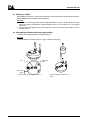
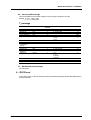
Jacket preparation
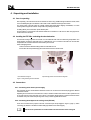
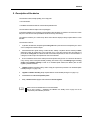
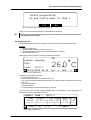
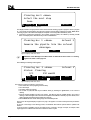
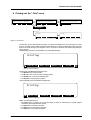
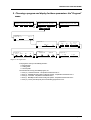
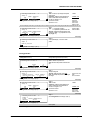
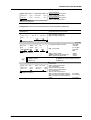
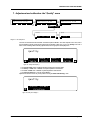
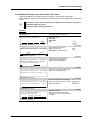
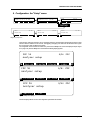
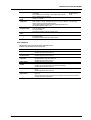
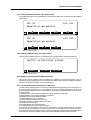
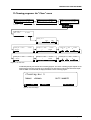
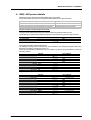
Do you really want to stop ?
Yes
No
Figure 15: Confirmation that jacket preparation is to be cancelled
Confirm or cancel the command by activating the Yes or No buttons respectively.
To gain time, the Jacket preparation stage can be carried out first before even preparing the sample and
assembling the filtration assembly.
2.6. Initiating the test
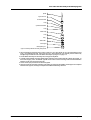
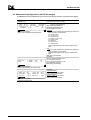
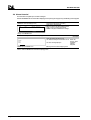
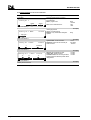
After the audible signal for the end of the preparation of the jacket is sounded, carry out following operations:
Procedure
1.
2.
3.
4.
Remove the Jacket cover.
Place the insulating assembly at the bottom of the Jacket.
Remove the measuring assembly from the receptacle and place it in the Jacket.
Activate the Start now menu.
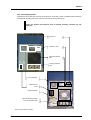
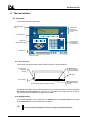
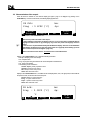
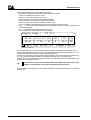
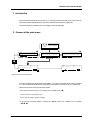
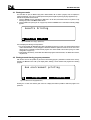
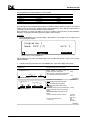
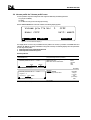
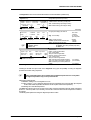
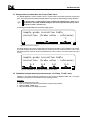
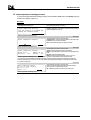
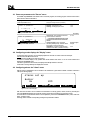
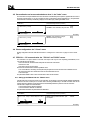
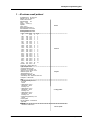
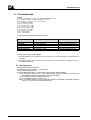
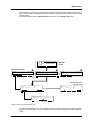
If all the stages have been carried out correctly, the display below will appear.
Status: Running
Test:
Jack: -34.0°C
12/05/1999 14:12
ID:
26.0°C
Up:
s
Dwn:
s
Figure 16: Display 1 Start now menu.
This display carries the following information :
• ID : Sample identification name
• Status : Operation under way, on this case the test is running.
• Test : During the test this field indicates the temperature of the sample at which the forthcoming suction will be
carried out.
• Jack : Jacket temperature.
• Current date and time.
• (In large characters) The sample temperature given by the probe.
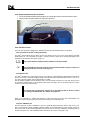
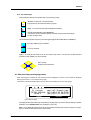
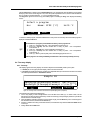
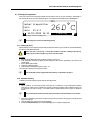
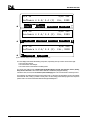
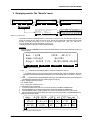
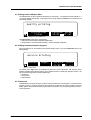
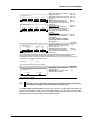
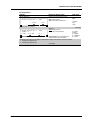
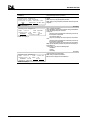
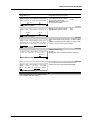
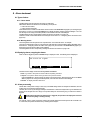
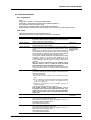
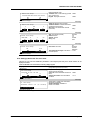
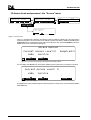
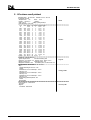
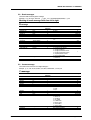
This screen gives access, by means of the Next Display button, to another display on which the progress and
details of the current test may be followed in real time.
Sample temp.:
Time
t0->t
Test:
26.0°C
Durat.
Up Down Temp.H t.H
t-1<->t (s) (s) (°C) (s)
0/
0 at
°C Next:
Figure 17: Display 2 Start now menu.
DOCV211A001-D
FPP 5G & 5Gs User Manual
Page 1-31