1
EQP-103 User’s Manual
4
2. Using This Manual
We provide instructions for the usage of your code reader in this manual.
Below is a list of conventions we used in the manual.
Safety Information
See Safety Information on pages 2-3.
Bold Text
Bold emphasis is used in procedures to highlight selectable items such
as buttons and menu options.
Example:
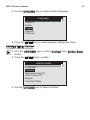
Use the UP/DOWN key to select the desired measurement unit.
Bold-Italic Text
Bold-italic text is used in the procedures to highlight the menus on the
code reader screen.
Example:
Use the UP/DOWN key to select Language from System Setup screen.
Symbols and Icons
√ Check Note
Additional information about the subject in the preceding paragraph is
introduced by a √ Check Note.
Example:
√ The code reader is set to display English menus by default.
• Solid Spot
Operation tips and lists that apply to specific tool are introduced by a
solid spot •.
Example:
System Setup allows you to:
• Select menu languages.
• Change measurement unit.
• Adjust display contrast.
IMPORTANT