1
NVR User Manual
Appendix B
Calculate Recording Capacity
You can calculate the size of hard disk according to the storage time and NVR recording
settings. The formula is as follows in full frame rate condition. Used space per hour (MB/h) =
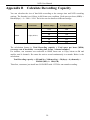
Bitrate(kbps) ÷8 ×3600 ÷1024. The below are the details at different settings.
Resolution
1080P
Frame Rate
30fps (NTSC)
Bit Rate (kbps)
Used Space(MB/h)
12M
5400
10M
4500
8M
3150
6M
2700
2M
900
1M
450
The calculation format is: Total Recording capacity = Used space per hour (MB/h)
(coverage rate of hard disk) × recording time (hour) × channel numbers
For instance, one customer sets resolution to 1080P, frame rate to 15fps, bitrate to 4M and
enables total 4 channels. He wants the unit to record continuously in a month. Below is the
calculation:
Total Recoding capacity = 450 (mb/h) × 24(hours/day) × 30(days) × 4 (channels) =
1296000 (MB) ≈ 1266(GB)
Therefore, customers just install one SATA HDD with 1.5TB for one month recording.
58