1
D. How to Use the IR Remote Control Extender
The IR extender accessory was connected to the receiver through its own special
This IR remote control extender will gives you the ability to control the source
Connector plug. The extender accessory emits an IR signal, bathing your AV
using your existing remote control device. It converts the infrared (IR) signal
equipment with the remote signal. To use the IR extender accessory, follow the
emitted by your remote control to a radio frequency (RF) signal in UHF band at
instructions below:
the transmitter and sends it back to the receiver where the RF signal is
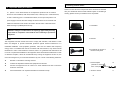
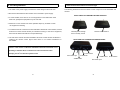
1. Plug the IR extender into the transmitter in rear panel.
2. Orient the end of the IR extender so that it points in the general direction of the IR
There are two means to make your source A/V equipment can be controlled
well by existing remote control through IR remote control extender.
1.
How To Use The IR Extender Accessory
converted back to the original IR signal and beamed to the audio/video source.
sensors of the source AV equipment you wish to be controlled. Cut a length of
provided fastener strip to secure the IR extender, which is always in its position.
3. Position the receiver so that your remote control signal can strike the IR window
on the bottom front of the unit. To use your remote control, point it at the front of
To orient the receiver unit face to face the source A/V equipment, this would
the receiver.
allow the converted IR signal which from receiver IR remote control window
be able to send to the source A/V equipment(s) front panel.
2.
Simply connect an IR extender accessory from receiver and locate this IR
extender accessory near the source A/V equipment from panel.
Occasionally it may be difficult or even impossible to orient the receiver unit
such that it can be "seen" (means face-to-face) by the A/V equipment you wish
to control. Perhaps there is no good surface that allows for this or perhaps you
wish to control. Or perhaps you wish to remotely control A/V equipment’s in
different locations without re-orienting the receiver, in this case, to use in
extender accessory will be more convenient.
5
6