1
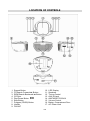
7. 8. 9. All). You may also tap SKIP FORWARD "" BUTTON (2) to go directly to other tracks ahead during program play but you cannot use the SKIP BACKWARD "" BUTTON (3) to go back to previous track(s). To review/edit the programmed tracks during play, press the STOP BUTTON (6) and then the PROGRAM BUTTON (7), the LED DISPLAY (10) will automatically show the programmed tracks one by one in their correct sequence starting from the first. At the end of program review, “01” in the LED DISPLAY and PROGRAM INDICATOR will both flash. If you do not want to change any track in the program, press the PLAY BUTTON (5). To edit a programmed track, use the SKIP FORWARD "" (2) or SKIP BACKWARD "" BUTTON (3) to select a new track and press the PROGRAM BUTTON (7) to confirm. To skip forward, press the PROGRAM BUTTON until you reach the program number whose track you want to change. To cancel Programmed Play, press the STOP BUTTON (6) twice while program playback is running or open the CD DOOR (4) in stop mode. AUX IN OPERATION This CD features an aux line-in jack for connecting your iPod, MP3 player or other digital music player. 1. Connect the headphone jack of your external device to the AUX IN jack located on the left side of this CD player (The connection cable is not included). 2. Turn on the CD player and it will enter the AUX function mode once an external device is plugged into the AUX IN jack (13). 3. Start to play your iPod, MP3 player or other external audio device. 4. Slowly adjust both volume controls on your CD player and the external device. 5. Turn off your iPod, MP3 player and etc. when you finish listening. Turn the CD player off and unplug the AUX IN jack. Remark: The AUX IN jack only can be used in CD mode. Once the AUX IN jack is plugged, the CD player will automatically enter the AUX mode Remember to disconnect the cable from the CD player after use, in order to be able to listen to the CD player again. Frequency Range: Power Sources: SPECIFICATIONS AM 522 - 1620 kHz FM 87.5 - 108 MHz 240V~ 50Hz 12W or 6 x DC1.5V ‘C’ (UM-2) Batteries (Not included) E-9