1
Visage 7 Web Client
User Manual
This software is CE-compliant and is defined as a class IIa medical device in
accordance with Medical Devices Directive 93/42/EEC.
All product and company names are trademarks or registered trademarks of the
respective companies.
Some of the specifications described herein may not be currently available in all
countries. Please contact your local sales representative for the most current
infor-mation.
Caution:
US federal law restricts this device to sale by or on the order of a physician
(or properly licensed practitioner).
Visage 7 is the successor of the Visage PACS/CS product family.
Information in this manual may be subject to changes without prior announcement.
Manufacturer
Visage Imaging GmbH
Lepsiusstraße 70
12163 Berlin, Germany
Phone: +49 (0) 30 700968-0
www.visageimaging.com
US Distributor
Visage Imaging, Inc.
300 Brickstone Square,
Suite 201
Andover, MA 01810 USA
www.visageimaging.com
Support and Safety Contact
Phone: +49 (0) 30 700968-30
Email: [email protected]
Copyright © Visage Imaging GmbH. All rights reserved.
Document Version 27.00
Table of Contents
System Overview
3
Intended use ............................................................................................................ 3
Constancy check ...................................................................................................... 4
Product overview...................................................................................................... 4
Data protection and data security........................................................................... 10
Overview of the Visage 7 product documentation.................................................. 13
Starting and Ending the Program
19
Calling up the login screen ..................................................................................... 19
Standard system login............................................................................................ 21
Integrated Windows authentication ........................................................................ 22
Call-up from another software program.................................................................. 22
Changing your password........................................................................................ 23
Logging off from the web server............................................................................. 23
The Visage 7 Web Client Window
25
Navigation bar ........................................................................................................ 25
Patient window ....................................................................................................... 27
Study/series window............................................................................................... 34
Preview window...................................................................................................... 42
Report window ....................................................................................................... 50
Visage 7 Web Client
1
Table of Contents
Viewers .................................................................................................................. 54
Compare mode ...................................................................................................... 66
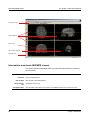
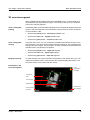
Basic MIP/MPR viewer........................................................................................... 67
Worklist (Expert Reading) ...................................................................................... 74
Display Protocol Viewer (Expert Reading) ............................................................. 81
Appendix
91
List of supported modality types and abbreviations ............................................... 91
Overview of functionality supported by client types................................................ 92
Index
2
107
Visage 7 Web Client
System Overview
Visage 7 is a software product for the distribution of image and report data via intranet or Internet.
Visage 7 is ideal both for complex requirements of large hospitals and for specialists' practices. The system can be customized to provide the optimum solution for
each customer.
In this section you will find an overview of the Visage 7 system and the Visage 7
Web Client and its data security concept, and an introduction to the Visage 7 user
documentation available for this software.
Intended use
Visage 7 is a system for distributing, viewing, processing, and archiving medical images within and outside health care environments.
TheVisage 7 server receives image data in DICOM format via the hospital network.
This provides universal connections to archives, modalities, and workstations.
The supported modalities are listed in the DICOM Conformance Statement.
Visage 7 is to be used only by trained and instructed healthcare professionals. It
can support physicians and/or their medical staff in providing their own diagnosis for
medical cases. The final decision regarding diagnoses, however, resides with the
doctors and/or their medical staff in their own area of responsibility.
Although the web and thin client technologies allow the software to be run on a variety of hardware platforms, for diagnostic purposes the user must make sure that the
display hardware used for reading the images complies with state-of-the-art diagnostic requirements and currently valid laws.
Only DICOM for presentation images can be used on an FDA approved monitor for
mammography for primary image diagnosis.
Only uncompressed or non-lossy compressed images must be used for primary image diagnosis in mammography.
Visage 7 Web Client
3
Constancy check
System Overview
Constancy check
Visage 7 is a category A diagnostic imaging device (DID) for which the equipment
used and the ambient conditions at the installation site must meet special requirements (RöV German X-Ray Ordinance dated January 8, 1987 in the version dated
June 18, 2002 amending the RöV and other atomic energy ordinances). Imaging
devices of this category are labeled accordingly.
The user is required to perform a monthly constancy check on these imaging devices in compliance with RöV, §16, per DIN 6868-57 (DIN V 6868-57:2000, Image
quality assurance in diagnostic X-ray departments, Acceptance testing for image
display devices).
The characteristic and reference values for the constancy check shall be defined
during the acceptance test. The reference values shall be ascertained using the user's test instruments (luminance meter, at least class B (DIN 5032-7) with valid calibration, range 0.05 cd/m² to 10,000 cd/m²).
Product overview
Visage 7 is a client/server application. It comprises the following components:
•
Central Visage 7 server(s) in the hospital and
•
Visage 7 Web Client clients in the wards, in special departments or in the physicians’ practices.
•
Visage 7 Clients (optional)
In this section you will find information on:
•
System architecture
•
License management
•
System requirements
•
Hints for Visage 7 Web Client installation
•
Archiving with the archive option
System architecture
In a hospital, all radiological patient data is collected on a central web server, for example, for the duration of the patient’s stay. Each modality used to examine the patient sends the study data not only to a long-term archive but also to the web server.
If physicians require information on patients and their examinations they can call up
an Visage 7 client from anywhere within the hospital intranet and will find the re-
4
Visage 7 Web Client
System Overview
Product overview
quired study information there. In order to make sure the patient information on the
web server is complete and up to date physicians can query other nodes in the network for recent examination data.
Whereas a HIS/RIS only makes administrative data generally available throughout
the hospital, the Visage 7 solution takes the idea of central data collection and universal availability of data one step further. Visage 7 Web Client makes radiological
study data, which includes DICOM image data and reports, available at the clinical
workplace.
In this context, the central web server functions as temporary storage medium of image data (usually for the duration of a patient’s stay at the hospital, e.g. 2-4 weeks)
and as an image distribution center.
Moreover, Visage 7 also extends beyond the hospital and its internal data network.
With appropriate authorization the web server can be accessed from the outside as
well, making use of the Internet. This way referring physicians can quickly and easily call up information on the examination results of their patients. Accessibility via
the Internet also proves helpful in critical situations where the opinion of an additional external expert is required.
The use of a secure data transmission protocol and additional data encryption options ensure high data security for this kind of data distribution via the Internet.
Web server
Visage 7 servers are web servers with a database to which the relevant image material is transmitted after examination or reporting. An internationally standardized
transmission protocol as defined in the DICOM standard is used for this purpose.
Note
Visage 7 will not be able to guarantee the availability of data if studies/series that
have been transferred by other network partners contain errors.
As a rule, the image data remains on the Visage 7 server only for as long as a patient is undergoing treatment or is an actual in-patient. How long data will be stored
on the Visage 7 server depends on the storage capacity of the RAID system and on
the license.
Please be sure to dimension your RAID in accordance with the data volumes in your
institution.
Data storage in Visage 7 is based on the FIFO (first in, first out) principle. Changes
to patient data result in the data being given a new time stamp. Once the storage
capacity of the system has been reached, the oldest data is automatically deleted in
order to create space for new image material. The data can be reloaded from the
hospital's archive at any time if needed.
Web clients
Visage 7 Web Client allows you to log on to the Visage 7 server and to access the
data that is stored on the server using the HTTP/HTTPS protocol.
Data can be accessed in two different ways:
•
Visage 7 Web Client
From the various wards or departments of a hospital via the intranet or
5
Product overview
System Overview
•
From outside the hospital, that is, from physicians' practices via the Internet (fast
transmission rates are recommended)
Visage 7 Web Client use the Microsoft Internet Explorer as a web browser.
To implement the functions required for editing images, special software components are used that are based on ActiveX. By using standard Internet technology it
is therefore possible to use standard PCs as viewing stations.
3D Thin Client
option
With the additional Visage 7 Client product option the system also supports distribution of 3D image data generated from state-of-the art scanning modalities.
A 3D render server (application server) processes the 3D data and makes it available over an intranet or Internet connection for 3D image viewing and evaluation.
The actual DICOM data remains on the 3D application server and is not transferred
to the 3D clients. Instead of image data a stream of compressed screen content is
transmitted during interaction, which allows for safe and consistent access even to
large volumes of 3D data.
License management
Every Visage 7 installation comes with a license code. Without it the software will
not run.
Licenses
The license code serves as copy protection and controls which product options are
enabled. This includes:
•
The maximum number of DICOM connections for calling/importing data from the
network onto the Visage 7 system, and for sending data from the Visage 7 system.
•
How many users may access data on the server simultaneously (per client type).
•
The maximum data volume on the system
•
Activation/deactivation of the audit trails.
•
The availability of an archive option.
•
The availability of the HL7 (Health Level Seven) option.
•
The availability of the GSM (Global Session Manager) option.
•
The availability of the worklist server option.
•
The availability of the failover option.
•
The accessibility of the Visage 7 Client.
Visage 7 uses the so-called “floating licenses” concept. This means that a license is
not bound to a particular user name or a dedicated workstation or PC. A license for
10 users means that 10 users can work with a Visage 7 Web Client or Visage 7 Client at any one time. If an 11th user tries to log on, he or she is told to try again later.
Once one of the original 10 users logs off, logon of the 11th user will be permitted.
Of course, licenses can be upgraded.
6
Visage 7 Web Client
System Overview
Upgrade
Product overview
When upgrading an installation the old license becomes invalid. The new Visage 7
license, which comes with the upgrade, must be installed.
If a larger data volume was licensed in a previous version, this may lead to the oldest data being deleted from the system after the new license has been installed, depending on the “auto-delete” settings defined by the system administrator.
Client types
Visage 7 Web Client provides different client types with different levels of functionality:
•
Visage 7 Web Client View with essential image viewing functions.
•
Visage 7 Web Client Classic offering more image handling and review functions.
•
Visage 7 Web Client Expert with full functionality.
•
Visage 7 Web Client Expert Dual Monitor with Expert functionality plus support of two monitors.
•
Visage 7 Web Client Expert Reading with all the features required to use Visage 7 Web Client for primary reading. The client type Expert Reading is available with the Expert licence.
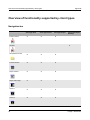
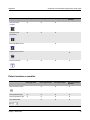
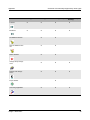
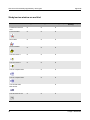
For a detailed comparison of the client types refer to the Appendix.
If your installation does not support one of these license types an error message will
be displayed when you try to log in.
System requirements
When describing system requirements we make a distinction between server and
clients.
Server
For a specification of the hardware and software requirements for Visage 7 servers
please contact your sales representative.
Clients
These are the minimum hardware and software requirements for Visage 7 Web Client PCs:
•
Operating system and software
Microsoft Windows 7, or
Microsoft Windows XP, or
Microsoft Windows Vista
Microsoft Internet Explorer 6, 7, or 8
Microsoft NetMeeting (optional equipment for teleconferencing)
Visage 7 Web Client
7
Product overview
System Overview
•
Computer/processor
Intel Pentium III with at least 500 MHz (Intel Pentium IV, 2 GHz recommended)
•
RAM
256 MB (more memory may be required depending on the size of your images.
•
Hard disk
At least 2 GB free hard disk space
•
Graphics card
Resolution of at least 1024x768 pixels, true color
•
Monitor
17" color monitor (21" recommended) or grayscale monitor
Note
Mammographic images may only be interpreted using an FDA-approved monitor
that provides at least 5-Mpixel resolution and meets other technical specifications
reviewed and accepted by the FDA (U.S. only).
Tip
If you are working with high-resolution monitors your system administrator can
configure the display of Visage 7 Web Client so that larger font sizes and icons are
shown.
•
Other
Network link or ISDN/analog modem
Loudspeakers, microphone, and web cam (optional for use with Microsoft NetMeeting Software)
Hints for Visage 7 Web Client installation
During installation the Visage 7 server is listed as a Trusted Site. To ensure that the
Visage 7 Web Client ActiveX components can be installed on the client computer
you must set the security level for Trusted Sites in the relevant network zone (intranet or Internet) to Medium or Low. The security level High would prevent ActiveX
components from running.
In order to change the security level for Trusted Sites:
1. Open the Internet Options (menu Tools > Internet Options) dialog box in the
Internet Explorer.
2. Click the Security tab card.
8
Visage 7 Web Client
System Overview
Product overview
3. Click Trusted Sites and Custom Level.
4. Check the settings for Trusted Sites and change them if necessary.
5. Also be sure to disable Use PopUp Blocker, if you are working with Windows
XP, Service Pack 2 or higher.
In order to add a Trusted Site manually:
1. Enter the Visage 7 Web Client URL (e.g. http://servername/en) in the Internet
Explorer address bar.
2. Select and copy the URL (Ctrl + C).
3. Open the Internet Options (menu Tools > Internet Options) dialog box in the
Internet Explorer.
4. Click Trusted Sites and Sites.
5. Paste the URL in the Add this Web site to the zone box (Ctrl + V).
6. Click Add and then close the dialog box with OK.
Note
For installation, administrator privileges are required on the client computer.
Tip
At some sites Visage 7 Web Client is distributed in the Windows Domain with a socalled MSI Package. If this is the case Visage 7 Web Client will be installed automatically, no user interaction is required here.
Archiving with the archive option
With the archive option, data is sent to the archive according to a configurable
schedule.
These archive options are available:
•
Archiving on RAID hard disks
•
Archiving on SAN and NAS devices
Which archiving method is used will depend on your requirements, the hardware
used, and the configuration of archive option.
Tip
Archiving is always performed in the background. As a user you will not actively intervene in archiving. However, you can monitor the status of archiving in the study
list and exclude studies from archiving.
Visage 7 Web Client
9
Data protection and data security
System Overview
Data protection and data security
Data relating to individuals is subject to data protection. In this regard, please ensure compliance with all applicable laws and regulations in your country.
Visage 7 provides extensive security mechanisms that help you assure data protection and data security:
On the administration platform the system administrator can also activate the audit
trail option. This ensures that the system follows the strict regulations concerning
patient data protection and data security according to US law.
Note
For security reasons, it is not permitted to make changes to the product Visage 7
and its database. Contravention of this will lead to all guarantees being revoked
and under some circumstances may even be violating applicable laws.
Access control and authentication
Visage 7 employs a user management concept that controls both access to study
data and the availability of program functions.
Each user must log in on to a Visage 7 client with a user name and password. The
Visage 7 server checks these entries. Only if they match is access to the system
granted.
Access to data
Access rights to study data are defined by the system administrator on the Visage 7
server. The basic idea is that only those users who are involved in a particular case
should have access to study data.
Access authorization ensures that users can only view data for which they have access rights.
Access to program
functions
In addition to restricting access to data, the system administrator can also make certain program functions available to some users but not to others. This way, every
user will find only those icons and functions on the user interface that he or she really needs. Controlling the range of functions available for each user also adds to data
security. The availability of potentially critical functions such as making specific patient data available to other users or deleting data that is no longer needed can be
restricted to more experienced users.
When a function is disabled on a user level, the icon or input field for that function is
also disabled.
Visage 7 comes with a number of preset user levels with predefined functionalities.
The Visage 7 system administrator can adapt these user levels to your requirements.
10
Visage 7 Web Client
System Overview
Login and password
Data protection and data security
To ensure that user accounts and their passwords are effectively protected from unauthorized access:
•
passwords are encrypted
and, if this has been configured
•
passwords will expire
•
failed login attempts are recorded, and multiple failed login attempts will cause a
user account to be locked.
Note
Recording logins and other actions only makes sense if all users on the system
have their own user names and passwords.
Tip
You should change your password from time to time for data security reasons.
User profiles
The working environment of each user (user profile) is saved on the server when
you log out. This supports roaming, which means that you can log in from any computer and find exactly the working environment you are accustomed to.
Auto logoff
Visage 7 can be configured so that a logged in user is logged off from the system after a configurable period of time with no user interactions. This prevents licenses
from being unnecessarily blocked and stops any unauthorized persons accessing
data if a user has logged on but has forgotten to log off again.
Multi-session
operation
If configured, a user may log on to Visage 7 more than once from different PCs.
Multi-session operation allows users to work from more than one clinical workplace
simultaneously and view the same data there.
Each session makes use of (and thereby blocks) one license.
Service access
permissions
Remote access for service purposes must be granted explicitly. It is therefore up to
you if and to what extent you wish to grant access rights to service.
•
Full Access
Service has read and write permissions. This means that service personnel can
analyze problems and can solve these problems or change settings. Service access is logged.
•
Limited Access
Service has read permission only.
•
No Access
Service has no access.
Visage 7 Web Client
11
Data protection and data security
System Overview
Note
Please note that with full access, service is granted unlimited access. Under certain circumstances this may include patient data which has not been anonymized.
Audit trails
Logging of user actions in Visage 7 occurs in so-called audit trails. Audit trails are
recordings of access-controlled actions. They are the proof that access to patient
data is monitored.
A message informs users that their actions may be monitored.
The following activities are recorded if the audit trail option has been activated by
the system administrator:
•
Changes to access rights with accessing user, date and time
•
Viewing, printing, or deleting patient data
•
Changes to archived images with time, date and user
•
Login and logout, and failed attempts to log in
•
Service sessions (local or remote)
•
Software updates, as well as backup and restore
In addition the highest original number of images is recorded, to compare the current number of images.
Audit trails must be kept for a number of years. It is the responsibility of the system
administrator to ensure that the relevant log files are archived according to the requirements that apply to your institution and country.
The system administrator is the only user who has access to the audit trails via a
dedicated viewer.
For larger systems, a separate database server can be made available for audit
trails.
Encryption
With Visage 7, data is transmitted in accordance with the SSL (Secure Socket Layer) standard. For this purpose, a security certificate, which is essential to guarantee
the security of data transfer, is installed automatically on your computer the first time
you start the program. Data is then automatically transmitted over a secure connection. Furthermore, it is advisable to additionally encrypt the images using the encryption function of Visage 7 Web Client for transmission.
For Visage 7 Web Client users who access the web server over the Internet, the
system administrator can set data encryption as a default for each data transfer.
12
Visage 7 Web Client
System Overview
Overview of the Visage 7 product documentation
The system administrator can also make sure that these Internet users cannot deactivate data encryption themselves.
Overview of the Visage 7 product documentation
The Visage 7 product documentation distinguishes between three user groups and
the tasks that these groups typically perform.
•
Clinical users
These users access the Visage 7 server from a Visage 7 Web Client or Visage 7
Client in order to review 2D, 3D, or report data (Visage 7 Web Client) or to view
and process 3D volume data (Visage 7 Client).
The Visage 7 Web Client and Visage 7 Client user documentation addresses
this user group.
•
System administrator
The system administrator of the hospital will perform system maintenance and
adapt server configuration and database settings to changes in the system and
network environment. This user group works on the administration platform.
The Visage 7 administrator documentation addresses this user group.
•
Service personnel
This user group will install the system and subsequently perform initial system
configuration. This group will need the installation manual for system installation and the administration documentation for initial system configuration.
In this section you will find an overview of the available product documentation as
well as information on how to work with the Visage 7 user manuals, online guide,
and online help systems.
User and administrator documentation
The Visage 7 product documentation addresses the information needs of each of
these user groups.
User documentation
The Visage 7 Web Client and Visage 7 Client user documentation addresses clinical
users.
It comprises:
•
The Visage 7 Web Client user documentation
In these documents clinical users will find a complete description of the Visage 7
Web Client user interface and program functionality.
In the printed user manual (this document) you will find a complete description
of all Visage 7 Web Client functions.
Visage 7 Web Client
13
Overview of the Visage 7 product documentation
System Overview
The online guide offers additional information and task-oriented descriptions
presented in a step-by-step style. Online guides are available on your installation
medium in English and German.
Visage 7 Web Client also features a context-sensitive online-help system
which you can call up right from the user interface. The context-sensitive help
topics explain all the user interface elements and features of the currently displayed screen in your native language. For the English and German user interface the online help system also contains task-oriented step-by-step instructions.
•
The Visage 7 Client user documentation
The user manual (pdf file and/or printed manual) provides a complete description of all Visage 7 Client functions.
Visage 7 Client also features an online-help system, which you can call up from
the Help menu. The various help topics explain the user interface of the client
software.
Tip
You can download the user documentation as pdf files. Follow the corresponding
link on the login screens.
Administrator
documentation
The Visage 7 administrator documentation supports system administrators in a hospital. It helps them with user management and adapting the system to changes in
the overall network environment, if this becomes necessary.
The Visage 7 administrator documentation also helps service personnel with initial
system configuration tasks right after system installation or update.
•
The Administration Manual
This document is available as a pdf file on your installation medium. You can
print out this document if you prefer reading on paper.
•
The administration platform Online Help System
The Visage 7 administration platform features a context-sensitive online-help
system.
The context-sensitive help topics explain the parameters you will find and the
settings you can make on the various configuration screens. Whenever relevant,
background information on selected topics is also given in the online help system.
Service
documentation
Installation instructions for single-server systems are available on your installation
medium. Installation instructions for cluster systems and CS systems are available
for Visage Imaging service personnel only.
Release notes
Release notes contain additional useful information about the software. They focus
on technical details. You can find the release notes document on your installation
medium.
14
Visage 7 Web Client
System Overview
Overview of the Visage 7 product documentation
Information on using the Visage 7 manuals
Document structure
In order to help you locate relevant information in the Visage 7 manuals quickly, they
are subdivided into chapters.
In the Visage 7 Web Client user manual and online guide each chapter addresses a specific task or group of tasks relevant to your daily work with the product. For
experienced users, The Visage 7 Web Client Window section serves as a concise
reference guide.
The Table of Contents and Index sections help you locate a topic quickly.
Layout conventions
To help you find and interpret the appropriate information, the following visual orientation aids are used here:
•
Operating steps
Single-step actions are presented as plain text.
1. Operating steps in sequences of actions are numbered.
•
Bold text
Names of windows, menus, and functions are shown in bold typeface. Sections of
text given particular emphasis are also highlighted in bold type.
Tips, notes,
warnings
Tips, notes, and warnings are highlighted.
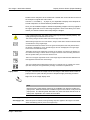
Tip
Tips provide additional useful information about a topic. Tips, for example, help
you organize your work more efficiently.
Note
Notes mark text that you should pay special attention to. A note may, for example,
emphasize a piece of information relating to the safety of functions, but where no
direct danger is involved.
Caution
Caution is used to indicate the presence of a hazard, which can cause personal
injury to a patient, or damage to the equipment.
Information on using the online help systems
The Visage 7 Web Client and Visage 7 Client user interfaces, and the Visage 7 administration platform feature an online-help system each.
Visage 7 Web Client
15
Overview of the Visage 7 product documentation
Calling up online
help
System Overview
You can call up the online help system from any Visage 7 Web Client window.
Click the help icon on the Visage 7 Web Client navigation bar along the left edge of
the window to open the context-sensitive online help system.
The context-sensitive online help displays the help topic relevant to the window that
is active when it is called.
Tab cards
The left half of the Visage 7 Web Client online help window shows tab cards for
quick access to the help contents.
This tab card contains a table of contents similar to that of a printed book.
1. Double-click the book icon to display a topic and show subheadings.
2. Click the page with the question mark icon to display the text of a help page in
the right half of the window.
You can search for index entries here.
1. Enter a word you want to search for.
-OrScroll through the alphabetical index.
2. Double-click an index entry to display the information about it.
This tab card permits a full-text search.
1. Enter a word to search for.
2. Press the RETURN key.
All help topics containing this word will be listed.
On this tab card you can set bookmarks for help topics that are of particular interest
to you.
1. Display the topic you want to add to the Favorites list.
2. Click Add.
Links to other topics
In various help topics you will find links that will take you to more detailed information about a subject.
Text links are shown in blue and underlined.
Links in overview graphics are shown in italics.
Scrolling from topic
to topic
16
Use the next and previous icons in the footer of each help topic to scroll through
the online help system topic by topic.
Visage 7 Web Client
System Overview
Help window toolbar
Overview of the Visage 7 product documentation
The upper part of the help window shows a number of icon buttons. Use these buttons to adapt the help window, scroll through topics, and print topics.
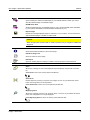
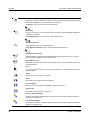
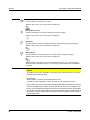
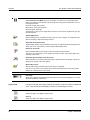
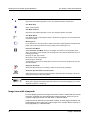
Shows the online help tab cards if they are hidden and then changes to the Hide button.
Hides the online help tab cards if they are shown and then changes to the Show button.
Returns to the previous topic.
Returns to the next topic (after you have clicked Back).
Prints the current topic on the set printer.
Shows a menu with more help functions.
Visage 7 Web Client
17
Overview of the Visage 7 product documentation
18
System Overview
Visage 7 Web Client
Starting and Ending the Program
This section tells you how to start Visage 7 Web Client, log onto the server, and
close Visage 7 Web Client properly at the end of each session.
Depending on your system configuration, the type of data connection you are using
to access the web server, and the settings made by your system administrator, you
will use one of the following methods for calling up Visage 7 Web Client and logging
onto the Visage 7 system.
When you have finished working with Visage 7 Web Client do not forget to log off
from the system again.
Calling up the login screen
Before attempting to start Visage 7 Web Client, make sure Microsoft Internet Explorer is installed on your PC.
See also System requirements on page 7.
Visage 7 Web Client will not work with older versions of the Microsoft Internet Explorer or Web browsers of other manufacturers. When you log onto the system, Visage 7 Web Client checks whether the correct browser is installed. If it is not, a
message tells you which browser you need.
Standard languages
The Visage 7 Web Client user interface is available in six languages. You choose a
language when you call the Visage 7 Web Client login screen.
1. Connect to the Internet (or Intranet).
2. Start the Internet Explorer.
3. Enter the address (URL) of the Visage 7 server.
http://servername (for the default user interface language)
http://servername/de (for the German program version)
http://servername/en (for the English program version)
http://servername/fr (for the French program version)
http://servername/es (for the Spanish program version)
http://servername/it (for the Italian program version)
http://servername/pt (for the Portuguese program version)
Visage 7 Web Client
19
Calling up the login screen
Starting and Ending the Program
Servername is a placeholder for the name of the Visage 7 server on the network.
URLs that follow the convention of previous software versions (http://servername/visagepacs/en or http://servername/radin/) are also still valid.
Customer-specific
translation
If a customer would like to have the user interface translated into any other language than those listed above, a separate directory is available for this.
The customer-specific directory ... /cs contains a version of the user interface that
can be translated into other languages.
The address of the login page in this case is:
http://servername/cs (for customer specific program version)
Shortcuts
To speed up the call-up procedure for subsequent logins you can create shortcuts to
the login screen.
1. Enter the URL of the Visage 7 server in the Internet Explorer address bar.
2. Select Favorites > Add to Favorites in the Internet Explorer menu.
-OrReduce the Internet Explorer window so that it no longer covers the entire
screen, and click this icon in front of the URL and drag it onto your Windows
desktop.
3. Select Visage 7 Web Client in the Favorites menu of the Internet Explorer.
-OrDouble-click the Visage 7 Web Client icon on your desktop next time you want to
call up the Visage 7 Web Client login screen.
Downloading the
user manual
1. Click on the text link Download user documentation on the login screen.
The link takes you to a web page where you will find the user manual as pdf file
in the language you have selected for the user interface.
2. You can download the pdf file from here onto your local PC in order to view it online or print it out.
Microsoft Windows
Vista
When you are calling the login screen from a Windows Vista system for the first time
Visage 7 Web Client cannot be installed automatically.
1. Follow the link to a download web page that will be displayed instead of the login
screen.
2. Click the link Visage7_WebClientInstall.msi on this page.
This link will help you with installing Visage 7 Web Client on your computer
20
Visage 7 Web Client
Starting and Ending the Program
Standard system login
Standard system login
After you have entered the address of the Visage 7 server, the Visage 7 Web Client
login screen is shown.
1. Select one of these client types: View, Classic, Expert, Expert Dual Monitor,
or Expert Reading.
-OrCall up the Visage 7 Web Client login screen in your preferred client type, e.g.:
http://servername/en/view (for client type View)
http://servername/en/classic (for client type Classic)
http://servername/en/expert (for client type Expert)
http://servername/en/2monitor (for client type Expert Dual Monitor)
http://servername/en/expertreading (for client type Expert Reading)
2. Enter your user name and password.
Visage 7 Web Client makes a distinction between upper and lower case letters.
3. Press the RETURN key or click the Login button.
The Visage 7 Web Client patient window opens.
If you are unable to log in, either the maximum permissible number of users may
be logged in at the moment or your license does not support the selected client
type. In this case, try logging on again a few minutes later or select another client
type.
If Visage 7 Web Client still does not start, check the network connection or contact your system administrator.
Dual monitor
In dual monitor mode you work with two monitors simultaneously. The operating elements and screen areas of Visage 7 Web Client are distributed over two monitors.
This makes working with Visage 7 Web Client easier.
Dual monitor mode is only available if you have an Expert license and the required
user privileges.
Multiple sessions
If your administrator has activated this function for you, you can log on to several
workstations with the same user data and continue on one workstation with the work
you started on another one.
Automatic client
update
Every time you log onto the Visage 7 server, the server automatically checks whether a more recent version of the client software is now available. Client update starts
automatically, unless your system administrator has disabled this option. A message is displayed in this case.
Visage 7 Web Client
21
Integrated Windows authentication
Starting and Ending the Program
Integrated Windows authentication
If your client is connected to the hospital network (Windows domain), you can work
with Visage 7 Web Client without entering a user name and password. Your Windows login will be used instead.
Note
Integrated Windows authentication is only possible for users whose accounts
were imported in the Visage 7 system from Windows and for whom the integrated
Windows authentication privilege has been set by the system administrator.
Before calling Visage 7 Web Client via integrated Windows authentication for the
first time:
Start the Internet Explorer and call up the standard Visage 7 Web Client login
screen once (e.g. http://servername/en).
After that use the following URL for calling Visage 7 Web Client via integrated Windows authentication:
https://servername/en/iwa
-Orhttps://servername/en/iwa/view
https://servername/en/iwa/classic
https://servername/en/iwa/expert
https://servername/en/iwa/2monitor
https://servername/en/iwa/expertreading
Call-up from another software program
If you are working with other clinical applications on your PC you might be able to
call up Visage 7 Web Client directly from such a program (e.g. a hospital or radiology information system (HIS/RIS) or electronic patient browser).
If Visage 7 has been integrated in the other clinical software application, the program will start automatically whenever you select one or more images and call up
image display. You do not have to enter your login data every time you call up image
display in this case. The selected images are immediately displayed in the Visage 7
Web Client viewer window.
If your Visage 7 installation includes the Visage 7 Client license both clients will be
called up automatically when you select a patient and study on the HIS/RIS for
which 3D volume data are available on the Visage 7 system. Joint OEM call of
22
Visage 7 Web Client
Starting and Ending the Program
Changing your password
course requires that the HIS/RIS has been configured to call Visage 7 with the correct parameters and that your Visage 7 user account holds appropriate user rights.
Changing your password
You should change your password from time to time for data security reasons.
1. Open the Visage 7 Web Client login screen.
2. Open the popup menu of the login screen with the right mouse button.
3. Select Change Password from the popup menu.
4. Enter your user name and your old password, as usual, and press RETURN.
You are now prompted to enter a new password on the login screen.
5. Enter the new password in the New Password box.
6. Enter the new password a second time in the Confirm box and press RETURN.
Use the new password from now on when logging in.
Tip
If the login screen popup menu does not contain the Change Password item, ask
your system administrator to configure this for you.
Logging off from the web server
Logging off from the
server
You should always log off from the Visage 7 system.
If images are currently being loaded, please cancel loading with the Esc key before
you log out.
Click this icon in the lower part of the navigation bar.
This logs you off from the Visage 7 system. The Visage 7 Web Client login
screen is displayed again.
-OrClick this icon in the top right corner of the program window.
This logs you off from the Visage 7 system and also closes the Internet Explorer.
Visage 7 Web Client
23
Logging off from the web server
Starting and Ending the Program
Tip
If you are working with a 1024x768 screen resolution the logoff icon in the lower
left-hand corner of the navigation bar may not be visible.
Press F11 for a full-screen display of the Internet Explorer in this case. In this view
the logoff icon is always available.
Tip
Your system administrator can configure an HTML link to an Internet page after
manual logoff.
Automatic logoff
If Visage 7 observes no activity for a certain time (default setting: 15 minutes) a
message box appears. You are prompted to confirm that you wish to continue working. If you do not answer you will be logged off automatically after a few seconds.
The license you were using is now available for another user.
Only the system administrator can change the automatic logout time.
24
Visage 7 Web Client
The Visage 7 Web Client Window
This section describes the screen layout and the windows you use when working
with Visage 7 Web Client. You will find a brief functional description of the individual
windows, the icons, and other elements here.
You open the Visage 7 Web Client windows via the navigation bar on the left-hand
side of the screen.
Tip
The online guide, which is available in German and English and which you received as a PDF file on your Visage 7 installation medium, provides more detailed
information and instructions for working with Visage 7 Web Client. If you are working with an English or German user interface you can also download the online
guide from the login screen.
Navigation bar
Using the icons on the navigation bar you can quickly switch to any of the other Visage 7 Web Client windows. Switching to another window will not load any data into
that window. Instead the data you last loaded to that window is displayed.
Dual monitor
If you are working with two monitors, the navigation bar appears at the left edge of
the left monitor and on the right edge of the right monitor. It contains the same icons
on both monitors.
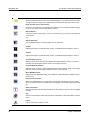
Audit Warning
A message is displayed. It informs you that only authorized users are permitted to use Visage 7 Web Client and that all your actions may be recorded.
This icon is displayed only if the audit trail license is installed and display of this icon has
been configured.
Patient Window
Lists all patients that were found by the last database query.
You can select a patient here to display his or her study list next. When you have logged on
to the client type Expert Reading, the patient window is shown in worklist view.
Visage 7 Web Client
25
Navigation bar
The Visage 7 Web Client Window
Study/Series Window
Shows all examinations and series of the selected patient. If you activate the preview area,
you will see preview images of the selected study or series in the right half of the window.
Image Preview (not for dual monitor)
Shows one or all series of an examination as thumbnails. You can select individual images,
or one or more series and load them into the viewers.
Report Window
If a report is stored on the Visage 7 server for a selected study, you can view the report text
in this window.
-OrReport with Image
You can display images of a study together with the report text.
Viewer 1
Displays the images of a selected study, series, or individual selected images in viewer 1.
Viewer 2
Displays the images of a selected study, series, or individual selected images in viewer 2.
Compare Mode (vertical)
Splits the screen down the center and displays the images loaded in viewer 1 on the lefthand side and the images loaded in viewer 2 on the right-hand side.
Compare Mode (horizontal)
Splits the screen across the center and displays the images loaded in viewer 1 in the upper
half of the screen and the images loaded in viewer 2 in the lower half.
Basic MIP/MPR Viewer
Displays the basic MIP/MPR viewer (only possible for image data that is suitable for 3D reconstruction).
Display Protocol Viewer
Shows the loaded images in a screen layout that has been optimized for primary reading.
This icon and viewer are only available if you have logged on to the client type Expert Reading.
Status information
Displays information about all data transfer jobs in the network as well as a list of all logged
on users.
Help
Calls a context-sensitive online help topic with an explanation of the window that is currently
active.
Logoff
Logs you off from the Visage 7 server.
26
Visage 7 Web Client
The Visage 7 Web Client Window
Patient window
Patient window
In the patient window you can search for the patient whose images you wish to review.
You can search for the patient in the local database (web server) or in the database
of a configured DICOM partner.
Entering filter and search criteria will make searching easier.
Note
To ensure the confidentiality of patient data, the system administrator will, as a
rule, restrict which examinations you are able to access. As a referring physician
you may, for example, only be able to view the data of your own patients.
Dual monitor
When you are working in dual monitor mode, the patient list is spread over both
monitors. The filter elements are shown on the left monitor only.
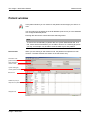
Information area
(patient window)
Filter parameters
Search criteria
System messages
Toolbar (patient window)
Data source
Patient list (local) or
Response list (network node)
Navigation bar
Visage 7 Web Client
27
Patient window
The Visage 7 Web Client Window
Information area (patient window)
This area of the patient window shows the user name you are logged in with.
Hide/show filter criteria
Use this icon for collapsing (or expanding) the filter parameters and search criteria section
of the screen.
Patient List
Active window where you are now.
User name
User currently logged in.
Filter parameters
Here you select criteria for filtering the patient list.
Study Date
Here you can select a period. After a database query, the patient list will only show patients
examined over this period.
Today - lists all patients examined today.
Yesterday - lists all patients examined yesterday.
The last X days - lists all patients examined over the last X days.
Date - lists all patients examined on this day.
From date to date - lists all patients examined within the stated period.
All - lists all patients, irrespective of examination date.
Modality
Here you can filter the patient list according to modality.
Click the
icon next to the filter parameter Modality.
Check one or more modalities.
After a new database query, only patients examined with this modality or these modalities
will be shown.
Physician
Here you can filter the patient list according to the name of the referring, performing, and/
or reporting physician.
Click the
icon next to the filter parameter Physician.
Check the box Referring physician, Performing physician, and/or Reporting physician
and type the name of the physician. Or type A for all physicians whose name begin with A,
for example.
-OrOpen a list of all names by clicking on the
icon behind an entry field. A list drops down
with all referring, performing, or reporting physicians of the studies you have access to. Select a name.
If you are searching in the network, the patient list can only be filtered according to the referring physician.
28
Visage 7 Web Client
The Visage 7 Web Client Window
Location
Patient window
Here you can filter the patient list according to the patient’s ward or the name of the institution where the patient was examined.
Click the
icon next to the filter parameter Location.
Select a Ward or Institution Name.
Insertion Date
Here you can sort the patient list according to the date when the patients’ data were transferred to the web server.
Today - lists all patients whose studies were transferred to the web server today.
Yesterday - lists all patients whose studies were transferred to the web server yesterday.
The last X days - lists all patients whose studies were transferred to the web server during
the last X days.
Date - lists all patients whose studies were transferred to the web server on that particular
day.
From date to date - lists all patients whose studies were transferred to the web server within the stated period.
All - lists all patients, irrespective of when their studies were transferred to the web server.
Interpretation
Status
Here you can filter the patient list according to the processing status of procedure steps:
SCHEDULED - lists all patients whose studies contain procedure steps that are scheduled
for interpretation.
IN PROGRESS - lists all patients whose studies are currently being reviewed in one of the
Visage 7 Web Client installations in your network.
DISCONTINUED - lists all patients whose studies contain procedure steps with interpretation status discontinued.
COMPLETED - lists all patients whose studies contain procedure steps with interpretation
status completed.
Search criteria
Here you can enter search criteria for a database query. If you do not remember a
name or number you can use wildcards in your search. (E.g. Mil to find Miller,
Milford, Miltner, or *mil to find all the above and also Hamilton, or AB??34 to find
AB1234, AB0034, and AB11345678.)
Patient Name
Searches for a patient by name.
Enter the patient name in the format: last name first name middle name prefix suffix. For example: Doe John Jack Dr. for Dr. John J. Doe.
Patient ID
Searches for a patient ID.
Patient
Comment
Searches for a patient whose studies contain a specific comment.
Visage 7 Web Client
29
Patient window
Date of Birth
The Visage 7 Web Client Window
Searches for a patient by date of birth.
Use the date format indicated next to the search box. (Your system administrator can configure this format for you). Also remember to enter the complete date of birth here (day
+ month + year). You cannot, for example, search by year of birth only.
Study ID
Study
Description
Accession Number
Searches for a patient with this study ID.
Searches for a patient with this study description.
Searches for a patient with this accession number.
Toolbar (patient window)
In the patient window you will start all processing steps with the icons of the toolbar.
User-defined filter
You can select a predefined filter here.
Reset to Default Filter
Activates the filter defined as the default filter.
Set Filter Properties
The Personal Settings dialog box opens. You can define your own filters here.
Reset Filter Settings
All the filter parameters you entered are removed. Click Start Data Query to display the unfiltered patient list again.
Reset Input Fields
All the search criteria you entered are removed. Click Start Data Query to display a longer
patient list again.
Data source
Here you select where to search for data: on the local web server database or on a DICOM
network node.
Start Data Query
Starts a data query with the current filter and search criteria in the selected data source. As
a result the patient list of the web server or a response list from a DICOM node will be displayed.
Cancel Data Query
A query currently in progress is stopped. All patients found so far are displayed.
30
Visage 7 Web Client
The Visage 7 Web Client Window
Patient window
Retrieve Study from DICOM Node
If you did not request data in the local database, but on a network node, you will see the response list of the DICOM node in the patient window. If you find the patient you are looking
for in this list, you nevertheless cannot work with this data immediately. You must first copy
the patient to the local database with this icon.
This icon is dimmed while the data source web server is selected, or while no patient is selected in a network response list.
Query Patient
This icon is active if a patient was selected in the local patient list and then a DICOM partner
was selected in the data source drop-down list.
The patient name and the patient ID of this patient are copied into the search criteria boxes
and the search for this patient is started on the DICOM partner.
DICOM Send
Opens a dialog box. Select the address(es) in your DICOM network to which you want to
send the selected patient(s).
DICOM Quick Send
Sends the selected patient(s) to one or several DICOM nodes immediately. (Your system
administrator has defined these addresses for you.)
Forward
For a better overview the patient list does not display all patients found at a time.
After a very generic patient search that results in more patients found, click this icon to page
through the list of all patients found.
Backward
Click this icon to page backward through the list of all patients found.
Set Delete Protection
Delete-protected patients cannot be deleted (neither automatically by the program nor manually by the user).
Remove Delete Protection
Cancels delete-protection for the selected patient(s).
Delete Patients
The selected patient(s) is/are deleted from the local database if delete protection is not active.
The status bar shows the progress of deletion. You cannot continue your work until deletion
has been completed.
Change Group Assignment
The Change Group Assignment dialog box opens. Here you can define which user
groups have access to the selected patients.
Change User Assignment
The Change User Assignment dialog box opens. Here you can define which users have
access to the selected patients.
Visage 7 Web Client
31
Patient window
The Visage 7 Web Client Window
Export Patient
The data of the selected patient(s) is exported. The data is first written to a directory on the
server and then written to CD or DVD depending on the configuration. If you use a CD or
DVD producer station, disks can be recorded automatically. Next to the icon the volume of
data that is stored for the selected patient(s) in the Visage 7 database is displayed.
Launching Application
Starts another web application if your system administrator has configured this for you. The
icon is only active if you have selected a patient.
System messages
This part of the patient window shows important messages from the system.
Patient list (local)
The local patient list shows all patients found in the web server database who match
the search criteria, and to whom you have access. The patient list contains only one
entry for each patient even if several studies exist for this patient.
Tip
You can sort the list by clicking on a column header.
Patient Name
Patient ID
Date of Birth
Sex
Name of the patient
Patient’s identification number
Date of birth in YYYY-MM-DD format
M = male, F = female, O = other (unknown)
Modalities
Modalities used to examine the patient
Patient
Comment
Comment text about the patient
Report
Yes - a report exists on the Visage 7 server for one of this patient’s studies.
No - no report exists on the Visage 7 server.
In the study/series window you can query for reports on configured report network nodes.
Delete Protect
Yes - this patient cannot be deleted
No - this patient can be deleted
Study Date
Date and time of the study in the format: YYYY-MM-DD and hh:mm:ss (24-hour clock).
If more than one study exists, the date of the most recent study is displayed.
Insertion Date
32
Date and time when the patient data was sent to the Visage 7 server.
Visage 7 Web Client
The Visage 7 Web Client Window
Patient window
Response list (network node)
If you selected a network node as the data source instead of querying the local Visage 7 server, you will see the response list of the DICOM node instead of the local
patient list. Here a patient name may be listed more than once as each entry represents exactly one study.
Tip
You cannot load patient data directly from the response list of a DICOM node into
the study/series window. You must first copy a patient to the local database by
double-clicking the patient entry, or with the Retrieve Study from DICOM Node
icon.
Patient Name
Patient ID
Study Date
Date of Birth
Sex
Accession Number
Study Description
Number of
Images
Referring Physician
Archive Status
Name of the patient.
Patient’s identification number
Date of the study in YYYY-MM-DD hh:mm:ss format.
Date of birth in YYYY-MM-DD format
M = male, F = female, O = other (unknown)
Job number of the patient in the HIS/RIS (hospital or radiology information system)
Description of the study
States how many images are stored for this study on the selected network node.
Name of the referring physician
(archive option only)
Here you can monitor the status of archiving of this study. The archive status tells you about
the availability of the study in the archive.
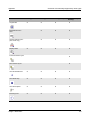
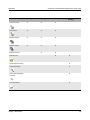
Completely archived
Partially archived
Not yet archived
Patient Comment
Visage 7 Web Client
Comment text about the patient.
33
Study/series window
The Visage 7 Web Client Window
Study/series window
The study/series window contains all studies, series, and presentation states of the
patient currently selected in the patient list.
You use the study/series window to select a study, series, individual images, or a
presentation state for display in one of the image viewers. To facilitate image selection you can display the images of a study as thumbnails in the right screen half of
the study/series window.
Series and
presentation state
tab cards
A presentation state comprises all those images of a study that the reporting physician considered particularly important. Presentation states are compiled at the diagnostic workstation that sends the study to the web server.
A presentation state also preserves the image display settings (such as window values, or zoom/pan settings) that were used at the time when the presentation state
was created. Presentation states are usually available in both compression levels (A
and B) unless matrix reduction has been configured for any of the images they refer
to. In that case no presentation states are available for that particular compression
level and the study may contain a different number of presentation states for level A
and B.
Dual monitor
In dual monitor mode, the study/series window is shown on the left monitor. The
right monitor shows the preview area. It is not possible to hide the preview area in
dual monitor operation.
Information area (study/series window)
Toolbar (study/series
window)
Study list
Image preview
Navigation bar
Series list /
Presentation state list
34
Visage 7 Web Client
The Visage 7 Web Client Window
Study/series window
Information area (study/series window)
This area of the study/series window provides information about the loaded patient.
Patient Name
Patient ID
Date of Birth
Name of the loaded patient.
Identification number of the loaded patient.
Date of birth of the loaded patient.
Toolbar (study/series window)
In the study/series window you will start most of your processing steps with the
icons of the toolbar. But note that a popup menu is also available for selecting images in the image preview area.
Previous Patient
Shows the studies and series of the patient above the patient currently selected in the patient list.
Next Patient
Shows the studies and series of the patient below the patient currently selected in the patient list.
Show all Studies
When Visage 7 Web Client is called from another application via the OEM interface, this
icon shows all studies of the current patient.
Load into viewer 1
The selected study, series, presentation state, or individual images are loaded into viewer 1.
Load into viewer 2
The selected study, series, presentation state, or individual images are loaded into viewer 2.
Load to Compare Mode
Loads the first two series of a selected study, or two selected series, or two images into
compare mode (side by side).
Load to Compare Mode
Loads the first two series of a selected study, or two selected series, or two images into
compare mode (top and bottom).
Load to Basic MIP/MPR Viewer
Loads the selected series into the basic MIP/MPR viewer.
Only CT or MR series that are suitable for 3D reconstruction can be loaded into the basic
MIP/MPR viewer.
Visage 7 Web Client
35
Study/series window
The Visage 7 Web Client Window
Load all series as one
Click this icon before you load an entire study into one of the viewers to merge all images of
this study into one “viewing series”.
Refresh
The study/series window is updated.
Delete object
Pops up a dialog box and allows you to select what you want to delete from the web server:
the entire study, the study reports (if available), or a presentation state, or one or several selected series only.
Archive Protection
Sets or removes archive protection for the selected study.
Change Procedure Step
Procedure steps are tasks in the diagnostic reading workflow. With Visage 7 Web Client you
can follow up on the task interpretation from scheduling this task to completion.
For studies for which no procedure step exists: Creates a new procedure step and allows
you to assign the new procedure step a priority.
For studies for which a procedure step exists: Allows you to delete the procedure step, mark
it as completed (or reset it to scheduled), or change its priority.
Compression Level A
Transfers images with compression level A. In compression level A, the images are usually
only slightly compressed and without loss of quality. Your system administrator defines the
compression rules for your system.
Compression Level B
Transfers images with compression level B, which compresses the images even more.
Note that compressed images do not contain the full volume of data of the original. The diagnostic quality of the images is affected as a result.
Encrypted Data Transfer
The images are transmitted encrypted.
Non-encrypted Data Transfer
The images are transmitted without encryption.
Query Report
Requests a report on the currently selected study from the configured report network node.
If a report on the selected study already exists on the Visage 7 server, the report is downloaded again and the existing report is overwritten.
36
Visage 7 Web Client
The Visage 7 Web Client Window
Study/series window
Use Local Cache
If this icon is activated, the images you download from the web server are stored in your local cache memory.
When you load images into a viewer, Visage 7 Web Client searches the local cache first and
only retrieves data from the web server if no images are found in the local cache.
This option speeds up your workflow if you need to load and review one study several times
during one Visage 7 Web Client session. It is recommended for networks with low data
transfer rates.
Preload Study
Loads all images of a selected study into the local cache for the duration of your session.
When you subsequently load these images into a viewer and move on to this viewer the images are displayed immediately.
This icon is only active if Use Local Cache has also been selected.
Image Preview on/off
Switches display of the image area on or off.
Truncate Thumbnails for Large Series
Toggles thumbnail display for large series: one or all thumbnails per series are shown in the
image preview section.
Show Thin Slice Series
When this option is selected the series list will list both thin slice series (original scan series)
and thick slice series (generated image series which permit faster loading and browsing).
When this option is deselected only thick slice series are shown in the series list.
Select all previews
Selects all images in the preview area.
Deselect all previews
Deselects all images currently selected in the preview area.
DICOM Information
Shows the DICOM information of the image selected in the preview area.
Launching Application
Starts another web application if your system administrator has configured this for you. The
icon is only active if you have selected a study.
DICOM Send
Opens a dialog box. Select the address(es) in your DICOM network to which you want to
send the selected study (or studies) or series.
DICOM Quick Send
Sends the selected study (or studies) or series to one or several DICOM nodes immediately. (Your system administrator has defined these addresses for you.)
Display as 3D volume
Shows the selected data in the Visage 7 Client for advanced 3D evaluation.
Visage 7 Web Client
37
Study/series window
The Visage 7 Web Client Window
Automatic Synchronization with 3D volume
Select this option to ensure that both the Visage 7 Web Client and the Visage 7 Client will
always show images of the same patient.
Marked images filter
You can filter the study/series lists so that only images marked with a star or flag (or both)
are displayed.
These flags are, however, only available in a Siemens diagnostic environment.
Study list
This list shows all studies of the patient selected in the patient list.
Online Status
(for archive option only)
The online status tells you about the availability of the study in the local database.
Completely available
Partially available
Not available
Archive Status
(for archive option only)
The archive status tells you about the availability of the study in the archive.
Completely archived
Partially archived
Not yet archived
Archive Protection
(for archive option only)
Yes - study cannot be archived
No - study can be archived
Study Description
Study Date/Time
Date and time of the study in the format: YYYY-MM-DD and hh:mm:ss (24-hour clock).
Referring Physician
Name of the referring physician
Study Comment
Comment text about the study
Accession Number
Accession number of the study
Study ID
38
Description of the study
Study’s identification number
Visage 7 Web Client
The Visage 7 Web Client Window
Report
Procedure Step
Study/series window
- no report is stored on the Visage 7 server for this study; 1 (2, 3, ...) - one or more reports
are stored on the Visage 7 server for this study. When you display or edit the report the
most recent of these report versions will be shown.
Indicates whether a procedure step exists for this study.
Visage 7 only supports procedure steps of the type Interpretation in this software version.
Status
Performer
Priority
Indicates the status of the procedure step: scheduled, in progress, discontinued, or completed.
Indicates the name of the Visage 7 Web Client user who is currently reviewing the images
of this study, or who completed this procedure step.
Low, medium, or high.
You can use this column to sort the study list, for example.
Non-viewable
Series
Number of series that cannot be displayed
Series list
This tab card lists all series that are stored on the web server for the current study.
Type
With Show Thin Slice Series selected both the original scan series (thin slice series) and
thick slice series are listed in the series list. When this icon is not selected only thick slice
series are displayed.
Thin slice series (original scan series, series with a large number of images)
Thick slice series (generated image series, series with a smaller number of images)
3D Volume
(Visage 7 Client option only)
Indicates if a 3D volume data set is available for this series on the system.
Only series with a 3D volume data set can be loaded into the Visage 7 Client.
Modality
Number of Images
Highest Image
Number
Preloaded
images
Organ
Description
Visage 7 Web Client
Modality used to create the series
Total number of images of this series on the web server.
Highest available image number
For modalities that work with single frame images, comparing the Number of images and
the Highest Image Number helps you determine if all images of this series have been transferred to the web server.
Number of images in the local cache
Examined organ or body part
Description of the series
39
Study/series window
Performing Physician
Series Date/
Time
The Visage 7 Web Client Window
Name of the performing physician
Date and time of creation of the series in the format: YYYY-MM-DD and hh:mm:ss (24-hour
clock).
Series number
Number of this series within the study
Marked images
In these columns you will find information about whether images in this series have been
marked with a star or a flag (only relevant if the imaging systems in your hospital support
marking images).
Exam status
Contains an icon that indicates the current examination status:
(These flags are only available in a Siemens diagnostic environment.)
Prepared
Reported
Signed off
Unknown
If a new exam status has not yet been issued (status New), this column remains empty.
Report Status
Contains an icon that indicates the current report status in the HIS/RIS:
(These flags are only available in a Siemens diagnostic environment.)
Dictated
Written
Validated
Presentation state list
This tab card lists all presentation states that are stored on the web server for the
current study and with the currently selected compression level (A or B).
Label
Description
Content creator
Creation Date/
Time
40
Presentation state label as entered on the diagnostic workstation where the presentation
state was created.
Descriptive text for this presentation state.
Name of the user who created the presentation state object.
Date and time when the presentation state was created in the format YYYY-MM-DD and
hh:mm:ss (24-hour clock).
Visage 7 Web Client
The Visage 7 Web Client Window
No. of ref. images
Study/series window
Number of referenced images in this presentation state object.
Image preview
The image preview of the study/series window shows the images of the selected
study or series as miniature images (thumbnails).
You use the preview area to select images or series. You can select an entire study,
complete series, a presentation state or individual images from one or several series and then load them into a viewer. With large series that contain a large number
of images and slow data transmission lines, selecting and loading only those images that are relevant to your diagnostic problem will save time.
Moreover the image preview contains information about the study, series, and the
images they contain. Refer to the preview window for details about:
Visage 7 Web Client
•
Information about the study
•
Information about a series
•
Thumbnails
•
Image preview popup menu
41
Preview window
The Visage 7 Web Client Window
Preview window
The preview window shows the images of the selected study or series as miniature
images (thumbnails).
Unlike the preview area of the study/series window, this preview window shows the
thumbnails over the full width of the browser window.
You use the preview area to select images or series. You can select an entire study,
complete series, or individual images from one or several series and then load them
into a viewer. With large series that contain a large number of images and slow data
transmission lines, selecting and loading only those images that are relevant to your
diagnostic problem will save time.
Moreover the image preview contains information about the study, series, and the
images they contain.
Information area (preview
window)
Toolbar (preview
window)
Information about the study
Information about a series
Thumbnails
Navigation bar
42
Visage 7 Web Client
The Visage 7 Web Client Window
Preview window
Information area (preview window)
This area of the preview window provides information about the loaded patient.
Patient Name
Patient ID
Date of Birth
Name of the loaded patient.
ID of the loaded patient.
Date of birth of the loaded patient
Toolbar (preview window)
In the preview window you will start most of your processing steps with the icons of
the toolbar. But note that a popup menu is also available for selecting images.
Previous Patient
Shows the studies and series of the patient above the patient currently selected in the patient list.
Next Patient
Shows the studies and series of the patient below the patient currently selected in the patient list.
Load to Viewer 1
The selected study, series, or individual images are loaded into viewer 1.
Load to Viewer 2
The selected study, series, or individual images are loaded into viewer 2.
Load to Compare Mode
Loads the first two series of a selected study, or two selected series, or two images into
compare mode (side by side).
Load to Compare Mode
Loads the first two series of a selected study, or two selected series, or two images into
compare mode (top and bottom).
Load all series as one
Click this icon before you load an entire study into one of the viewers to merge all images of
this study into one “viewing series”.
Compression Level A
Transfers images with compression level A. In compression level A, the images are usually
only slightly compressed and without loss of quality. Your system administrator defines the
compression rules.
Visage 7 Web Client
43
Preview window
The Visage 7 Web Client Window
Compression Level B
Transfers images with compression level B, which compresses the images even more.
Note that compressed images do not contain the full volume of data of the original. The diagnostic quality of the images is affected as a result.
Encrypted Data Transfer
The images are transmitted encrypted.
Non-encrypted Data Transfer
The images are transmitted without encryption.
Query Report
Requests a report on the currently selected study from the configured report network node.
If a report on the selected study already exists on the Visage 7 server, the report is downloaded again and the existing report is overwritten.
Use Local Cache
If this icon is activated, the images you download from the web server are stored in your local cache memory.
When you load images into a viewer, Visage 7 Web Client searches the local cache first and
only retrieves data from the web server if no images are found in the local cache.
This option speeds up your workflow if you need to load and review one study several times
during one Visage 7 Web Client session. It is recommended for networks with low data
transfer rates.
Preload Study
Loads all images of a selected study into the local cache for the duration of your session.
When you subsequently load these images into a viewer and move on to this viewer the images are displayed immediately.
This option is only active if Use Local Cache has also been selected.
Truncate Thumbnails for Large Series
Toggles thumbnail display for large series: one or all thumbnails per series are shown in the
image preview section.
Show Thin Slice Series
When this option is selected the series list will list both thin slice series (original scan series)
and thick slice series (generated image series which permit faster loading and browsing).
When this option is deselected only thick slice series are shown in the series list.
Select all previews
Selects all images in the preview window.
Deselect all previews
Deselects all images currently selected in the preview window.
DICOM Information
Shows the DICOM information of the selected image.
44
Visage 7 Web Client
The Visage 7 Web Client Window
Preview window
Launching Application
Starts another web application if your system administrator has configured this for you. The
icon is only active if you have selected a study.
DICOM Send
Opens a dialog box. Select the address(es) in your DICOM network to which you want to
send the selected series or image(s).
DICOM Quick Send
Sends the selected series or image(s) to one or several DICOM nodes immediately. (Your
system administrator has defined these addresses for you.)
Display as 3D volume
Shows the selected data in the Visage 7 Client for advanced 3D evaluation.
Automatic Synchronization with 3D volume
Select this option to ensure that both the Visage 7 Web Client and the Visage 7 Client will
always show images of the same patient.
Information about the study
The colored header bar of the study shows the following information:
study description date/time referring physician study ID
Tip
Click on the study information bar to select all images of this study or to invert the
current selection of images. Double-clicking on the study information will load the
entire study into viewer 1.
Information about a series
In the image preview thumbnails are grouped by series. Series header bars show
the following information about a series:
series description modality number of images examined organ date/time additional series information
Visage 7 Web Client
45
Preview window
The Visage 7 Web Client Window
Tip
Click on the series information bar to select all images of this series or to invert the
current selection of images. Double-clicking on the series information will load the
entire series into viewer 1.
Additional series
information
•
CT: Series scanned with contrast medium
For CT series the abbreviation WC on the right edge of the series information
bar indicates that these images were scanned with contrast medium. WO indicates that this series was scanned without contrast medium.
If a CT series contains both images that were scanned with and without contrast
medium then Visage 7 Web Client splits up this series. The images are displayed
grouped as two separate series.
•
MR: T1/T2 series
For MR series, Visage 7 Web Client indicates if the series contains T1 or T2weighted images.
If an MR series contains both T1 and T2-weighted images then Visage 7 Web
Client splits it up. The images are displayed grouped according to their T1/T2weighting.
46
Visage 7 Web Client
The Visage 7 Web Client Window
Preview window
Thumbnails
The way the thumbnails themselves are presented also provides information about
image types and acquisition data.
Multiframe images
Series of some modalities can contain single images or multiframe images. You will
recognize multiframe images by the dog-ear shown in the top right corner of the
thumbnail.
XA report or
photofile images
XA series may contain report or photofile images with image evaluation information.
Report/photofile images are displayed next to the corresponding multiframes as
separate series.
Visage 7 Web Client
47
Preview window
The Visage 7 Web Client Window
Biplane scenes
XA scenes that have been recorded in biplane mode contain image pairs. You can
recognize biplane scenes in the image preview by the fact that two multiframe images are close together.
Truncated series
For very large series so-called truncated thumbnail display mode can be enabled in
the image preview (see Truncate Thumbnails for Large Series icon in the toolbar).
One image from the middle of the series followed by three dots is shown in the image preview for such long series.
MPPS (Modality
Performed
Procedure Steps)
Support of MPPS (Modality Performed Procedure Steps) can either be activated or
deactivated by your system administrator.
If MPPS support is deactivated, the display of the series is staggered according to
the SeriesInstanceID, and using possible value pairs (e.g. image type).
If MPPS support is activated, however, the MPPS-ID is used to group series, together with further value pairs. If no MPPS-ID is available, then the display is staggered only according to these value pairs (e.g. image type). The original image
sequence within an MPPS series is retained.
48
Visage 7 Web Client
The Visage 7 Web Client Window
Preview window
Image preview popup menu
A popup menu is available in the image preview section to help you select images
and show image information.
Select
Selects the thumbnail the cursor is currrently pointing to.
Deselect
Deselects the thumbnail the cursor is currrently pointing to.
Select all
Selects all images of a study or series if the cursor points to the study or series title bar, or if
the cursor points to anywhere between thumbnails.
Deselect all
Deselects all images of a study or series (depending where the cursor is currently pointing).
Invert Selection
Image Info
Visage 7 Web Client
Inverts the selection (i.e. selects the currently unselected images) of a study or series (depending where the cursor is currently pointing).
Shows information about the image type and compression level settings for an image.
49
Report window
The Visage 7 Web Client Window
Report window
Visage 7 Web Client can display both images and reports.
Visage 7 Web Client provides a text-only view and a view in which images and report text are displayed side by side, and in which you can also edit a report.
Tip
Your system administrator can define that the report with image view is the preferred viewer. This means that it will automatically pop up when you double-click a
study or series in the study/series or preview window for which a report exists on
the Visage 7 system.
If no report is available locally and a report interface has been configured with automatic report query, Visage 7 Web Client will automatically search the HIS/RIS for
the report every time you load images.
Use these icons on the navigation bar to switch to the report window or report with
image view.
The icons are active if you have selected a study for which a report is available in
the study/series window.
Tip
You must first load images into viewer 1 or viewer 2 before switching over to the
report with image view. Otherwise the image section of this view will remain blank
and only the report text will be shown.
-OrClick the Edit Report icon in the toolbar of one of the viewer windows to create a
new report.
Visage 7 Web Client now shows the report with image window whose report section
is in editing mode.
Tip
If your hospital works with a HIS/RIS and normally uses this system to create and
manage reports the Edit Report icon will most likely not be available in your client
installation. Instead the system will automatically query the report node for the latest report version and display it view-only every time you load images.
Consult your system administrator for details about how your system has been
configured with respect to report handling.
50
Visage 7 Web Client
The Visage 7 Web Client Window
Dual monitor
Report window
Dual monitor operation does not support the text-only view. When you call the report
with image view in dual monitor mode, the left monitor shows the image window, the
right monitor shows the report.
Information area (viewer)
Viewer toolbar
Report text
Image display
Navigation bar
Report text
When you call one of the report windows with the navigation bar icons the report
text is shown view only.
From the report with image window you can move on to the Visage 7 Web Client report editor. In the text only report window you can only view but not edit a report.
Note
Note that when you edit and save a report in the Visage 7 Web Client report editor
this will only change the report stored on Visage 7 but not update the report version stored in the HIS/RIS for this study.
Visage 7 Web Client
51
Report window
The Visage 7 Web Client Window
Caution
Visage 7 can receive and display DICOM Structured Reports. The layout in which
these structured reports are shown in Visage 7 Web Client can be configured by
Customer Service.
However, if Customer Service makes any layout changes at your request, you
must validate these changes to ensure that all relevant report information is actually shown in the HTML report translation of these reports.
Report text display
Header information
The header of the loaded report shows data about the patient and examination (for
example, accession number, study ID, patient name, and patient ID). This data represents the information stored for this study and patient in the HIS/RIS.
Compare this data with the patient information in the viewer section (if you are working in the report with image window) or with the patient’s information in the study/series window to ensure the information in the HTML report is up to date.
Report text
If the report is too long for the report window, use the scroll bar to scroll through the
report text.
Footnotes
When a report was received from the HIS/RIS in the format DICOM Structured Report it may contain footnote information, which is not immediately visible in the
HTML report version shown in the report window.
Move the mouse pointer over these icons which indicate hidden footnote text to
show this information in a tooltip.
Report editor
You activate the report editor with this icon in the toolbar of the image display section.
Once you have switched over from view only to editing mode a toolbar appears
above the report text with basic text editing and text formatting functions.
Note
You can only edit the report text (white background) but not the report header
(gray background).
52
Visage 7 Web Client
The Visage 7 Web Client Window
Report window
Report editor toolbar
Save
Saves your changes to the report back to the web server.
Cancel
Undoes your editing and displays the report as you last saved it or as it was stored on the
web server before you started editing it.
Font family and size
Allows you to change the font family and size for selected report text.
Cut, Copy, Paste
These icons allow you to cut, copy, and paste text in your report.
Icons for editing characters
With the icons Bold, Italic, Underline, Strikethrough, Superscript, and Subscript you
can change the format properties of selected characters.
Icons for paragraph editing
With the icons Align left, Center, Right you can change the alignment of the paragraph in
which the text cursor rests at the moment.
With Numbering you can create numbered lists, with Bullets you can create lists with bullets. Use Increase Indent and Decrease Indent to indent paragraphs or to remove indention.
Image display
The image section in the report view contains all those images from the current
study that you have loaded into a viewer.
The image display in the report window provides you with the same image display
and editing functions as any of the viewer windows.
Viewer toolbar
Use the icons on the toolbar above the image display to change the display of the
loaded image, to evaluate image information, and to print images.
See also Toolbar (viewer)
Position indicator
bar
The position indicator bar below the image display shows you which image of a
loaded series is currently visible.
See also Position indicator bar (viewer)
Visage 7 Web Client
53
Viewers
The Visage 7 Web Client Window
Viewers
The viewer windows integrate all functions required for reviewing images.
In the viewer windows you can scroll through the loaded images, select a screen
layout best suited to your problem, optimize image display of individual or all loaded
images for the duration of the current Visage 7 Web Client session, and evaluate
image information.
Viewers 1 and 2
Visage 7 Web Client offers you two viewer windows. The layout of the windows and
the function of the toolbar icons are identical in both viewers.
Modality-specific
options
Depending on the modality of the loaded images, the toolbar of the viewer may contain a number of extra icons.
Dual monitor
•
Standard mode: all modalities except for XA
•
Angio mode: XA
In dual monitor operation, the viewer is spread across both monitors. It contains an
additional scroll bar on the left monitor for navigating through the loaded images.
This is synchronized with the right scroll bar.
Information area
Toolbar (viewers)
Image area
Navigation bar
Position indicator
bar (viewer)
54
Visage 7 Web Client
The Visage 7 Web Client Window
Viewers
Information area (viewer)
This area of the viewer provides information about the loaded patient and study.
Patient Name
Patient ID
Date of Birth
Study description
Study Date/Time
Name of the loaded patient.
ID of the loaded patient.
Date of birth of the loaded patient
Description of the study
Date and time of the study in the format: YYYY-MM-DD and hh:mm:ss (24-hour clock).
Toolbar (viewer)
With the icons of the viewer toolbar and the popup menu in the image display area
you scroll through the loaded images, change the screen layout, and optimize the
image display.
The viewer toolbar is shown as one, two, or three rows of icons, depending on your
screen resolution and the number of configured icons.
Note
The selection of available icons depends on what images are loaded (XA images
or others), and on how the system administrator has configured the user interface
for you.
Change Toolbar Location
Moves the toolbar from above to left of the image area (i.e. horizontal to vertical) and vice
versa.
Auto-Hide Toolbar/Lock Toolbar
Hides or redisplays the viewer toolbar. If the toolbar is hidden move the cursor over the area
where it would normally be shown to redisplay it temporarily and to access its icons.
Previous Patient
Shows the first study and series of the patient above the patient currently selected in the patient list.
Next Patient
Shows the first study and series of the patient below the patient currently selected in the patient list.
Previous Study
Loads the previous study of the current patient and displays its images.
Visage 7 Web Client
55
Viewers
The Visage 7 Web Client Window
Next Study
Loads the next study of the current patient and displays its images.
Previous Series
Loads the previous series of the current study and displays its images. With multiframe images, the previous scene is loaded.
Next Series
Loads the next series of the current study and displays its images. With multiframe images,
the next scene is loaded.
Previous Presentation State
Shows the previous presentation state of this patient and study.
Next Presentation State
Shows the next presentation state of this patient and study.
The Previous/Next Presentation State icons are dimmed if only one presentation state exists for this study or if no presentation state has been loaded.
Cancel loading
Stops loading images.
Select Images
Offers options for selecting images for printout on a DICOM printer.
Select all Images
Selects all loaded images for DICOM print.
Range Selection
Opens a dialog box for range selection.
Deselect all Images
Undoes the current selection for DICOM print (no images are selected after you click this
icon).
Print
Allows you to print images on a connected DICOM or Windows printer.
Windows Print
Opens the Windows Print dialog box and prompts you to select a printer and print settings.
All images currently displayed on the screen will be printed.
DICOM Print
Opens the DICOM Print dialog box and prompts you to select a printer and print settings.
Only those images that are marked for DICOM print (solid green box in the lower right-hand
corner of the image segment) will be printed.
Copy to Clipboard
Copies the currently displayed images to the clipboard. From there, you can paste the copied images into another Windows program (e.g. a presentation or NetMeeting program).
56
Visage 7 Web Client
The Visage 7 Web Client Window
Viewers
DICOM Send
Opens a dialog box. Select the address(es) in your DICOM network to which you want to
send the selected image or all loaded images.
DICOM Quick Send
Sends the selected image or all loaded images to one or several DICOM nodes immediately. (Your system administrator has defined these addresses for you.)
Export Images
Exports the currently displayed images to a directory on your local PC. You can save the images as DICOM images or in BMP or JPEG format.
Caution
When images were saved in BMP or JPEG format they may no longer be suitable for
diagnosis.
DICOM Information
Shows the DICOM information of the current image.
Hide/Show Image Text
Shows or hides text in the image.
Edit Report
Opens an existing report for editing or creates a new study report on the web server.
Zoom
Allows you to enlarge or reduce the displayed images steplessly using the left mouse button.
While Zoom is active, the mouse pointer looks like this:
Quick Zoom
Permits temporary zooming of a portion of an image. As soon as you release the mouse
button, the image returns to its original size.
While Quick Zoom is active, the mouse pointer looks like this:
Magnifying Glass
Allows you to enlarge a portion of an image by factor 2. As soon as you release the mouse
button, the enlargement is no longer displayed.
While Magnifying Glass is active, the mouse pointer looks like this:
Visage 7 Web Client
57
Viewers
The Visage 7 Web Client Window
Pan
Allows you to move the image in the segment. If the portions of the image disappear off the
screen after enlargement, you can pan them back into view.
While Pan is active, the mouse pointer looks like this:
Windowing
If this icon is pressed, you can use the mouse to change the grayscale display (brightness/
contrast) in the images.
While Windowing is active, the mouse pointer looks like this:
Edge Enhancement
This filtering enhances the contrast in images.
While Edge Enhancement is active, the mouse pointer looks like this:
Predefined Level Presets
If different window or filter values are predefined for the current image type, you can call
them up here and apply them to the loaded images.
Reset Window Level
Resets the window and filter values back to default values (i.e. the values with which the images were loaded).
Invert
Inverts the grayscale display of an image. Bright areas are now shown dark and dark areas
are shown light.
Rotate
Rotates the current image 90° clockwise.
Mirror
Mirrors the current image about its vertical axis.
Fit into Segment
Resizes the current image to fit it optimally in the image segment.
Original size
Resets the loaded image to its original size.
Previous Annotated Image
Scrolls up in the stack of loaded images and shows the next image containing annotation
graphics or annotation text.
Next Annotated Image
Scrolls down in the stack of loaded images and shows the next image containing annotation
graphics or annotation text.
58
Visage 7 Web Client
The Visage 7 Web Client Window
Viewers
Measurement Functions
Opens a selection list with measurement functions.
Distance Measurement
Permits measurement of distances in images.
While this tool is active, the mouse pointer looks like this:
Measured values are indicated in exact millimeters (mm; in CT and MR images), estimated
millimeters (mm[?]), or in pixels (pix) if no distance measurement in millimeters is possible.
Caution
The accuracy of distance measurements is ± 2 pixels. Larger errors can occur if
the image is displayed with reduced matrix size, that is if not every original pixel is
shown on the screen due to zoom-out. For optimum accuracy we recommend
zooming into the structure of interest as much as possible. The accuracy is further
limited by the physical resolution of the acquisition itself. If the monitor used for
display does not permit exact pixel selection, the inaccuracy can be greater still.
Angle Measurement
Permits measurement of angles in images.
While this tool is active, the mouse pointer looks like this:
Caution
The accuracy of angle measurements depends on the length of the shorter of the
two angle legs. The longer the angle legs are, the better the accuracy.
For example:
Length of shorter angle leg (measurement error):
10 pixels (± 12°), 20 pixels (± 6°), 50 pixels (± 2.5°), 100 pixels (± 1.1°)
Larger errors can occur if the image is displayed with reduced matrix size, that is if
not every original pixel is shown on the screen due to zoom-out. For optimum accuracy we recommend zooming into the structure of interest as much as possible.
The accuracy is further limited by the physical resolution of the acquisition itself. If
the monitor used for display does not permit exact pixel selection, the inaccuracy
can be greater still.
Visage 7 Web Client
59
Viewers
The Visage 7 Web Client Window
Calibrate Distance
Permits calibration of distances in images.
While this tool is active, the mouse pointer looks like this:
Density Measurement
Permits measurement of grayscale values (pixel values) in images.
While this tool is active, the mouse pointer looks like this:
ROI Ellipse
Permits evaluation of circular or elliptical regions of interest (ROIs) in grayscale images.
While this tool is active, the mouse pointer looks like this:
ROI Rectangle
Permits evaluation of rectangular regions of interest (ROIs) in grayscale images.
While this tool is active, the mouse pointer looks like this:
Measured values are indicated in exact square millimeters (mm²; in CT and MR images),
estimated square millimeters (mm[?]²), or in pixels (pix) if ROI measurement in millimeters
is possible.
Caution
The relative error of the elliptical or rectangular ROI measurements is ± 2 pixels/
(shorter radius or shorter side).
For example:
Shorter radius or shorter side (measurement error):
10 pixels (± 20%), 20 pixels (± 10%), 50 pixels (± 4%), 100 pixels (± 2%)
Larger errors can occur if the image is displayed with reduced matrix size, that is if
not every original pixel is shown on the screen due to zoom-out. For optimum accuracy we recommend zooming into the structure of interest as much as possible.
The accuracy is further limited by the physical resolution of the acquisition itself. If
the monitor used for display does not permit exact pixel selection, the inaccuracy
can be greater still.
60
Visage 7 Web Client
The Visage 7 Web Client Window
Viewers
Density Profile
Permits evaluation of a density profile along a straight line (an arrow indicates the direction).
While this tool is active, the mouse pointer looks like this:
Show Scoutlines (compare mode only)
Shows the position of selected images on the corresponding reference images.
Note that this icon is only shown in the viewer toolbars in compare mode. It will only become
active if a CT or MR study has been loaded that contains suitable image data.
Show All Scoutlines
Shows all scoutlines in the reference image.
Show Border Scoutlines
Shows only the first and last scoutline in the reference image.
Show Border and Current Scoutlines
Shows the scoutline of the current image and the first and last scoutline in the reference image.
Show Current Scoutline
Shows only the current scoutline in the reference image.
Display Mode
Opens a selection list with different layouts.
Select, for example, the 2x2 view. The image display is divided into 4 segments in this example. Depending on the number of images that are loaded, up to 4 images will be displayed at one time.
Cine Mode Backward
Plays back the loaded images like a movie. The playback direction is backward.
Cine Mode Stop
Stops movie playback.
Cine Mode Forward
Plays back the loaded images like a movie. The playback direction is forward.
Cine Mode Speed
If the slider is far left, movie playback stops. If the slider is far right, the movie is played back
at maximum speed.
Bouncing Cine
If you click this icon, the movie will run without interruption: When playback reaches the last
image, the movie runs backward to the first image, then forward again, etc.
Visage 7 Web Client
61
Viewers
The Visage 7 Web Client Window
Interactive Cine Mode
When Interactive Cine Mode is active, the images of a series (or scene) will play back
when you move the mouse pointer over the image area. This gives the impression of a movie being played back.
Mouse up or right: play forward
Mouse down or left: play backward
Mouse stopped: still image
The direction in which you are supposed to move the mouse can be configured by your system administrator.
Gamma Adjustment
Opens a dialog box for the adjustment of the gamma curve of images. This adjustment applies to all Visage 7 Web Client image viewers.
Show/Hide Presentation State
Toggles image display: from presentation state image to original referenced image and vice
versa. The icon is only active if you have loaded a presentation state.
Display as 3D volume
Shows a loaded series in the Visage 7 Client for advanced 3D evaluation.
The icon is only active when you are reviewing a series for which a 3D volume data set is
available on the server.
Automatic Synchronization with 3D volume
Select this option to ensure that both the Visage 7 Web Client and the Visage 7 Client will
always show images of the same patient.
Mark study as read
Sets the status of the procedure step for this study to completed.
This icon is only active if a procedure step of status scheduled exists for the study whose
images are currently shown in the viewer.
Color Map
Allows you to display the loaded images with another color map that highlights your current
diagnostic problem in a better way.
Angio mode
In angio mode (with XA images loaded), the toolbar contains a number of additional
icons. They provide special display functions for evaluating XA scenes.
Plane A
Switches to plane A for biplane angio scenes.
Plane B
Switches to plane B for biplane angio scenes.
62
Visage 7 Web Client
The Visage 7 Web Client Window
Viewers
Loop All
Successively plays back all loaded scenes of a study.
If you click the Previous Series or Next Series icon during playback, the movie will jump
back to the last scene or on to the next scene.
Previous Frame
Scrolls to the previous frame (individual image) of the multiframe.
Next Frame
Scrolls to the next frame (individual image) of the multiframe.
Display Reports
Displays the report images originating from the XA environment which are assigned to a
scene.
Display Scenes
Switches back from displaying the report images to displaying the multiframe (scene).
Image area
The image area shows the loaded images with the selected size and in the selected
layout. The size of this area depends on the screen resolution and the actual size of
the application window.
Icons
Once you have loaded images or started manipulating images icons may appear in
the upper right-hand corner of the image segments. These icons alert you to information you should consider when interpreting the images.
Lossy compressed image: The quality of the image may have been affected (artifacts). The
quality percentage is indicated next to the icon.
This warning triangle remains visible even if the image texts are hidden.
When loading images into one of its viewers, Visage 7 Web Client checks the DICOM header information in every single image.
If this DICOM header information does not agree with the patient and study data stored in
the Visage 7 database for one or several images, this icon is displayed in the upper righthand corner of the affected images.
If you have manipulated a presentation state image this icon appears in the upper righthand corner. It warns you that the current image no longer corresponds to the image saved
in the presentation state at the diagnostic workstation.
This icon in the upper right-hand corner of the image segment indicates that calibration has
been applied to distance lines in this image.
Visage 7 Web Client
63
Viewers
The Visage 7 Web Client Window
This icon indicates that the displayed images do not originate from an original scan series
(thin slice series) but were generated by a Visage 7 thick slice compilation rule.
Popup menu
For your convenience the image area of the Visage 7 Web Client viewers offers a
popup menu for quick and easy access to frequent image processing functions.
Right-click in the image display area.
Note
Note that many image display functions are available from both the toolbar and
popup menu. Others functions are available only from the toolbar or only from the
popup menu. The following table describes only those functions that have not already been explained in the context of the toolbar.
Apply to All
Auto Apply to All
Undo
When this option is selected, all image editing steps are applied to all images of a loaded
series immediately (and not just to one image alone).
Undoes the last editing step.
Show/Hide
Overlays
Shows overlays if any have been created for the loaded images.
Hide/Show
Shutter
Shows or hides a shutter, if a shutter was created for the loaded image.
Delete
Measurement/
Annotation
Deletes a selected measurement or annotation graphic.
Delete all
Measurements
Deletes all measurement graphics in the currently selected image.
Delete all
Annotations
Delete all
Measurements
and Annotations
Select Image
Remove Image
Selection
Hide/Show ECG
64
Applies the last editing step to all images of a loaded series.
Deletes all annotation graphics in the currently selected image.
Deletes all measurement or annotation graphics in the currently selected image.
Selects the current image (i.e. the image highlighted by a white border) for DICOM print.
DICOM print selection is indicated by a solid green box in the lower right-hand corner of the
image segment.
Removes the current image from the DICOM print selection.
Shows (or hides) the ECG curve in the image (only possible for XA images containing ECG
information).
Visage 7 Web Client
The Visage 7 Web Client Window
SMPTE 1/2
Show/Hide Measurements and
Annotations
Viewers
Calls one of two available test images for performing a display quality check of your monitor.
Shows or hides measurement and annotation graphics stored in an image.
Tip
In this client type you can only create measurements and you can delete measurements or annotation graphics only temporarily and for the duration of the current
session. You cannot save these changes back to the web server. Saving measurements and annotations back to the web server is possible in client type Expert
Reading only.
Tip
The SMPTE images you can display here are not suitable for calibration of DICOM
printouts. Use TestImage_SMPTE_1k instead. You find this test case in the patient
list. If no patient of this name exists in your patient list, ask your system administrator to insert this test case into the Visage 7 system from your installation medium. We recommend that you protect the TestImage_SMPTE_1k test case against
deletion, so that it will not be deleted automatically when disc space is running low.
Position indicator bar (viewer)
You will usually have more images loaded than can be displayed simultaneously in
the selected layout. The position indicator bar at the bottom edge of the screen tells
you which images are visible and which are still in the background.
Light green bar
These images are visible on the screen.
White bar
This image is selected.
Dark green bar
Loaded images are not visible.
Dark gray bar
Image not yet loaded (only appears during loading).
Visage 7 Web Client
65
Compare mode
The Visage 7 Web Client Window
Compare mode
Compare mode shows the two viewers side by side or one above the other. You can
easily compare two series in this way.
Use these icons on the navigation bar to switch to compare mode (vertical), i.e. side
by side, or compare mode (horizontal), i.e. top and bottom.
Image display and
editing
As far as image display and processing is concerned, you can work in both screen
halves in just the same way as if a viewer were displayed full screen.
Tip
The toolbars above (or to the left) of each image view contain the same icons and
access the same functions as in one of the full screen viewer windows, with one
exception: Showing scoutlines in suitable CT or MR images is only possible in
compare mode but not in any of the full screen image viewers or the report with
image view. If configured, scoutlines are shown by default when you load suitable
series into compare mode.
Dual monitor
In dual monitor mode, the two viewers are displayed on the two monitors: viewer 1
on the left and viewer 2 on the right monitor.
Information area
(viewer)
Toolbar (viewer)
Viewer 1
Viewer 2
Navigation bar
66
Visage 7 Web Client
The Visage 7 Web Client Window
Basic MIP/MPR viewer
Basic MIP/MPR viewer
The basic MIP/MPR Viewer can calculate a volume data set from suitable CT and
MR series.
You can move freely through this volume data set, viewing new slice images in any
plane or orientation.
Note
The basic MIP/MPR viewer is a display mode only. It allows you to calculate and
display new slice images. However, it does not provide measurement tools and
you cannot save the recalculated images back to the web server.
If you require advanced 3D evaluation functions contact your Sales Representative concerning the Visage 7 Client option.
Calculation method
3D operation
The Visage 7 Web Client basic MIP/MPR viewer gives you a choice of two 3D calculation methods:
•
Multiplanar reconstruction (MPR)
This method is the default method used by the program.
•
Maximum intensity projection (MIP)
You can switch each of the four views separately to an MIP-based display.
Unlike other Visage 7 Web Client windows, the basic MIP/MPR viewer does not provide a toolbar for calling operating functions.
In the basic MIP/MPR viewer, you work with:
Dual monitor
Visage 7 Web Client
•
Popup menu
•
Keyboard
•
Mouse clicks
If you are working in dual monitor mode, the basic MIP/MPR viewer is only shown
on the left monitor.
67
Basic MIP/MPR viewer
The Visage 7 Web Client Window
Information area
Slice segments
Slice cursor
3D overview segment
Navigation bar
Information area (basic MIP/MPR viewer)
This area of the basic MIP/MPR viewer provides information about the loaded patient and study.
Patient Name
Patient ID
Date of Birth
Study description
Study Date/Time
68
Name of the loaded patient.
ID of the loaded patient.
Date of birth of the loaded patient
Description of the study
Date and time of the study in the format: YYYY-MM-DD and hh:mm:ss (24-hour clock).
Visage 7 Web Client
The Visage 7 Web Client Window
Basic MIP/MPR viewer
3D overview segment
When suitable data is loaded into the basic MIP/MPR viewer, a volume data set is
calculated from the acquired slice images. The volume is shown as an orientation
cube in the overview segment.
Color coding after
loading
Color coding after
moving
Image processing
Immediately after you have loaded a 3D data set, the anatomical standard views are
shown in the slice segments. The orientations of these slices are shown as follows
on the orientation cube:
•
Surface with yellow border - transverse standard view
•
Surface with red border - sagittal standard view
•
Surface with green border - coronal standard view
Using the Slice cursor, you can change the orientation and position of slices in the
slice segments. The slices always remain mutually orthogonal. This calculates and
displays new slice images. The slices then no longer correspond to the anatomical
standard views. The following now applies:
•
Surface with yellow border - upper left segment
•
Surface with red border - upper right segment
•
Surface with green border - lower left segment
To obtain a better view of the orientation and position of the display slices, you can
rotate the orientation cube in each direction and change display parameters, such
as window values. This is done with the mouse.
Information in the
overview segment
Lossy
compression
of images
Transverse
slice
Coronal slice
Sagittal slice
Current operating mode
Visage 7 Web Client
Current calculation method
69
Basic MIP/MPR viewer
The Visage 7 Web Client Window
Slice segments
After you have loaded the data set, the slice segments first show the anatomical
standard views:
Slice cursor
•
Transverse standard view (upper left, yellow border)
•
Sagittal standard view (upper right, red border)
•
Coronal standard view (lower left, green border)
You can ascertain the position and orientation of the two other slices by the color of
the Slice cursor and from the orientation labels.
You can use the slice cursor to move through the volume data set. You can observe
the changes in orientation and position of the slices displayed in the 3D overview
segment.
Image processing
Information in the
slice segments
To obtain a better view of details in the displayed slices, you can change different
display parameters in the slice segments (e.g. window, zoom, pan).
Orientation labels
Orientation and
position of the
slice in the upper right segment
Orientation and
position of the
slice in the lower left segment
Current calculation method
Current operating mode
Current slice
thickness
Example: Upper left segment (after loading images: transverse slice)
Slice cursor
The slice cursor in a slice segment shows you the orientation and position of the
slices that are currently shown in the two other slice segments.
Color coding
70
On the slice cursor:
•
a yellow cursor line corresponds to the slice image in the upper left segment.
•
a red cursor line corresponds to the slice image in the upper right segment.
•
a green cursor line corresponds to the slice image in the lower left segment.
Visage 7 Web Client
The Visage 7 Web Client Window
Slices in the volume
data set
Basic MIP/MPR viewer
You can use the slice cursor of the three slice segments to move through the volume data set and display the recalculated slice images.
If you move the center of the slice cursor, you will move the entire slice cursor in the image.
This moves two view planes simultaneously in the volume data set and shows new slice images in both of the other slice segments.
If you click near to the point of intersection on the cursor line, you will only move a single
cursor line.
That will take you through the volume data set along the two other standard axes and update the view in one of the other slice segments.
If you click a long way from the point of intersection on the cursor line, you can rotate the
slice cursor.
This rotates the cross-hair, updates the views in the two other slice segments, and generates slice images with non-standard views in them.
Tip
You can monitor all your slice cursor movements in the 3D overview segment. This
gives you a clear overview of the slices through the volume data set that are currently being displayed in the slice segments.
Popup menu
Right-click on a slice segment or on the 3D overview segment.
A popup menu appears with all the processing options that are possible here.
Apply to All
Applies a processing function in the current segment to all other segments, too.
(In the overview segment, only possible for windowing)
Windowing
Activates interactive windowing with the mouse.
Zoom
Activates interactive image zooming with the mouse.
Pan
Activates interactive image panning with the mouse.
Rotate
In the 3D overview segment only
Allows you to rotate the orientation cube in any direction with the mouse.
SliceShift
In the slice segments only
Allows you to move the slice currently shown in the slice segment along two standard axes.
Do not accidentally click on the slice cursor line.
Visage 7 Web Client
71
Basic MIP/MPR viewer
SliceThickness
The Visage 7 Web Client Window
In the slice segments only
Allows you to change the slice thickness of the image shown in this slice segment interactively.
Do not accidentally click on the slice cursor line.
View
Fit into Segment
Original size
Full size
Show All slices
Opens a submenu:
Enlarges or reduces the image so that it fits optimally into the image segment.
Shows the image in its original size.
Displays the current segment in full window size. The other three segments are then hidden.
In the 3D overview segment only
Shows or hides all slices in the overview segment.
Slice1 (2, 3)
In the 3D overview segment only
Shows or hides display of individual slices.
Volume box
In the 3D overview segment only
Shows or hides the volume box in the overview segment.
Slice cursor
In the slice segments only
Shows or hides the slice cursor in a slice segment.
MPR
MIP
Reset
Unload
Selects MPR as the volume calculation method (default).
Selects MIP as the volume calculation method.
Resets all processing steps and again shows the images in all segments as they were when
first loaded.
Removes the data set from the basic MIP/MPR viewer. All segments are then empty.
Keyboard
In the basic MIP/MPR viewer you can activate processing modes in the segments
via the keyboard.
1. Click on a segment.
2. Then press the corresponding key.
The display switches or the new operating mode is shown bottom left in the segment.
3. Now perform the processing step with the mouse.
72
w
Activates interactive windowing with the mouse.
z
Activates interactive image zooming with the mouse.
p
Activates interactive image panning with the mouse.
Visage 7 Web Client
The Visage 7 Web Client Window
r
Basic MIP/MPR viewer
In the 3D overview segment only
Allows you to rotate the orientation cube in any direction with the mouse.
s
In the slice segments only
Allows you to move the slice currently shown in the slice segment along two standard axes.
Do not accidentally click on the slice cursor line.
t
In the slice segments only
Allows you to change the slice thickness of the image shown in this slice segment interactively.
Do not accidentally click on the slice cursor line.
f
Enlarges or reduces the image so that it fits optimally into the image segment.
o
Shows the image in its original size.
s
In the 3D overview segment only
Shows or hides all slices in the overview segment.
1 (2, 3)
In the 3D overview segment only
Shows or hides display of individual slices.
v
In the 3D overview segment only
Shows or hides the volume box in the overview segment.
c
In the slice segments only
Shows or hides the slice cursor in a slice segment.
x
Resets all processing steps and again shows the images in all segments as they were when
first loaded.
Mouse clicks
In the basic MIP/MPR viewer you can also switch operating steps and calculation
modes using mouse clicks.
1. Left-click on the display of the operating mode in a segment to scroll forward
through the operating modes.
-OrRight-click to scroll backward through the operating modes.
2. Left-click on the display of the calculation method in the lower right corner of the
segments to switch between MPR and MIP.
Visage 7 Web Client
73
Worklist (Expert Reading)
The Visage 7 Web Client Window
Worklist (Expert Reading)
When you call Visage 7 Web Client with client type Expert Reading the patient window is shown in worklist view.
Tip
Filter this list according to interpretation status SCHEDULED for a quick and easy
overview of all studies that are scheduled for reporting.
Single or dual
monitor
Your user profile stores your monitor configuration. This means, the system will remember whether you worked with a single monitor or dual monitors during your last
Visage 7 Web Client session.
Information area (worklist)
Filter parameters and
search criteria
Navigation bar
System messages
Toolbar (worklist)
Data source
Monitor selection
Display protocols list
Patient list (local) or
Response list (network node)
Study list (worklist)
74
Visage 7 Web Client
The Visage 7 Web Client Window
Worklist (Expert Reading)
Information area (worklist)
This area of the patient window shows the user name you are logged in with.
Hide/show filter criteria
Use this icon for collapsing (or expanding) the filter parameters and search criteria section
of the screen.
Worklist
User name
Active window where you are now.
User currently logged in.
Filter parameters and search criteria
In the worklist view of the patient window you can filter the patient list and search for
specific patients and studies in just the same way as you can in the patient window
of the client types View, Classic, and Expert.
Therefore, refer to the following sections for details about filter and search criteria:
•
Filter parameters on page 28
•
Search criteria on page 29
Toolbar (worklist)
In the worklist, you start all processing steps with the icons on the toolbar.
User-defined filter
You can select a predefined filter here.
Reset to Default Filter
Activates the filter defined as the default filter.
Set Filter Properties
The Personal Settings dialog box opens. You can define your own filters here.
Reset Filter Settings
All the filter parameters you entered are removed. Click Start Data Query to display the unfiltered patient list again.
Reset Input Fields
All the search criteria you entered are removed. Click Start Data Query to display a longer
patient list again.
Visage 7 Web Client
75
Worklist (Expert Reading)
The Visage 7 Web Client Window
Data source
Here you select where to search for data: on the local web server database or on a DICOM
network node.
Start Data Query
Starts a data query with the current filter and search criteria in the selected data source.
As a result the patient list of the web server or a response list from a DICOM node will be
displayed.
Cancel Data Query
A query currently in progress is stopped. All patients found so far are displayed.
Retrieve Study from DICOM Node
If you did not request data in the local database, but on a network node, you will see the response list of the DICOM node in the patient window.
If you find the patient you are looking for in this list, you nevertheless cannot work with this
data immediately. You must first copy the patient to the local database with this icon.
This icon is dimmed while the data source web server is selected, or while no patient is selected in a network response list.
Query Patient
This icon is active if a patient was selected in the local patient list and then a DICOM partner
was selected in the data source drop-down list.
The patient name and the patient ID of this patient are copied into the search criteria boxes
and the search for this patient is started on the DICOM partner.
Forward
For a better overview the patient list does not display all patients found at a time.
After a very generic patient search that results in more patients found, click this icon to page
through the list of all patients found.
Backward
Click this icon to page backward through the list of all patients found.
DICOM Send
Opens a dialog box. Select the address(es) in your DICOM network to which you want to
send the selected patient(s).
DICOM Quick Send
Sends the selected patient(s) to one or several DICOM nodes immediately. (Your system
administrator has defined these addresses for you.)
Change Group Assignment
The Change Group Assignment dialog box opens. Here you can define which user
groups have access to the selected patients.
Change User Assignment
The Change User Assignment dialog box opens. Here you can define which users have
access to the selected patients.
76
Visage 7 Web Client
The Visage 7 Web Client Window
Worklist (Expert Reading)
Launching Application
Starts another web application if your system administrator has configured this for you.
The icon is only active if you have selected a patient.
Change Procedure Step
Procedure steps are tasks in the diagnostic reading workflow. With Visage 7 Web Client you
can follow up on the task interpretation from scheduling this task to completion.
For studies for which no procedure step exists: Creates a new procedure step and allows
you to assign the new procedure step a priority.
For studies for which a procedure step exists: Allows you to delete the procedure step, mark
it as completed (or reset it to scheduled), or change its priority.
Encrypted Data Transfer
The images are transmitted encrypted.
Non-encrypted Data Transfer
The images are transmitted without encryption.
Compression Level A
Transfers images with compression level A. In compression level A, the images are usually
only slightly compressed and without loss of quality. Your system administrator defines the
compression rules.
Compression Level B
Transfers images with compression level B, which compresses the images even more.
Note that compressed images do not contain the full volume of data of the original. The diagnostic quality of the images is affected as a result.
Preferably load thin slices
When this option is selected the system will always load the original scans.
When the option is deselected the system will load a thick slice series instead of the original
thin slice series if such a thick slice series is available on the Visage 7 server.
Display as 3D volume
Shows the selected study in the Visage 7 Client for advanced 3D evaluation.
Automatic Synchronization with 3D volume
Select this option to ensure that both the Visage 7 Web Client and the Visage 7 Client will
always show images of the same patient.
Visage 7 Web Client
77
Worklist (Expert Reading)
The Visage 7 Web Client Window
Monitor selection
Here you select the monitor configuration you are working with, that is whether you
are working with a single or dual monitors.
This selection also filters the display protocols list. When you select 1 Monitor Landscape, for example, only those protocols are listed that have been optimized
for single monitors with landscape display.
Select your monitor configuration and filter for the display protocols list.
All protocols shows all display protocols irrespective of their orientation and suitability for a
particular monitor configuration.
Patient list (local)
The local patient list shows all patients found in the web server database who match
the search criteria, and to whom you have access.
The patient list contains only one entry for each patient even if several studies exist
for this patient.
Tip
You can sort the list by clicking on a column header.
Patient Name
Patient ID
Date of Birth
Sex
Insertion Date
Name of the patient
Patient’s identification number
Date of birth in YYYY-MM-DD format
M = male, F = female, O = other (unknown)
Date and time when the patient data was sent to the Visage 7 server.
Response list (network node)
If you selected a network node as the data source instead of querying the local Visage 7 server, you will see the response list of the DICOM node instead of the local
patient list.
Here a patient name may be listed more than once as each entry represents exactly
one study.
78
Visage 7 Web Client
The Visage 7 Web Client Window
Worklist (Expert Reading)
Tip
You cannot load patient data directly from the response list of a DICOM node into
the display protocol viewer. You must first copy a patient to the local database by
double-clicking the patient entry, or with the Retrieve Study from DICOM Node
icon.
For an explanation of columns in the response list from a network node refer to section Response list (network node) on page 33.
Display protocols list
Here you find a list of all display protocols that are suitable for the selected monitor
configuration and study data.
Display Protocol
Description
Monitors
Orientation
Ranking
Name of the display protocol, which usually includes a description of how many viewports
will be available in the viewer as well as an indication of the display layout used in these
viewports.
More detailed description for a display protocol.
Indicates whether this display protocol supports single or dual monitor configuration.
Indicates whether this display protocol supports landscape or portrait displays.
Suitability ranking of a display protocol for the study data selected in the patient or study list
section of this window.
This column may be hidden.
Study list (worklist)
Lists all studies that are available on the Visage 7 server for the selected patient.
Procedure Step
Status
Performer
Priority
Indicates whether a procedure step exists for this study.
Indicates the status of the procedure step: scheduled, in progress, discontinued, or completed.
Indicated the name of the Visage 7 Web Client user who is currently reviewing the images
of this study, or who completed a procedure step.
Low, medium, or high.
You can use this column to sort the study list, for example.
Study Date/Time
Visage 7 Web Client
Date and time of the study in the format: YYYY-MM-DD and hh:mm:ss (24-hour clock).
79
Worklist (Expert Reading)
Modalities in
Study
Modalities used to examine the patient.
Image Series
Number of series in this study.
Study Description
Description of the study
Referring Physician
Name of the referring physician
Accession Number
Job number of the patient in the HIS/RIS (hospital or radiology information system)
Study ID
Reading Physician
Study Comment
80
The Visage 7 Web Client Window
Study’s identification number
Name of the physician who read this study on the system that sent the data to Visage 7.
Comment text about the study.
Visage 7 Web Client
The Visage 7 Web Client Window
Display Protocol Viewer (Expert Reading)
Display Protocol Viewer (Expert Reading)
In client type Expert Reading the display protocol viewer replaces the viewer and
report windows of the other client types.
The display protocol viewer is particularly well-suited for primary reading.
Caution
When reviewing images of a current and previous study be sure to show image
texts in the display protocol viewer. This will help you distinguish the two studies in
the various viewports. Be sure you have correctly identified the current study when
reporting on the image data.
Toolbar (display
protocol viewer)
Thumbnail browser
Navigation bar
Image area with
viewports
Thumbnail browser
The thumbnails in this section of the screen represent the series you selected from
the worklist. The series thumbnails are grouped by study (if you have loaded more
than one study).
You can load series into the viewports of the image area from here (drag & drop).
Visage 7 Web Client
81
Display Protocol Viewer (Expert Reading)
The Visage 7 Web Client Window
Toolbar (display protocol viewer)
Auto-Hide Toolbar/Lock Toolbar
Hides or redisplays the viewer toolbar. If the toolbar is hidden move the cursor over the area
where it would normally be shown to redisplay it temporarily and to access its icons.
Display Mode
Opens a selection list with different layouts. Here you can switch from stack mode to tile
mode in the currently selected viewport.
Select, for example, the 2x2 view. The viewport is divided into 4 segments in this example.
Depending on the number of images that are loaded, up to 4 images will be displayed in the
selected viewport at one time.
Next Viewer Layout
Loads the next viewer layout defined in the currently active display protocol.
Previous Viewer Layout
Loads the previous viewer layout from the currently active display protocol.
Previous Scene
Loads the previous scene of a series containing several multiframe images (or scenes).
Next Scene
Loads the next scene of a series containing several multiframe images (or scenes)
Hide/Show Image Text
Shows or hides text in the image.
Gamma Adjustment
Opens a dialog box for the adjustment of the gamma curve of images. This adjustment applies to all Visage 7 Web Client image viewers.
Cancel loading
Stops loading images.
Mark study as read
Sets the status of the procedure step for this study to completed.
This icon is only active if a procedure step exists for the study whose images are currently
shown in the viewer.
Edit Report
Opens an existing report for editing or creates a new study report on the web server.
Select Images
Offers options for selecting images for printout on a DICOM printer.
Select all Images
Selects all loaded images for DICOM print.
82
Visage 7 Web Client
The Visage 7 Web Client Window
Display Protocol Viewer (Expert Reading)
Range Selection
Opens a dialog box for range selection.
Deselect all Images
Undoes the current selection for DICOM print (no images are selected after you click this
icon).
Print
Allows you to print images on a connected DICOM or Windows printer.
Windows Print
Opens the Windows Print dialog box and prompts you to select a printer and print settings.
All images currently displayed on the screen will be printed.
DICOM Print
Opens the DICOM Print dialog box and prompts you to select a printer and print settings.
Only those images that are marked for DICOM print (solid green box in the lower right-hand
corner of the image segment) will be printed.
Copy to Clipboard
Copies the currently displayed images to the clipboard. From there, you can paste the copied images into another Windows program (e.g. a presentation or NetMeeting program).
Export Images
Exports the currently displayed images to a directory on your local PC. You can save the images as DICOM images or in BMP or JPEG format.
DICOM Information
Shows the DICOM information of the current image.
Predefined Level Presets
If different window or filter values are predefined for the current image type, you can call
them up here and apply them to the loaded images.
Reset Window Level
Resets the window and filter values back to default values (i.e. the values with which the images were loaded).
Windowing
If this icon is pressed, you can use the mouse to change the grayscale display (brightness/
contrast) in the images.
While Windowing is active, the mouse pointer looks like this:
Edge Enhancement
This filtering enhances the contrast in images.
While Edge Enhancement is active, the mouse pointer looks like this:
Visage 7 Web Client
83
Display Protocol Viewer (Expert Reading)
The Visage 7 Web Client Window
Pan
Allows you to move the image in the segment. If the portions of the image disappear off the
screen after enlargement, you can pan them back into view.
While Pan is active, the mouse pointer looks like this:
Magnifying Glass
Allows you to enlarge a portion of an image by factor 2. As soon as you release the mouse
button, the enlargement is no longer displayed.
While Magnifying Glass is active, the mouse pointer looks like this:
Zoom
Allows you to enlarge or reduce the displayed images steplessly using the left mouse button.
While Zoom is active, the mouse pointer looks like this:
Quick Zoom
Permits temporary zooming of a portion of an image. As soon as you release the mouse
button, the image returns to its original size.
While Quick Zoom is active, the mouse pointer looks like this:
Previous Annotated Image
Scrolls up in the stack of loaded images and shows the next image containing annotation
graphics or annotation text.
Next Annotated Image
Scrolls down in the stack of loaded images and shows the next image containing annotation
graphics or annotation text.
Measurement Functions
Opens a selection list with measurement functions.
Distance Measurement
Permits measurement of distances in images.
While this tool is active, the mouse pointer looks like this:
Measured values are indicated in exact millimeters (mm; in CT and MR images), estimated
millimeters (mm[?]), or in pixels (pix) if no distance measurement in millimeters is possible.
84
Visage 7 Web Client
The Visage 7 Web Client Window
Display Protocol Viewer (Expert Reading)
Caution
The accuracy of distance measurements is ± 2 pixels. Larger errors can occur if
the image is displayed with reduced matrix size, that is if not every original pixel is
shown on the screen due to zoom-out. For optimum accuracy we recommend
zooming into the structure of interest as much as possible. The accuracy is further
limited by the physical resolution of the acquisition itself. If the monitor used for
display does not permit exact pixel selection, the inaccuracy can be greater still.
Angle Measurement
Permits measurement of angles in images.
While this tool is active, the mouse pointer looks like this:
Caution
The accuracy of angle measurements depends on the length of the shorter of the
two angle legs. The longer the angle legs are, the better the accuracy.
For example:
Length of shorter angle leg (measurement error):
10 pixels (± 12°), 20 pixels (± 6°), 50 pixels (± 2.5°), 100 pixels (± 1.1°)
Larger errors can occur if the image is displayed with reduced matrix size, that is if
not every original pixel is shown on the screen due to zoom-out. For optimum accuracy we recommend zooming into the structure of interest as much as possible.
The accuracy is further limited by the physical resolution of the acquisition itself. If
the monitor used for display does not permit exact pixel selection, the inaccuracy
can be greater still.
Calibrate Distance
Permits calibration of distances in images.
While this tool is active, the mouse pointer looks like this:
Density Measurement
Permits measurement of grayscale values (pixel values) in images.
While this tool is active, the mouse pointer looks like this:
ROI Ellipse
Permits evaluation of circular or elliptical regions of interest (ROIs) in grayscale images.
While this tool is active, the mouse pointer looks like this:
Visage 7 Web Client
85
Display Protocol Viewer (Expert Reading)
The Visage 7 Web Client Window
ROI Rectangle
Permits evaluation of rectangular regions of interest (ROIs) in grayscale images.
While this tool is active, the mouse pointer looks like this:
Measured values are indicated in exact square millimeters (mm²; in CT and MR images),
estimated square millimeters (mm[?]²), or in pixels (pix) if ROI measurement in millimeters
is possible.
Caution
The relative error of the elliptical or rectangular ROI measurements is ± 2 pixels/
(shorter radius or shorter side).
For example:
Shorter radius or shorter side (measurement error):
10 pixels (± 20%), 20 pixels (± 10%), 50 pixels (± 4%), 100 pixels (± 2%)
Larger errors can occur if the image is displayed with reduced matrix size, that is if
not every original pixel is shown on the screen due to zoom-out. For optimum accuracy we recommend zooming into the structure of interest as much as possible.
The accuracy is further limited by the physical resolution of the acquisition itself. If
the monitor used for display does not permit exact pixel selection, the inaccuracy
can be greater still.
Density Profile
Permits evaluation of a density profile along a straight line (an arrow indicates the direction).
While this tool is active, the mouse pointer looks like this:
Create Annotation
Opens a selection list with annotation functions.
Arrow Annotation
Allows you to annotate images with arrows.
Text Annotation
Allows you to annotate images with text.
Arrow and Text Annotation
Creates a combined arrow plus text annotation.
Circle Annotation
Allows you to draw a circle around an area of interest.
86
Visage 7 Web Client
The Visage 7 Web Client Window
Display Protocol Viewer (Expert Reading)
Spine Labeling
Allows you to label vertebrae or intervertebral spaces in images.
Clicking this icon opens the Spine Labels dialog box. In this dialog box you can select what
you want to label, whether you want to proceed from top to bottom or from bottom to top,
and if you want to label vertebrae consecutively or only every second or third.
Select Annotation/Measurement
Allows you to select an annotation graphic in order to move or to delete it, or to change its
display properties.
Save Annotations
Saves any annotations you have created in the currently loaded data back to the web server
Original size
Resets the loaded image to its original size.
Fit into Segment
Resizes the current image to fit it optimally in the image segment.
Mirror
Mirrors the current image about its vertical axis.
Rotate
Rotates the current image 90° clockwise.
Invert
Inverts the grayscale display of an image. Bright areas are now shown dark and dark areas
are shown light.
Show Scoutlines
Shows the position of selected images on the corresponding reference images.
Note that this icon will only become active if a CT or MR study has been loaded that contains suitable image data.
Show All Scoutlines
Shows all scoutlines in the reference image.
Show Border Scoutlines
Shows only the first and last scoutline in the reference image.
Show Border and Current Scoutlines
Shows the scoutline of the current image and the first and last scoutline in the reference image.
Show Current Scoutline
Shows only the current scoutline in the reference image.
Visage 7 Web Client
87
Display Protocol Viewer (Expert Reading)
The Visage 7 Web Client Window
Cine Mode Backward
Plays back the loaded images like a movie. The playback direction is backward.
Cine Mode Stop
Stops movie playback.
Cine Mode Forward
Plays back the loaded images like a movie. The playback direction is forward.
Cine Mode Speed
If the slider is far left, movie playback stops. If the slider is far right, the movie is played back
at maximum speed.
Bouncing Cine
If you click this icon, the movie will run without interruption: When playback reaches the last
image, the movie runs backward to the first image, then forward again, etc.
Interactive Cine Mode
When Interactive Cine Mode is active, the images of a series (or scene) will play back
when you move the mouse pointer over the image area. This gives the impression of a movie being played back.
Mouse up or right: play forward
Mouse down or left: play backward
Mouse stopped: still image
The direction in which you are supposed to move the mouse can be configured by your system administrator.
Display as 3D volume
Shows the selected study in the Visage 7 Client for advanced 3D evaluation.
Automatic Synchronization with 3D volume
Select this option to ensure that both the Visage 7 Web Client and the Visage 7 Client will
always show images of the same patient.
Color Map
Allows you to display the loaded images with another color map that highlights your current
diagnostic problem in a better way.
Image area with viewports
For most display protocols the image area of this viewer is subdivided into several
viewports. Viewports are semi-independent viewer segments, which you use to
compare images and series from the same or different studies.
Viewports can be linked for synchronized scrolling. All other image navigation and
manipulation functions apply only to the images in the viewport that is currently active (highlighted by a colored border).
88
Visage 7 Web Client
The Visage 7 Web Client Window
Display Protocol Viewer (Expert Reading)
Double-click a viewport to show it fullscreen. Double-click a second time to return to
the viewport’s original size and location.
Use the +/- or number (1, ...8) keys on your keyboard to display more viewports or
to hide viewports or to switch between predefined layouts.
Icons
Once you have loaded images or started manipulating images icons may appear in
the upper right-hand corner of the image segments. These icons alert you to information you should consider when interpreting the images.
Lossy compressed image: The quality of the image may have been affected (artifacts). The
quality percentage is indicated next to the icon.
This warning triangle remains visible even if the image texts are hidden.
When loading images into one of its viewers, Visage 7 Web Client checks the DICOM header information in every single image.
If this DICOM header information does not agree with the patient and study data stored in
the Visage 7 database for one or several images, this icon is displayed in the upper righthand corner of the affected images.
The display protocol may define the sort order for the images of a series in the display protocol viewer according to certain criteria. If images cannot be sorted according to these crietria the system alerts you to this fact with this icons.
This icon in the upper right-hand corner of the image segment indicates that calibration has
been applied to distance lines in this image.
This icon indicates that the displayed images do not originate from an original scan series
(thin slice series) but were generated by a Visage 7 thick slice compilation rule.
Popup menu
For your convenience the image area of the Visage 7 Web Client viewers offers a
popup menu for quick and easy access to frequent image processing functions.
Right-click in the image display area.
Note
Note that many image display functions are available from both the toolbar and
popup menu. Others functions are available only from the toolbar or only from the
popup menu. The following table describes only those functions that have not already been explained in the context of the toolbar.
Apply to All
Auto Apply to All
Visage 7 Web Client
Applies the last editing step to all images of a loaded series.
When this option is selected, all image editing steps are applied to all images of a loaded
series immediately (and not just to one image alone).
89
Display Protocol Viewer (Expert Reading)
Undo
The Visage 7 Web Client Window
Undoes the last editing step.
Show/Hide
Overlays
Shows overlays if any have been created for the loaded images.
Hide/Show
Shutter
Shows or hides a shutter, if a shutter was created for the loaded image.
Delete
Measurement/
Annotation
Deletes a selected measurement or annotation graphic.
Delete all
Measurements
Deletes all measurement graphics in the currently selected image.
Delete all
Annotations
Delete all
Measurements
and Annotations
Select Image
Remove Image
Selection
SMPTE 1/2
Synchronized
Scrolling
Show/Hide Measurements and
Annotations
Deletes all annotation graphics in the currently selected image.
Deletes all measurement or annotation graphics in the currently selected image.
Selects the current image (i.e. the image highlighted by a white border) for DICOM print.
DICOM print selection is indicated by a solid green box in the lower right-hand corner of the
image segment.
Removes the current image from the DICOM print selection.
Calls one of two available test images for performing a display quality check of your monitor.
Allows you to select a mode for synchronized scrolling.
Shows or hides measurement and annotation graphics stored in an image.
Tip
The SMPTE images you can display here are not suitable for calibration of DICOM
printouts. Use TestImage_SMPTE_1k instead. You find this test case in the patient
list. If no patient of this name exists in your patient list, ask your system administrator to insert this test case into the Visage 7 system from your installation medium. We recommend that you protect the TestImage_SMPTE_1k test case against
deletion, so that it will not be deleted automatically when disc space is running low.
90
Visage 7 Web Client
Appendix
List of supported modality types and abbreviations
Abbreviation
Modality
CR
Computed Radiography
CT
Computed Tomography
DR
Digital Radiography
DX
Digital Radiography
ES
Endoscopy
GM
General Microscopy
IO
Intra-oral Radiography
MG
Mammography
MR
Magnetic Resonance
NM
Nuclear Medicine
OT
Other
PR
Presentation State
PT
Positron emission tomography (PET)
PX
Panoramic X-Ray
RF
Radio Fluoroscopy
RT
Radiotherapy Image
SM
Slide Microscopy
SR
SR Document
US
Ultrasound
XA
X-Ray Angiography
XC
External-camera Photography
Visage 7 Web Client
91
Overview of functionality supported by client types
Appendix
Overview of functionality supported by client types
Navigation bar
Client type View
Patient window
x
Client type Classic
x
Client type Expert
x
x
Worklist
Study/series window
x
x
x
Preview window
x
x
x
Report window
x
x
x
Report with image
x
x
x
Viewer 1
x
x
x
Viewer 2
x
x
x
92
Client type Expert
Reading
Visage 7 Web Client
Appendix
Overview of functionality supported by client types
Client type View
Client type Classic
Client type Expert
Compare mode
(vertical)
x
x
x
Compare mode
(horizontal)
x
x
x
x
Basic MIP/MPR Viewer
x
Display protocol viewer
Status information
Client type Expert
Reading
x
x
x
x
Patient window or worklist
Client type View
Hide/show filter criteria
Client type Classic
Client type Expert
Client type Expert
Reading
x
x
x
Filter parameters (all)
x
x
x
x
Search parameters (all)
x
x
x
x
x
x
x
User-defined filter
Visage 7 Web Client
93
Overview of functionality supported by client types
Client type View
Client type Classic
Appendix
Client type Expert
Client type Expert
Reading
Reset to Default Filter
x
x
x
Set Filter Properties
x
x
x
Reset Filter Settings
x
x
x
Reset Input Fields
x
x
x
x
x
x
Data source
local DB only
Start Data Query
x
x
x
x
Cancel Data Query
x
x
x
x
Retrieve Study from
DICOM Node
x
x
x
Query Patient
x
x
x
DICOM Send
x
x
x
DICOM Quick Send
x
x
x
94
Visage 7 Web Client
Appendix
Overview of functionality supported by client types
Client type View
Client type Classic
Client type Expert
Client type Expert
Reading
Forward
x
x
x
x
Backward
x
x
x
x
Set Delete Protection
x
x
Remove Delete Protection
x
x
Delete Patients
x
x
Change Group Assignment
x
x
x
Change User Assignment
x
x
x
x
Export Patient
Launching Application
Visage 7 Web Client
x
x
x
95
Overview of functionality supported by client types
Appendix
Study/series window or worklist
Client type View
Client type Classic
Client type Expert
Presentation state tab
card
x
x
x
Previous Patient
x
x
x
Next Patient
x
x
x
Show all Studies
x
x
x
Load into viewer 1
x
x
x
Load into viewer 2
x
x
x
Load to Compare Mode
x
x
Load to Compare Mode
x
x
x
Load to Basic MIP/
MPR Viewer
Load all series as one
96
Client type Expert
Reading
x
x
x
Visage 7 Web Client
Appendix
Overview of functionality supported by client types
Client type View
Refresh
x
Delete object
Client type Classic
Client type Expert
x
x
x
x
x
Change Procedure
Step
Archive Protection
(only with archive option)
x
x
Client type Expert
Reading
x
Compression Level A
x
x
x
x
Compression Level B
x
x
x
x
Encrypted Data Transfer
x
x
x
x
Non-encrypted Data
Transfer
x
x
x
x
x
x
x
x
Query Report
Use Local Cache
Visage 7 Web Client
x
97
Overview of functionality supported by client types
Client type View
Client type Classic
Appendix
Client type Expert
Client type Expert
Reading
Preload Study
x
x
x
Image Preview on / off
x
x
x
Truncate Thumbnails
for Large Series
x
x
x
Select all previews
x
x
x
Deselect all previews
x
x
x
DICOM Information
x
x
x
Launching Application
x
x
x
DICOM Send
x
x
x
DICOM Quick Send
x
x
x
x
x
x
Display as 3D volume
98
x
Visage 7 Web Client
Appendix
Overview of functionality supported by client types
Client type View
Client type Classic
Client type Expert
Client type Expert
Reading
Synchronize with 3D
volume
x
x
x
x
Show/Hide Thin Slice
Series
x
x
x
x
x
x
Marked images filter
Viewers
Client type View
Client type Classic
Client type Expert
Change Toolbar Location
x
x
x
Auto-Hide Toolbar/Lock
Toolbar
x
x
x
Previous Patient
x
x
x
Next Patient
x
x
x
Previous Study
x
x
x
Visage 7 Web Client
Client type Expert
Reading
x
99
Overview of functionality supported by client types
Client type View
Client type Classic
Appendix
Client type Expert
Client type Expert
Reading
Next Study
x
x
x
Previous Series
x
x
x
Next Series
x
x
x
Previous Scene
x
x
x
x
Next Scene
x
x
x
x
Previous Presentation
State
x
x
x
Next Presentation State
x
x
x
Previous Annotated Image
x
x
x
x
Next Annotated Image
x
x
x
x
Cancel loading
x
x
x
x
100
Visage 7 Web Client
Appendix
Overview of functionality supported by client types
Client type View
Client type Classic
Client type Expert
Client type Expert
Reading
x
Select Images
x
x
x
x
x
x
x
x
DICOM Send
x
x
x
DICOM Quick Send
x
x
x
x
x
Windows Print
DICOM Print
Copy to Clipboard
x
Export Images
DICOM Information
x
x
x
x
Hide/Show Image Text
x
x
x
x
Zoom
x
x
x
x
x
x
x
Quick Zoom
Visage 7 Web Client
101
Overview of functionality supported by client types
Client type View
Magnifying Glass
Client type Classic
Appendix
Client type Expert
Client type Expert
Reading
x
x
x
Pan
x
x
x
x
Windowing
x
x
x
x
Edge Enhancement
x
x
x
x
Predefined Level Presets
x
x
x
x
Reset Window Level
x
x
x
x
Invert
x
x
x
x
Rotate
x
x
x
x
Mirror
x
x
x
x
Fit into Segment
x
x
x
x
102
Visage 7 Web Client
Appendix
Overview of functionality supported by client types
Client type View
Client type Expert
Client type Expert
Reading
x
x
x
Measurement Functions
x
x
x
Show Scoutlines (compare mode only)
x
x
x
x
x
x
Original size
Display Mode
x
Client type Classic
x
Previous Viewer Layout
x
Next Viewer Layout
x
Cine Mode Backward
x
x
x
x
Cine Mode Stop
x
x
x
x
Cine Mode Speed
x
x
x
x
Bouncing Cine
x
x
x
x
Visage 7 Web Client
103
Overview of functionality supported by client types
Client type View
Interactive Cine Mode
x
Client type Classic
x
Gamma Adjustment
Show/Hide Presentation State
x
x
Client type Expert
Client type Expert
Reading
x
x
x
x
x
x
x
x
x
x
Edit report
Color Map
Appendix
Display as 3D volume
x
x
x
x
Automatic Synchronization with 3D volume
x
x
x
x
Plane A
x
x
x
Plane B
x
x
x
Loop All
x
x
x
104
Visage 7 Web Client
Appendix
Overview of functionality supported by client types
Client type View
Client type Classic
Client type Expert
Previous Frame
x
x
x
Next Frame
x
x
x
Display Reports
x
x
x
Display Scenes
x
x
x
x
x
Hide/Show ECG
Mark as read
x
Client type Expert
Reading
x
Synchronized scrolling
x
Create Annotation
x
Select Annotation/Measurement
x
Save Annotation
x
Visage 7 Web Client
105
Overview of functionality supported by client types
106
Appendix
Visage 7 Web Client
Index
-
C
3D
Access control , 10
Angle Measurement (icon) , 59 , 85
Archive Protection (icon) , 36
Archiving , 9
Arrow and Text Annotation (icon) , 86
Arrow Annotation (icon) , 86
Audit trails , 12
Authentication , 10
Auto logoff , 11 , 24
Auto-Hide Toolbar (icon) , 55 , 82
Automatic Synchronization with 3D volume (icon) , 38 , 45 , 62 , 77 , 88
Calibrate Distance (icon) , 60 , 85
Cancel Data Query (icon) , 30 , 76
Cancel loading (icon) , 56 , 82
Change Group Assignment (icon) , 31 ,
76
Change Procedure Step (icon) , 36 , 77
Change Toolbar Location (icon) , 55
Change User Assignment (icon) , 31 ,
76
Cine Mode Backward (icon) , 61 , 88
Cine Mode Forward (icon) , 61 , 88
Cine Mode Speed (icon) , 61 , 88
Cine Mode Stop (icon) , 61 , 88
Client installation , 8
Color map (icon) , 62 , 88
Compare mode , 66
Compare Mode (horizontal) (icon) , 26
Compare Mode (vertical) (icon) , 26
Compression Level A/B (icon) , 36
Constancy check , 4
Copy to Clipboard (icon) , 56 , 83
Create Annotation (icon) , 86
Customer-specific translation , 20
B
D
Backwards (icon) , 31 , 76
Basic MIP/MPR viewer , 67
overview segment , 69
slice cursor , 70
slice segments , 70
Basic MIP/MPR Viewer (icon) , 26 , 35
Biplane scenes , 48
Bouncing Cine (icon) , 61 , 88
Data protection , 10
Data security , 10
Delete object (icon) , 36
Delete Patients (icon) , 31
Density Measurement (icon) , 60 , 85
Density Profile (icon) , 61 , 86
Deselect all Images (DICOM Print)
(icon) , 56 , 83
Deselect all previews (icon) , 37
DICOM Information (icon) , 37 , 57 , 83
DICOM Print (icon) , 56 , 83
DICOM Quick Send (icon) , 31 , 37 , 57
Automatic Synchronization with 3D
volume , 38 , 45 , 62 , 77 ,
88
Display as 3D volume , 37 , 45 , 62
A
Visage 7 Web Client
107
Index
, 76
DICOM Send (icon) , 31 , 37 , 57 , 76
Display as 3D volume (icon) , 37 , 45 ,
62 , 77 , 88
Display Mode (icon) , 61 , 82
Display Protocol Viewer (icon) , 26
Display protocols list (worklist) , 79
Display Reports (icon) , 63
Display Scenes (icon) , 63
Distance Measurement (icon) , 59 , 84
Dual monitor , 21
E
Edge Enhancement (icon) , 58 , 83
Edit Report (icon) , 57 , 82
Encrypted Data Transfer (icon) , 36 , 77
Encryption , 12
Export Images (icon) , 57 , 83
Export Patient (icon) , 32
F
Favorites , 20
Filter
parameters , 28 , 75
Fit into Segment
(icon) , 58 , 87
Forward (icon) , 31 , 76
I
Image preview , 41 , 47
Image Preview (icon) , 26
Image Preview on/off (icon) , 37
Integrated Windows authentication , 22
Intended use , 3
Interactive Cine Mode (icon) , 62 , 88
Invert (icon) , 58 , 87
L
Launching Application (icon) , 32 , 37 ,
45 , 77
Layout conventions , 15
License management , 6
Load all series as one (icon) , 36
Load into viewer 1 (icon) , 35
Load into viewer 2 (icon) , 35
Load to Compare Mode (icon) , 35
Lock Toolbar (icon) , 55 , 82
Login
Favorites , 20
from another software program , 22
integrated Windows authentication ,
22
multi-session , 21
standard procedure , 21
with shortcut , 20
Login screen , 19
Logoff , 23
Logoff (icon) , 26
Loop All (icon) , 63
G
Gamma Adjustment (icon) , 62 , 82
H
Help (icon) , 26
Hide/show filter criteria (icon) , 28 , 75
Hide/Show Image Text (icon) , 57 , 82
108
M
Magnifying Glass (icon) , 57 , 84
Mark study as read (icon) , 62 , 82
Maximum intensity projection (MIP) , 67
Measurement Functions (icon) , 59 , 84
Mirror (icon) , 58 , 87
Monitor selection (worklist) , 78
MPPS (Modality Performed Procedure
Steps) , 48
Multiframe images , 47
Visage 7 Web Client
Index
Multiplanar reconstruction (MPR) , 67
Multiple sessions , 21
Multi-session operation , 11
N
Navigation bar , 25
Network node (response list) , 33 , 78
Next Annotated Image (icon) , 58 , 84
Next Frame (icon) , 63
Next Patient (icon) , 35 , 55
Next Presentation State (icon) , 56
Next Scene (icon) , 82
Next Series (icon) , 56
Next Study (icon) , 56
Next Viewer Layout (icon) , 82
Non-encrypted Data Transfer (icon) , 36
, 77
O
Original size
(icon) , 58 , 87
P
Pan (icon) , 58 , 84
Password , 21
change password , 23
Patient list (local) , 32
Patient list (local) (worklist) , 78
Patient window , 27
Patient Window (icon) , 25
Photofiles , 47
Plane A/B (icon) , 62
Position indicator bar , 65
Predefined Level Presets (icon) , 58 , 83
Preferably load thin slices (icon) , 77
Preload Study (icon) , 37
Preview window , 42
Previous Annotated Image (icon) , 58 ,
84
Previous Frame (icon) , 63
Visage 7 Web Client 6.0
Previous Patient (icon) , 35 , 55
Previous Presentation State (icon) , 56
Previous Scene (icon) , 82
Previous Series (icon) , 56
Previous Study (icon) , 55
Previous Viewer Layout (icon) , 82
Print (icon) , 56 , 83
Q
Query Patient (icon) , 31 , 76
Query Report (icon) , 36
Quick Zoom (icon) , 57 , 84
R
Range Selection (DICOM Print) (icon) ,
56 , 83
Refresh (icon) , 36
Remove Delete Protection (icon) , 31
Report images , 47
Report window , 50
Report Window (icon) , 26
Report with Image (icon) , 26
Reset Filter Settings (icon) , 30 , 75
Reset Input Fields (icon) , 30 , 75
Reset to Default Filter (icon) , 30 , 75
Reset Window Level (icon) , 58 , 83
Response list (network node) , 33
Response list (network node) (worklist) ,
78
Retrieve Study from DICOM Node
(icon) , 31 , 76
ROI Ellipse (icon) , 60 , 85
ROI Rectangle (icon) , 60 , 86
Rotate
(icon) , 58 , 87
S
Save Annotations (icon) , 87
Search criteria , 29
Second opinion , 5
109
Index
Select all Images (DICOM Print) (icon) ,
56 , 82
Select all previews (icon) , 37
Select Annotation/Measurement (icon) ,
87
Select Images (icon) , 56 , 82
Series information , 45
Series list , 39
Set Delete Protection (icon) , 31
Set Filter Properties (icon) , 30 , 75
Shortcut , 20
Show , 61 , 87
Show All Scoutlines (icon) , 61 , 87
Show all Studies (icon) , 35
Show Border and Current Scoutlines
(icon) , 61 , 87
Show Border Scoutlines (icon) , 61 , 87
Show Current Scoutline (icon) , 61 , 87
Show Thin Slice Series (icon) , 37 , 44
Show/Hide Presentation State (icon) ,
62
Spine Labeling (icon) , 87
Standard languages , 19
Standard login , 21
Start Data Query (icon) , 30 , 76
Status information (icon) , 26
Study information , 45
Study list , 38
Study/series window , 34
Study/Series Window (icon) , 26
System architecture , 4
System requirements , 7
U
Use Local Cache (icon) , 37
User name , 21
User profiles , 11
V
Viewer 1 , 54
Viewer 1 (icon) , 26
Viewer 2 , 54
Viewer 2 (icon) , 26
Viewport , 88
W
Warning icon
calibration , 63 , 89
DICOM header information , 63 , 89
lossy compressed image , 63 , 89
presentation state image manipulation , 63
sort order of images , 89
thick slices , 64 , 89
Windowing
(icon) , 58 , 83
Windows Print (icon) , 56 , 83
Worklist (Expert Reading) , 74
T
Teleradiology , 4
Text Annotation (icon) , 86
Thumbnail browser , 81
Thumbnails , 47
Toolbar
patient window , 30 , 75
preview window , 43
study/series window , 35
viewers , 55
Truncate Thumbnails for Large Series
(icon) , 37
110
Z
Zoom (icon) , 57 , 84
Visage 7 Web Client
REF: VI-LEG-MANWEB-EN
Copyright © Visage Imaging GmbH
European Headquarters
US Headquarters
Pro Medicus Headquarters
Visage Imaging GmbH
Lepsiusstraße 70
12163 Berlin, Germany
phone: +49 (0) 30-700968-0
Visage Imaging Inc.
300 Brickstone Square, Suite 201
Andover, MA 01810, USA
phone :+1-888-338-4724
+1-978-319-4641
Pro Medicus Ltd.
450 Swan Street, Richmond
3121 Victoria, Australia
phone: +61 3 9429 8800
For contact information and a list of our world-wide office locations visit www.visageimaging.com.
Visage Imaging is a wholly owned subsidiary of Pro Medicus Ltd. -www.promedicus.com.