1
I-PILOT SETUP
FISHFINDER OPERATIONS
I-PILOT SETUP
FISHFINDER OPERATIONS
Set the i-Pilot Pre-Arrival Alarm
Set the i-Pilot Off Course Alarm
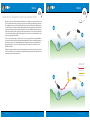
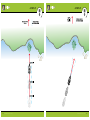
You can set the alarm to provide an alert when the boat is within the set distance to the
destination point in a waypoint, route, or iTrack. For example, if i-Pilot Link is navigating an
iTrack, and the Pre-Arrival Alarm is set to 100 feet, the alert will trigger when the boat is
within 100 feet from the iTrack End Point.
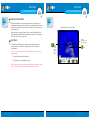
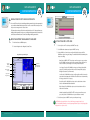
You can set how far the boat can move off course during i-Pilot Link navigation before an alarm is
triggered. If the boat moves off course, an alert will display on the screen.
Caution! When the alert sounds, be prepared that the i-Pilot Link will soon transition to the
type of navigation set in the Arrival Mode menu option. In which case, you may need to take
manual control of the boat.
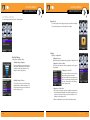
1. Main Menu: Press the MENU key twice.
2.Select the Accessories tab > i-Pilot > i-Pilot Pre-Arrival Alarm.
3. Press the RIGHT or LEFT Cursor keys to adjust the setting.
1. Main Menu: Press the MENU key twice.
2.Select the Accessories tab > i-Pilot > i-Pilot Off Course Alarm.
3. Press the RIGHT or LEFT Cursor keys to adjust the setting.
(Off to 300 ft, Off to 100 m; Default = Off )
NOTE: When i-Pilot Navigation is turned on, the Arrival Alarm in the Alarms tab is replaced by
the Pre-Arrival Alarm, and the Off Course Alarm is replaced by the i-Pilot Off Course Alarm.
See Enable i-Pilot Link Navigation for details.
(Off to 300 ft, Off to 100 m; Default = Off )
NOTE: When i-Pilot Navigation is turned on, the Arrival Alarm in the Alarms tab is replaced by
the Pre-Arrival Alarm, and the Off Course Alarm is replaced by the i-Pilot Off Course Alarm.
See Enable i-Pilot Link Navigation for details.
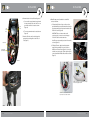
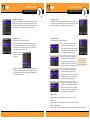
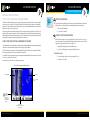
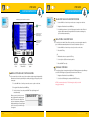
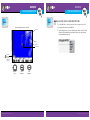
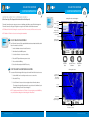
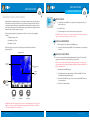
i-Pilot Off Course Alarm Displayed
The i-Pilot Off Course
alert displays on the
screen.
40
minnkotamotors.com
minnkotamotors.com
41