1
15:Reports
General
Having selected Reports on the menu bar you may choose an
Input/Analysis report, a Steel Design, or an RC Design report. Tables
of structure data, loads, or results may be limited to the specific nodes,
members, and load cases required. This ability to select exactly what you
want is particularly useful in reporting for large structures. Reports are
available at any stage of a job – tables of structure data may be produced
prior to analysis. Several sample reports are shown in Chapter 20 –
“Examples”.
Input/Analysis Report Options
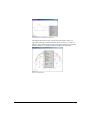
The report options dialog box is displayed when an Input/Analysis report
is requested and this allows you to specify the tables required in the
report. The number format may be specified separately for translations,
rotations, and other quantities.
INPUT/ANALYSIS REPORT OPTIONS
Microstran V9
15:Reports • 267