1
Quick Heal AntiVirus 2011 Server Edition
Copyright and Trademarks
Copyright ©1993-2010 Quick Heal®
All Rights Reserved.
All rights are reserved by Quick Heal Technologies (P) Ltd.
No part of this software may be reproduced, duplicated or modified in any form or incorporated into any information retrieval
system, electronic or any other or transmitted in any form without prior permission of Quick Heal Technologies (P) Ltd, 603 Mayfair
Towers II, Wakdewadi, Shivajinagar, Pune-411005, India.
Marketing, distribution or use by anyone barring the people authorized by Quick Heal Technologies (P) Ltd. is liable to legal
prosecution.
Trademarks
Quick Heal and DNAScan are registered trademarks of Quick Heal Technologies (P) Ltd.
Microsoft, MSN, Windows and Windows Logo are trademarks of Microsoft Corporation. Vade Retro is registered trademark of Goto
Software, France. All brand names and product names used in this manual may be trademarks, registered trademarks or trade
names of their respective companies.
Quick Heal Technologies (P) Ltd.
2
User Guide
Quick Heal AntiVirus 2011 Server Edition
End User License Agreement
Quick Heal AntiVirus License Agreement
IMPORTANT
PLEASE READ THIS USER LICENSE AGREEMENT CAREFULLY BEFORE USING THIS SOFTWARE.
BY USING THIS SOFTWARE OR BY CLICKING THE "I AGREE" BUTTON OR LOADING THE QUICK HEAL'S SOFTWARE, IN ANY WAY,
YOU ACKNOWLEDGE AND ADMIT THAT YOU HAVE READ, UNDERSTOOD AND AGREED TO ALL THE TERMS AND CONDITIONS OF
THIS USER LICENSE AGREEMENT. IF YOU DO NOT AGREE TO THE TERMS AND CONDITIONS BELOW, DO NOT USE THIS
SOFTWARE IN ANY WAY AND PROMPTLY RETURN IT OR DELETE ALL THE COPIES OF THIS SOFTWARE IN YOUR POSSESSION.
This License is a legally enforceable contract between you as an individual (assuming you are above 18 years), or the Company or
any legal entity that will be using the software (hereinafter referred to as 'you' or 'your' for the sake of brevity) referred to as the
licensee, and Quick Heal Technologies Private Ltd (hereinafter referred as "Quick Heal" for the sake of brevity). In consideration of
payment of the License Fee, which is a part of the price, evidenced by the Receipt, Quick Heal grants the Licensee, a non-exclusive
and non-transferable right. Quick Heal reserves all rights not expressly granted, and retains title and ownership of the Software,
including all subsequent copies in any media. This Software and the accompanying written materials are the property of Quick Heal
and are copyrighted. Copying of the Software or the written material is expressly forbidden.
DO'S & DON’TS
You can:
•
use one copy of the software on a single computer. In case of multi-user, use the software only on the said number of
systems as mentioned on the packaging.
•
make one copy of the software solely for backup purpose.
•
install the software on a network, provided you have a licensed copy of the software for each computer that can access
the software over that network.
You cannot:
•
sublicense, rent or lease any portion of the software.
•
debug, decompile, disassemble, modify, translate, and reverse engineer the software.
•
try making an attempt to reveal/discover the source code of the software.
•
use for unlicensed and illegal purpose.
MANDATORY ACTIVATION
Quick Heal warns you that in the process of installation of the software, the other security products/softwares installed on your
computer may uninstall or disable if the same are not compatible with Quick Heal's software. The license rights granted under this
Agreement are limited for the first twenty (20) days after you first install the Product unless you supply registration information
required to activate your licensed copy as described in Activation Wizard of the Product. You can activate the Product through the
Internet or telephone; toll charges may apply. You may also need to reactivate the Product if you happen to re-install the product
due to some reasons. There are technological measures in this Product that is designed to prevent unlicensed or illegal use of the
Product. You agree that we may use those measures. You agree that Quick Heal's software may use the measures that can control
and prevent piracy of softwares.
As the only warranty under this Agreement, and in the absence of accident, abuse or misapplication, Quick Heal warrants, to the
original Licensee only, that the disk(s) on which the software is recorded is free from defects in the materials and workmanship
under normal use and service for a period of thirty (30) days from the date of payment as evidenced by a copy of the Receipt.
Quick Heal' s only obligation under this Agreement is, at Quick Heal's option, to either (a) return payment as evidenced by a copy of
the Receipt or (b) replace the disk that does not meet Quick Heal's limited warranty and which is returned to Quick Heal with the
copy of the Receipt.
Quick Heal Technologies (P) Ltd.
3
User Guide
Quick Heal AntiVirus 2011 Server Edition
End User License Agreement
THIRD PARTY WEBSITE LINKS
At some point the software product includes links to third party sites; you may link to such third party websites as the user of this
software. The third party sites are not under the control of Quick Heal and Quick Heal is not responsible for the contents of any
third party website, any links contained in the third party websites. Quick Heal is providing these links to third party websites to you
only as a convenience and is not responsible for any kind of loss/ damage arising out of it.
SUPPORT
Quick Heal offers support features during usage of this software i.e., Live Chat with technical support team and/ or the technical
support team may, at your discretion, take remote computer access. The availing of this support will be solely at your discretion and
you are solely responsible to take back up of the existing data/software/programs in your computer before availing such a support.
Quick Heal will not be held responsible for any loss of data, any kind of direct/ indirect/ consequential loss or damage to data/
property arising during this entire process. If at any point of time the Technical Support team is of the opinion that it is beyond their
scope, it will be the sole discretion of Quick Heal to suspend, cease, terminate or refuse such support as Quick Heal does not claim
any warranty and/or guarantee of any kind in providing the support feature.
EMAIL/ELECTRONIC COMMUNICATION
Once you register the software by activating the software product, Quick Heal may communicate with you on the contact
information submitted during the registration process through email or other electronic communication device like telephone or a
cell phone. The communication can be for the purpose of product renewal or product verification for your convenience.
QUICK HEAL STATUS UPDATE
Upon every update of licensed copy, Quick Heal Update module will send current product status information to Quick Heal Internet
Center. The information that will be sent to the Internet Center includes the Quick Heal protection health status like, which
monitoring service is in what state in the system. The information collected does not contain any files or personal data. The
information will be used to provide quick and better technical support for legitimate customers.
COLLECTION OF INFORMATION
Quick Heal's software may collect the following information which may / may not contain any personally identifiable information
either with or without your discretion/permission, solely for statistical purpose or enhancing and evaluating the ability, effectiveness
and performance of Quick Heal's product in identifying and/or detecting the malicious behavioral pattern, inherently fraudulent
websites and other Internet security threats/ risks. This information will not be correlated with any personally identifiable
information and shall include, but not limited to:
•
Any type of Executable files which the Quick Heal's software may identify having a potentially malware behavioral pattern.
•
Any type of information relating to the status of the software that whether there occurred any error while installing the
software or the installation was successful.
•
Any type of URLs of websites visited that the Quick Heal's software deems inherently and potentially fraudulent.
•
Any type of information that Quick Heal's software deems potentially fraudulent, posing security risks/ threats.
•
Any type of information for identifying the Media Access Control (MAC) address of the Computer on which the Quick
Heal's Software has been installed.
•
Any type of information for identifying the Internet Protocol (IP) Address and information required for effective license
administration and enhancing product functionality and usability.
•
You admit that the information/data as collected above can be used for analyzing, preventing and detecting the potential
internet security risks, publishing any type of data/ reports/ presentations on the trends collected, sharing the data to
create awareness with any organizations, vendors.
Quick Heal Technologies (P) Ltd.
4
User Guide
Quick Heal AntiVirus 2011 Server Edition
End User License Agreement
DISCLAIMERS
This software package is provided as such without warranty of any kind, expressed or implied, including but not limited to the
implied warranties of merchantability and fitness of the package. In no event will Quick Heal or its suppliers will be liable to you or
anyone else for any damages arising directly/indirectly or consequential, including loss of data, lost profits or any other damages of
data/ property arising out of the use or inability to use this software package ever.
Quick Heal reserves the right to co-operate with any legal process and may provide documents, information related to your use of
the Quick Heal's Software.
The disclaimers and limitations set forth above will apply regardless of whether you accept the software.
ALL MATTERS SUBJECTED TO PUNE (INDIA) JURISDICTION.
Quick Heal Technologies (P) Ltd.
5
User Guide
Quick Heal AntiVirus 2011 Server Edition
About the Document
About the Document
This user guide covers all the information needed to install and use Quick Heal AntiVirus on Windows server-based operating
systems. You can use it as a handbook of Quick Heal AntiVirus Server Edition. We have ensured that all the details provided in this
guide are completely updated with the latest developments in the shipping.
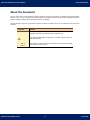
We have followed a certain set of conventions to prepare this guide. The following are a list of conventions that are used in this
document.
Convention
Meaning
Bold Font
Anything highlighted in bold indicates that it is a Menu Title, Window Title,
Checkbox, Drop-down Box, Dialog Box, Buttons, Hyperlinks, etc.
This symbol indicates additional information or important information about the
topic being discussed.
1.
<Step 1>
2.
<Step 2>
Quick Heal Technologies (P) Ltd.
The numbered list and the instruction mentioned in each numbered list indicate
actions that you need to perform.
6
User Guide
Quick Heal AntiVirus 2011 Server Edition
About Quick Heal AntiVirus Server Edition
About Quick Heal AntiVirus Server Edition
Quick Heal AntiVirus Server Edition is specially designed and optimized for providing complete protection to Microsoft Windows
Server operating systems. It offers complete protection to Windows Servers from all kinds of malicious threats without
compromising the Server performance. Its optimized scanning technology provides high performance utilizing minimum server
resources making it ideal for large corporate servers that experience heavy loads, and for system administrators who expect an
intuitive and a power packed performer for the servers they maintain.
AntiVirus and AntiSpyware
The new and improved scan engine provides freedom from malicious threats like viruses, spywares, worms, trojans and backdoors.
It continuously monitors the system, even when working in the background, against malicious threats trying to gain entry from the
instant messenger, Internet downloads, data storage devices and vulnerability exploits. Additionally, Quick Heal's renowned
DNAScan® Technology detects and eliminates new and unknown malicious threats in the system, even if their signatures are not
present in the anti-virus database.
AntiMalware
AntiMalware is a standalone tool that detects and eliminates active malwares residing in system memory.
Anti-Rootkit
Anti-Rootkit is a standalone tool that scans running processes, registries and file systems for any suspicious rootkit activity that is
kept hidden in the system.
Email Protection and AntiSpam
Email Protection has been optimized to provide utmost and best protection for systems. It ensures that only trusted or genuine
email clients are communicating on SMTP protocol. This prevents a worm to use your server as an infection spreading medium. The
AntiSpam feature with its powerful spam filter engine identifies and filters junk and unwanted emails automatically. The AntiSpam
plug-in feature minimizes the effort for the users of MS Outlook or Eudora mail client. This plug-in is user-friendly and will help the
user to add email address to the Black List or White List just by a single click.
USB Drive Protection
USB Drive Protection prevents execution of autorun from infected pen drive, and also vaccinates the pen drive against autorun
malware infections.
Silent Firewall
The Silent Firewall is a new feature from Quick Heal that works silently in the background and acts as a barrier between the server
and hackers. It provides complete protection against known and unknown, internal and external, network-based threats.
Browsing Protection
Browsing Protection has been enhanced to provide additional protection for your system from threats that try to sneak into your
system through malicious websites.
IDS / IPS
Intrusion Detection System (IDS) and Intrusion Prevention System (IPS) are the new features from Quick Heal. IDS monitors the
network traffic for preconfigured and predetermined attack patterns and once a match is found IPS takes the appropriate action to
keep suspicious network traffic away from your system, giving you a worry-free experience when browsing the Internet.
Data Theft Protection
The most valuable asset of your system is the data it stores and protecting the data in the system is absolutely essential. The Data
Theft Protection feature blocks unauthorized access to USB-based drives, preventing to-and-fro transfer of data between your
system and the USB-based drives.
Quick Heal Technologies (P) Ltd.
7
User Guide
Quick Heal AntiVirus 2011 Server Edition
Table of Contents
Table of Contents
INSTALLING QUICK HEAL ANTIVIRUS ............................................................................... 10
GETTING STARTED ............................................................................................................................ 10
SYSTEM REQUIREMENTS...................................................................................................................... 11
HOW TO INSTALL QUICK HEAL ANTIVIRUS ............................................................................................... 13
UN-INSTALLING QUICK HEAL ANTIVIRUS ................................................................................................. 14
REGISTRATION, RE-ACTIVATION AND RENEWAL .................................................................. 15
REGISTRATION ................................................................................................................................. 15
REGISTERING ONLINE WITH INTERNET CONNECTION ON THE SAME PC ............................................................................................ 15
REGISTERING OFFLINE WITH INTERNET CONNECTION ON SOME OTHER PC ....................................................................................... 15
RE-ACTIVATION ................................................................................................................................ 17
RENEWAL ........................................................................................................................................ 17
RENEWING ONLINE WITH INTERNET CONNECTION ON THE SAME PC ................................................................................................ 17
RENEWING OFFLINE USING INTERNET CONNECTION ON SOME OTHER PC .......................................................................................... 17
USING QUICK HEAL ANTIVIRUS ...................................................................................... 19
ABOUT QUICK HEAL DASHBOARD .......................................................................................................... 19
RIGHT SHELL MENU OPTIONS............................................................................................................... 21
QUICK HEAL PROTECTION CENTER .................................................................................. 22
FILES & FOLDERS ............................................................................................................................................................... 23
EMAILS ............................................................................................................................................................................ 30
INTERNET & NETWORK ........................................................................................................................................................ 35
EXTERNAL DRIVES & DEVICES ............................................................................................................................................... 36
QUICK ACCESS FEATURES ............................................................................................. 38
SCAN ............................................................................................................................................. 38
PERFORMING A FULL SYSTEM SCAN ........................................................................................................................................ 38
PERFORMING A CUSTOM SCAN ............................................................................................................................................... 38
PERFORMING MEMORY SCAN ................................................................................................................................................. 39
PERFORMING BOOT TIME SCAN ............................................................................................................................................. 39
NEWS............................................................................................................................................. 39
QUICK HEAL MENUS .................................................................................................... 40
SETTINGS........................................................................................................................................ 40
AUTOMATIC UPDATE ........................................................................................................................................................... 40
INTERNET SETTINGS ........................................................................................................................................................... 41
REGISTRY RESTORE ............................................................................................................................................................ 42
SELF PROTECTION .............................................................................................................................................................. 42
PASSWORD PROTECTION ...................................................................................................................................................... 42
REPORT SETTINGS.............................................................................................................................................................. 43
Quick Heal Technologies (P) Ltd.
8
User Guide
Quick Heal AntiVirus 2011 Server Edition
Table of Contents
REPORT VIRUS STATISTICS................................................................................................................................................... 43
RESTORE DEFAULT SETTINGS ................................................................................................................................................ 43
TOOLS ............................................................................................................................................ 44
HIJACK RESTORE ............................................................................................................................................................... 44
TRACK CLEANER................................................................................................................................................................. 46
ANTI-ROOTKIT .................................................................................................................................................................. 46
CREATE EMERGENCY CD ...................................................................................................................................................... 50
LAUNCH ANTIMALWARE ....................................................................................................................................................... 52
VIEW QUARANTINE FILES ..................................................................................................................................................... 53
USB DRIVE PROTECTION ..................................................................................................................................................... 54
SYSTEM EXPLORER ............................................................................................................................................................. 54
WINDOWS SPY .................................................................................................................................................................. 55
EXCLUDE FILE EXTENSIONS .................................................................................................................................................. 55
REPORTS......................................................................................................................................... 56
HELP.............................................................................................................................................. 57
HELP ............................................................................................................................................................................... 57
SUPPORT.......................................................................................................................................................................... 57
ABOUT............................................................................................................................................................................. 59
UPDATING QUICK HEAL ANTIVIRUS ................................................................................. 60
UPDATING QUICK HEAL ANTIVIRUS FROM INTERNET .................................................................................. 60
UPDATING QUICK HEAL ANTIVIRUS WITH DEFINITION FILES ......................................................................... 61
UPDATE GUIDELINES FOR NETWORK ENVIRONMENT ................................................................................... 61
CLEANING VIRUSES ..................................................................................................... 62
CLEANING VIRUSES ENCOUNTERED DURING SCANS...................................................................................... 62
CLEANING VIRUS ENCOUNTERED IN MEMORY ............................................................................................. 63
CLEANING BACKDOOR, TROJAN, WORM AND MALWARES ENCOUNTERED IN MEMORY ............................................. 63
TECHNICAL SUPPORT ................................................................................................... 64
CONTACT US .................................................................................................................................... 65
Quick Heal Technologies (P) Ltd.
9
User Guide
Quick Heal AntiVirus 2011 Server Edition
Installing Quick Heal AntiVirus
Chapter
1
Installing Quick Heal AntiVirus
Quick Heal AntiVirus has a simple installation procedure. During installation, read each installation screen, follow the instructions,
and then click Next to continue.
Quick Heal AntiVirus should be installed on a virus-free machine. If the computer is infected by a virus, use the Emergency CD to
remove the viruses before installing Quick Heal AntiVirus. If the computer is not infected by viruses, continue with the installation.
Quick Heal AntiVirus setup will scan the computer’s memory for viruses as a part of its installation process.
Getting Started
Remember the following guidelines before installing Quick Heal AntiVirus on the system:
•
A system with multiple anti-virus software installed, can be hazardous for the system. If any other anti-virus software is
installed on the system, it needs to be un-installed before proceeding with Quick Heal AntiVirus installation.
•
Close all open programs before proceeding with Quick Heal AntiVirus installation.
•
Quick Heal AntiVirus must be installed with administrative rights.
Quick Heal Technologies (P) Ltd.
10
User Guide
Quick Heal AntiVirus 2011 Server Edition
Installing Quick Heal AntiVirus
System Requirements
To use Quick Heal AntiVirus, the system should meet the following minimum requirements:
•
750 MB of free Hard Disk Space
•
DVD-ROM or CD-ROM drive
•
Internet connection to receive updates
•
Internet Explorer 6 or the latest browser
Operating Systems
Minimum Requirements
Windows 2000
•
300 MHz Pentium (or compatible) processor
•
256 MB RAM
•
Service Pack 3
Windows 2003
Server
•
•
500 MHz Pentium (or compatible) processor
•
256 MB RAM
•
Service Pack 2
Windows 2008
Server
•
1 GHz Pentium (or compatible) processor
•
512 MB RAM
Windows Server
2008 R2
•
1 GHz Pentium (or compatible) processor
•
512 MB
The requirement is applicable to both 32-bit and 64-bit operating systems unless specifically mentioned.
•
This requirement is not applicable for Windows 2000 Professional desktop-based operating system.
•
The requirement is applicable to all flavors of the operating system.
•
The requirements provided are minimum system requirements. Quick Heal recommends system with higher
configuration than the minimum requirements to obtain best results.
•
To check the latest system requirements, visit www.quickheal.com.
Clients that support email scan
The POP3 email clients that support the email scanning feature are as follows:
•
Microsoft Outlook Express 5.5 and above
•
Microsoft Outlook 2000 and above
•
Netscape Messenger 4 and above
•
Eudora 5 and above
•
IncrediMail
•
Windows Mail
Quick Heal Technologies (P) Ltd.
11
User Guide
Quick Heal AntiVirus 2011 Server Edition
Installing Quick Heal AntiVirus
Clients that do not support email scan
The POP3 email clients and network protocols that do not support the email scanning feature are as follows:
•
IMAP
•
AOL
•
POP3s with Secure Sockets Layer (SSL)
•
Web based email such as Hotmail and Yahoo! Mail
•
Lotus Notes
SSL connections not supported
Email Protection does not support encrypted email connections that use Secure Sockets Layer (SSL). If SSL connections are being
used then the emails are not protected by Email Protection.
Quick Heal Emergency CD creation
•
Emergency CD creation feature is only supported on Windows Server 2003 (32-bit) operating system.
•
Command Line Scanner cannot be executed on Windows 2003 Server and above operating systems.
Quick Heal Anti-Rootkit Requirements
•
This feature is not supported on 64-bit operating systems.
•
It requires minimum 256 MB RAM installed on system.
Quick Heal Self-Protection
•
This feature is not supported on Microsoft Windows 2000.
•
For Windows 2003 this feature is supported only if Service Pack 1 is installed.
Quick Heal Technologies (P) Ltd.
12
User Guide
Quick Heal AntiVirus 2011 Server Edition
Installing Quick Heal AntiVirus
How to install Quick Heal AntiVirus
To begin installation, insert the Quick Heal AntiVirus CD in the CD or DVD drive. The autorun feature of the CD is enabled and it will
automatically open a screen and provide a list of options. Sometimes the CD or DVD Drive does not automatically start a CD when it
is inserted. In such case, to start the installation, please perform the following steps:
1.
Double click the My Computer or Computer icon on the Desktop.
2.
Right click CD-ROM drive and select Explore option.
3.
Double click Autorun.exe to start the installation.
Please perform the following steps for a successful installation of Quick Heal AntiVirus:
1.
Click Install Quick Heal AntiVirus to initiate the installation process.
2.
The installation wizard will perform a pre-install virus scan of the system. This pre-install scan will scan the system
memory for viruses. During the pre-install scan, if a virus is found active in memory, then:
a.
The installer automatically sets the boot time scanner to scan and disinfect the system on next boot.
b.
After disinfection of the system, the system will start and you need to re-initiate the installation. For more
details refer to Boot Time Scan in User Guide.
During the pre-install virus scan if viruses are not found in the in the system memory, then the installation will proceed
further.
3.
The End User License Agreement screen appears. Read the license agreement carefully. At the end of the license
agreement there are two checkboxes: Submit suspicious files and Submit statistics. By default these two options
are checked. If you do not wish to submit suspicious files or statistics or both, then uncheck these options. If you do not
agree with the terms mentioned in the license agreement, click Cancel to discontinue the installation. If you agree with
the terms mentioned, then check I Agree and click Next to continue the installation.
4.
The Install Location screen appears. The default location where Quick Heal AntiVirus will be installed is displayed. The
disk space required during installation is mentioned on the screen. If the default location has insufficient space, or to
install Quick Heal AntiVirus on another location, click Browse to change the installation location otherwise click Next to
continue the installation.
5.
The installation progress screen appears. This screen displays the status of installation in the progress bar.
6.
Upon completion, a screen appears that indicates Quick Heal AntiVirus was successfully installed on the system. Click
Register Now to initiate the activation process or click Register Later to perform activation at some other time.
Quick Heal Technologies (P) Ltd.
13
User Guide
Quick Heal AntiVirus 2011 Server Edition
Installing Quick Heal AntiVirus
Un-installing Quick Heal AntiVirus
If due to any reasons you wish to uninstall Quick Heal AntiVirus, please perform the following steps:
1.
Click Start -> Programs -> Quick Heal AntiVirus -> Uninstall Quick Heal AntiVirus to initiate the un-installation
process.
2.
The screen appears with the prompt Do you want to Remove Quick Heal AntiVirus completely from your
computer? Click No to abort the un-installation. Click Yes to continue with the un-installation.
3.
If the Password Protection is enabled for Quick Heal AntiVirus, then a screen appears which requires the password to
proceed further. Enter the password and click OK to continue.
4.
Quick Heal AntiVirus maintains a repository of Report Files, Quarantine Files, Backup Files, Black list email address and
White list email address. You have the option to retain or delete this repository during un-installation. By default the
Remove Report Files, Remove Quarantine/Backup Files and Remove list of black-list & white-list email
senders options are checked. Click Next to continue un-installation without saving the repository. If the repository is to
be retained, uncheck the required options, or all the options, and click Next to continue with the un-installation.
5.
The un-installation progress screen appears. This screen displays the status of un-installation in the progress bar.
6.
Upon completion, a screen appears that indicates Quick Heal AntiVirus was successfully un-installed from the system. You
can provide feedback and reasons for un-installing Quick Heal AntiVirus by clicking Write to us the reason of uninstalling Quick Heal AntiVirus. Your feedback will help us to improve the product. Please note the product key for
future reference. You can also click Copy to clipboard. Upon clicking Copy to clipboard, the Product Key will be copied
to the windows clipboard. You can open a document and directly paste this information into the document. Restart is
recommended after un-installation. To restart click Restart Now, or click Restart Later to continue working on the
system and restart after some time.
Quick Heal Technologies (P) Ltd.
14
User Guide
Quick Heal AntiVirus 2011 Server Edition
Registration, Re-activation and Renewal
Chapter
2
Registration, Re-activation and Renewal
Registration
Quick Heal AntiVirus needs to be registered upon installation to activate the copy. It is strongly recommended that you register the
copy immediately after installation; otherwise without activation it cannot be further updated. If the product is not regularly
updated it will not protect your system against the latest threats. Registered users will also get technical support through email.
You can register Quick Heal AntiVirus by any of the following methods:
•
Online with Internet connection on the same PC
•
Offline with Internet connection on some other PC
Registering online with Internet connection on the same PC
1.
Click Start -> Programs -> Quick Heal AntiVirus -> Activate Quick Heal AntiVirus.
2.
The Registration Wizard opens. Enter the 20-digit Product Key and click Next to continue.
3.
The Registration Information appears. Enter details like Purchased From and Register for. Click Next to continue.
4.
Provide personal details like Name, Email Address, Contact Number, Country, State and City. You can select the
Country, State and City in the drop-down. In case your State/Province and City are not available in the list you can type
the same in the respective boxes. Click Next to continue.
5.
The entered details will be displayed. If any modifications are needed, click Back and modify the concerned fields or click
Next to continue.
6.
The activation progress screen appears displaying the progress of the activation.
7.
The activation will be successfully completed. The expiry date is displayed. Click Finish to close the Registration Wizard.
Registering offline with Internet connection on some other PC
If you do not have an Internet connection on the system, then Quick Heal AntiVirus can be registered by filling the registration form
on Quick Heal website by visiting the offline activation page www.quickheal.com/actinfo.htm with any system having Internet
connection. For example: Cyber cafe.
Offline registration involves the following steps:
•
Getting the details of Quick Heal AntiVirus installation.
•
Visiting and filling offline registration form on Quick Heal website using some other PC having Internet connection.
•
Receiving <license>.key file.
•
Activating Quick Heal AntiVirus installation using the <license>.key file.
Quick Heal Technologies (P) Ltd.
15
User Guide
Quick Heal AntiVirus 2011 Server Edition
Registration, Re-activation and Renewal
Getting the details of Quick Heal AntiVirus installation
Before visiting the offline activation page, as mentioned earlier, you should have the following details ready:
•
Product Key: It will be pasted on the User Guide and/or inside the box. If the product is purchased online, then the
product key can be obtained from the e-mail confirming the order.
•
Installation Number: It can be obtained from the Activation Wizard by performing the following steps:
•
1.
Click Start -> Programs -> Quick Heal AntiVirus -> Activate Quick Heal AntiVirus.
2.
The Internet connection required screen appears. Click Register Offline.
3.
The offline activation screen appears. You can note down the offline activation URL and Installation Number or
click Copy to clipboard. Upon clicking Copy to clipboard, the offline activation URL and the 12-digit
Installation Number will be copied to the windows clipboard. You can open a document and directly paste this
information into the document.
A valid email address: A <license>.key file will be generated upon successful completion of offline activation. This file will
be sent to the email address provided by you. You should ensure the correctness of the email address provided.
Visiting and filling offline registration web form using some other PC having Internet connection
You must visit the offline activation page www.quickheal.com/actinfo.htm and perform the following steps:
1.
Click the hyperlink Click here to proceed to Step 1.
2.
Enter the Product Key and Installation Number and click Submit.
3.
Enter the details requested on the screen. The fields with a * are mandatory fields. Click Submit upon completion.
Receiving <license>.key file
You can download the <license>.key from the Acknowledgement screen upon successful completion of offline activation. The
downloaded <license>.key file can be transferred to the PC, on which Quick Heal AntiVirus is installed, using a removable media.
The <license>.key file is also sent as an attachment to the email address provided. You can download the file from the email to a
removable media and transfer it to the PC on which Quick Heal AntiVirus is installed.
Activating the Quick Heal AntiVirus installation using newly obtained <license>.key file
Once the <license>.key file is transferred to the PC having Quick Heal AntiVirus, please perform the following steps:
1.
Click Start -> Programs -> Quick Heal AntiVirus -> Activate Quick Heal AntiVirus.
2.
The Internet connection required screen appears. Click Register Offline.
3.
The offline activation screen appears. Click Browse to locate the path where the <license>.key is stored and click Next
to continue.
4.
The activation will be successfully completed. Click Finish to close the Registration Wizard.
Quick Heal Technologies (P) Ltd.
16
User Guide
Quick Heal AntiVirus 2011 Server Edition
Registration, Re-activation and Renewal
Re-activation
During the product validity period, you might need to format the system, or you might need to discontinue using Quick Heal
AntiVirus on the existing system, to continue using it on another system. In such cases you are advised to re-activate Quick Heal
AntiVirus upon re-installation.
The re-activation process is similar to the activation process, with just one exception: You do not have to enter the complete
personal details again. Upon submitting the Product Key (and Installation Number in case of offline re-activation), the details will be
displayed. You can just verify the details and complete the process.
Renewal
Once Quick Heal AntiVirus is activated, it displays the expiry date. This date indicates the period of validity of Quick Heal AntiVirus.
Till this date, your system will be constantly protected from all the latest malware. Upon expiry, you need to renew Quick Heal
AntiVirus by purchasing a renewal code. You can renew Quick Heal AntiVirus from Quick Heal website, or from the nearest
distributor or reseller.
You can renew Quick Heal AntiVirus by any of the following methods:
•
Online with Internet connection on the same PC
•
Offline with Internet connection on some other PC
Renewing online with Internet connection on the same PC
If your system has Internet connection then Quick Heal AntiVirus can be renewed by performing the following steps:
1.
Click Start -> Programs -> Quick Heal AntiVirus -> Quick Heal AntiVirus.
2.
If Quick Heal AntiVirus has expired then click Renew Now on the main window. If Quick Heal AntiVirus has not expired,
then click Help -> About and click Renew Now.
3.
The Renewal form opens. The Product Key box is filled with the Product Key detail. Enter the 20-digit Renewal Code in
the Renewal Key box and click Next to continue.
4.
The license information such as Current Expiry Date and New Expiry Date will be displayed for your confirmation.
5.
Click Next to continue.
6.
Quick Heal AntiVirus will be renewed. Click Finish to complete the renewal process.
If you have purchased an additional renewal code, then the renewal can be performed only after 10 days of the current
renewal.
Renewing offline using Internet connection on some other PC
If you do not have Internet connection on the system, then Quick Heal AntiVirus can be renewed by filling the renewal form on
Quick Heal website by visiting the offline renewal page www.quickheal.co.in/offline-renewal.asp with any system having Internet
connection. For example: Cyber cafe.
Offline renewal involves the following steps:
•
Getting the details of Quick Heal AntiVirus installation.
•
Visiting and filling offline renewal web form using some other PC having Internet connection.
•
Receiving <license>.key file.
•
Renewing Quick Heal AntiVirus using the newly obtained <license>.key file.
Quick Heal Technologies (P) Ltd.
17
User Guide
Quick Heal AntiVirus 2011 Server Edition
Registration, Re-activation and Renewal
Getting the details of Quick Heal AntiVirus installation
Before visiting the offline renewal page, as mentioned earlier, you should have the following details ready:
•
•
Product Key and Installation Number: These can be obtained from the Renewal form by performing the following steps:
1.
Click Start -> Programs -> Quick Heal AntiVirus -> Quick Heal AntiVirus.
2.
If Quick Heal AntiVirus has expired then click Renew Now on the main window. If Quick Heal AntiVirus has
not expired, then click Help -> About and click Renew Now.
3.
The Internet connection required screen appears. Click Renew Offline.
4.
The offline renewal details screen appears. You can note down the offline renewal URL, Product Key and
Installation Number or click Copy to clipboard. Upon clicking Copy to clipboard, the offline renewal URL, the
12-digit Installation Number and the 20-digit Product Key will be copied to the windows clipboard. You can
open a document and directly paste this information into the document.
A valid email address: A <license>.key file will be generated upon successful completion of offline renewal. This file will
be sent to the email address provided. You should ensure the correctness of the email address provided.
Visiting and filling offline renewal web form using some other PC having Internet connection
You can visit the offline renewal page www.quickheal.co.in/offline-renewal.asp and perform the following steps:
1.
Click the hyperlink Click here to proceed to Step 1.
2.
Enter the Product Key, Installation Number, Purchased Renewal Code and Purchased From details and click
Submit.
3.
Upon verification of the provided data, the next screen will display the user name and the registered email address. If
your email address has changed, then you have the option to update the email address in this form. Click Submit.
Receiving <license>.key file
You can download the <license>.key from the Acknowledgement screen upon successful completion of offline renewal. The
downloaded <license>.key file can be transferred to the PC, on which Quick Heal AntiVirus is installed, using a removable media.
The <license>.key file is also sent as an attachment to the email address. You can download the file from the email to a removable
media and transfer it to the PC on which Quick Heal AntiVirus is installed.
Renewing Quick Heal AntiVirus using the newly obtained <license>.key file
Once the <license>.key file is transferred to the PC having Quick Heal AntiVirus, please perform the following steps:
1.
Click Start -> Programs -> Quick Heal AntiVirus -> Quick Heal AntiVirus.
2.
If Quick Heal AntiVirus has expired then click Renew Now on the Quick Heal dashboard. If Quick Heal AntiVirus has not
expired, then click Help -> About and click Renew Now.
3.
The Internet connection required screen appears. Click Renew Offline.
4.
The offline renewal details screen appears. Click Browse to locate the path where the <license>.key is stored and click
Next to continue.
5.
The copy of Quick Heal AntiVirus will be renewed and the renewed validity of Quick Heal AntiVirus will be displayed. Click
Finish to close the Registration Wizard.
Quick Heal Technologies (P) Ltd.
18
User Guide
Quick Heal AntiVirus 2011 Server Edition
Using Quick Heal AntiVirus
Chapter
3
Using Quick Heal AntiVirus
Quick Heal AntiVirus can be accessed from the desktop in any of the following ways:
•
By clicking Start -> Programs -> Quick Heal AntiVirus -> Quick Heal AntiVirus from the desktop.
•
By double-clicking the Virus Protection icon on the system tray.
•
By right-clicking the Virus Protection icon on the system tray and clicking Quick Heal AntiVirus.
•
By clicking Start -> Run, typing Scanner and pressing the Enter key.
Quick Heal AntiVirus, with its all new Graphical User Interface (GUI), is designed with the focus to simplify the task of securing your
PC.
The Main Window or the Dashboard will serve as the interface to all the features of Quick Heal AntiVirus. You can also access the
Dashboard and certain features of Quick Heal AntiVirus from the Windows system tray. Quick Heal protects the entire system even
with the default settings. You can start Quick Heal AntiVirus to check the status of Quick Heal protection, to manually scan, to view
reports and update the product.
About Quick Heal Dashboard
The dashboard is split into three sections. They are:
•
Quick Heal Protection Center
•
Quick Access Features
•
Quick Heal Menus
Quick Heal Protection Center provides indication of the security status of Quick Heal AntiVirus with the help of colored icons. The
colored icons and their specific meaning are as follows:
Green
This indicates that Quick Heal AntiVirus is configured with optimal settings and
your system is protected.
Red
This indicates that Quick Heal AntiVirus is not configured with optimal settings
and your immediate attention is needed. The action corresponding to the
message needs to be executed immediately to keep your system protected.
Orange
This indicates that a feature of Quick Heal AntiVirus needs your attention, if not
immediately, but at the earliest.
Quick Heal Technologies (P) Ltd.
19
User Guide
Quick Heal AntiVirus 2011 Server Edition
Using Quick Heal AntiVirus
There are four categories of protection offered by Quick Heal AntiVirus. These four categories are the areas or medium through
which a malware can gain access and infect your system. Each category has many options of protection. The categories and their
description are provided in the following table:
Files & Folders
Allows you to configure settings to protect your files and folders against
malwares. Also allows you to customize scan options and actions.
Emails
Allows you to configure settings that protect your system against malicious
threats that try to sneak into your system through emails.
Internet &
Network
Allows you to configure settings that protect your system against malicious
threats that try to sneak into your system when you are browsing the Internet,
or when you are perform to-and-fro transfer of files in the network.
External Drives &
Devices
Allows you to configure settings that protect your system against malicious
threats from external drives like CDs, DVDs and USB-based drives.
Quick Access Features deals with the frequently used features. Quick Access Features are as follows:
News
Provides you the latest bytes of information from Quick Heal Labs.
Scan
Launches the scanner that scans the entire system, user-defined locations,
system memory, and schedules boot time scan.
Quick Heal Menus deals with configuring the general settings of Quick Heal, tools for preventing virus infection and diagnosing the
system, reports of the activities of the features and access help and license details. The following menus are available:
Settings
Allows you to customize important settings of Quick Heal AntiVirus.
Tools
Provides access to important tools that can help you keep the system and its
software protected.
Reports
Provides detailed logs of important activity performed by Quick Heal AntiVirus.
Help
Provides vital information related to software and licensing information. Also
provides support related details.
The features of the following buttons and settings are common irrespective of where they are placed:
Cancel
Exit from the feature being accessed.
Default
Configures default settings.
Save Changes / OK
Saves changes made to settings. If changes are made and if you try to exit
from the screen, then a prompt will appear saying Do you want to continue
without saving? Click Yes if you do not want to save the changes, else click
No if you want to save the changes.
ON/OFF
Click the button to keep the setting to ON or OFF. ON means the feature is
enabled and OFF means the feature is disabled.
Help
Displays Help for the feature or the dialog box opened.
Quick Heal Technologies (P) Ltd.
20
User Guide
Quick Heal AntiVirus 2011 Server Edition
Using Quick Heal AntiVirus
Right Shell Menu Options
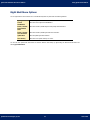
You can right-click the Virus Protection icon on the Windows System Tray and access the following features:
Open Quick Heal
Click this to Quick Heal AntiVirus.
Launch
AntiMalware
Click this to launch Quick Heal AntiMalware.
Enable / Disable
Entertainment
Mode
Click this to enable / disable all Quick Heal prompts and notifications.
Enable / Disable
Virus Protection
Click this to enable / disable Quick Heal Virus Protection.
Update Now
Click this update Quick Heal AntiVirus.
Scan Memory
Click this to scan system memory for viruses.
You can also scan specific files and folders for malicious behavior and activity by right-clicking the desired file and folder and
selecting Quick Heal Scan.
Quick Heal Technologies (P) Ltd.
21
User Guide
Quick Heal AntiVirus 2011 Server Edition
Quick Heal Protection Center
Chapter
4
Quick Heal Protection Center
Quick Heal Protection Center is your instant interface to vital protection settings that can affect files, folders, emails, etc. It also
allows users to configure protection against viruses that try to gain entry through Internet, external drives and emails. Quick Heal
Protection Center is split into two sections.
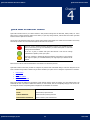
The top strip of the Protection Center acts as a security status indicator which displays color coded icons that indicate s the security
status at any moment. The icons and the description of their status are as follows:
If the icon is red, it indicates that Quick Heal AntiVirus requires your immediate attention.
The icon turns red if your copy is not activated, if your license has expired or if some vital
settings have been disabled.
If the icon is green, it indicates that Quick Heal AntiVirus is safe and the settings
maintained are optimal to protect your system.
If the icon is Orange, it indicates that Quick Heal AntiVirus is providing you with a warning
that might not require your immediate attention, but might require your attention at the
earliest.
Each colored icon has an action associated with it which needs to be executed by the user.
Quick Heal Protection Center also provides four categories of protection and customizable settings. These four categories are the
areas or medium through which a malware can gain access and infect your system. The four categories of protection are as follows:
•
Files & Folders
•
Emails
•
Internet & Network
•
External Drives & Devices
Each of these categories displays two vital features of that particular category, below the category icon. These features have to be
enabled all the time. If you want to disable these features, for some reasons, then the corresponding category icons will turn red.
The categories and their corresponding features displayed on the Dashboard are as follows:
Files & Folders
Virus Protection, DNA Scan
Emails
Email Protection, Spam Protection
Internet & Network
Firewall Protection, Browsing Protection
External Drives and Devices
Autorun Protection, Scan External Drives
Quick Heal Technologies (P) Ltd.
22
User Guide
Quick Heal AntiVirus 2011 Server Edition
Quick Heal Protection Center
Files & Folders
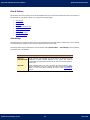
Files & Folders option in the Protection Center of the Dashboard allows you to customize the settings that concern the protection of
files and folders on your system. It allows you to configure the following settings:
•
Scan Settings
•
Virus Protection
•
DNAScan
•
Block Suspicious Packed Files
•
Automatic Rogueware Scan
•
Scan Schedule
•
Exclude Files & Folders
•
Quarantine & Backup
Scan Settings
Scan Settings lets you customize the way a scan is to be performed and the action that needs to be taken when a virus is detected.
The default settings are optimal and can provide the required protection a system needs.
Scan Settings feature in Quick Heal AntiVirus can be accessed by clicking Files & Folders -> Scan Settings from the Dashboard.
The following options are available:
Select Scan Mode
Automatic
(Recommended)
Select Automatic (Recommended) scan mode which is the default scan mode
configured to provide complete protection for the system. This setting is
recommended for achieving best results from the scan and is the ideal option for
novice users.
Advanced
Select Advanced mode if you want to customize the scanning behavior. This is
ideal for experienced users only. Selecting this option activates the Configure
button. To know more about configuring the scanner, refer Configuring the
scanner.
Quick Heal Technologies (P) Ltd.
23
User Guide
Quick Heal AntiVirus 2011 Server Edition
Quick Heal Protection Center
Select action to be performed when virus is found
Repair
During a scan if a virus is found, then it will repair the file or automatically
quarantine it, if it cannot be repaired. When the scan is over, a summary window
appears providing details about all the actions taken and other scan details. If the
infectious file is a Backdoor, Worm, Trojan, or Malware then Quick Heal AntiVirus
automatically deletes the file.
Delete
Deletes a virus-infected file without notifying you. When the scan is over, a
summary window appears providing details about all the actions taken and other
scan details. Files deleted in such a manner cannot be recovered.
Skip
In this mode the scanner scans for viruses, skips them, when the scan is over a
summary window (report) appears providing all the scan details.
Backup before
taking action
Scanner will keep a copy of infected file before disinfecting it. (Files that are stored
in backup can be restored from Quarantine menu.)
After making the selection click Save Changes to apply the settings.
Configuring Advanced Scan Mode
If you select Advanced scan mode, it activates the Configure button. Clicking the Configure button will provide you with the
following options:
Scan executable
files
Select Scan executable files if you want the scanner to scan only executable
files.
Scan all files
(Takes longer
time)
Select Scan all files if you want the scanner to scan all files and types. If this
option is selected, then the scanning process slows down considerably.
Scan archive files
If Scan archive files feature is checked then the scanner will also scan archived files like zip files, archive files, etc. If Scan
archive files feature is un-checked then the scanner will skip archive files during the scan. It will also de-activate the Configure
button. By default, this feature is checked. If this feature is checked, then the Configure button is active and allows you to
configure the way scanner should treat malicious archive files. Clicking the Configure button gives you the following option:
Select action to be performed when virus is found
Delete
Deletes an archive containing virus-infected file without notifying you.
Quarantine
During scan if a virus is found in an archive file, then the archive will be moved to
Quarantine.
Skip
In this mode the scanner scans for viruses under archive, skips the virus and
archive file without taking any action.
Archive Scan
level
Set the level to scan inside an archive. By default it is set to level 2. Increasing the
default Archive Scan Level may affect the scanning speed.
Quick Heal Technologies (P) Ltd.
24
User Guide
Quick Heal AntiVirus 2011 Server Edition
Quick Heal Protection Center
Select the type of archive that should be scanned
The list of archive file types that can be scanned during the scanning process is available in this section. A few important archive file
types are checked by default. You can customize the same.
Select All
Click Select All to check all the archive file types displayed in the list.
Deselect All
Click Deselect All to un-check all the archive file types displayed in the list.
Scan packed files
If Scan packed files feature is checked then the scanner will also scan packers. Packers are files that pack together many files, or
compress a single file to reduce file size. These files do not need a third party application to get unpacked. They have an inbuilt
functionality of packing and unpacking. Packers can also be used as tools to spread malware by packing a malicious file along with a
set of files. When such packers are unpacked it can cause harm to your PC. If Scan packed files feature is un-checked then the
scanner will skip packers during the scan.
List files while scanning
If List files while scanning is checked then the entire list of files scanned, along with their scanned status (i.e. Clean or
Infected), will be displayed in the Actions tab of the particular scan and also in the Scanner Reports.
Scan mailboxes
If Scan mailboxes feature is checked then the scanner will scan the mail box of Outlook Express 5.0 and higher versions (inside
the DBX files). Viruses like KAK, JS.Flea.B etc, remain inside DBX files and can reappear if patches are not applied for Outlook
Express. It also scans the email attachments encoded with UUENCODE/MIME/BinHex (Base 64). If Scan mailboxes feature is unchecked then the scanner will skip mailboxes during the scan. By default, Scan mailboxes feature is checked which activates the
following two options:
Quick scan of
mailboxes
Select Quick scan of mailboxes if you want to skip all previously scanned
messages and to scan only new messages. By default, this option is selected.
Thorough scan
of mailboxes
Select Thorough scan of mailboxes if you want to scan all the mails in the
mailbox all the time. Selecting this option will considerably affect the speed as the
size of the mailbox increases.
The options Quick scan of mailboxes and Thorough scan of mailboxes are activated only if the Scan mailboxes
feature is checked.
Quick Heal Technologies (P) Ltd.
25
User Guide
Quick Heal AntiVirus 2011 Server Edition
Quick Heal Protection Center
Virus Protection
Virus Protection continuously monitors the system by working in the background and trapping any malicious files that have tried to
sneak from email attachments, Internet downloads, network file transfer, file execution, etc.
Virus Protection feature in Quick Heal AntiVirus can be accessed by clicking Files & Folders from the Dashboard. By default Virus
Protection is enabled and is set to ON. You can disable Virus Protection by clicking the button. Quick Heal recommends that you
keep it enabled to secure your system from any potential threats at any point of time.
ON
The ON state indicates that Virus Protection feature is enabled.
OFF
The OFF state indicates that Virus Protection feature is disabled. If you click the
ON/OFF button when Virus Protection is set to ON, then a prompt is displayed
that recommends against turning off Virus Protection. You can select one of the
following options from the Select Action drop-down box:
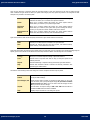
•
Turn on after 15 minutes
•
Turn on after 30 minutes
•
Turn on after 1 hour
•
Turn on after next reboot
•
Permanently disable
Select an option and click OK button. You will see that Virus Protection icon’s color
has changed from Green to Red in Windows System Tray. It means that Virus
Protection has been disabled temporarily or permanently based on your selection.
If you have selected Turn on after 15 minutes / 30 minutes / 1 hour then
the icon’s color will change back from Red to Green, based on the time frame
selected, to indicate that Virus Protection has been enabled. If you have selected
Turn on after next reboot, then the icon’s color will change back to Green at
the next reboot. If you have selected Permanently disable then the icon’s color
will remain Red until you enable Virus Protection manually.
You can customize Virus Protection by clicking Files & Folders -> Virus Protection from the Dashboard. The following options
are available:
Display alert
messages
Quick Heal Technologies (P) Ltd.
Display alert messages feature, if checked or enabled, displays an alert message
whenever a malware is detected. If un-checked, it will not display an alert
message whenever a malware is detected. By default this feature is checked.
26
User Guide
Quick Heal AntiVirus 2011 Server Edition
Quick Heal Protection Center
Select action to be performed when virus is found
You can configure the action that needs to be carried out when a malware is detected by Virus Protection. The following actions are
available:
Repair
Attempts to repair the file and quarantines it automatically in case if it cannot be
repaired.
Delete
Deletes a virus-infected file without notifying you. Files deleted in such a manner
cannot be recovered.
Deny access
Prevents you from using a virus-infected file.
Backup before
taking action
Virus Protection will keep a copy of infected file before disinfecting it. (Files that
are stored in backup can be restored from Quarantine menu.)
After making the selection click Save Changes to apply the settings.
DNAScan
DNAScan is Quick Heal’s indigenous technology to detect and eliminate new and unknown malicious threats in the system.
Additionally it copies the suspected file in the Quarantine directory before taking any action. Quarantined suspicious files can be
submitted to our research lab for further analysis. This submission is important to curb the wild spread of new malicious threats.
Suspicious file submission ensures the detailed analysis of the file in our research lab. After the detailed analysis it can be added in
the known threat signature database which will be provided in updates to all the users. This can be only possible if they are
detected and eliminated before their wild spread. DNAScan technology successfully traps suspected files with very less false alarms.
Whenever DNAScan detects a new malicious threat in your system it informs you, or asks for your action during memory scanning if
the scanning is set with Prompt settings. One copy of DNAScan suspected files will always be quarantined which can later be
submitted to research lab for further detailed analysis. The submission can be done automatically or manually through email. The
submission takes place whenever Quick Heal AntiVirus updates itself and finds new DNAScan suspected files in the Quarantine
folder. It sends new DNAScan suspicious quarantined files in an encrypted file format to Quick Heal research lab.
DNAScan feature in Quick Heal AntiVirus can be accessed by clicking Files & Folders from the Dashboard. By default DNAScan is
enabled and is set to ON. You can disable DNAScan by clicking the button. Quick Heal recommends that you keep it enabled to
secure your system from any potential threats at any point of time.
IF DNAScan Protection is disabled then it will remain disabled during Scan, Virus Protection and Email Scans.
Configuring the submission settings
DNAScan suspected files can be submitted to research lab of Quick Heal through email. Submission of the suspected files is at your
liberty. Submission of the DNAScan suspected files depend on the below mentioned settings:
Do not submit
files
This option does not let DNAScan submit the suspected files to Quick Heal
research lab.
Submit files
DNAScan suspected files can be submitted to Quick Heal research lab.
If Show notification while submitting files option is checked, then Quick Heal
prompts for permission before submission of samples to Quick Heal Research Lab.
If Show notification while submitting files option is not checked, then Quick
Heal submits the suspicious files without notifying you.
Manual submission can be done through the Quarantine tool.
Quick Heal Technologies (P) Ltd.
27
User Guide
Quick Heal AntiVirus 2011 Server Edition
Quick Heal Protection Center
Block Suspicious Packed Files
Suspicious Packed Files are files that are packed using pre-defined list of suspicious packers. These packers are mostly used to pack
malicious files, and when unpacked can cause a lot of harm to the computer.
Block Suspicious Packed Files feature in Quick Heal AntiVirus can be accessed by clicking Files & Folders from the Dashboard.
Click the button to either enable or disable Block Suspicious Packed Files feature. By default, Block Suspicious Packed Files feature is
enabled and set to ON.
Automatic Rogueware Scan
The Automatic Rogueware Scan feature in Quick Heal AntiVirus automatically scans and removes critical level roguware and fake
anti-virus software.
Automatic Rogueware Scan feature in Quick Heal AntiVirus can be accessed by clicking Files & Folders from the Dashboard. Click
the button to either enable or disable Automatic Rogueware Scan files feature. By default, Automatic Rogueware Scan feature is
enabled and set to ON.
Scan Schedule
You can schedule the scanner to scan automatically at predetermined time and intervals. You can schedule the scan at first boot,
daily or weekly. This will supplement other automatic protection features to ensure that your computer remains virus-free.
You can easily schedule custom scan. Frequency can be set for daily and weekly scans, which additionally can refine your request to
schedule it to occur every two days or every three days instead. Further you can also schedule the task to repeat at specific
intervals.
To create a new schedule scan
1.
Click Files & Folder -> Schedule Scan from the Dashboard.
2.
The Schedule Scan wizard opens. Click New.
3.
Name your custom schedule scan under Scan Name. For example: My Scan.
4.
Select Start at First Boot to schedule the scanner to scan at first boot of the day. When you select Start at First Boot,
you don’t have to specify the time of the day to start the scan. Scan will take place only during the first boot no matter at
what time you start the system. Otherwise set the frequency and time at which you want to scan the system. Most of the
frequency options include additional options (Every day (s) and Repeat scan after every) that let you further refine your
schedule scan. Select the schedule scan priority from Low or High. Set the additional options as necessary.
5.
Provide User Name and Password.
6.
Under Scan Settings, you can specify specific items to be scanned, action required to be taken if a virus is found and
use of advance options while scanning. By default, setting has been set for adequate options for scanning.
7.
When you are done, press Next.
8.
Click Add Folders.
9.
Select the Drives, folder or multiple folders to be scanned and press OK. You can configure Exclude Subfolder while
scanning of a specific folder. This will ignore scanning inside the subfolders while scanning. e.g. If you select C:\ drive for
scan along with selecting Exclude Subfolder option, this will initiate scan for files available at the root of C:\ drive only.
10. Click Next.
11. Review the summary of your custom scheduled scan.
12. When you are done, click Finish.
Quick Heal Technologies (P) Ltd.
28
User Guide
Quick Heal AntiVirus 2011 Server Edition
Quick Heal Protection Center
To edit a scheduled scan
You can change the schedule of any scheduled scan. To edit a scheduled scan:
1.
Click Files & Folders -> Scan Schedule from the Dashboard.
2.
Highlight the desired Schedule Item from the list and click Edit.
3.
Change the schedule as desired.
4.
When you are done, click Next.
5.
Change the scan area as desired.
6.
Click Next.
7.
Review the summary of your custom scheduled scan.
8.
When you are done, click Finish.
To delete a scan schedule
You can delete any scan schedule. To delete a scan schedule:
1.
Click Files & Folders -> Scan Schedule from the Dashboard.
2.
Highlight the desired Schedule Item from the list and click Remove.
3.
The following prompt appears: Do you want to remove the Schedule Scan? Click Yes to delete the Schedule Item.
Exclude Files & Folders
You can configure Quick Heal AntiVirus to skip scanning of certain files or folders. Scanning can be excluded in the cases, of known
virus detection, DNAScan and packer identification.
Following scanning modules can be excluded
•
Scanner
•
Virus Protection
•
Memory Scanner
•
DNAScan
To exclude Files or Folders from scanning, please perform the following steps:
1.
Click Files & Folders -> Exclude Files & Folders from the Dashboard.
2.
The Exclude Files & Folders screen opens. Click Add.
3.
Click File Icon or Folder icon for the exclusion.
4.
Select the desired file or folder for exclusion from scanning.
5.
Check Include Subfolder option to exclude subfolders from the scan as well. Click OK to complete the process.
The following are a few guidelines:
•
If you are getting a warning for a known virus in a clean file, you can exclude it for scanning of Known Virus
Detection.
•
If you are getting a DNAScan warning in a clean file, you can exclude it for scanning of DNAScan.
Quick Heal Technologies (P) Ltd.
29
User Guide
Quick Heal AntiVirus 2011 Server Edition
Quick Heal Protection Center
Quarantine & Backup
Quarantine & Backup feature allows you to configure the number of days to retain the quarantined or backup files. To access this
feature click Files & Folders -> Quarantine & Backup from the Dashboard.
The following can be configured in Quarantine & Backup:
Delete
quarantine/backup
files after
If this feature is checked then it enables deletion of quarantine/backup files
after the selected option in the drop-down box. By default the value is 30 days.
If this feature is un-checked then it disables deletion of quarantine/backup files
and retains all the files. The list of files in Quarantine will be listed below this
feature.
View Files
Click this button to view the files under Quarantine and Backup. To know more
refer View Quarantine Files.
Emails
Emails option in the Protection Center of the Dashboard allows you to customize the settings that concern the protection of emails
entering your mailbox. It allows you to configure the following settings:
•
Email Protection
•
Trusted Email Clients Protection
•
Spam Protection
Email Protection
Email Protection feature allows you to customize the action that needs to be taken when a malware is detected in mail. The default
settings are optimal and can provide the required protection to the mailbox from malicious mails.
Email Protection feature in Quick Heal AntiVirus can be accessed by clicking Emails from the Dashboard. By default Email
Protection is enabled and is set to ON. You can disable Email Protection by clicking the button. Quick Heal recommends that you
keep it enabled to secure your mailbox from any potential threats at any point of time.
You can customize Email Protection by clicking Emails -> Email Protection from the Dashboard. The following options are
available:
Display alert
message
Quick Heal Technologies (P) Ltd.
Virus found alert will be shown in case a virus is found in an email or attachment.
Display Alert Message will contain following information:
•
Virus Name
•
Sender Email Address
•
Email Subject
•
Attachment Name
•
Action Taken
30
User Guide
Quick Heal AntiVirus 2011 Server Edition
Quick Heal Protection Center
Select action to be performed when virus is found
Repair
Attempts to repair the malicious attachment. If the attachment cannot be repaired
then it will be deleted.
Delete
Selecting this option will delete the infected attachment while downloading mails.
Backup before
taking action
Email Protection will keep a copy of infected email before disinfecting it. (Files that
are stored in backup can be restored by clicking Tools -> View Quarantine
Files from the Dashboard.)
Attachment Control Settings
Block attachments
with multiple
extensions
Checking this feature enables blocking of attachment in emails with multiple
extensions. Worms commonly use multiple extensions. Enabling this option will
block multiple extension attachments in incoming e-mails. It prevents infection
from new worms, and thus protects your system. Un-checking of this feature
disables blocking of attachment in emails with multiple extensions. By default
this feature is checked or enabled.
Block emails
crafted to exploit
vulnerability
Checking this feature enables blocking of emails whose sole purpose is to
exploit vulnerabilities of mail clients. Enabling this option will block emails,
which contain vulnerability like MIME, IFRAME, etc. Un-checking of this feature
disables the blocking of emails that are crafted to exploit vulnerability. By
default this feature is checked or enabled.
Enable attachment
control
Checking this feature enables attachment control that allows you to customize
blocking of email attachments with specific extensions or all extensions. Unchecking this feature does not provide you with the option to customize the
type of mail attachments that can enter your mailbox. By default this feature is
disabled. When enabled it provides the following options:
Block all attachments
Selecting this option blocks all types of attachments in emails.
Block user specified attachments
Selecting this option allows you to customize the type of email attachments you
can receive and block. If this option is selected, Configure button is activated.
Click Configure and configuration dialog appears. Perform the following steps
to block specific extensions:
Quick Heal Technologies (P) Ltd.
1.
If you wish to block the extensions mentioned in the list just retain
the ones you want to block and delete all other extensions using the
Delete button. If you wish to configure default extensions for
blocking then click Default button.
2.
If the desired extension is not in the list, enter the extension and click
Add button. Perform the previous step again to configure.
3.
Click OK to save changes.
31
User Guide
Quick Heal AntiVirus 2011 Server Edition
Quick Heal Protection Center
Trusted Email Clients Protection
Trusted Email Clients Protection is, by default, configured to support most of the popularly used email clients like Eudora. If your
email client is different from the ones provided in the list, then you can simply add the same in the trusted email client list.
Trusted Email Clients Protection feature in Quick Heal AntiVirus can be accessed by clicking Emails from the Dashboard. By default
Trusted Email Clients Protection is enabled and is set to ON. You can disable Trusted Email Clients Protection by clicking the button.
To add email client, perform the following steps:
1.
Click Emails -> Trusted Email Clients Protection from the Dashboard.
2.
Click Browse and select the trusted client.
3.
Click Add to add the email client into trusted email client list.
4.
Click Save Changes.
Spam Protection
Spam Protection will block unwanted mails, such as spam, phishing and porn emails, from reaching your inbox.
Spam Protection feature in Quick Heal AntiVirus can be accessed by clicking Emails from the Dashboard. By default Spam
Protection is enabled and is set to ON. You can disable Spam Protection by clicking the button.
Quick Heal Technologies (P) Ltd.
32
User Guide
Quick Heal AntiVirus 2011 Server Edition
Quick Heal Protection Center
To customize Spam Protection, click Emails -> Spam Protection from the Dashboard. The following options are available:
Tag subject with
text
(Recommended)
Using this option the Subject of a spam mail will be tagged with "[SPAM] -".
Spam Protection
level
Drag the bar towards Strict, Moderate or Soft to adjust SPAM control. Strict
ensures complete protection while Low ensures minimal protection.
Enable email
black list
Black List is the list of mail addresses/domains whose mails have to be blocked
irrespective of their contents. Thus, mails from the addresses/domains listed here
will be tagged as "[SPAM] -". This feature may be specifically evoked in case some
server has an Open Relay which is being misused by Mass Mailers and viruses.
To add specific email address in the black list, follow the below given steps:
1.
Check Enable email black list and click Customize button.
2.
Enter the email address and click Add. To edit the address, highlight the
email address on the list and click Edit.
3.
Click OK to save the changes.
To add specific domain in the black list, follow the below given steps:
Enable email
white list
1.
Check Enable email black list and click Customize button.
2.
Type the domain and click Add. e.g. *@mytest.com. For editing an
existing entry click Edit.
3.
Click OK to save the changes.
White List is the list of email addresses/domains whose mails are to be seen
irrespective of their contents. Thus, mails from the addresses/domains listed here
will not be passed through the SPAM filter. Please configure such email address
and domain for your regular contacts.
To add specific email address in the white list, follow the below given steps:
1.
Check Enable email white list and click Customize button.
2.
Enter the email address and click Add. To edit the address, highlight the
email address on the list and click Edit.
3.
Click OK to save the changes.
To add specific domain in the white list, follow the below given steps:
Quick Heal Technologies (P) Ltd.
1.
Check Enable email white list and click Customize button.
2.
Type the domain and click Add. e.g. *@mytest.com. For editing an
existing entry click Edit.
3.
Click OK to save the changes.
33
User Guide
Quick Heal AntiVirus 2011 Server Edition
Enable AntiSpam
plug-in
Quick Heal Protection Center
This plugin is user-friendly and will help the user to add email address to the Black
List or White List just by a single click.
To add specific email address in the black list, please perform the following step:
•
Highlight the mail and click the Quick Heal Black List button in case
of MS Outlook. In case of Eudora, highlight the mail and click Edit ->
Message Plug-ins -> Quick Heal Black List.
The sender of the email will be added into Quick Heal Black List.
To add specific email address in the white list, please perform the following step:
•
Highlight the mail and click the Quick Heal White List button in case
of MS Outlook. In case of Eudora, highlight the mail and click Edit ->
Message Plug-ins -> Quick Heal White List.
AntiSpam plugin feature will only work with Eudora and MS Outlook email clients.
In case of MS Outlook, for 64-bit operating systems, the AntiSpam plugin feature
will only work if a 64-bit MS Outlook is installed on your system. Also, Enable
Black List and Enable White List have to be checked under Options ->
AntiSpam.
Import List
If you have exported or saved AntiSpam data and wish to use the same. You can
import the existing list using this feature.
Export List
If you are having AntiSpam data configured in AntiSpam and planning to uninstall
Quick Heal AntiVirus. It is recommended that you export/save your existing
AntiSpam configuration using this feature. You can reuse the same data after reinstallation of Quick Heal AntiVirus.
Quick Heal Technologies (P) Ltd.
34
User Guide
Quick Heal AntiVirus 2011 Server Edition
Quick Heal Protection Center
Internet & Network
Internet & Network option in the Protection Center of the Dashboard allows you to customize the settings that concern the
protection of your system from malicious files that can sneak into your system during online activities like banking, shopping,
surfing etc. It allows you to configure the following settings:
•
Firewall Protection
•
Browsing Protection
•
Malware Protection
Firewall Protection
Firewall Protection feature works silently in the background and monitors network activity for malicious behavior to ensure their
elimination before the malwares can reach the system. The method of detecting malicious network activity is done by Intrusion
Detection System and the method of elimination of malicious network activity is done by Intrusion Prevention System.
Firewall Protection in Quick Heal AntiVirus can be accessed by clicking Internet & Network from the Dashboard. Click the button
to either enable or disable Firewall Protection feature. By default, Firewall Protection feature is enabled and set to ON.
Browsing Protection
Browsing Protection feature blocks malicious content from the websites before the user can access them. Browsing Protection in
Quick Heal AntiVirus can be accessed by clicking Internet & Network from the Dashboard. Click the button to either enable or
disable Browsing Protection feature. By default, Browsing Protection feature is enabled and set to ON.
Malware Protection
Malware Protection feature safeguards your PC from Internet related threats like spywares, adwares, keyloggers, riskwares etc.
Malware Protection in Quick Heal AntiVirus can be accessed by clicking Internet & Network from the Dashboard. Click the button
to either enable or disable Malware Protection feature. By default, Malware Protection feature is enabled and set to ON.
Quick Heal Technologies (P) Ltd.
35
User Guide
Quick Heal AntiVirus 2011 Server Edition
Quick Heal Protection Center
External Drives & Devices
External Drives & Devices option in the Protection Center of the Dashboard allows you customize the settings that concerns
protection of your system against malware that may try to sneak in through external devices or drives like CDs, DVDs, USB-based
drives, etc. External Drives & Devices option allows you to configure the following settings:
•
Autorun Protection
•
Scan External Drives
•
Data Theft Protection
Autorun Protection
Autorun Protection feature protects your system from autorun malware that tries to sneak into your system from USB-based devices
or CDs / DVDs using the autorun feature of the installed operating system.
Autorun Protection feature in Quick Heal AntiVirus can be accessed by clicking External Drives and Devices from the Dashboard.
Click the button to either enable or disable Autorun Protection feature. By default, Autorun Protection feature is enabled and set to
ON.
Scan External Drives
USB-based drives should always be scanned for viruses before accessing it from your system, as these devices have become the
medium for quick transfer of malware from one system to another. The Scan External Drives feature, if enabled, always prompts
you to scan USB-based drives as soon as they are attached to your system. By default, this feature is enabled.
Scan External Drives feature in Quick Heal AntiVirus can be accessed by clicking External Drives and Devices from the
Dashboard. Click the button to either enable or disable Scan External Drives feature. By default, Scan External Drives feature is
enabled and set to ON.
You can customize the scanning of USB-based drives by clicking Scan External Drives. The following two options will be
available:
Scan files on the
root of the drive
only
Selecting this option ensures that only the files on the root drive are scanned.
The files within the folders on the root drive are skipped. This option is quick
but less safe. By default, this option is selected.
Scan full drive
Selecting this option ensures that all the files on the USB-based drive are
scanned. This option is slow but safe.
After making the selection click Save Changes to apply the settings.
Scan External Drives feature will not be performed if the feature Data Theft Protection is enabled, and its option Block
complete access to external drives is selected.
Quick Heal Technologies (P) Ltd.
36
User Guide
Quick Heal AntiVirus 2011 Server Edition
Quick Heal Protection Center
Data Theft Protection
Data Theft Protection is used to block to-and-fro transfer of data between the system and USB drives. This feature ensures
protection of confidential information on your system by blocking transfer of data from the system to these drives. It also blocks
transfer of data from the USB drives to the system protecting your system from malware that can infect your system.
Data Theft Protection feature in Quick Heal AntiVirus can be accessed by clicking External Drives and Devices from the
Dashboard. Click the button to either enable or disable Data Theft Protection feature. By default, Data Theft Protection feature is
enabled and set to ON.
You can customize the protection provided by the feature by clicking Data Theft Protection. The following two options will be
available:
Read only and no
write access to
external drives
Selecting this option allows transfer of data from the USB drives to the system
but not from the system to the USB drives. By default this option is selected.
Block complete
access to external
drives
Selecting this option blocks to-and-fro transfer of data between the system
and the USB drive.
After making the selection click Save Changes to apply the settings.
Quick Heal Technologies (P) Ltd.
37
User Guide
Quick Heal AntiVirus 2011 Server Edition
Quick Access Features
Chapter
5
Quick Access Features
Quick Access Features provides you with quick access to important features like Scan and also provides latest news about Quick
Heal.
Scan
If virus protection is enabled with default setting, a manual scan will not be needed as the system will be continuously monitored
and protected. However, you can manually scan the entire computer, drives, network drives (mapped drives), USB data storage
drives, folders, or files as per your wish. Although the default settings for manual scan are usually adequate, you can adjust the
options for manual scan by clicking Files & Folders -> Scan Settings from the dashboard.
Performing a Full System Scan
A full system scan scans all boot records, drives, folders and files on your computer (excluding mapped network drives). To perform
a full system scan, please perform the following steps:
1.
2.
3.
Click Scan -> Full System Scan on the Quick Heal Dashboard.
The scan will begin. Upon completion of the scan, the scan statistics and report will be provided.
After reviewing the statistics and report click Close.
Performing a Custom Scan
To perform a scan of specific files or folders, please perform the following steps:
1.
2.
3.
4.
5.
Click Scan -> Custom Scan on the Quick Heal Dashboard.
Click Add to locate the path of the desired Folder that is to be scanned. You can select multiple folders for scan.
Once the selection is made, click Start Scan.
The scan will begin. Upon completion of the scan, the scan statistics and report will be provided.
After reviewing the statistics and report click Close.
Quick Heal Technologies (P) Ltd.
38
User Guide
Quick Heal AntiVirus 2011 Server Edition
Quick Access Features
Performing Memory Scan
To perform a memory scan, please perform the following steps:
1.
2.
3.
Click Scan -> Memory Scan on the Quick Heal Dashboard.
The scan will begin. Upon completion of the scan, the scan statistics and report will be provided.
After reviewing the statistics and report click Close.
The following fields will be displayed in the Status tab during a scan:
Files scanned
Displays the total number of files scanned.
Archive/Packed
Threats detected
Displays the number of scanned archive or packed files among the total
number of files.
Displays the number of threats detected.
DNAScan warnings
Displays the number of files detected by DNAScan.
Boot/Partition viruses
Displays the number of Boot/Partition viruses.
Files repaired
Displays the number of malicious files detected that were repaired.
Files quarantined
Displays the number of malicious files detected that were quarantined.
Files deleted
Displays the number of malicious files detected that were deleted.
I/O errors
Displays the number of I/O errors occurred during the scan.
Scanning status
Displays the status of the scan being performed.
Performing Boot Time Scan
Boot Time Scan is very useful to disinfect the system. In case the system is badly infected by a virus and it cannot be cleaned
because the virus is active, use Boot Time Scan. This scan will be performed on next boot using Windows NT Boot Shell. To activate
Boot Time Scan, please perform the following steps:
1.
2.
3.
Click Scan -> Boot Time Scan on the Quick Heal Dashboard.
A confirmation prompt will be displayed to set boot time scanner on next boot. Click Yes.
To scan the system immediately, click Yes to restart the system. To scan the system later at next boot click No.
News
The News section displays the latest bytes of information and developments from Quick Heal Technologies (P) Ltd.
Quick Heal Technologies (P) Ltd.
39
User Guide
Quick Heal AntiVirus 2011 Server Edition
Quick Heal Menus
Chapter
6
Quick Heal Menus
Quick Heal Menus gives you instant access to tools, settings, reports and help topics. Quick Heal Menus are on the top right corner
of the dashboard and are always available irrespective of the feature being accessed. Quick Heal Menus are as follows:
•
Settings
•
Tools
•
Reports
•
Help
Settings
Quick Heal AntiVirus provides you the option to customize the functioning of certain settings of Quick Heal AntiVirus. The settings
that can be customized are as follows:
•
Automatic Update
•
Internet Settings
•
Registry Restore
•
Self Protection
•
Password Protection
•
Report Settings
•
Report Virus Statistics
•
Restore Default Settings
The default settings that are configured are enough to provide complete security to your PC. We recommend that you
keep the default settings intact and not change the settings unless absolutely required.
Automatic Update
Automatic Update ensures that Quick Heal AntiVirus is updated with the latest virus signatures to protect your system from the
latest malwares. Automatic Updates requires an Internet connection to download the updates from the Quick Heal server. By
default the Automatic Update is enabled or is set to ON. Although it is not recommended, you can disable Automatic Update by
clicking the ON/OFF button.
Configuring Automatic Update
Show update
notification window
Quick Heal Technologies (P) Ltd.
By default this feature is enabled. This ensures that a notification pops-up
after each update of Quick Heal AntiVirus. To disable this feature, just
uncheck the checkbox and click Save Changes.
40
User Guide
Quick Heal AntiVirus 2011 Server Edition
Quick Heal Menus
Select the update mode
Download from
Internet
By default this option is selected. This option downloads the updates to your
system from the Quick Heal server.
Pick update files
from the specified
location
Select this option if you want to pick the updates from a local folder or a
network folder.
Copy update files to
specified location
Select this option if you want to save a copy of the updates downloaded to
your local folder or network folder.
Internet Settings
If you are using a proxy server on your network, or using Socks Version 4 & 5 network then you need to enter the IP address (or
domain name) and port of the proxy, SOCKS V4 & SOCKS V5 server in Internet settings. Username & Password credentials are
mandatory for login. Following Quick Heal modules requires these changes:
•
Registration Wizard
•
Quick Update
•
Messenger
To enable and configure HTTP proxy settings
1.
Click Settings -> Internet Settings on the Dashboard.
2.
Choose HTTP Proxy, Socks V 4 or SOCKS V 5 as per your settings and then perform the following steps:
3.
•
In Server, type IP address of the proxy server or domain name (For example: proxy.yourcompany.com).
•
In Port, type the port number of the proxy server (For example: 80).
•
In User Name and Password, type your server logon credentials, when required.
Click Save Changes to save the settings.
Quick Heal Technologies (P) Ltd.
41
User Guide
Quick Heal AntiVirus 2011 Server Edition
Quick Heal Menus
Registry Restore
The Registry is a database used to store settings and options of Microsoft Windows Operating Systems. It contains information and
settings for all the hardware, software, users, and preferences of the system. Whenever a user makes changes to a Control Panel
settings, or File Associations, System Policies, or installed new software, the changes are reflected and stored in the Registry.
Malwares usually target the system Registry to restrict specific features of the Operating Systems or other applications. They may
modify the system registry so that it behaves in a manner beneficial to malwares, and most of the times it creates problem for the
system.
Quick Heal Registry Restore feature restores the critical system registry area and other areas from the changes made by malwares.
It also repairs the system registry.
Registry Restore settings
Restore critical
system registry
areas
Selecting this option allows Quick Heal AntiVirus to restore the critical system
registry during scan. Critical System Registry areas are generally changed by
malwares to perform certain task automatically or to avoid detection or
modification by system applications. e.g. Disabling Task Manager, Disabling
Registry Editor etc.
Repair malicious
registry entries
Selecting this option allows Quick Heal AntiVirus to scan system registry for
malware related entries. Malwares and their remains will be repaired
automatically during scan.
Self Protection
Self Protection feature, when enabled, will protect Quick Heal AntiVirus, by safeguarding its files, folders, configurations and registry
entries against malwares and also against tamper from other applications.
Self Protection feature in Quick Heal AntiVirus can be accessed by clicking Settings from the Dashboard. Click the button to either
enable or disable Self Protection feature. By default, Self Protection feature is enabled and set to ON.
Password Protection
You can protect the settings configured for Quick Heal AntiVirus by enabling Password Protection. Enabling Password Protection
ensures that Quick Heal AntiVirus configurations and settings are protected from modification by other users. Once Password
Protection is enabled, Protection Center features of Quick Heal AntiVirus like Files & Folders, Emails, Internet & Network, and
External Drives & Devices along with the Settings menu will be accessible to users only on authentication of password.
To enable Password Protection please perform the following steps:
1.
Click Settings on the Dashboard.
2.
By default the Password Protection feature will be set to OFF. Click OFF to open Password Protection window.
3.
If you are setting the password for the first time, then Enter old password will be de-activated. Type the desired
password in Enter new password and re-type the same in Confirm new password.
4.
Click Save Changes.
Quick Heal Technologies (P) Ltd.
42
User Guide
Quick Heal AntiVirus 2011 Server Edition
Quick Heal Menus
Report Settings
Report Settings lets you specify the number of days to retain the reports generated by Quick Heal AntiVirus. You can also retain all
the reports without deleting any of the reports generated. By default, the setting has been configured to retain reports for 30 days.
Configuring Report Settings
To configure report settings, please perform the following steps:
1.
Click Settings on the Dashboard.
2.
The Settings screen is displayed. Click Report Settings.
3.
The Report Settings screen is displayed. By default, the Delete reports after checkbox is checked and the value is set
to 30 days. If you want to retain all the reports generated then uncheck the Delete reports after checkbox. If you
want to change the value of number of days for retaining the reports, then click the drop-down menu and select from the
choices.
4.
Click Save Changes to apply the settings.
Report Virus Statistics
Report Virus Statistics feature in Quick Heal AntiVirus submits the virus detection statistics report, generated during scans, to Quick
Heal Research Center.
Report Virus Statistics feature in Quick Heal AntiVirus can be accessed by clicking Settings from the Dashboard. Click the button to
either enable or disable Report Virus Statistics feature. By default, Report Virus Statistics feature is enabled and set to ON.
Restore Default Settings
Restore Default Settings changes all the modifications to settings and restores the default settings. If you have customized the
settings of Quick Heal AntiVirus and feel that the protection of the system may have been compromised, then you can bring back
the protection to its default settings with the click of a single button. This single click restores all default settings so that you don’t
have to remember all the configurations made. To restore default settings, please perform the following steps:
1.
Click Settings on the Dashboard.
2.
In the Restore Default Settings row click Default All.
Quick Heal Technologies (P) Ltd.
43
User Guide
Quick Heal AntiVirus 2011 Server Edition
Quick Heal Menus
Tools
The tools available with Quick Heal AntiVirus are as follows:
•
Hijack Restore
•
Track Cleaner
•
Anti-Rootkit
•
Create Emergency CD
•
Launch AntiMalware
•
View Quarantine Files
•
USB Drive Protection
•
System Explorer
•
Windows Spy
•
Exclude File Extensions
Hijack Restore
The Hijack Restore feature restores the modified settings of Internet Explorer browser to default settings. If you have modified the
default settings of Internet Explorer or if the settings have been modified by malwares, spywares, and sometimes genuine
applications, then you can restore the default settings of Internet Explorer browser by using the Hijack Restore feature. This feature
also helps to restore critical operating system settings like registry editor and task manager.
Using Hijack Restore
1.
Click Tools Menu from the Dashboard.
2.
Click Hijack Restore under Cleaning & Restore Tools.
The following actions can be performed:
Check All
Checking this option checks all the options displayed in the Internet Explorer
Browser Settings frame. This is useful if you want to restore all the browser
settings and you can avoid manually checking all options one after the other.
If all the options are checked and you want to uncheck all of them then unchecking Check All feature will un-check all the options displayed in the
Internet Explorer Browser Settings frame.
Quick Heal Technologies (P) Ltd.
44
User Guide
Quick Heal AntiVirus 2011 Server Edition
Quick Heal Menus
Restore default host file
Check this option if you wish to restore the default host file. If you check Restore default host file option, it enables Default
Host file button. Click Default Host file button to open the Host Specification window.
IP Address
Enter the IP Address of the host.
Host Name
Enter the host name of the host.
Add
Click Add to add the host details in the frame.
Edit
Highlight the added host in the frame and click Edit to make any
modifications, if required, to the host details.
Delete
Highlight the added host in the frame and click Delete to remove the added
host details.
OK
Click OK to save the added host and exit from the Host Specification window.
Close
Click Close to exit without saving, from the Host Specification window.
Restore important system settings
Check this option if you wish to restore critical system settings. If you check Restore important system settings option, it
enables Settings button. Click Default Host file button to open the Important System Settings window.
Check All
Checking this option checks all the options displayed in the Settings to
restore frame. This is useful if you want to restore all the system settings and
you can avoid manually checking all options one after the other.
If all the options are checked and you want to uncheck all of them then unchecking Check All feature will un-check all the options displayed in the
Settings to restore frame.
OK
Click OK to save all modified settings and exit from the Important System
Settings window.
Close
Click Close to exit without saving, from the Important System Settings
window.
The buttons on the Hijack Restore function and their feature are as follows:
Restore Now
Once the required settings are checked, click Restore Now button to restore
default settings.
Undo
If you wish to revert to the existing settings rather than the restored default
settings, click Undo button. It opens a window called Undo Operations. The
settings which have been restored to default settings will be listed. Check the
required settings or check the option Check All to check all the settings
displayed. Click OK to revert to the existing settings or click Close to exit
without reverting.
Close
Click Close to exit from the Hijack Restore window.
Quick Heal Technologies (P) Ltd.
45
User Guide
Quick Heal AntiVirus 2011 Server Edition
Quick Heal Menus
Track Cleaner
Track Cleaner removes the Most Recently Used (MRU) from popular and daily-used applications to ensure that your privacy is not
breached. Many applications store the list of recently opened files in their internal format to help you open them again for quick
access. This feature of Windows is good but at the same time, on the systems which is used by more than one user it may happen
that the user's privacy is compromised. Track Cleaner helps delete all the tracks of such applications and prevent privacy breach.
Using Track Cleaner
1.
Click Tools -> Track Cleaner from Quick Heal dashboard.
2.
Select applications whose traces need to be removed by checking them. In case you want to remove traces of all the
applications, check the Check All feature.
3.
Click Start Cleaning to remove traces from the applications selected. Upon completion click Close to exit.
Anti-Rootkit
Quick Heal Anti-Rootkit is a program that proactively detects and cleans rootkits that are active in the system. This program scans
objects like running Processes, Windows Registry and Files and Folders for any suspicious activity and detects the rootkits without
any signatures. It detects most of the existing rootkits and is designed to detect the upcoming rootkits and also provides the option
to clean them.
It is recommended that Quick Heal Anti-Rootkit should be used by person having certain knowledge of the operating system or with
the help of Quick Heal Technical Support engineer. Improper usage of this program could result in unstable system.
To Start Quick Heal Anti-Rootkit from Quick Heal AntiVirus
1.
Click Tools -> Anti-Rootkit from the Dashboard.
2.
A pop-up appears that recommends closing all other applications before launching Anti-Rootkit.
Using Quick Heal Anti-Rootkit
1.
Start Quick Heal Anti-Rootkit.
2.
In the left side of the main window click Start Scan.
3.
Quick Heal Anti-Rootkit will start scanning your system for suspicious rootkit activity in running Processes, windows
registry and Files and Folders.
4.
After completing the scan result is displayed in three different tabs that will display hidden items in running Processes,
Windows Registry, Files and Folders.
5.
You can now select and take appropriate action against each displayed threat. Like you can terminate the rootkit Process,
rename the rootkit Registry entry/Files and Folders.
6.
After taking the appropriate action you need to restart your system so that rootkit cleaning take place.
Stop Scanning
During scan you can select Stop Scan to stop the scan; Quick Heal AntiRootkit will prompt before stopping the scan.
Close
Click Close to quit Quick Heal Anti-Rootkit. If you choose to close the
application while scanning is in progress, it will prompt to stop the scan.
Quick Heal Technologies (P) Ltd.
46
User Guide
Quick Heal AntiVirus 2011 Server Edition
Error Report
Submission
Quick Heal Menus
Due to infection or some unexpected conditions in system, scanning of
Quick Heal Anti-Rootkit may fail. On failure you will be asked to re-scan
your system and submit error report to Quick Heal Team for further
analysis.
With the help of Scan Settings you can select what item to scan during scan process.
Configuring Quick Heal Anti-Rootkit for Scan
1.
Start Quick Heal Anti-Rootkit.
2.
Click on the Settings button on top bar of Quick Heal Anti-Rootkit.
3.
Settings dialog box will appear.
4.
By default Quick Heal Anti-Rootkit is configured for Auto Scan where it scans appropriate predefined system areas.
Auto Scan
Auto Scan is default scan option provided by Quick Heal Anti-Rootkit.
Under Auto Scan Quick Heal Anti-Rootkit scans appropriate predefined
system areas. During Auto Scan, scanning is performed for:
•
Hidden Processes.
•
Hidden Registry entries.
•
Hidden Files and Folders.
•
Executable ADS.
Custom Scan
By selecting Custom Scan radio button, you can configure following
options:
Detect Hidden Process
To scan for running hidden processes in the system.
Detect Hidden Registry
Items
To scan for hidden items in Windows Registry.
Detect Hidden files and
folders
To scan for hidden files and folders in the system and executable ADS
(Alternate Data Streams). You can choose option:
1.
Scan drive on which Operating System is installed.
2.
Scan All Drives to perform scanning in all fixed drives.
3.
Alternate Data Streams (ADS) to scan for executable ADS.
Scan drive on which
operating system is
installed
Will scan for hidden files and folders on the drive on which operating
system is installed.
Scan all fixed drives
Will scan for hidden files and folders on all the fixed drives of the system.
Alternate Data Streams
(ADS)
To scan for suspicious items in Alternate Data Streams of NTFS File
system.
Report File Path
Quick Heal Anti-Rootkit creates a scan report file at the location from
which it is executed. You can specify different location by specifying
report file path.
Quick Heal Technologies (P) Ltd.
47
User Guide
Quick Heal AntiVirus 2011 Server Edition
Quick Heal Menus
Overview of Alternate Data Streams - ADS
ADS, allows data to be stored in hidden files that are linked to a normal visible file. Streams are not limited in size and there can be
more than one stream linked to a normal file. The primary reason why ADS is a security risk is because streams are almost
completely hidden and represent possibly the closest thing to a perfect hiding spot on a file system - something trojans can and will
take advantage of. Streams can easily be created/written to/read from, allowing any trojan or virus author to take advantage of a
hidden file area.
Scanning Results and Cleaning Rootkits
Quick Heal Anti-Rootkit Scanning
1.
Start Quick Heal Anti-Rootkit.
2.
In the left side of the main window click on Start Scan.
3.
Quick Heal Anti-Rootkit will start scanning your system for suspicious rootkit activity in running Processes, Windows
Registry and Files and Folders.
4.
After completing the scan result is displayed in three different tabs that will display hidden items in running Processes,
Windows Registry and Files and Folders.
5.
You can now select and take appropriate action against each displayed threat. Like you can terminate the rootkit Process
or rename the rootkit Registry entry or Files.
6.
After taking the appropriate action you need to restart your system so that rootkit cleaning take place.
Action to be taken on Scan Results
Process
After scanning Quick Heal Anti-Rootkit will detect and display a list of
hidden Processes. You can select process or process for termination, but
make sure that list of Processes for termination doesn’t include any know
trusted process.
Quick Heal Anti-Rootkit also displays summary of process scanning as
total number of Processes scanned and number of hidden Processes
detected.
Terminating Hidden
Process
After selecting list of Processes for termination click on Terminate button.
If a process is successfully terminated then its PID (Process Identifier)
field will show n/a and process name will be appended by Terminated.
All terminated Processes will be renamed after a restart.
Registry
Similar to process scan Quick Heal Anti-Rootkit will display a list of hidden
Registry keys. You can select keys for renaming, but make sure that list of
keys for renaming doesn’t include any known trusted registry key.
Quick Heal Anti-Rootkit also displays summary of Registry scanning as
total number of items scanned and number of hidden items detected.
Renaming Hidden
Registry Key
Quick Heal Technologies (P) Ltd.
After selecting list of keys for renaming click on Rename button.
Renaming operation requires reboot hence Key name will be prefixed by
Rename Queued.
48
User Guide
Quick Heal AntiVirus 2011 Server Edition
Files and Folders
Quick Heal Menus
Similar to process and Registry Quick Heal Anti-Rootkit will display a list of
hidden Files and Folders. You can select Files and Folders for renaming,
but make sure that list of Files and Folders for renaming doesn’t include
any know trusted file.
Quick Heal Anti-Rootkit also displays list of executable Alternate Data
Streams.
Quick Heal Anti-Rootkit also displays summary of File scanning as total
number of files scanned and number of hidden files detected.
Renaming Hidden Files
and Folders
After selecting list of Files and Folders for renaming click on Rename
button. Renaming operation requires reboot hence Files and Folders name
will be prefixed by Rename Queued.
Cleaning Rootkits through Quick Heal Emergency CD
In some cases it may happen that rootkits are not being cleaned. They are reappearing during Quick Heal Anti-Rootkit scan. In such
case you can also use Quick Heal Emergency CD for proper cleaning. All you have to do is create a Quick Heal Emergency CD and
boot your system through it. To create a Quick Heal Emergency CD and clean your system through it please follow the below given
steps:
Steps 1
To create an Emergency CD
To create Quick Heal Emergency CD, your system should fulfill following requirements:
•
Licensed copy of Microsoft Windows Operating System. (Windows 2000/XP/2003 or above).
•
Microsoft Windows Installation CD. (Windows XP/2003 or above)
•
A blank writable CD and a CD-Writer drive.
•
Emergency CD can only be used to scan and clean drives of the same system for which you have licensed Microsoft
Windows operating system.
Creating Emergency CD:
1.
Start Quick Heal AntiVirus.
2.
Click Tools -> Create Emergency CD from the Dashboard. Click Next.
3.
Select Create Emergency CD, click Next.
4.
Bootable files required to make the CD bootable. Select Operating System Installation CD option and insert the
Operating CD (Windows XP and Windows 2003 operating system CD only). Select the CD-Rom drive.
5.
Click Next.
6.
System files will be fetched from the installation CD.
7.
Remove the Operating System Installation CD and insert a blank writable CD.
8.
Select the CD-Rom drive.
9.
Click Next.
10. Emergency CD will be created.
Quick Heal Technologies (P) Ltd.
49
User Guide
Quick Heal AntiVirus 2011 Server Edition
Quick Heal Menus
Step 2
1.
Start Quick Heal Anti-Rootkit.
2.
In the left side of the main window click on Start Scan.
3.
Quick Heal Anti-Rootkit will start scanning your system for suspicious rootkit activity in running Processes, Windows
Registry and Files and Folders.
4.
After completing the scan result is displayed in three different tabs that will display hidden items in running Processes,
Windows Registry and Files and Folders.
5.
You can now select and take appropriate action against each displayed threat. Like you can terminate the rootkit process
or rename the rootkit registry entry or files.
Step 3
1.
Boot your system using Quick Heal Emergency CD.
2.
Quick Heal Emergency CD will automatically scan and clean the rootkits from your system during boot time scan.
Create Emergency CD
You can create your own emergency bootable CD that will help you to boot your Windows PC and scan and clean all the drives
including NTFS partitions. This CD helps in cleaning, badly infected PC from file infecting viruses which cannot be cleaned from
inside Windows. This features works only on 32-bit operating systems.
You can create an emergency CD or command line scanner from Quick Heal AntiVirus at any time. This will be created with the
latest virus signature pattern file used by Quick Heal AntiVirus on your system.
To create an Emergency CD
To create Quick Heal Emergency CD, your system should fulfill following requirements:
•
Licensed copy of Microsoft Windows Operating System. (Windows 2000/XP/2003 or above).
•
Microsoft Windows Installation CD. (Windows XP/2003)
•
A blank writable CD and a CD-Writer drive.
•
Emergency CD can only be used to scan and clean drives of the same system for which you have licensed Microsoft
Windows operating system.
Creating Emergency CD
1.
Click Tools -> Create Emergency CD from the Dashboard.
2.
Click Next.
3.
Select Create Emergency CD and click Next.
4.
Bootable files are required to make the CD bootable. Select Operating System Installation CD option and insert the
Operating System CD (Windows XP or Windows 2003 operating system CD only). Select CD-ROM drive and click Next.
5.
System files will be fetched from the installation CD.
6.
Remove the Operating System Installation CD and insert a blank writable CD.
7.
Select the CD-ROM drive and click Next.
8.
Emergency CD will be created.
Quick Heal Technologies (P) Ltd.
50
User Guide
Quick Heal AntiVirus 2011 Server Edition
Quick Heal Menus
Creating Emergency CD using system files
If you have created emergency CD earlier by providing Microsoft Windows Installation CD using Emergency CD Creation Wizard,
then you can quickly burn the emergency CD again by performing the steps that follow:
1.
Click Tools -> Emergency CD from the Dashboard.
2.
The Emergency CD creation wizard opens. Click Next to continue.
3.
The options screen opens. Click Next to continue.
4.
Select System files used earlier while creating emergency CD and click Next to continue.
5.
System files used earlier for CD creation will be fetched automatically.
6.
Remove the Operating System Installation CD and insert a blank writable CD.
7.
Select the CD-ROM drive and click Next to continue.
8.
Emergency CD will be created.
To create Command line scanner
You can create DOS Command line scanner using Emergency CD wizard.
1.
Click Tools -> Emergency CD from the Dashboard.
2.
The Emergency CD creation wizard opens. Click Next to continue.
3.
Select the option Save Command line scanner at and browse the desired path. Click Next to continue.
4.
Command line scanner will be created. Click Finish to continue.
In case if you wish to disinfect a badly infected system it is recommended that you write a CD by copying Command line Scanner
folder.
Using Emergency CD
1.
Insert Emergency CD into your CD-ROM/DVD-ROM drive.
2.
Restart your system.
3.
Emergency CD will automatically start and it will start scanning all the drives. It will automatically disinfect the infection, if
found.
4.
Once the scanning is over remove the Emergency CD from CD-ROM/DVD-ROM drive.
5.
Restart your system.
Using Command Line Scanner
Command line Scanner is executed using EMGSCAN.EXE command at the DOS command prompt. EMGSCAN.EXE usage is:
Emgscan.exe [drive/path] [options]
Quick Heal Technologies (P) Ltd.
51
User Guide
Quick Heal AntiVirus 2011 Server Edition
Quick Heal Menus
Emgscan Options
For specified options '-' inverts the default meaning.
/DELETE
Delete infected files.
/REPAIR
Disinfect whenever possible.
/DUMB
Do a "dumb" scan of all files.
/WARE
Scan for Adware/Spyware.
/MIME
Scan for .eml files.
/HELP or /?
Display this help.
/LIST
List all files checked.
/NOSUB
Do not scan subdirectories.
/ARCHIVE[-]
Scan inside archive files.
/PACKED[-]
Unpack compressed executables.
/REPORT=FileName
Create a report file.
/TEMPDIR=DirPath
Temporary Directory name.
To remove viruses using Emergency Disk:
1.
Shutdown your computer.
2.
Switch on the computer.
3.
Insert Windows 95/98 Startup Disk or a clean DOS bootable disk. This will boot your system in A:\ Dos Shell.
4.
Insert the Quick Heal Emergency disk.
5.
Type EMGSCAN C: /REPAIR at the DOS command prompt and press Enter.
6.
Quick Heal will scan entire C drive of your system and will try to disinfect the boot sectors or files if found infected during
the scan.
7.
When Quick Heal removes all the viruses and completes the scan, it will provide you with the respective scan summary.
Launch AntiMalware
Quick Heal AntiMalware, with its improved malware scanning engine, scans registry, files and folders at lightning speed to
thoroughly detect and clean Spywares, Adwares, Roguewares, Dialers, Riskwares and lots of other potential threats in your system.
Launching Quick Heal AntiMalware
Quick Heal AntiMalware can be launched from any of the following ways:
•
Click Start –> Programs -> Quick Heal AntiVirus -> Quick Heal AntiMalware.
•
Right-clicking the Virus Protection icon on the Windows system tray and selecting Launch AntiMalware.
•
Clicking Tools -> Launch AntiMalware from the Quick Heal dashboard.
Quick Heal Technologies (P) Ltd.
52
User Guide
Quick Heal AntiVirus 2011 Server Edition
Quick Heal Menus
Using Quick Heal AntiMalware
Click Scan Now on the Quick Heal AntiMalware screen to initiate the malware scan process. While scanning for malwares Quick Heal
AntiMalware displays malicious files, folders and registry entries related to various malwares. Once the scanning is complete and in
case a malware is found, a list will be displayed for detected malwares contained in malicious files, folders and registry. You can uncheck specific file, folder or registry entries within the displayed list, but ensure that all un-checked items are genuine applications
and not malicious ones.
In a case a malware is detected, the following actions can be taken:
Clean
Clicking this button will clean the malwares and its remains from the system.
If you have un-checked specific file, folder or registry entry then you will be
prompted whether you wish to exclude those items in future scan. If you
wish to permanently exclude those items then click Yes, otherwise click No
for temporary exclusion.
Skip
Clicking this button will not take any action against malwares in your system.
Stop Scan
Selecting
Set System Restore
point before cleaning
Selecting this option will create System Restore point before the cleaning
process starts in your system. This enables you to revert to the cleaning done
by Quick Heal AntiMalware by using Windows System Restore facility.
Set System Restore point before cleaning feature is not
available on Windows 2000 operating system.
Details
Clicking this button redirects you to Quick Heal Website
View Quarantine Files
Quarantine helps in safely isolating the infected or suspected files. When a file is added to Quarantine, Quick Heal AntiVirus
encrypts the file and keeps it inside the Quarantine directory. Being kept in an encrypted form, these files cannot be executed and
hence are safe. Quarantine also keeps a copy of infected file before repairing. Backup functionality is available by selecting Backup
before repairing option under Scanner's settings.
How to launch Quarantine Files
1.
Click Tools -> View Quarantine Files from the Dashboard.
You can perform the following tasks with the Quarantine feature:
Add
Add a file to the Quarantine module.
Remove
Delete a quarantine file.
Restore
Delete all the Quarantine files.
Remove All
Restore a file from Quarantine to its original location.
Send
You can send the quarantined file to our research lab for further analysis.
Select the file which you wish to submit and click Send.
Quick Heal Technologies (P) Ltd.
53
User Guide
Quick Heal AntiVirus 2011 Server Edition
Quick Heal Menus
In the Quarantine feature, when a suspicious file is selected and the Send button is clicked, a prompt appears requesting
permission to obtain your email address. You also need to provide a reason for submitting the files. Select from the following
reasons:
Suspicious File
Select this reason if you feel that a particular file in your system has been the
cause of suspicious activity in the system.
File is un-repairable
Select this reason if Quick Heal has been able to detect the malicious file on
your system during its scans, but has not been able to repair the infection of
the file.
False positive
Select this reason if a non malicious data file that you have been using and
are aware of its function, has been detected by Quick Heal as a malicious file.
USB Drive Protection
Quick Heal AntiVirus safeguards your USB devices from autorun malwares. Autorun feature of the removable drive is one of the
mediums for malwares to gain access into the system. The USB Drive Protection feature prevents autorun malwares from using
your removable device as an infection spreading medium. Securing the removable drive also ensures that the drive, if connected to
an infected system, cannot be used for spreading autorun malwares on other system.
To safeguard removable drives please perform the following steps:
1.
Click Tools -> USB Drive Protection from the Dashboard.
2.
The removable drives plugged into your system will be listed in the Select a removable drive drop-down box. Select the
drive and click Secure Removable Drive button.
3.
The drive will be secured against autorun malwares when used in other systems.
Although Quick Heal recommends that you keep the autorun feature of your USB drive disabled but if you wish to enable
the Autorun feature of the USB drive, just follow the steps mentioned earlier and in Step 2 click the Un-secure
Removable Drive button to enable autorun on your USB drive. Insert the same removable drive for un-secure that has
been secured using Quick Heal AntiVirus.
System Explorer
This tool provides all important information related to your computer such as running process, installed BHO’s, toolbars installed in
Internet Explorer, installed ActiveX, Hosts, LSPs, Startup Programs, Internet Explorer settings and Active network connection. This
will help diagnose the system for tracing existence of any new malware or riskware.
Quick Heal Technologies (P) Ltd.
54
User Guide
Quick Heal AntiVirus 2011 Server Edition
Quick Heal Menus
Windows Spy
This tool can be used to find out more information about an application or process whenever required. At times it happens that we
keep on getting dialog boxes or messages that are shown by spyware or some malware and we are not able to locate the malware.
In such situation this tool can be used to find out more information about the application by dragging the target on to the dialog or
window that appears on the screen. This tool will provide following information about the dialog or a window.
•
Application Name
•
Original File Name
•
Company Name
•
File Description
•
File Version
•
Internal Name
•
Product Name
•
Product Version
•
Copyrights Information
•
Comments
Using Windows Spy
1.
Click Tools -> Windows Spy from the Dashboard.
2.
Click Drag and move the mouse pointer on the application.
3.
A window will be opened displaying above mentioned information.
4.
If you wish to terminate that application or window then click Kill Process.
Exclude File Extensions
Exclude File Extensions feature helps you to create an exclusion list of file types or extensions for Virus Protection. This helps Virus
Protection to concentrate only on those files that are prone to malicious behavior.
Creating exclusion list for virus protection
1.
Click Tools -> Exclude File Extensions form the Dashboard.
2.
Enter the file extension that needs to be excluded from the Virus Protection scan and click Add.
3.
If the added extension is incorrect, then highlight the extension added in the list and click Remove to delete it from the
list.
4.
Click OK to save the list or click Cancel to exit without saving.
Quick Heal Technologies (P) Ltd.
55
User Guide
Quick Heal AntiVirus 2011 Server Edition
Quick Heal Menus
Reports
Quick Heal AntiVirus creates and maintains a detailed report of some important and frequently used features of Quick Heal. Reports
such as virus scan details, update details, changes in settings of the features, etc, are maintained. The features of Quick Heal
AntiVirus for which the reports can be viewed are as follows:
•
Scanner
•
Registry Restore
•
Virus Protection
•
Boot Time Scanner
•
Email Protection
•
AntiMalware Scanner
•
Scan Scheduler
•
Firewall Protection
•
Quick Update
•
IDS & IPS
•
Memory Scan
•
Browsing Protection
The Reports window consists of Reports for frame on the left side that contains the list of features for which reports can be
viewed. To the right of the Reports for frame contains the list of records for a particular feature, where each record contains a
detailed report for the respective feature of Quick Heal AntiVirus. There are three buttons present in the Reports window. The
buttons and their functions are as follows:
Button
Action
Details
Click Details to display a detailed report of the highlighted record in the list.
Delete All
Click Delete All to delete all the records in the list.
Delete
Click Delete to delete the highlighted record in the list.
To view a detailed for a particular feature, please perform the following steps:
1.
Click Reports on the Dashboard.
2.
Click the desired feature, listed under the Reports for frame, for which the report is to be viewed.
3.
Highlight the desired record on the right side of the Reports for frame and click Details button to view the Report.
Once the report window is opened, you can view the report. This window has five buttons in it. The buttons and their function are
as follows:
Button
Action
Prev
Click Prev to display the detailed report of the previous record in the list. This
button will be disabled if the record being accessed is the first record in the list.
Next
Click Next to display the detailed report of the next record in the list. This
button will be disabled if the record being accessed is the last record in the list.
Print
Click Print to take a print-out of the detailed report.
Save As
Click Save As to save the detailed report in .txt format in the desired location of
your system.
Close
Click Close to exit from the window.
Quick Heal Technologies (P) Ltd.
56
User Guide
Quick Heal AntiVirus 2011 Server Edition
Quick Heal Menus
Help
The Help menu provides you the required assistance to understand Quick Heal AntiVirus better. Assistance, such as online
documentation, remote support and license information can all be accessed from the Help menu. The following menu items are
available under the Help menu:
•
Help
•
Support
•
About
Help
Help system consists of extensive topics, index, commands and procedures with general FAQs. Quick Heal provides online help for
most of the message windows. You can get help on all the topics by any of the following ways:
•
Launching Help by clicking Help -> Help from the Dashboard.
•
Pressing F1 key when help is needed.
•
Clicking the Help button in a dialog box.
The latest user guide can be downloaded from www.quickheal.co.in/documentation-manual.asp.
Support
Support menu item provides you with technical support details and also provides you with tools that can capture and send the
system information to Quick Heal Technical Support team and also allows Technical Support executives to remotely access your
system (with your permission) to solve any problems. The following features are available under Support menu item:
Quick Heal Technical Support Details
The entire list of Quick Heal branches and their contact information is available in this section.
System Information
Quick Heal AntiVirus System Information is an essential tool to gather critical information of a Windows based system for following
cases:
To detect new
Malwares
This tool gathers information to detect new Malwares from Running processes,
Registry, System files like Config.Sys, Autoexec.bat etc.
To get Quick Heal
AntiVirus
information
It gathers information of the installed version of Quick Heal AntiVirus, its
configuration settings and Quarantined file(s), if any.
Quick Heal Technologies (P) Ltd.
57
User Guide
Quick Heal AntiVirus 2011 Server Edition
Quick Heal Menus
Submitting System Information file
This tool generates an INFO.QHC file at C:\ and submits the same automatically to [email protected].
INFO.QHC file contains information in text and binary format. It contains critical system details and installed Quick Heal
AntiVirus version details. Information contains automatic execution of files (through Registry, Autoexec.bat, System.ini and
Win.ini) and Running processes along with their supported library details. These details are used to analyze the system for
new Malwares and proper functioning of Quick Heal AntiVirus. The above information is used to provide better and
adequate services to customers. This tool doesn't collect any other personally identifiable information, passwords etc. We
respect your privacy; rest assured this information will not be shared or disclosed.
Generating System Information
To generate system information you need to perform the following steps:
1.
Click Help -> Support from the Dashboard.
2.
Click Submit System Information.
3.
The System Information wizard opens. Click Next to continue.
4.
Select the system information generating reason. If you are suspecting new Malwares in your system then select I
suspect my system is infected by new Malwares or if you are facing problem while using Quick Heal AntiVirus then
select I am having problem while using Quick Heal. Provide comments in the Comments text area and also enter
your email address. Click Finish.
5.
System Information (INFO.QHC) will be generated and sent to Quick Heal Technical Support.
Remote Support
Quick Heal Technical Support Team also provides Remote Support in some cases. Quick Heal Remote Support module helps us to
easily connect to your PC through the Internet and provide remote support. This helps us to give you efficient remote support as if
our technical executives are there in front of your PC. No installation is required. Please follow the below given to use Remote
Support:
1.
Click Remote Support to activate the Remote Support Agent on your system.
2.
Contact Quick Heal Support team.
3.
Provide the ID available in Quick Heal Remote Support Agent to Quick Heal Support executive.
4.
Quick Heal Support executive will remotely access your system to fix the issue.
Quick Heal Technologies (P) Ltd.
58
User Guide
Quick Heal AntiVirus 2011 Server Edition
Quick Heal Menus
About
Quick Heal AntiVirus About section provides following information:
•
Quick Heal AntiVirus Version
•
License details
•
License validity
Following buttons are also available in About Section:
Renew Now
Renew Now allows you to renew your existing subscription.
License Details
License Information and End User License Agreement (EULA) are available under
this section.
Update License Details: This feature is pretty useful to synchronize your
existing License information with Quick Heal Activation Server. e.g. Suppose you
wish to renew your existing subscription and you do not know how to renew it or
facing problem during renewal. You can call Quick Heal Support team; provide
your Product key and Renewal Code.
Quick Heal Support team will renew your copy. You just need to follow the below
given steps:
1.
Be connected to Internet.
2.
Click Update License Details.
3.
Click Continue to update your existing subscription.
Print License Details: Click Print License Details to print the existing
subscription information.
Update Now
Quick Heal Technologies (P) Ltd.
Update Now allows you to update you’re the virus database of Quick Heal
AntiVirus.
59
User Guide
Quick Heal AntiVirus 2011 Server Edition
Updating Quick Heal AntiVirus
Chapter
7
Updating Quick Heal AntiVirus
Updates for Quick Heal AntiVirus are posted regularly on its website containing detection and removal of newly discovered viruses.
To prevent newly discovered viruses from infecting your computer, your system should have latest updated copy of Quick Heal
AntiVirus. By default Quick Heal AntiVirus is set to update automatically from the Internet. This is done without user’s intervention.
Only basic requirement in this case, is the availability of a valid Internet connection for availing automatic updates. Automatic
updates can also be applied from local or network path, but that path should have the latest set of definitions.
Some important facts about Quick Heal AntiVirus Updates
•
All Quick Heal AntiVirus Updates are complete updates including Definition File Update and Engine Updates.
•
All Quick Heal AntiVirus updates also provide you version up gradation, thus making available the new features and
technology for your protection.
•
Quick Heal Quick Update is a single step upgrade.
Updating Quick Heal AntiVirus from Internet
Quick Update by default automatically updates your copy of Quick Heal AntiVirus through the Internet. For this, you only need to
have a valid Internet Connection. This feature works for all types of Internet connections (Dialup, ISDN, Cable, etc.)
To update Quick Heal AntiVirus manually through Internet
1.
Click Start -> Programs -> Quick Heal AntiVirus -> Quick Update.
2.
Follow the instructions and click Next button.
3.
Check Download from Quick Heal Internet Centre.
4.
Ensure that the Internet connection is active, and then click Next to initiate the update procedure.
5.
Quick Update connects to the Quick Heal site, downloads the appropriate upgrade files for your copy of Quick Heal, and
applies it thereafter to your copy, thus updating it to the latest available update file.
Quick Heal Technologies (P) Ltd.
60
User Guide
Quick Heal AntiVirus 2011 Server Edition
Updating Quick Heal AntiVirus
Updating Quick Heal AntiVirus with definition files
If you already have the upgraded definition file with you, you can upgrade Quick Heal AntiVirus without connecting to the Internet.
It is specifically useful for Network environments with more than one PC. You are not required to download the upgrade file from
the internet on all the PCs within the network using Quick Heal.
To update Quick Heal AntiVirus through definition file:
1.
Click Start -> Programs -> Quick Heal AntiVirus -> Quick Update.
2.
Follow the instructions and click Next button.
3.
Click Pick from specified path.
4.
Click File to locate the definition file.
5.
Provide the index file for the definition i.e. Index.dat.
6.
Click Next.
Quick Update picks up the definition file from the designated path, verifies its applicability on the installed version and upgrades
your copy of Quick Heal AntiVirus accordingly.
Update Guidelines for Network Environment
Quick Heal AntiVirus can be configured to provide hassle free updates across the network. You are suggested to follow these
guidelines for best results:
1.
Setup one computer (may be the server) as the master update machine. Suppose server name is SERVER.
2.
Configure Quick Heal AntiVirus on this computer to upgrade automatically from the Internet as per your desired schedule.
3.
Make QHUPD folder in any location. For example: C:\QHUPD.
4.
Assign Read-Only sharing rights to this folder.
5.
Click Start -> Programs -> Quick Heal AntiVirus -> Quick Heal AntiVirus to open Quick Heal AntiVirus.
6.
Click Settings -> Automatic Update from the Dashboard.
7.
Select Copy update files to specified location.
8.
Click Browse and locate the QHUPD folder. Click OK.
9.
Click Save Changes to save this setting.
10. On all user computers within the network launch Quick Heal AntiVirus.
11. Go to Automatic Update page under Settings.
12. Select Pick update files from specified path.
13. Click Browse.
14. Locate the SERVER\QHUPD folder from Network Neighborhood. Alternatively you can type the path as
\\SERVER\QHUPD.
15. Click Save Changes to save the settings.
Quick Heal Technologies (P) Ltd.
61
User Guide
Quick Heal AntiVirus 2011 Server Edition
Cleaning Viruses
Chapter
8
Cleaning Viruses
Quick Heal warns you for a virus infection when:
•
A virus is encountered during a manual or scheduled scan.
•
A virus is encountered in the memory.
•
A virus is encountered by Quick Heal AntiVirus Virus Protection/Email Protection.
Cleaning viruses encountered during scans
Quick Heal AntiVirus is adequately configured with the default installation to protect your system. If a virus is detected during
scanning with default settings, Quick Heal AntiVirus tries to repair the virus and if it fails in doing so, it will quarantine the file. If
you have changed the default scanner settings, then action will be taken accordingly when a virus is found.
Scanning Options
During scanning you are provided with the following options for your ease of operation:
Action
Click this tab to view the action taken, if any, during the scan.
Skip Folder
During the scan if you want to avoid scanning the current folder, just
press on Skip folder. Scanning will be moved to other location. This
option can be used while scanning a folder which contains nonsuspicious items.
Skip File
During the scan if you want to avoid scanning the current file, just
press on Skip file. Scanning of the current file will be skipped. This
option can be used while scanning a big archive of files.
Stop
To stop the scanning process.
Close
To exit from the scanning process.
Shut down PC when
finished
Check this option when you to shut down your system after finishing
the scan. This feature will work only if the scanning is completed.
Quick Heal Technologies (P) Ltd.
62
User Guide
Quick Heal AntiVirus 2011 Server Edition
Cleaning Viruses
Cleaning virus encountered in memory
“Virus Active in memory” means that a virus is active, and is spreading to other files or computer (if connected to network) and
doing malicious activity as per its payload.
Whenever a virus is detected during memory scan, a Boot Time Scan is automatically scheduled to run the next time you boot your
system. Boot Time Scan will scan and clean all drives including NTFS partitions at boot time before the desktop is completely
loaded. It will detect and clean even the most cunning Rootkits, spywares, special purpose Trojans and loggers.
Cleaning backdoor, trojan, worm and malwares encountered in
memory
During memory scanning if backdoor, trojan, worm, and other malwares are found, then Quick Heal AntiVirus will try to disable
them and will ask you to scan the system for complete disinfection.
Restart required during cleaning for some malwares
Some malwares drop and inject their dynamic link libraries into system’s running processes such as explorer.exe, Iexplorer.exe,
svchost.exe, etc. which cannot be disabled or cleaned. During memory scan when they will be detected, they will be set for deletion
in the next boot automatically. Quick Heal AntiVirus memory scan will provide complete detail or action recommendation for you in
such cases.
Cleaning of Boot/Partition viruses
In case if Quick Heal AntiVirus memory scanner detects a boot or partition virus in your system then it will recommend you to boot
your system using a clean bootable disk and scan it using Quick Heal Emergency disk to clean the virus.
Responding to virus found alerts from Virus Protection
Quick Heal AntiVirus Virus Protection continuously scans your system for viruses in the background as you work. By default, Virus
Protection repairs the infected files automatically. You will also get a prompt after the action is taken by Quick Heal AntiVirus Virus
Protection.
Quick Heal Technologies (P) Ltd.
63
User Guide
Quick Heal AntiVirus 2011 Server Edition
Technical Support
Technical Support
Quick Heal provides extensive technical support for registered users. It is recommended that you have all the necessary details with
you during the call to receive efficient support from Quick Heal support executives.
When is the best time to call?
Quick Heal Technologies (P) Ltd. provides technical support between 9:30 AM and 9:30 PM IST (Indian Standard time).
Which number to call?
Quick Heal users can call +91 - 927 22 33 000.
Quick Heal users in India can also call the Toll Free support number 1800 233 3733.
Details that will be necessary during the call
•
Product Key, that is included in the boxed version of the products. If the product is purchased online, then the Product
Key can be obtained from the email confirming the order.
•
Information about the computer: brand, processor type, RAM capacity, the size of the hard drive and free space on it, as
well as information about other peripherals.
•
The operating system: name, version number, language.
•
Version of the installed anti-virus and the virus database.
•
Software installed on the computer.
•
Is the computer connected to a network? If yes - contact the system administrators first. If the administrators can't solve
the problem they should contact Quick Heal technical support.
•
Details: When did the problem first appear? What were you doing when the problem appeared?
Very often this information helps us to resolve your problem quickly.
What should I say to the technical support personnel?
You need to be as specific as possible and provide maximum details as the support executive will provide solution based on your
input.
Quick Heal Technologies (P) Ltd.
64
User Guide
Quick Heal AntiVirus 2011 Server Edition
Technical Support
Contact Us
Head Office
Quick Heal Support Center
Quick Heal Technologies (P) Ltd.
Telephone Support
603, Mayfair Towers II,
Help Line for Support: +91-927 22 33 000
Wakdewadi, Shivajinagar,
Pune 411005, Maharashtra
Toll Free Number: 1800 233 3733 (Only for users in India)
Fax: +91-20-41402805
Email: [email protected]
Email: [email protected]
For more details, please visit: www.quickheal.com
Quick Heal Technologies (P) Ltd.
65
User Guide