1
Introduction
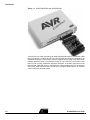
Figure 1-1. AVR AT90ICEPRO with AT90ADCPOD
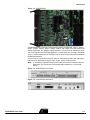
The AVR ICE unit is the main part of the AVR AT90ICEPRO system. AVR Studio, which
runs on a host PC, controls the ICE unit. The AVR ICE unit must be connected to an
available RS-232 port on the host PC with the supplied RS-232 cable. AVR Studio automatically detects if there is an emulator present on one of the PC’s serial ports. Note
that if no ICE is found, AVR Studio will show “Simulator” in the lower right corner of the
main window. If the ICE is found, “AVR Emulator” will be indicated and your connections
are correct. AVR Studio will issue a warning if a program previously run in emulator
mode is started in simulator mode.
1-2
AT90ICEPRO User Guide