1
Contents
Chapter 1: Getting Started
8
Overview
8
Caring for Your Phone
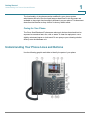
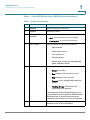
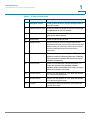
Understanding Your Phone Lines and Buttons
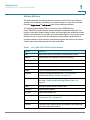
Softkey Buttons
Using the Keypad and Buttons with Menus
10
10
13
16
Using Keypad Shortcuts
16
Using the Navigation Button
16
Entering Numbers and Text in Fields
16
Using Phone Hardware and Accessories
17
Using the Speakerphone
17
Using Wired and Wireless Headsets
17
Connecting the Headset
17
Connecting Bluetooth Headsets
18
Using a Headset with Your IP Phone
20
Switching Between the Handset/Headset/Speakerphone
During a Call
Using the Cisco Attendant Console
Changing the Cisco SPA500DS Attendant Console Display
Chapter 2: Installing Your Phone
20
21
21
23
Before You Begin
23
Connecting the Handset
24
(Optional) Attaching the Desk Stand
26
(Optional) Mounting the Phone to the Wall
26
Connecting the Power
27
Connecting Your Phone to the Network
27
Connecting Your Phone to the Wired Network
27
Connecting Your Phone to the Wireless Network
28
Determining Your Wireless Router Security Type
Setting the Phone Wireless Connection
Using Wi-Fi Protected Setup
Cisco SPA525G and Cisco SPA525G2 SIP IP Phone User Guide
28
30
31
2