1
book.book Page 101 Wednesday, April 4, 2007 7:31 AM
1
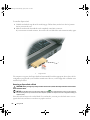
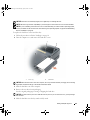
screws (2)
2
keyboard
4
keyboard cable
5
plastic bar on keyboard
connector
3
tabs
NOTICE: To avoid scratching the palm rest when replacing the keyboard, hook the tabs along the front edge of the
keyboard into the palm rest, and then press on the right edge near the top to snap the keyboard into place before
replacing the two screws.
Wireless Mini-Card
If you ordered a Mini-Card with your computer, the card is already installed.
CAUTION: Before you begin any of the procedures in this section, follow the safety instructions in the
Product Information Guide.
NOTICE: To help prevent damage to the system board, you must remove the battery from the battery bay before
you begin working inside the computer.
1 Follow the procedures in "Before You Begin" on page 89.
2 Remove the hinge cover. See "Hinge Cover" on page 99.
3 Remove the keyboard. See "Keyboard" on page 100.
4 If a Mini-Card is not already installed, go to step 5. If you are replacing a Mini-Card, remove the
existing card:
a
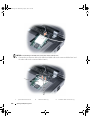
Disconnect the two antenna cables from the Mini-Card.
Adding and Replacing Parts
101