1
Controls
Controls
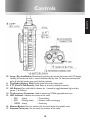
10 Lamp / Key lock Button: Momentarily pressing this button illuminates the LCD display.
Holding this button for over 1 second activates the key lock. To deactivate the key lock
press & hold the button again until the lock removes.
11 The Radio’s Battery Pack: Rechargable lithium-ion battey pack.
12 PTT (Push To Talk Switch): Hold down to transmit, release to receive.
13 H/L Button: Press and hold this button for 1 second to toggle between high and low
power (1 & 5 Watts).
14 The Accessory Connector: Used to attach any HT644 approved accessory.
15 LED Indicator: Indicates the status of the radio:
• RED
Steady
= Transmitting
• RED
Flashing slowly
= Battery needs re-charging
• GREEN Steady
= Receiving
16 Monitor Button: Press to monitor the channel without the squelch mute.
17 Antenna Connector: Use to attach the antenna of the radio.
14