1
Reference/Window Overview
Dimmer Patching
LightFactory
A Guide for Users
Dimmer Patching
LightFactory provides 2000 control channels that can be assigned
any number of DMX dimmers or intelligent fixtures. Up to 5000
DMX dimmers are supported by the software and can be patched to
the 2000 channels.
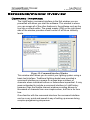
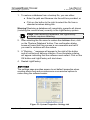
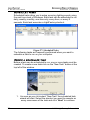
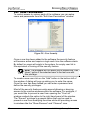
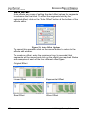
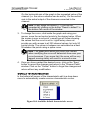
To modify the patching of dimmers or intelligent fixtures to channels
open the “Dimmer Patch” window by clicking on the “Dimmer
Patching” button on the right of the command window.
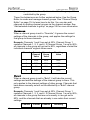
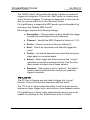
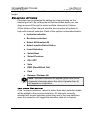
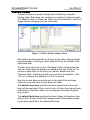
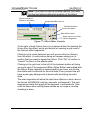
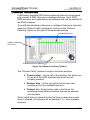
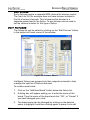
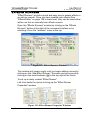
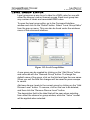
Available Dimmers
System Channels
or Fixtures
Available fixture for patching
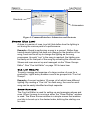
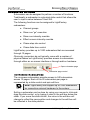
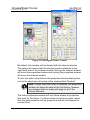
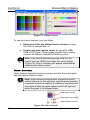
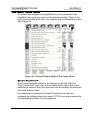
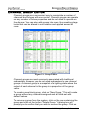
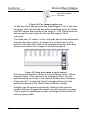
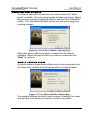
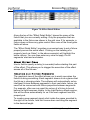
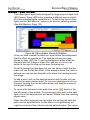
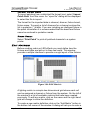
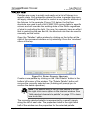
Figure 96: Dimmer Patching Window
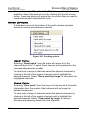
The “Dimmer Patch” window is broken into three sections.
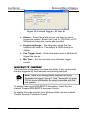
♦ Channel View – On the left of the window, this allows you
to see all of the 2000 channels and how they are
currently patched.
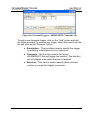
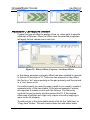
♦ Dimmer View – At the top right is the dimmer view,
containing all of the available dimmers
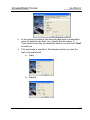
♦ Fixture List – At the bottom right is the fixture list,
containing all the different fixtures that can be patched
into channels.
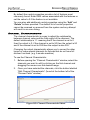
When LightFactory is started for the first time or when the current
show is cleared, all channels will be patched 1 to 1 with available
dimmers.
http://www.lifact.com
165