1
Some of the contents in this manual may
differ from your phone depending on the
software of the phone or your service
provider.
KS360 User Guide
ENGLISH
Congratulations on your purchase of the
advanced and compact KS360 phone by LG,
designed to operate with the latest digital
mobile communication technology.
Disposal of your old appliance
1 When this crossed-out wheeled bin symbol is attached to a product it
means the product is covered by the European Directive 2002/96/EC.
2 All electrical and electronic products should be disposed of separately
from the municipal waste stream via designated collection facilities
appointed by the government or the local authorities.
3 The correct disposal of your old appliance will help prevent potential
negative consequences for the environment and human health.
4 For more detailed information about disposal of your old appliance,
please contact your city office, waste disposal service or the shop
where you purchased the product.
G,
SET UP
01
YOUR STANDBY SCREEN
02
THE BASICS
03
GET CREATIVE
04
GET ORGANISED
05
VODAFONE LIVE!
06
SETTINGS
07
ACCESSORIES
08
Contents
GUIDELINES
Guidelines for safe and efficient use .......... 7
01 SET UP
Getting to know your phone ..................... 13
Open view ............................................... 14
Installing the SIM and battery .................. 16
Memory card ........................................... 19
Installing a memory card ........................ 19
Removing the memory card.................... 19
Formatting the memory card .................. 19
Menu map ............................................... 20
02 YOUR STANDBY SCREEN
Your standby screen ................................ 21
The status bar ....................................... 21
03 THE BASICS
Calls ........................................................ 22
Making a call......................................... 22
Making a call from your contacts ............ 22
Answering and rejecting a call ................ 22
Adjusting the call volume ....................... 23
Speed dialling........................................ 23
Viewing your call logs ............................ 23
Using call divert ..................................... 24
Using call barring................................... 24
Changing the call settings ...................... 25
4 LG KS360 | User Guide
Contacts .................................................. 26
Searching for a contact .......................... 26
Adding a new contact ............................ 26
Contact options ..................................... 26
Adding a contact to a group ................... 27
Renaming a group ................................. 27
Adding a picture to a contact .................. 27
Copying your contacts to your SIM .......... 28
Deleting all your contacts ....................... 28
Viewing information ............................... 28
Messaging ............................................... 29
Messaging ............................................ 29
Sending a message ............................... 29
Entering text .......................................... 30
Text input mode using the keypad........... 30
Setting up your email ............................. 30
Sending an email using your new
account................................................. 30
Using Postcard menu ............................. 31
Message folders .................................... 31
Managing your messages ...................... 31
Using templates..................................... 32
Changing your text message settings ...... 33
Changing your multimedia message
settings ................................................. 33
Changing your email settings ................. 34
Changing your other settings .................. 34
04
Ca
Vid
MP
26
26
26
26
27
27
27
28
28
28
29
29
29
30
30
30
30
31
31
31
32
33
33
34
34
04 GET CREATIVE
FM radio .................................................. 43
Using the FM radio ................................ 43
Camera.................................................... 35
Searching for stations ............................ 43
Taking a quick photo .............................. 35
Resetting channels ................................ 43
Before you’ve taken your photo .............. 35
Listening to the radio ............................. 43
After you’ve taken your photo ................. 36
Using the quick settings ......................... 36 My files.................................................... 44
Images.................................................. 44
Changing the image size ........................ 37
Images options menu............................. 44
Viewing your saved photos ..................... 37
Sending a photo .................................... 45
Setting a photo as Wallpaper or Picture ID .. 37
Organising your images ......................... 45
Video camera........................................... 38
Deleting an image ................................. 45
Shooting a quick video ........................... 38
Deleting multiple images ........................ 45
After you’ve shot your video ................... 38
Creating a slide show............................. 46
Getting to know the viewfinder................ 39
Sounds ................................................. 46
Using the quick settings ......................... 39
Using a sound ....................................... 46
Watching your saved videos ................... 39
Videos .................................................. 46
Adjusting the volume when viewing
Watching a video ................................... 46
a video .................................................. 39
Using options while video is paused ....... 47
MP3 player .............................................. 40
Sending a video clip............................... 47
MP3 player ........................................... 40
Video options menu ............................... 47
Transferring music onto your phone ........ 40
Documents............................................ 48
Playing a song ....................................... 40
Viewing a document .............................. 48
Using options while playing music........... 40
Others .................................................. 48
Creating a playlist .................................. 41
External memory ................................... 48
Playing a playlist .................................... 41 Games and Applications........................... 49
Editing a playlist .................................... 41
Games and Applications ......................... 49
Playing a game...................................... 49
Deleting a playlist .................................. 42
Viewing applications .............................. 49
Changing the network profile .................. 49
5
Contents
05 GET ORGANISED
G
07 SETTINGS
Organiser & Tools..................................... 50 Settings .................................................. 56
Adding an event to your calendar ........... 50
Changing your profiles ........................... 56
Editing a calendar event ......................... 50
Personalising your profiles...................... 56
Sharing a calendar event........................ 51
Changing your date & time ..................... 56
Adding a memo ..................................... 51
Changing the language .......................... 56
Setting your alarm ................................. 51
Changing your security settings .............. 57
Using the voice recorder ........................ 52
Changing your display settings ............... 57
Recording your voice memo ................... 52
Using flight mode................................... 58
Sending a voice recording ...................... 52
Resetting your phone ............................. 58
Using your calculator ............................ 52
Viewing memory status .......................... 58
Using the stopwatch .............................. 52
Changing your Bluetooth settings............ 58
Converting a unit ................................... 53
Changing your connectivity settings ........ 58
Adding a city to your world clock ............ 53
Pairing with another Bluetooth device ..... 59
Vodafone Services ................................. 53
Using a Bluetooth headset ...................... 59
Using your phone as a mass storage device .. 60
06 VODAFONE LIVE!
Transferring a file to your phone ............. 60
Vodafone live! .......................................... 54
Sending and receiving your files using
Accessing the web................................. 54
Bluetooth .............................................. 61
Adding and accessing your bookmarks ... 54
Saving a page ....................................... 55 08 ACCESSORIES
Accessing a saved page......................... 55 Accessories ............................................. 62
Viewing your browser history ................. 55 Network service....................................... 63
Changing the web browser settings ........ 55 Technical data ......................................... 63
General ................................................ 63
Ambient Temperatures .......................... 63
6 LG KS360 | User Guide
Ple
fol
or
Ex
TH
GU
WA
Yo
rec
no
fre
gu
of
pe
po
ind
pe
stu
sa
of
Th
em
Sp
lim
2.0
sta
tra
in
56
56
56
56
56
57
57
58
58
58
58
58
59
59
60
60
61
Please read these simple guidelines. Not
following these guidelines may be dangerous
or illegal.
Exposure to radio frequency energy
THIS DEVICE MEETS INTERNATIONAL
GUIDELINES FOR EXPOSURE TO RADIO
WAVES
Your mobile device is a radio transmitter and
receiver. It is designed and manufactured
not to exceed the limits for exposure to radio
frequency (RF) recommended by international
guidelines (ICNIRP). These limits are part
of comprehensive guidelines and establish
permitted levels of RF energy for the general
population. The guidelines were developed by
independent scientific organisations through
periodic and thorough evaluation of scientific
studies. The guidelines include a substantial
safety margin designed to assure the safety
of all persons, regardless of age and health.
The exposure standard for mobile devices
employs a unit of measurement known as the
Specific Absorption Rate, or SAR. The SAR
limit stated in the international guidelines is
2.0 W/kg*. Tests for SAR are conducted using
standard operating positions with the device
transmitting at its highest certified power level
in all tested frequency bands.
Although the SAR is determined at the highest
certified power level, the actual SAR of the
device while operating can be well below the
maximum value. This is because the device is
designed to operate at multiple power levels
so as to use only the power required to reach
the network. In general, the closer you are to
a base station, the lower the power output of
the device. Before a phone model is available
for sale to the public, compliance with the
European R&TTE directive must be shown.
This directive includes as one essential
requirement the protection of the health and
the safety for the user and any other person.
The highest SAR value for this device when
tested for use at the ear is 0.489 W/kg.
This device meets RF exposure guidelines
when used either in the normal use position
against the ear or when positioned at least
1.5 cm away from the body. When a carry
case, belt clip or holder is used for body-worn
operation, it should not contain metal and
should position the product at least 1.5 cm
away from your body. In order to transmit
data files or messages, this device requires
a quality connection to the network. In some
cases, transmission of data files or messages
may be delayed until such a connection is
available.
GUIDELINES
62
63
63
63
63
Guidelines for safe and efficient use
7
Guidelines for safe and efficient Use
Ensure the above separation distance
instructions are followed until the
transmission is completed. The highest SAR
value for this device when tested for use at
the body is 0.949 W/kg.
* The SAR limit for mobile devices used by the
public is 2.0 watts/kilogram (W/kg) averaged
over ten grams of body tissue. The guidelines
incorporate a substantial margin of safety to
give additional protection for the public and to
account for any variations in measurements.
SAR values may vary depending on national
reporting requirements and the network band.
For SAR information in other regions please
look under product information at www.
lgmobile.com.
FCC SAR information
GUIDELINES
Your mobile device is also designed to meet
the requirements for exposure to radio waves
established by the Federal Communications
Commission (USA) and Industry Canada.
These requirements set a SAR limit of 1.6
W/kg averaged over 1 gram of tissue. The
highest SAR value reported under this
standard during product certification for use
at the ear is 0.489 W/kg and when properly
worn on the body is 0.949 W/kg.
8 LG KS360 | User Guide
Additionally, this device was tested for typical
body-worn operations with the back of the
phone kept 0.79 inches (2cm) between the
users body and the back of the phone.
To comply with FCC RF exposure
requirements, a minimum separation distance
of 0.79 inches(2cm) must be maintained
between the user’s body and the back of
the phone.
Pr
On
ap
mo
inv
to
•
FCC Notice & Caution
Notice!
This device complies with part 15 of the FCC
Rules. Operation is subject to the following
two conditions:
(1) This device may not cause harmful
interference, and
(2) this device must accept any interference
received, including interference that may
cause undesired operation.
•
•
•
•
•
Caution!
Change or Modifications that are not
expressly approved by the manufacturer
could void the user’s authority to operate the
equipment.
•
al
ce
C
y
e
Product care and maintenance
WARNING
Only use batteries, chargers and accessories
approved for use with this particular phone
model. The use of any other types may
invalidate any approval or warranty applying
to the phone, and may be dangerous.
• Do not disassemble this unit. Take it to a
qualified service technician when repair
work is required.
• Keep away from electrical appliances such
as TVs, radios, and personal computers.
• The unit should be kept away from heat
sources such as radiators or cookers.
• Do not drop.
• Do not subject this unit to mechanical
vibration or shock.
• Switch off the phone in any area where
you are required by special regulations.
For example, do not use your phone in
hospitals as it may affect sensitive medical
equipment.
while it is being charged. It may cause an
electric shock and can seriously damage
your phone.
flammable material as the handset can
become hot and create a fire hazard.
• Use a dry cloth to clean the exterior of the
unit (do not use solvents such as benzene,
thinner or alcohol).
• Do not charge the phone when it is on soft
furnishings.
• The phone should be charged in a well
ventilated area.
• Do not subject this unit to excessive smoke
or dust.
• Do not keep the phone next to credit
cards or transport tickets; it can affect the
information on the magnetic strips.
• Do not tap the screen with a sharp object
as it may damage the phone.
• Do not expose the phone to liquid or
moisture.
• Use the accessories like earphones
cautiously. Do not touch the antenna
unnecessarily.
GUIDELINES
• Do not handle the phone with wet hands
• Do not to charge a handset near
9
Guidelines for safe and efficient Use
Efficient phone operation
Hospitals
•
Electronic and medical devices
Switch off your wireless device when
requested to do so in hospitals, clinics or
health care facilities. These requests are
designed to prevent possible interference with
sensitive medical equipment.
Av
All mobile phones may get interference,
which could affect performance.
• Do not use your mobile phone near
medical equipment without requesting
permission. Please consult your doctor to
determine if operation of your phone may
interfere with the operation of your medical
device.
• Some hearing aids might be disturbed by
mobile phones.
• Minor interference may affect TVs, radios,
PCs, etc.
Pacemakers
Pacemaker manufacturers recommend that a
minimum separation of 15cm be maintained
between a mobile phone and a pacemaker
to avoid potential interference with the
pacemaker. To achieve this use the phone on
the opposite ear to your pacemaker and do
not carry it in a breast pocket.
GUIDELINES
10 LG KS360 | User Guide
Road safety
Check the laws and regulations on the use of
mobile phones in the area when you drive.
• Do not use a hand-held phone while driving.
• Give full attention to driving.
• Use a hands-free kit, if available.
• Pull off the road and park before making
or answering a call if driving conditions so
require.
• RF energy may affect some electronic
systems in your vehicle such as car
stereos and safety equipment.
• When your vehicle is equipped with an
air bag, do not obstruct with installed or
portable wireless equipment. It can cause
the air bag to fail or cause serious injury
due to improper performance.
Da
ex
tim
no
ea
vo
Gl
So
of
mo
or
bre
Sto
is
Bl
Do
pro
reg
ith
of
g.
o
e
• If you are listening to music whilst out and
about, please ensure that the volume is at
a reasonable level so that you are aware
of your surroundings. This is particularly
imperative when near roads.
Avoid damage to your hearing
Damage to your hearing can occur if you are
exposed to loud sound for long periods of
time. We therefore recommend that you do
not turn on or off the handset close to your
ear. We also recommend that music and call
volumes are set to a reasonable level.
Glass Parts
Some parts of your mobile device are made
of glass. This glass could break if your
mobile device is dropped on a hard surface
or receives a substantial impact. If the glass
breaks, do not touch or attempt to remove.
Stop using your mobile device until the glass
is replaced by an authorized service provider.
Potentially explosive atmospheres
• Do not use the phone at a refueling point.
• Do not use near fuel or chemicals.
• Do not transport or store flammable
gas, liquid, or explosives in the same
compartment of your vehicle as your
mobile phone and accessories.
In aircraft
Wireless devices can cause interference in
aircraft.
• Turn your mobile phone off before boarding
any aircraft.
• Do not use it on the ground without
permission from the crew.
Children
Keep the phone in a safe place out of the
reach of small children. It includes small
parts which may cause a choking hazard if
detached.
Blasting area
GUIDELINES
Do not use the phone where blasting is in
progress. Observe restrictions, and follow any
regulations or rules.
11
Guidelines for safe and efficient Use
Emergency calls
Emergency calls may not be available
under all mobile networks. Therefore, you
should never depend solely on the phone
for emergency calls. Check with your local
service provider.
Battery information and care
• You do not need to completely discharge
the battery before recharging. Unlike
other battery systems, there is no memory
effect that could compromise the battery’s
performance.
• Use only LG batteries and chargers. LG
• Recharge the battery if it has not been
used for a long time to maximize usability.
• Do not expose the battery charger to direct
sunlight or use it in high humidity, such as
in the bathroom.
• Do not leave the battery in hot or cold
places, this may deteriorate the battery
performance.
replaced by an incorrect type.
the manufacturer’s instructions. Please
recycle when possible. Do not dispose as
household waste.
• If you need to replace the battery, take it
to the nearest authorized LG Electronics
service point or dealer for assistance.
pack clean.
• Replace the battery when it no longer
provides acceptable performance. The
battery pack maybe recharged hundreds of
times until it needs replacing.
GUIDELINES
12 LG KS360 | User Guide
OK
• Dispose of used batteries according to
• Do not disassemble or short-circuit the
battery pack.
Ma
• There is risk of explosion if the battery is
chargers are designed to maximize the
battery life.
• Keep the metal contacts of the battery
G
• Always unplug the charger from the wall
socket after the phone is fully charged to
save unnecessary power consumption of
the charger.
Le
Go
dir
Ca
Dia
and
cal
To
Act
pre
Na
•I
U
D
R
L
•I
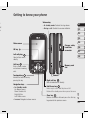
Getting to know your phone
Volume key
• In standby mode: Controls the ring volume.
• During a call: Controls the receiver volume.
y.
ct
s
s
01
02
03
04
05
Main screen
Charger, cable,
handsfree
connector
OK key
Left softy key
Goes to Quick menu
directly.
Navigation keys
• In standby mode:
Memory card
slot
Camera
Right soft key
Goes to Vodafone live! directly.
End/Power key
Ends or rejects a call. Turns the phone on/off.
Returns to the standby screen when you use the menu.
Clear key
Deletes a character with each press. Use this key
to go back to the previous screen.
SET UP
Up: Browser menu.
Down: Contacts list.
Right: My files.
Left: Profiles menu.
• In menu: Navigates between menus.
07
08
Call key
Dials a phone number
and answers incoming
calls.
Touchpad key
Activate the touch screen by
pressing the key.
06
13
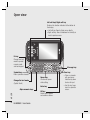
Open view
Left soft key/ Right soft key
Performs the function indicated at the bottom of
the display.
• Left soft key: Goes to Quick menu directly
• Right soft key: Goes to Vodafone live! directly or
back to previous menu.
Fn key
Change from text
mode to symbol/
numeric mode
and lock keypad.
Message key
Symbol key
Enters symbolic character.
Change the text mode
(Capital/ Small)
Space Key
Use to enter space
while editing.
Enter key
Alpha numeric keys
SET UP
14 LG KS360 | User Guide
OK key
Selects menu options
and confirms actions.
Clear key
• Clears a character
with each press.
Hold the key down
to clear all input.
• Use this key to go
back to a previous
screen.
01
f
02
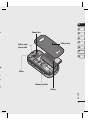
Camera lens
or
03
04
Battery cover
Battery cover
release latch
05
06
07
08
ey
Mirror
er
wn
o
us
Memory card slot
Battery
SET UP
15
Installing the SIM and battery
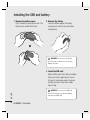
1 Remove the battery cover
Press the battery cover release latch. The
battery cover should lift off easily.
2 Remove the battery
Lever the bottom edge of the battery
and remove it carefully from the battery
compartment.
WARNING: Do not remove the battery
when the phone is switched on, as this may
damage the phone.
3 Install the SIM card
Slide the SIM card into the SIM card holder.
Make sure that the gold contact area on
the card is facing downwards. To remove
the SIM card, push it out of the holder
from the top.
SET UP
16 LG KS360 | User Guide
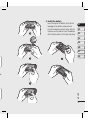
WARNING: Do not insert the SIM card
when the slide is open, as this may damage
your phone and SIM card.
4 Install the battery
Insert the top of the battery first into the
top edge of the battery compartment.
Ensure the battery contacts align with the
terminals on the phone. Press the bottom
of the battery down until it clips into place.
01
02
03
04
05
06
07
08
er.
SET UP
17
Installing the SIM and battery
M
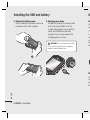
5 Replace the battery cover
Insert the bottom of the battery cover and
push down until it clicks into place.
In
6 Charging your phone
Pull open the cover of the charger socket
on the side of your KS360. Insert the
charger and plug into a mains electricity
socket. Your KS360 will need to be
charged until a message reading Fully
Charged appears on screen.
WARNING: Do not charge the phone when
it is on soft furnishings. The phone should be
charged in a well ventilated area.
Yo
on
T
Op
ca
pla
fac
Re
Op
me
ph
the
SET UP
18 LG KS360 | User Guide
t
Memory card
Installing a memory card
01
You can expand the memory space available
on your phone using a memory card.
02
TIP! A memory card is an optional accessory.
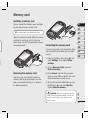
Open the memory card slot. Slide the memory
card into the slot cover, until it clicks into
place. Make sure that the gold contact area is
facing downwards.
03
04
05
Formatting the memory card
If your memory card is not already formatted,
you will need to do so before you can begin
using it.
1 From the standby screen press
and
select Settings. Then choose Phone
settings.
06
07
08
2 Choose Memory status and select
External memory.
Removing the memory card
Open the cover and carefully remove the
memory card by gently pushing it in to the
phone and quickly releasing it, as shown in
the following diagram:
3 Press Format and enter the password,
which is set to 0000 as default. Your card
will be formatted and ready to use.
4 To view the new formatted folders on your
KS360 press
and select My files.
Choose External memory.
SET UP
WARNING: When you format your memory
card, all the content will be wiped. If you do not
want to lose the data on your memory card,
back it up first.
19
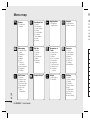
Menu map
Yo
Games
Vodafone live!
Applications
Camera
1 Download
Games
1
2
3
4
5
6
7
8
9
1 Download
Applications
1 Still camera
2 Video camera
Home
Bookmarks
Enter address
History
Saved pages
Settings
Information
News
Sports
Messaging
My files
1
2
3
4
5
6
7
New message
Inbox
Email box
Drafts
Outbox
Sent
Listen to
voicemail
8 Info messages
9 Templates
0 Settings
1
2
3
4
5
6
Call history
Google Search
1
2
3
4
5
6
7
All calls
Missed calls
Dialled calls
Received calls
Call duration
Call costs
Data
information
SET UP
20 LG KS360 | User Guide
Images
Sounds
Videos
Documents
Others
External
memory
Th
Th
thi
an
yo
Be
ico
Organiser &
Tools
1
2
3
4
5
6
7
8
9
Alarm clock
Calendar
Memo
Voice recorder
Calculator
Stopwatch
Unit converter
World clock
Vodafone
Services
Contacts
1
2
3
4
5
6
7
8
Search
New contact
Speed dials
Groups
Copy all
Delete all
Settings
Information
Music
Settings
1 MP3 player
2 FM radio
1
2
3
4
5
6
7
8
9
0
Profiles
Phone settings
Display
Shortcut
Connectivity
Call
Flight mode
Power save
Browser
Java settings
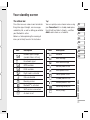
The status bar
Tip!
The status bar uses various icons to indicate
things like signal strength, new messages
and battery life, as well as telling you whether
your Bluetooth is active.
You can quickly access chosen menus using
your Favourites list. In standby mode press
the left soft key. Select <Empty>, and then
Add to add a menu as a favourite.
Below is a table explaining the meaning of
icons you’re likely to see in the status bar.
01
02
03
04
05
06
Icon
Description
Network signal strength
(number of bars will vary)
No network signal
GPRS available
EDGE available
Flight mode is activated
Calls are diverted
Roaming service
Bluetooth® is activated
WAP service is connected
An alarm is set
Icon
Description
Schedule
07
08
New message
New voice message
General profile in use
Silent profile in use
Vibrate profile in use
Outdoor profile in use
Headset profile in use
Remaining battery life
Battery empty
YOUR STANDBY SCREEN
s
Your standby screen
21
Calls
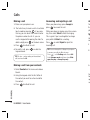
Making a call
Answering and rejecting a call
Ad
1 Make sure your phone is on.
When your phone rings, press Accept or
press
to answer the call.
To
the
ph
2 The fastest way to make a call is to activate
touch mode by pressing
. If you press
this key, you can touch the screen to enter
the phone number to call. Or, you can
use the keypad after opening the slide. To
delete a digit press
or the back arrow.
3 Press
to initiate the call.
4 To end the call, press
or slide the
keypad closed.
TIP! To enter + when making an international
call, touch and hold 0.
Making a call from your contacts
While your phone is ringing, press the camera
key, then select Silent to mute the ringing.
This is great if you have forgotten to change
your profile to Silent for a meeting.
Press
or select Reject to reject the
incoming call.
TIP! You can change the settings on your phone
to answer your calls in different ways.
Press
, select Settings and choose Call.
Select Answer mode and choose from Slide
open, Any key or Accept key only.
Sp
Yo
co
1
2
3
1 Select Contacts in the menu and choose
Search.
2 Using the keypad, enter the first letter of
the contact you want to call and scroll to
the contact.
3 Press
to initiate the call.
THE BASICS
22 LG KS360 | User Guide
To
ho
ap
au
ra
e
Adjusting the call volume
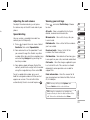
Viewing your call logs
To adjust the volume during a call, press
the volume key on the left hand side of your
phone.
Press
to view:
Speed dialling
and select Call history. Choose
All calls - View a complete list of all your
dialled, received and missed calls.
You can assign a speed dial number to a
contact you call frequently.
Missed calls - View a list of any calls you
have missed.
1 Press
Dialled calls - View a list of all the numbers
you have called.
2 Your voicemail is set to speed dial 1 and
Received calls - View a list of all the
numbers that have called you.
to open the main menu. Select
Contacts, then select Speed dials.
you cannot change this. Select any other
number either by using the navigation keys
and selecting Assign or by pressing the
hard key number.
3 Your address book will open. Select the
contact you’d like to assign to that number
using the navigation keys then select OK.
To call a speed dial number, press and
hold the assigned number until the contact
appears on screen. The call will initiate
automatically; there’s no need to press
.
Call duration - View details of how long you
have spent on your calls; received and dialled.
01
02
03
04
05
06
07
08
Call costs - View the charges applied to your
Last call or All calls. This service is network
dependent, some operators are unable to
support this.
Data information - View the amount of all
your received and sent data for Web, Data or
All, in kilobytes.
TIP! From any call log select Options and
choose Delete to delete selected items.
THE BASICS
TIP! Using the navigation keys highlight any
single call entry to view the date and time of the
call. To view the call duration select View.
23
Calls
Using call divert
Using call barring
Ch
1 Press
1 Press
1
, select Settings and choose
Call.
, select Settings and choose
Call.
2 Select Call divert.
2 Select Call barring.
3 Choose whether to divert all calls, when
3 Choose any or all of the seven options:
the line is busy, when there is no reply,
when you are out of reach, all data calls or
all fax calls.
4 Choose Activate and select whether to
divert to voicemail, another number or your
favourite number.
5 Enter your divert number or select Search
to browse Contacts for your divert
number.
Note: Charges are incurred for diverting
calls. Please contact your network provider
for details.
TIP! To turn off all call diverts, choose Cancel
all from the Call divert menu.
THE BASICS
24 LG KS360 | User Guide
All outgoing
Outgoing international
O/G international except home country
All incoming
Incoming when abroad
Cancel all barrings
Change password
4 Select Activate and enter the call barring
password. Please check with your network
operator for this service.
TIP! Select Fixed dial number from the Call
menu to turn on and compile a list of numbers
which can be called from your phone. You’ll
need your PIN2 code from your operator. When
activated, only numbers included in the fixed dial
list can be called from your phone.
2
ry
g
rk
Changing the call settings
1 Press
, select Settings and choose
Call.
2 From here you can amend the settings for:
Call divert - Choose whether to divert
your calls.
Call barring - Select which calls you
would like to be barred.
Fixed dial number - Choose a list of
numbers that can be called from your
phone.
Answer mode - Choose whether to
answer the phone using only the accept
key, any key or by sliding your handset
open.
Auto redial - Choose that the phone will
automatically try to redial in the case of
failure to connect a call.
Send DTMF tones - You can send the
DTMF (dual tone multi-frequency) tones
of the number on the display during a
call. This option is helpful for entering a
password or account number when you
call an automated system, like a banking
service.
01
02
03
04
05
06
07
08
Send my number - Choose whether your
number will be displayed when you call
someone.
Call waiting - Be alerted when you have
a call waiting.
Minute minder - Select On to hear a tone
every minute during a call.
THE BASICS
25
Contacts
Searching for a contact
Contact options
Ad
1 Select Contacts from the main menu,
There are many things you can do when
viewing a contact. Here’s how to access and
use the Options menu:
Yo
for
an
of
Co
alr
and choose Search. Or, press the right
navigation key.
2 Using the keypad or touchpad, enter the
first letter of the contact you want to call.
3 To scroll through the contacts and their
different numbers use the navigation keys.
1 Open Contacts. (see Searching for a
contact above)
2 Select Options to open the list of options.
From here you can:
Adding a new contact
Edit - Change any of the contact’s details.
1 Select Contacts and choose New
New message - Send a message to
the contact. If the contact has an email
address, select whether you’d like to send
a Message or Email.
contact.
2 Choose whether to store your new contact
on your Phone or SIM card.
3 Enter all the information you have in the
fields provided and select Save.
Or, use a slightly quicker method…
1 Enter the number you wish to store and
press Options.
2 Choose Save or Add to existing
contact.
3 Enter the relevant information as above
THE BASICS
and select Save.
26 LG KS360 | User Guide
Send via - Send the contact’s details to
another person as a business card. Choose
to send as a Text message, Multimedia
message, via Bluetooth or by Email.
Delete - Delete the contact. Select Yes if
you are sure.
New contact - Add a new contact.
Multi delete - Mark multiple contacts to
delete.
Copy to SIM/phone - Choose to move or
copy to the SIM card or phone (depending
on where you originally saved the contact).
1
2
3
4
T
g
r
t
d
s.
s.
d
se
a
f
Renaming a group
You can save your contacts into groups,
for example, keeping your work colleagues
and family separate. There are a number
of groups including Family, Friends,
Colleague, VIP, Group 1 and Group 2
already set up on the phone.
You can rename any of the groups to fit your
lifestyle.
1 Select Contacts and choose Groups.
2 Scroll to the group you wish to add a
contact to and select View then select
Add.
3 Your contacts list will open. Scroll to any
contacts you would like to add to the group
and press
, then select Done.
4 Select Yes if you are sure.
TIP! You can assign a ringtone or icon to a
group. Select the group you wish to assign the
ringtone or icon to, select Options and choose
the item you want.
01
02
1 Select Contacts and choose Groups.
2 Select the group you want to rename.
3 Choose Options, select Rename and
enter your new group name.
4 Select Save.
Note: You can only assign a contact to a
group or add a picture to a contact that is
saved in your phone (not SIM) memory.
03
04
05
06
07
08
Adding a picture to a contact
You can change the appearance of your
contacts in your address book to include a
picture.
1 Select Contacts and choose Settings.
2 Select View options and choose With
picture.
3 Then return to the address book and select
the contact you want to add a picture to.
4 Choose Options and select Edit.
THE BASICS
or
g
t).
Adding a contact to a group
27
Contacts
5 Scroll down to the Photo section. Choose
Options and select Images or New
image. If you select Images, you can
choose an image that is saved in your
phone memory. If you select New image,
your camera viewfinder will open, so you
can take a picture of your contact. Take the
picture then press Set.
6 Select Save.
Copying your contacts to your SIM
You can also choose to copy your contacts
from your SIM to your handset or from your
handset to your SIM.
1 Select Contacts and choose Copy All.
2 Select to copy the contacts from SIM to
phone or Phone to SIM.
3 Choose whether to Keep original or
Delete original.
4 Select Yes if you are sure.
THE BASICS
28 LG KS360 | User Guide
M
Deleting all your contacts
M
1 Select Contacts and choose Delete all.
Yo
(Sh
Me
ne
2 Select to delete contacts from SIM or
Phone.
3 Select Yes if you are sure.
4 Enter the password, which is set to 0000
as default, and select OK.
Se
1
Viewing information
Select Contacts and choose Information.
From here you can view your Service dial
numbers, your Own number and your
Business card.
2
TIP! If you haven’t yet created a business card,
the Business card screen will give you the
option to create one. Select New and enter your
details as you would for any contact. Choose
Save.
3
4
Messaging
Messaging
5 Select Options and choose Insert to add
an Image, Sound, Video, Symbol, Text
template, Emoticon, Name & Number,
New slide, Subject or More (Contact/
My business card/Schedule).
Your KS360 includes functions related to SMS
(Short Message Service), MMS (Multimedia
Message Service) and email, as well as the
network’s service messages. Simply press
and select Messaging.
6 Choose Send to.
Sending a message
7 Enter the phone number or press Options
1 Press
, select Messaging and choose
New message.
2 Choose Message to send an SMS or
MMS. (If you want to send an Email see
page 30 or if you want to send something
using Bluetooth, see page 61.)
3 A new message editor will open.
Message editor combines SMS and MMS
into one intuitive and easy to switch
between mode. The default setting of the
message editor is SMS mode.
and select Contacts or Recent list
to open your contacts list. You can add
multiple contacts.
8 Select Send.
WARNING: If an Image, Sound, Video,
New slide or Subject is added to the message
editor, it will be automatically converted to MMS
mode and you will be charged accordingly.
01
02
03
04
05
06
07
08
4 Enter your message using the keypad. See
page 30 for more information on how to
enter text.
THE BASICS
29
Messaging
Entering text
You can enter alphanumeric characters using
the phone’s keypad. For example, storing
names in Contacts, writing a message and
creating scheduling events in the calendar all
require entering text. The following text input
methods are available in the phone: ABC
manual mode and 123 mode.
Note: Some fields may allow only one text
input mode (e.g. telephone number in address
book fields).
To input a symbol in the text entry field, press the
key and select a symbol, then select OK.
Scroll using the naivgation keys to show more
symbol options.
Complete each word with a space by
pressing
.
To delete a character, press
key.
Text input mode using the keypad
THE BASICS
When you are required to enter text, for
example when writing a message, the keypad
will default to ABC mode. If you are entering
a number, for example when making call, the
keypad keys with numbers on will default to
numbers.
30 LG KS360 | User Guide
In ABC mode you can enter numbers by
first pressing [Fn] and then the number you
require.
Us
Setting up your email
2
You can stay in touch on the move using
email on your KS360. It’s quick and simple to
set up a POP3 or IMAP4 email account.
3
1 Press
1
, select Messaging and choose
Settings.
2 Select Email then Email account.
4
3 Select New.
4 You can see Vodafone E-M@il as a default.
Sending an email using your new
account
5
To send/receive an email, you should set up
an email account (see above).
No
co
pro
1 Press
, select Messaging and choose
New message.
2 Choose Email and a new email will open.
3 Write a subject then press OK.
4 Enter your message using the keypad.
M
Pre
str
ex
Inb
pla
for
Using Postcard menu
1 Press
, select Messaging and choose
New message.
2 Choose live! Postcard and a new
postcard will open.
to
se
3 Enter text using the keypad. You can
choose Options and then Insert to
attach an Image, Text template, Symbol,
Emoticon, Name & number.
4 Press Options and Send to. You will be
ult.
prompted to fill out the fields: Name,
Additional info, Address, Post code, City,
State, Country. Choose Send to send the
Postcard.
5 Press
se
to send the created postcard.
Note: This service is not available in all
countries. Please contact your service
provider for further information.
Message folders
.
Press
, select Messaging. The folder
structure used on your KS360 is fairly selfexplanatory.
Drafts - If you don’t have time to finish
writing a message, you can save what you
have done so far here.
Outbox - This is a temporary storage folder
while messages are being sent.
01
02
03
04
05
06
Sent - All the messages you send are placed
into your Sent folder.
07
Listen to voicemail - You can access your
voicemail box (if provided by your network).
When a new voice message is received,
the symbol will be displayed on the standby
screen.
08
Info messages - All info messages and
updates received from your operator.
Templates - A list of useful messages,
already written for a quick reply.
Managing your messages
You can use your Inbox to manage your
messages.
1 Press
Inbox.
, select Messaging and choose
THE BASICS
Inbox - All the messages you receive are
placed into your Inbox. From here you can reply,
forward and more, see page 31 for details.
Email box - Contains all your email
messages. Select the account you want to
use then select Retrieve. Your KS360 will
connect to your email account and retrieve
your new messages.
31
Messaging
2 Select Options and then choose to:
Delete - Delete the selected message.
Reply - Send a reply to the selected
message.
Forward - Send the selected message on
to another person.
Return call - Call the person who sent
you the message.
Threaded view/General view - Choose
the way messages are displayed in your
inbox.
Information - View the details of a
message, for example, the time it was
sent.
Copy/Move - Choose to copy or move
the selected message to the SIM card or
phone.
Multi delete - Delete selected messages.
Delete all read - All opened messages
will be deleted.
Delete all - Delete text messages,
multimedia messages or all messages.
THE BASICS
If you see the message No space for SIM
message, you should delete some messages
from your inbox.
32 LG KS360 | User Guide
If you see the message No space for
messages, you can delete either messages
or saved files to create space.
Ch
Using templates
If y
ca
You can create templates for the Text and
Multimedia messages you send most
frequently. There are some templates already
on your phone, which can be edited if you
wish.
Yo
so
Pre
Se
ch
1 Press
Me
Fa
2 Choose Text or Multimedia template. In
Va
me
, select Messaging and choose
Templates.
text template menu, you can then select
Options and choose Edit to change
existing templates, to add New or to
Delete templates.
3 To send a template, select the one you
want to send, choose Options and select
Send via.
4 Choose how you would like to send the
template, as a Message, Bluetooth
message or Email.
5 Choose a contact and select Send.
De
co
Re
yo
Me
for
Ch
ch
of
Se
yo
at
Be
yo
Changing your text message settings
s
Your KS360 message settings are pre-defined
so that you can send messages immediately.
If you would like to change the settings, you
can do this using the Settings options.
y
, select Messaging, then choose
Press
Settings and Text message. You can make
changes to:
se
Message type - Convert your text into Voice,
Fax, Paging, X.400, Email or ERMES.
n
Validity period - Choose how long your
message is stored at the message centre.
t
Delivery report - Choose to receive
confirmation that your message was delivered.
Reply charging - Choose to be billed for
your message recipient’s reply.
Message centre number - Enter the details
for your message centre.
Character encoding - Choose how your
characters are encoded. This impacts the size
of your message and therefore data charges.
Bearer setting - Choose whether to send
your messages via GSM or GPRS.
Your KS360 message settings are pre-defined
so that you can send messages immediately.
If you would like to change the settings, you
can do so using the Settings options.
01
02
03
04
, select Messaging, then choose
Press
Settings and Multimedia message.
05
You can make changes to:
06
Slide duration - Choose how long your
slides appear on screen.
07
Priority - Choose the priority level of your
multimedia message.
08
Validity period - Choose how long your
message is stored at the message centre.
Delivery report - Choose to allow and/or
request a delivery report.
Read report - Choose to allow and/or send
a read report.
Auto download - Choose to automatically
or manually download multimedia messages
depending on whether you are at home or
roaming.
Network profile - Select an operator
specific network profile for sending
multimedia messages.
THE BASICS
Send long text as - Choose whether to send
your message as SMS or MMS when you enter
a text longer than 2 pages in the message field.
Changing your multimedia message
settings
33
Messaging
C
Permitted message type - Select which
type of multimedia messages to allow.
New email notification - Choose
whether or not to be alerted to new emails.
Changing your email settings
Signature - Create an email signature and
switch this feature on.
You can adapt your email settings to your own
preferences.
1 Press
, select Messaging and choose
Settings.
2 Select Email then you can adapt the
following settings:
Email account - You can set up an email
account.
Access point - You can set the email
access point.
Retrieve interval - Choose how often
your KS360 checks for new email
messages.
Auto retrieval in roaming - Choose
whether or not to automatically retrieve
your messages when abroad.
Include original message - Choose
whether or not to include the original
message.
THE BASICS
Include attachment - Choose whether or
not to include the original attachment.
34 LG KS360 | User Guide
Priority - Choose the priority level of your
email messages.
Ta
1
2
Changing your other settings
3
Press
, select Messaging, choose
Settings then:
4
Voicemail number - Your voicemail number
is stored here. Contact your network operator
for more information on the service they
provide.
Service message - Here you can switch
off service message, which means your
messages will no longer be pushed directly to
your device as they are received, only when
you check for new messages. You can also
change your service message security.
Info message - Choose the reception status,
alerts and language of your info messages.
Save text message - Choose whether
to save your text messages to the phone
memory or to the external memory.
No
fro
se
the
ls.
nd
ur
er
or
to
us,
Camera
Taking a quick photo
Before you’ve taken your photo
1 Hold the camera key down on the left side
Press
of the handset. The camera viewfinder will
appear on screen.
2 Holding the phone horizontally, point the
lens towards the subject of the photo.
3 Position the phone so you can see the
subject of your photo.
4 Press
or press the camera key all the
way down to take a photo.
Note: You can also access the camera menu
from the standby screen. Press
and
select Camera. Select Still camera to open
the viewfinder.
to access these options:
01
Self timer - The self-timer allows you
to set a delay after the capture button is
pressed. Choose from 3 seconds, 5 seconds
or 10 seconds. Great for that group photo you
want to be part of.
02
Multi shot - This enables you to take
up to 9 shots automatically in very quick
succession, great for taking photos of moving
objects or at sporting events.
05
White balance - The white balance
ensures that any white in your photo is
realistic. In order for your camera to correctly
adjust the white balance you may need to
determine the light conditions. Choose from
Auto, Daylight, Incandescent, Cloudy,
Fluorescent or Night mode.
03
04
06
07
08
Colour effect - Choose from four
colour tone options: Off (normal/colour),
Sepia, Mono (black and white) or Negative.
GET CREATIVE
EV - Turn macro mode on if you are
taking a picture very close to the image
subject.
35
Camera
After you’ve taken your photo
Using the quick settings
Ch
Your captured photo will appear on the
screen. The name of the image runs along
the bottom of the screen and you will see
six options displayed on the left side of the
screen.
Select Options to access the quick settings
options. These include various options for
taking photos.
OK - Select to take another photo
straightaway. Your current photo will be saved.
Display - Choose Standard or Clean mode.
Yo
me
the
mo
pic
nu
New image - Take another photo
straightaway. Your current photo will be
saved.
Set as - Select to open a sub menu to
set your image as Wallpaper or Picture ID.
Send via - Select to send the photo as
a Multimedia message or Email. See page
23 for Sending a message.
Album - Select to look at the other
photos in your album. Your current photo will
be saved. See page 37 for Viewing your
saved photos.
GET CREATIVE
Delete - Delete the photo you have just taken
and confirm by selecting Yes. The viewfinder
will reappear.
36 LG KS360 | User Guide
Video camera - Convert from camera mode
to video camera mode.
Resolution - See Changing the image
size on page 37.
Quality - Choose between Normal, Fine and
Super fine. The finer the quality, the sharper
a photo will be. The file size will increase as a
result, which means you will be able to store
fewer photos in your memory.
Shutter tone - Select one of the three
shutter sounds.
1
2
3
Vi
1
Save to - Choose whether to save your
photos to the phone memory or to the
external memory.
Reset settings - Choose Yes to reset your
phone to the original camera settings.
2
3
e
nd
er
a
e
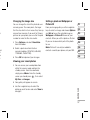
Changing the image size
You can change the size of the photo to save
memory space. The more pixels, the larger
the file size, which in turn means they take up
more of your memory. If you want to fit more
pictures on your phone you can alter the pixel
number to make the file size smaller.
1 Press Options and select Resolution
from the toolbar.
2 Select a pixel value from the four
numerical options (320x240, 640x480,
1280x960, 1600x1200).
3 Press OK to implement your changes.
Setting a photo as Wallpaper or
Picture ID
From your image gallery, use the navigation
keys to select an image and choose Options
and Set as to use the selected image as
Wallpaper or Picture ID for one of your
contacts. When you set the photo as Picture
ID you can choose which part of the photo
to use.
Note: Picture ID can only be added to
contacts saved to your phone, not your SIM.
01
02
03
04
05
06
07
08
Viewing your saved photos
1 You can access your saved photos from
within the camera mode and from the
standby screen. From the viewfinder,
simply press Album. From the standby
screen you should press
, then select
My files and Images.
2 Your gallery will appear on screen.
3 Use the navigation keys to select the
GET CREATIVE
photo you want to view and select View to
enlarge it.
37
Video camera
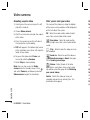
Shooting a quick video
After you’ve shot your video
Ge
1 Quickly press the camera key on the left
The name of the video runs along the bottom
of the screen and six options will be displayed
on the left side of the screen.
No
vo
side of the handset.
2 Choose Video camera.
3 Point the camera lens towards the subject
of the video.
4 Press the camera key on the left side of
the handset to start recording.
5 REC will appear in the bottom right corner
of the viewfinder and a timer will show the
length of your video.
6 To pause the video select Pause and
resume by selecting Resume.
7 Select Stop to stop recording.
Note: You can also access the Video
camera from the standby screen. Press
and select Camera, scroll down and select
Video camera to open the viewfinder.
GET CREATIVE
38 LG KS360 | User Guide
OK - Select to record another video straight
away. Your current video will be saved.
New video - Select to shoot another
video straight away. Your current video will be
saved.
Play - Select to play the video you have
just recorded.
Send via - Select to send the video as
a Multimedia message or Email. See page
29 for Sending a message.
Album - Select to look at the other
video clips in your album. Your current video
clip will be saved. See page 39 for Watching
your saved videos.
Delete - Delete the video you have just
recorded and confirm by selecting Yes. The
viewfinder will reappear.
Us
Se
op
rec
Ca
to
Di
Re
on
nu
be
32
Qu
Sa
cli
me
Re
ph
m
ed
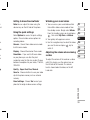
Getting to know the viewfinder
Watching your saved videos
Note: You can adjust the zoom using the
volume keys on the left side of the phone.
1 You can access your saved videos either
Using the quick settings
be
ve
as
ge
o
ng
Select Options to access the quick settings
options. These include various options for
recording videos.
Camera - Convert from video camera mode
to still camera mode.
Display - Choose Standard or Clean mode.
Resolution - If you want to fit more videos
on your phone you can alter the pixel
number to make the file size smaller. Choose
between two options for your video, 176x144,
320x240.
Quality - Super fine/ Fine/ Normal.
from within video camera mode or from
the standby screen. Simply select Album.
From the standby screen you should press
, then select My files and Videos.
2 Your gallery will appear on screen.
3 Use the navigation keys to select the video
you want to view and press
watch it.
key to
Adjusting the volume when viewing
a video
01
02
03
04
05
06
07
08
To adjust the volume of the audio on a video
whilst it is playing, use the volume keys on
the left side of the handset. The volume
level is shown below the video, on the left
hand side.
Save to - Choose whether to save your video
clip to the phone memory or to an external
memory.
Reset settings - Choose Yes to reset your
phone to the original video camera settings.
GET CREATIVE
39
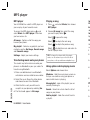
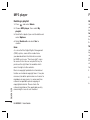
MP3 player
MP3 player
Playing a song
Your LG KS360 has a built-in MP3 player so
you can play all your favourite music.
1 Press
and
To access the MP3 player, press
select Music then MP3 player. From here
you have access to:
2 Choose All songs then select the song
and select Music, then choose
MP3 player.
you want to play. Select
.
Se
Ri
Inf
ab
Se
Eq
Select
to pause the song.
All songs - Contains all of the songs you
have on your phone.
Select
to skip to the next song.
Cr
My playlist - Contains any playlists you have
created as well as On the go, Recent songs
and Favourite songs.
Select
to skip to the previous song.
Select
to stop the music and return to
the MP3 player menu.
Yo
as
Settings - Adjust your music settings.
Transferring music onto your phone
The easiest way to transfer music onto your
phone is via Bluetooth or your sync cable. To
transfer using Bluetooth:
1 Make sure both devices have Bluetooth
switched on and are visible to one another.
2 Select the music file on the other device
and choose to send it via Bluetooth.
3 When the file is sent you will have to
GET CREATIVE
accept it on your phone by selecting Yes.
4 The file should appear in All songs.
40 LG KS360 | User Guide
TIP! To change the volume while listening to
music, use the volume keys on the left side of
your phone, or the up and down navigation keys.
Using options while playing music
1
2
3
4
Select Options and choose from:
Minimise - Hide the music player screen so
that you can continue using your phone as
normal while music is playing.
View playlist - Look at the playlist you are
currently listening to.
5
Pl
1
Search - Search for a track from the list of
songs on your phone.
2
Add to playlist - Adds the current track to
a playlist.
3
e
Set as - Set the current track as your
Ringtone or Message tone.
Information - You can view information
about the music file you are listening to.
Settings - Change the Shuffle, Play mode or
Equalizer settings.
to
o
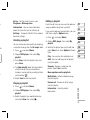
Editing a playlist
From time to time, you may want to add new
songs or delete songs from a playlist.
03
1 Press
04
and select Music.
2 Choose MP3 player, then select My
You can create your own playlists by choosing
a selection of songs from the All songs folder.
3 Scroll to the playlist you want to edit and
and select Music.
2 Choose MP3 player, then select My
playlist.
3 Press New, enter the playlist name and
press Save.
4 The New playlist folder will show. Select
all of the songs that you would like to
include in your playlist by scrolling to them
and selecting
.
5 Select Save to store the playlist.
05
06
select View, then select Options. Choose
from:
07
Play - You can play the selected music.
08
Add - You can add songs to the playlist
using this option.
Remove - Remove a song from the
playlist. Select Yes to confirm.
Move up/down on the playlists.
Multi delete - Select and delete songs
from the playlist.
playlist.
3 Select the playlist you would like to play
.
Information - View the playlist
information.
GET CREATIVE
and select Music.
2 Choose MP3 player, then select My
and select View, then select
playlist.
Remove all - Remove all of the songs
from the playlist.
Playing a playlist
1 Press
02
If you want to organise your playlists, you can
edit them using the Options menu.
Creating a playlist
1 Press
01
41
MP3 player
F
Deleting a playlist
Us
1 Press
Yo
yo
list
and select Music.
2 Choose MP3 player, then select My
playlist.
3 Scroll to the playlist you want to delete and
select Options.
4 Select Delete all and select Yes to
confirm.
Note:
No
ord
the
tha
Se
GET CREATIVE
As a result of the Digital Rights Management
(DRM) system, some of the media items
you download from the Internet or receive
by MMS may have a “Purchase right” menu
to access them. You can acquire the key to
purchase the right from the website which
owns the rights to the contents.
Yo
by
au
sp
to
ch
Music is copyright protected in international
treaties and national copyright laws. It may be
necessary to obtain permission or a licence to
reproduce or copy music. In some countries
national law prohibits private copying of
copyrighted material. Please check the
national legislation of the applicable country
concerning the use of such material.
1
42 LG KS360 | User Guide
To
2
3
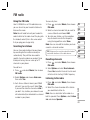
FM radio
Using the FM radio
To manually tune:
Your LG KS360 has an FM radio feature so
you can tune in to your favourite stations to
listen on the move.
1 Press
Note: You will need to insert your headset in
order to listen to the radio. Insert the plug into
the headset socket (this is the same socket
that you plug your charger into).
Searching for stations
You can tune radio stations into your phone
by searching for them either manually or
automatically. They will then be saved to
specific channel numbers so you don’t have
to keep re-tuning. You can save up to 12
channels in your phone.
To auto tune:
1 Press
and select Music, then choose
FM radio.
2 Select Options and choose Auto scan
then select Yes.
3 Each time a station is found, your KS360
01
TIP! To improve the reception extend the headset
cord, which functions as the radio antenna.
07
02
03
04
05
06
08
Resetting channels
1 Press
and select Music, then choose
FM radio.
2 Select Options and select Reset channels.
Choose Yes to confirm the reset. Each channel
will return to the starting 87.5Mhz frequency.
Listening to the radio
1 Press
and select Music, then choose
FM radio.
2 Select the channel number of the station
you would like to listen to.
Note: You can also listen to the radio via a
built-in speaker. Press Options, select Listen
via and choose Speaker.
GET CREATIVE
will ask if you want to save it. Select Yes
if you want to store the channel and No if
you don’t. Any stations you choose to save
will automatically be allocated to a channel
number in your phone.
and select Music, then choose
FM radio.
2 Select a channel number that you want to
save a station to and choose Edit.
3 To enter your station, use the navigation
keys to search or enter the frequency
using the keypad then select Save.
Note: You can also edit the stations you have
saved in a channel number.
43
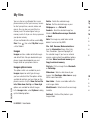
My files
You can store any multimedia files in your
phone memory so that you have easy access
to all of your pictures, sounds, videos and
games. You can also save your files to a
memory card. The advantage of using a
memory card is that you can free up space on
your phone memory.
Delete - Delete the selected image.
All your multimedia files will be saved in My
files. Press
then select My files to open
a list of folders.
Note: The image may need to be resized
before it can be sent by MMS.
Images
Images contains a folder of default images
and default flash files pre-loaded onto your
phone, images downloaded by you and
images taken on your phone camera.
Images options menu
GET CREATIVE
The options which are available to you in
Images depend on what type of image
you have selected. All of the options will be
available for pictures you have taken on the
phone’s camera. Only the View, Set as, File
info, Slide show, Sort by and View style
options are available for default images.
In the Images folder, select Options to bring
up the following options.
44 LG KS360 | User Guide
Set as - Set the selected image as your
Wallpaper or as a Picture ID.
Send via - Send the selected image to a
friend via Multimedia message, Bluetooth
or Email.
File - Edit, Rename, Make animation or
view the Information (Name, Size, Date,
Time, Resolution, Type and Copyright) of
the selected image. If you have an external
memory card inserted, two additional options
will show: Move to external memory and
Copy to external memory.
So
Ty
Vie
ph
Se
1
2
3
4
5
Print via - Print an image file via Bluetooth
or Pictbridge.
Slide show - Watch a slide show of your
images. See Creating a slide show on page
48 for more information.
New folder - Create a new folder within the
main Images folder.
Mark/Unmark - Select more than one image
to delete.
Delete all - Delete all the photos in your
Images folder.
Or
1
2
3
4
Sort by - Arrange your images by Date,
Type or Name.
View style - Change the way you view your
photos.
h
Sending a photo
1 Press
then select My files.
2 Select Images.
3 Select a photo and choose Options.
4 Select Send via and choose from
Multimedia message, Bluetooth or Email.
s
h
ge
e
Email, your photo will be attached to the
message and you can write and send
the message as normal. If you choose
Bluetooth, you will be prompted to turn
Bluetooth on and your phone will search
for a device to send the picture to.
Organising your images
1 Press
then select My files.
2 Select Images.
3 Choose Options then select Sort by.
4 Choose from Date, Type or Name.
1 Press
then select My files.
2 Select Images.
3 Select an image and press Options.
4 Select Delete and confirm by pressing
01
02
03
04
Yes.
Deleting multiple images
05
1 Press
06
then select My files.
2 Select Images.
3 Choose Options and select Mark/
Unmark and Delete.
07
08
4 A box will appear next to each image.
Select
to mark each image. To unmark
an image, select
again so that the
tick disappears from the box. Or, you can
select Options then choose Mark all or
Unmark all.
5 Once you have marked all of the
appropriate boxes, select Done and
confirm you want to delete all of the
marked images.
GET CREATIVE
ge
5 If you choose Multimedia message or
Deleting an image
45
My files
Creating a slide show
Using a sound
Us
If you want to look at all of the images on
your phone or scan through what you’ve got,
you can create a slide show to save you from
having to open and close each individual
image.
1 Press
By
pla
ch
1 Press
then select My files.
2 Select Images.
3 Choose the photo you would like to begin
the slide show and select Options.
4 Choose Slide show and it will begin.
5 Press Pause to pause the slide show and
Quit to end the slide show and return to
the Images folder.
During the slide show, press Options to
choose between Full image and Full
screen. Select Landscape to change the
orientation of the image.
Sounds
GET CREATIVE
The Sounds folder contains the Default
sounds, your Voice recordings and sound
files downloaded by you. From here you can
manage, send or set sounds as ringtones.
46 LG KS360 | User Guide
then select My files.
2 Scroll to and select Sounds.
3 Select Default sounds or choose from the
list of voice recording files.
4 Select a sound and press
to listen to it.
5 Select Options, select Set as and
choose from Ringtone, Ringtone ID and
Message tone.
Videos
The Videos folder shows the list of
downloaded videos and videos you have
recorded on your phone.
then select My files.
2 Scroll to and select Videos.
3 Select a video and press
Se
via
Bl
Inf
Tim
se
Se
1
2
Watching a video
1 Press
De
3
4
.
5
Using options while video is paused
he
it.
d
By selecting Options, the video you are
playing will be in pause mode and you can
choose from:
Delete - Delete the video.
Send via - Send the video to a friend
via Multimedia message, Email and
Bluetooth.
Note: The video may need to be resized
before it can be sent by MMS. Some videos
may be too large to send by MMS at all.
Video options menu
In the Videos folder highlight a video and
press Options to bring up the following list
of options.
Delete - Delete the selected video.
01
02
03
04
05
Information - View the Name, Size, Date,
Time, Type and Copyright details of the
selected file.
Send via - Send the selected video to a
friend via Multimedia message, Email or
Bluetooth.
06
Sending a video clip
File - Rename the video or view the
information (Name, Size, Date, Time, Type and
Copyright).
08
1 Press
then select My files.
2 Scroll to and select Videos.
3 Select the video clip you want and press
Options.
4 Press Send via and choose from
If you have an external memory card inserted
two additional options will show: Move to
external memory and Copy to external
memory.
Multimedia message, Email and
Bluetooth.
New folder - Create a new folder within the
main Videos folder.
5 If you choose Message or Email, your
Mark/Unmark - Select more than one video
clip before selecting Delete.
Delete all - Delete all the clips in your Videos
folder.
Sort by - Arrange your videos by Date, Type
or Name.
GET CREATIVE
video clip will be attached to the message
and you can write and send the message
as normal. If you choose Bluetooth, you
will be prompted to turn Bluetooth on and
your phone will search for a device to send
the video to.
07
47
My files
Auto next play - Allows to set the play
mode: Off, Repeat once and Repeat all.
• Off: Plays the selected file.
• Repeat once: Plays all files in a list once.
• Repeat all: Continues to play all files in a
list repeatedly.
List view / Thumbnail view - Change the
way you view your videos.
G
Others
Ga
From the Others menu, you can view the files
which are not saved in the Images, Sounds,
Videos or Documents folders.
Yo
to
to
ad
sa
You may find that when you transfer files
from your computer to your phone, they
appear in the Others folder rather than the
Documents folder. If this happens you can
move them.
Documents
To move a file from Others to Documents:
From the Documents menu, you can view
Excel, PowerPoint, Word, Text and PDF files.
1 Press
Viewing a document
2 Select a file and select Options.
1 Press
3 Press Move, then select Move again.
then select My files.
, then select My files followed
by Others.
External memory
3 Select a document and press View.
If you’ve inserted a memory card it will
be displayed as a folder within My files.
Your external memory folder will be divided
into five further folders: Images, Sounds,
Videos, Documents and Others. Each
folder will contain all the files of that type
which are saved to your memory card rather
than your handset.
GET CREATIVE
2 Select Documents.
48 LG KS360 | User Guide
Pl
1
2
No
co
ch
Vi
Yo
ins
Ap
do
1
2
es
d
r
Games and Applications
Games and Applications
Changing the network profile
Your KS360 comes with preloaded games
to keep you amused when you have time
to spare. If you choose to download any
additional games or applications they will be
saved into this folder.
To download a game, you can set the value
to connect to the network using Network
profile.
01
1 Press
03
Playing a game
2 Select Network profile.
1 Press
3 You can add and edit a new network
and select Games.
2 You can use this menu to download and
play games.
Note: An additional cost is incurred when
connecting to this service. Check your data
charges with your network provider.
and select Vodafone live! and
choose Settings.
profile.
02
04
05
06
07
08
Viewing applications
You can manage the Java applications
installed in your phone by using the
Applications menu. You can also delete
downloaded applications.
1 Press
and select Applications.
2 View and manage any applications you
have.
GET CREATIVE
49
Organiser & Tools
Adding an event to your calendar
1 From the standby screen press
, and
select Organiser & Tools, then Calendar.
2 Select the date you would like to add an
event to. You can choose a date either by
scrolling to it using the navigation keys or
by selecting Options and Go to date in
order to enter a date.
3 Select New schedule and scroll down to
enter the time you would like your event to
begin. Scroll down and enter the end time
of your event.
4 Scroll down again and choose whether you
would like to set an Alarm for the event.
Scroll left or right to see the available
options. You can set the alarm to go off at
the starting time of the event or at a set
period of time before the event starts to
remind you the event is coming up.
5 Scroll down and enter a Subject for the
event. Use the keypad to type letters and
numbers.
GET ORGANISED
50 LG KS360 | User Guide
6 Scroll down once more to select whether
the event is occurring Once or repeated
at Daily, Weekly, Monthly or Yearly
intervals. If the event is repeated, you can
also scroll down to enter an Expiration
date for when the events will stop
completely.
Sh
1
2
3
7 Select Save and your event will be saved
in the calendar. A square cursor will mark
the days of any saved events.
Editing a calendar event
Ad
1
1 From the standby screen press
, and
select Organiser & Tools, then Calendar.
2
2 Choose Options and select All schedules
3
to see a list of all your events. Scroll to
the event you would like to edit and select
View. Alternatively select the day of the
event in the calendar and select View.
3 Select Edit and scroll to the event
detail you want to change. Make your
modifications and select Save to store the
edited event.
Note: You can delete an event from your
calendar by viewing the event and then
pressing Options and Delete.
4
T
t
s
n
Sharing a calendar event
Setting your alarm
1 From the standby screen press
1 From the standby screen press
, and
select Organiser & Tools, then Calendar.
2 Choose the event you would like to share
and select Options.
3 Choose Send via and select from Text
d
k
message, Mutimedia message,
Bluetooth or Email.
Adding a memo
1 From the standby screen press
, and
select Organiser & Tools, then Memo.
d
ar.
2 Select New and type your memo.
es
3 Select Options then Save.
ct
4 Your memo will appear on screen the next
time you open the memo application.
TIP! You can edit an existing memo. Select
the one you want to edit, press Options and
select Edit.
e
, and
select Organiser & Tools, then Alarm
clock.
01
02
2 Select New.
03
3 Scroll down and enter the time you would
04
like the alarm to sound at.
4 Choose the repeat type to indicate whether
you would like your alarm to sound Once,
Daily, Mon - Fri, Mon - Sat, Sat - Sun,
or Choose weekday.
5 Scroll down and choose whether you
would like the alarm to Always sound,
Always vibrate or Follow profile.
05
06
07
08
6 Scroll down to choose the alarm tone.
Choose Sounds to select a new sound.
7 Scroll down and enter a name for the
alarm or keep the suggested name.
8 Select Save.
Note: You can set up to 5 alarms.
GET ORGANISED
51
Organiser & Tools
Using the voice recorder
Use your Voice recorder to record voice
memos or other sounds.
TIP! To send your recording as a message, first
select Options, select Recording mode and
choose MMS. This will ensure that the recording
fits into a message.
Recording your voice memo
1 Press
and select Organiser & Tools,
then choose Voice recorder.
2 Press
to begin recording.
Using your calculator
, and
select Organiser & Tools, then Calculator.
2 Press the numeric keys to input numbers.
4 Choose Stop to end the recording.
3 For simple calculations, select the
to listen to the recording.
Note: You can listen to all of the voice
recordings you have saved by selecting
Options and choosing Album.
Sending a voice recording
1 Once you have finished recording, select
Options.
2 Select Send via and choose from
GET ORGANISED
Multimedia message, Bluetooth or
Email. If you choose Message or Email,
the recording will be added to the message
and you can write and send it as normal.
If you choose Bluetooth, you will be
prompted to turn Bluetooth on.
52 LG KS360 | User Guide
1
2
1 From the standby screen press
3 Select Pause to pause the recording.
5 Select
Co
function you require (+, –, ×, ÷) using the
navigation keys followed by =.
3
4
4 For more complex calculations, select
Function to choose a command.
5 Select Clear to clear the screen and start
a new calculation.
Using the stopwatch
Ad
1
1 From the standby screen press
, and
select Organiser & Tools, then Stopwatch.
2 Select Start to begin the timer.
3 Choose Lap if want to record a lap time.
Up to 20 lap times can be saved.
4 Select Stop to end the timer.
5 Choose Resume to restart the stopwatch
at the time you stopped it at or select
Reset to return to zero.
2
3
4
or.
s.
e
t
Vodafone Services
1 From the standby screen press
This feature depends on SIM and the network
services.
, and
select Organiser & Tools, then Unit
converter.
2 Choose whether you would like to convert
Currency, Area, Length, Weight,
Temperature, Volume or Velocity.
3 Scroll up to choose from the unit of
measurement you want to enter. Scroll left
and right to select a unit, then scroll down
and enter the unit quantity.
4 Scroll down to the unit conversion box and
choose the unit measurement you want
to convert into. The conversion will show
automatically in the line below.
If the SIM card supports SAT (i.e. SIM
Application Toolkit) services, this menu will be
the operator specific service name stored on
the SIM card.
01
02
03
04
05
06
07
08
Adding a city to your world clock
1 From the standby screen press
, and
select Organiser & Tools, then World
clock.
2 Scroll up, down, left or right to navigate the
globe and choose a continent.
3 Select Zoom in to zoom into an area and
choose from the cities in that area.
4 Press Set.
GET ORGANISED
h
Converting a unit
53
Vodafone live!
With a browser at the tip of your fingers,
you can get up to date news and weather
forecasts as well as information on sports or
traffic whenever you need it. In addition, the
browser allows you to download the latest
music, ringtones, wallpapers and games.
Accessing the web
1 Press
and select Vodafone live!.
Or, press the right soft key to access the
menu directly.
2 To access the browser homepage directly,
select Home. Or, select Enter address
and type in your desired URL, followed by
Connect.
Note: An additional cost is incurred when
connecting to this service and downloading
content. Check your data charges with your
network provider.
Adding and accessing your
bookmarks
Sa
1
For easy and fast access to your favourite
websites, you can add bookmarks and save
web pages.
2
1 Press
3
and select Vodafone live!.
2 Select Bookmarks. A list of your
bookmarks will appear on the screen.
Ac
3 To add a new bookmark, select Options
1
and choose New bookmark. Enter a
name for your bookmark followed by the
URL.
2
3
T
s
4 Press Save. Your bookmark will now
appear in the list of bookmarks.
5 To access the bookmark simply scroll
to the required bookmark and select
Connect. You will be connected to your
bookmarked page.
Vi
1
2
3
VODAFONE LIVE!
54 LG KS360 | User Guide
Saving a page
Changing the web browser settings
1 Access your required web page as
1 Press
described on page 54.
2 Choose Options and scroll to Save, select
This page.
3 Select OK.
Accessing a saved page
1 Press
and select Vodafone live!.
2 Select Saved pages.
3 Select the required page and press Open.
TIP! This menu will also allow you to delete
saved pages.
and select Vodafone live!.
2 Select Settings.
3 You can choose the way your mobile
handles, displays and uses information
when browsing the internet. You can
amend settings within Network profiles,
Rendering mode, Cache, Cookies,
Security certificates, Show image,
JavaScript, Storage location and
Browser Reset.
4 Once you have changed your settings,
select OK.
01
02
03
04
05
06
07
08
Viewing your browser history
1 Press
and select Vodafone live!.
2 Select History and select OK.
3 A list of web page titles you have accessed
VODAFONE LIVE!
recently will be displayed. To access one
of these pages, scroll to the required page
and select Connect.
55
Settings
Within this folder you can adapt your settings
to make your KS360 personal to you.
Note: For information on call settings see
page 25.
Changing your profiles
Changing your date & time
Ch
You can set functions relating to the date
and time.
Ch
KS
pro
1 Press
and open Settings, then select
Phone settings.
1
2 Select Date & Time and choose from the
You can quickly change your profile from the
standby screen. Simply press
then the
profile you would like to activate. Choose from
General, Silent, Vibrate only, Outdoor and
Headset.
Set date - You can enter the current date.
Date format - You can set the date format
(YYYY/MM/DD, DD/MM/YYYY, MM/DD/YYYY).
PI
req
Personalising your profiles
Set time - You can enter the current time.
You can personalise each profile setting.
Time format - You can set the time format to
either 24 hours or 12 hours.
Au
se
1 Press Settings and select Profiles.
2 Choose the profile you want and select
Personalise.
3 For the Silent and Vibrate only profiles,
you can adapt the vibration. For the other
profiles, you can change all of the sounds
and alert options available in the list.
list below:
Auto update - Select On, and the phone will
automatically update the date and time.
Changing the language
Go to Phone settings and select
Languages to change the language for any
text in your phone. Any change will also alter
the language input mode.
2
Ph
yo
ch
Ch
co
Ch
1
2
Wa
on
SETTINGS
56 LG KS360 | User Guide
Clo
vis
No
Changing your security settings
ct
Change your security settings to keep your
KS360 and the important information it holds
protected.
1 Press
e
and open Settings, then select
Phone settings.
ill
y
r
01
02
03
04
Auto key lock - Choose from 10, 30 or 60
seconds.
Home screen shortcut - Select On to
display the shortcuts of 4 menus as pictures
on the middle of the standby screen.
07
Phone lock - Choose a security code to lock
your phone When power on, When SIM
changed or Immediately.
Font size - Change the font size of the
following : Menu, Dialling and Messaging.
below:
to
TIP! The longer the backlight is on for, the more
battery power is used and you may need to
charge your phone more often.
Brightness - Use the navigation keys to
adjust the brightness. Choose from 40%,
60%, 80% or 100%, then select OK to save
your change.
2 Select Security and choose from the list
).
Backlight timer - Choose how long the
backlight remains on.
PIN code request - Choose a PIN code to be
requested when you turn your phone on.
Change codes - Change your Security
code, PIN1 code or PIN2 code.
Menu style - Change the menu view from
Grid view to List view.
1 Press
Main font style - Adjust the font type.
2 Select Display and choose from:
Wallpaper - Choose a wallpaper to appear
on your screen display.
08
Dialling font style - Adjust the font style for
when you are dialling a phone number.
Standby text - Choose to add a message to
your standby screen.
SETTINGS
Clocks - Choose to have the time and date
visible on your standby screen. Choose from
No date & time or Normal.
06
Theme - Quickly change the whole look of
your screen.
Changing your display settings
and select Settings.
05
57
Settings
Using flight mode
Changing your Bluetooth settings
Use this function to switch the flight mode
On or Off. You will not be able to make calls,
connect to the internet or send messages
when Flight mode is switched On.
1 Open Settings and select Connectivity,
Resetting your phone
My visibility - Choose whether to Show or
Hide your device to others.
Use Reset in Phone settings to reset all the
settings to the factory definitions. You need
the security code to activate this function.
then choose Bluetooth.
2 Choose Bluetooth settings. Make your
changes to:
My name - Enter a name for your KS360.
My address - View your Bluetooth address.
Viewing memory status
Changing your connectivity settings
Your KS360 has three memories available:
the phone, the SIM card and an external
memory card (you may need to purchase the
memory card separately).
Your connectivity settings have already been
set up by your network operator, so you can
enjoy your new phone from the off. If you
want to change any settings, use this menu.
You can use the memory manager to
determine how each memory is used and see
how much space is available.
Open Settings and select Connectivity.
Your options are:
Press Settings and select Phone settings.
Choose Memory status and you will then
see the current status of the memories
(Common, Reserved, SIM card and External
memory) in your KS360.
SETTINGS
TIP! See page 13 for information on inserting
a memory card.
58 LG KS360 | User Guide
Bluetooth - Set up your KS360 for Bluetooth
use. You can adapt your visibility to other
devices or search through devices your phone
is paired with.
Sync service - Set up your KS360 for sync
service.
Ne
au
ch
als
US
an
Su
If y
Ma
wa
yo
KS
Pa
de
By
yo
co
se
1
2
,
r
.
gs
n
.
th
ne
c
Network - Your KS360 connects
automatically to your preferred network. To
change these settings use this menu. You can
also add new access points using this menu.
3 Your KS360 will search for devices. When
USB connection - Choose Data service
and synchronise your KS360 using the LG PC
Suite software to copy files from your phone.
If you have a memory card inserted, select
Mass storage to use your phone in the same
way as you would use a USB stick. Connect to
your computer and drag and drop files to the
KS360 removable device folder.
select Pair and enter a passcode then
choose OK.
Pairing with another Bluetooth
device
the search is completed Pair and Refresh
will appear on screen.
4 Choose the device you want to pair with,
5 Your phone will then connect to the other
device, on which you should enter the
same passcode.
6 Your passcode protected Bluetooth
connection is now ready.
Using a Bluetooth headset
02
03
04
05
06
07
08
1 Check your Bluetooth is On and Visible.
By pairing your KS360 and another device,
you can set up a passcode protected
connection. This means your pairing is more
secure.
2 Follow the instructions that came with your
1 Check your Bluetooth is On and Visible.
to your Bluetooth headset and switch to
headset profile.
You can change your visibility in the
Bluetooth settings menu, by selecting
My visibility, then Show.
01
headset to place it in pairing mode and
pair your devices.
3 Your KS360 will then automatically connect
2 Select Device list from the Bluetooth
menu and choose New.
SETTINGS
59
Settings
Using your phone as a mass
storage device
Your KS360 can be used as a mass storage
device, just like a USB stick. This is a great
way of moving your files from your computer
to your phone. If you’ve inserted a memory
card, when connecting as Mass storage, the
phone will be displayed as two drives on your
computer: the handset memory and external
memory.
1 Open Settings and select Connectivity.
2 Select USB Connection.
3 Scroll to Mass storage and select OK.
4 Insert the smaller end of the USB cable
into the USB cable connector on the edge
of the KS360. Plug the larger end into the
USB port of your computer.
5 A removable disk folder will open
automatically on your computer, two if you
have a memory card inserted, showing all
the folders on your phone or memory card.
6 Drag and drop your images, videos, music
or documents into the correct folders.
SETTINGS
60 LG KS360 | User Guide
7 Safely remove your phone by clicking on
the Safely remove hardware icon in
your desktop toolbar.
8 When you want to then access a file, for
example an image, press
, then select
My files followed by External memory
then Images. All the images you transfer
will be contained in this file.
Transferring a file to your phone
You can also transfer files from your computer
to your phone using Bluetooth.
Se
us
Blu
file
is
Blu
Be
Blu
wit
on
an
1 Make sure your phone and computer have
To
Bluetooth switched on and are visible to
one another.
1
2 Use your computer to send the file via
Bluetooth.
3 When the file is sent you will have to
2
3
accept it on your phone by selecting Yes.
To
4 The file will be saved within the appropriate
1
folder depending on type. So for example,
photographs will be saved in the Images
folder and music in the Sounds folder. If
your phone cannot identify the file type, the
file will be saved in the Others folder.
Note: Files sent using Bluetooth will be saved
to the phone memory.
2
3
ct
r
ter
ve
Sending and receiving your files
using Bluetooth
Bluetooth is a great way to send and receive
files as no wires are needed and connection
is quick and easy. You can also connect to a
Bluetooth headset to make and receive calls.
Before you can start sharing files using
Bluetooth, you will need to pair your phone
with another Bluetooth device. For information
on pairing devices, see Pairing with
another Bluetooth device on page 59.
1 Open Settings and select Connectivity,
then choose Bluetooth.
2 Select Bluetooth on/off and choose On.
5 Choose the device you want to send the
file to and select Send.
To receive a file:
1 To receive files, your Bluetooth must be
both On and Visible. See Changing your
Bluetooth settings on page 58 for more
information.
file from the sender. Select Yes to receive
the file.
01
02
03
04
05
06
07
08
TIP! Keep an eye on the progress bar to make
sure your file is sent.
3 Select Off to switch Bluetooth off.
To send a file:
ate
,
s
1 Open the file you want to send, typically
this will be a photo, video or music file.
Note The Bluetooth® word mark and logos are
owned by the Bluetooth SIG, Inc. and any use of
such marks by LG Electronics is under licence.
Other trademarks and trade names are those of
their respective owners.
2 Select Options and choose Send via,
then Bluetooth.
3 Select Yes to turn Bluetooth on if it is not
already activated.
SETTINGS
ed
other Bluetooth enabled devices within
range.
2 A message will prompt you to accept the
To switch Bluetooth on:
.
he
4 Your KS360 will automatically search for
61
Accessories
N
These accessories were supplied with your KS360.
Th
ap
an
Charger
Data cable and CD
Connect and
synchronise your
KS360 and PC.
Battery
User Guide
Learn more about your KS360.
Stereo headset
ACCESSORIES
62 LG KS360 | User Guide
Note
• Always use genuine LG accessories.
Failure to do this may invalidate your warranty.
• Accessories may be different in different
regions; please check with our regional
service company or agent for further inquires.
An
are
sp
yo
ca
Se
yo
for
Network service
Technical data
The wireless phone described in this guide is
approved for use on the GSM 900, DCS 1800
and PCS1900 networks.
General
A number of features included in this guide
are called Network Services. These are
special services that you arrange through
your wireless service provider. Before you
can take advantage of any of these Network
Services, you must subscribe to them through
your service provider and obtain instructions
for their use from your service provider.
Product name : KS360
System : GSM 900 / DCS 1800 / PCS 1900
Ambient Temperatures
01
02
03
Max : +55°C (discharging)
+45°C (charging)
04
Min : -10°C
05
06
07
08
.
NETWORK SERVICE
63