1
FOCUS
This camera can be set up to automatically focus to the changing environment or just once
at a preset field of view. (e.g.,a man walking across the monitored area closer to the
camera.) Important: Continuous use of the Auto Focus feature under heavy movement
conditions will significantly shorten the lifespan of the lens.
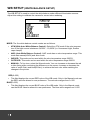
MODE: You can select the most suitable zoom mode.
• ONESHOT: Focus is automatically adjusted just once, after zoom position is set.
• AUTO: Focus is automatically adjusted with moving zoom.
• MANUAL: After the desired field of view is set, focus can be manually adjusted.
ZOOM SPEED: Configure zoom speed using this feature.
• FAST: To move zoom fast.
• SLOW: To move zoom slowly.
LENS INIT: Use this feature to initialize the lens.
15