1
FUNCTION
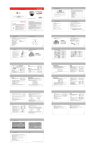
D-ZOOM: When this feature is set to ON, it will digitally magnify images after the optical
magnification has reached its limit.
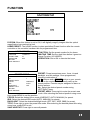
HOME PRESET: The HOME function invokes predefined Preset function after the remote
controller or the controller has been idle for programmed time.
HOME PRESET
FUNCTION
WATING TIME
OPERATION
RETURN
SAVE AND EXIT
1<EMPTY>
10
OFF
PRESET SETUP
NO.
PRESET AREA
FOCUS
IRIS
BACKLIGHT
PRESET TITLE
RETURN
SAVE AND EXIT
1
ONESHOT
AUTO
OFF
FUNCTION: Set the preset number for the home.
WAITING TIME: Set the dwell time before it goes into
Home Function.(10-240SEC)
OPERATION: Set to ON to execute the home.
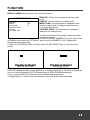
PRESET: Preset memorizes zoom, focus, iris and
backlight, and title settings. Once programmed,
pressing combination of
1 ~8 numbers and a PRESET button on your remote
control or the controller automatically calls up the
preset position. Presets may be assigned to alarm or
motion actions.
No.: Select the desired preset number using
LEFT/RIGHT keys.
PRESET AREA: Press right to enter the preset area
mode. After selecting the desired position using zoom
keys, press MENU to set the position.
FOCUS: Select the desired focus mode (ONESHOT, AUTO, MANUAL) for preset.
IRIS: Select the desired IRIS mode (AUTO, MANUAL) for preset.
BACKLIGHT: Select the desired backlight mode (OFF, BLC, WDR, BMB) for preset.
TITLE: Press right to enter the preset title mode. After selecting the desired preset title using
zoom keys, press ESC to exit.
SAVE AND EXIT: Press right to save all presets.
23