1
TimeLine - User Manual
®
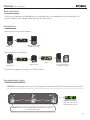
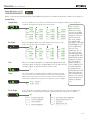
Front Panel Controls
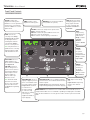
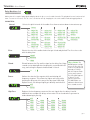
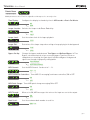
VALUE: Provides fine
adjustment of delay time.
Push to access the parameter
menu for the current delay
machine. Hold to access the
global menu.
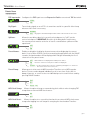
TIME: Provides coarse
adjustment of delay time.
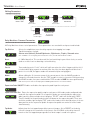
FILTER: Controls the shape of the repeats filter.
dTape: controls tape age
dBucket: controls the special dBucket filter. See
dBucket section for full details.
Filter: controls center frequency of LFO filter.
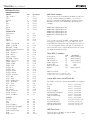
TYPE: Selects the
currently active delay
machine. Push to toggle
the display between
showing time and the
current bank. Hold to
save the current preset.
TIP: If the parameter or
global menu is currently
displayed, push to exit
and show bank or time.
VALUE
ICE
REVERSE
PATTERN
DUCK
MIX
TREM
FILTER
dTAPE
FILTER
LO-FI
TYPE
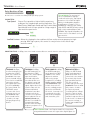
TIP: To find the knob
positions of a saved
preset, turn each knob
until the LED returns
to GREEN after glowing
Amber.
REPEATS
TIME
push (param)
hold (global)
GRIT:
Progressively
adds distortion
and artifacts
dTape: controls
tape bias
dBucket:
controls bucket
loss
SWELL
DUAL
DIGITAL
dBUCKET
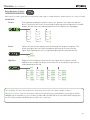
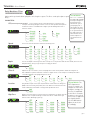
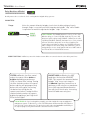
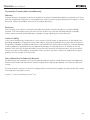
A & B LEDS: Green if
active. Amber if the
preset has been edited.
Off if bypassed.
TAP LED: Flashes to
indicate delay time in
quarter notes. Flashes
alternating red/green
while looper is active.
Flashes amber to
indicate that a tap
division is active.
MIX: Adjusts the mix of
analog dry signal to wet
delay signal. The Mix
occurs in analog. Set
around 3 o’clock for a
50/50 mix.
REPEATS: Sets the delay feedback
level (number of repeats.)
GRIT
SPEED
MOD
DEPTH
®
push (bank / time)
hold (save)
A
B
BANK DOWN
REC / DUB
TAP
BANK UP
PLAY
STOP
hold (looper)
SPEED:
Controls
the speed
of the delay
modulation LFO
dTape: controls
tape crinkle
DEPTH:
Controls the
intensity of
the delay
modulation.
dTape: controls
wow & flutter
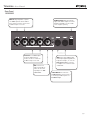
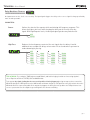
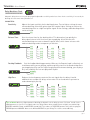
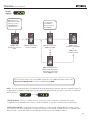
FOOTSWITCH A: Press to
FOOTSWITCH B: Press to engage or bypass
TAP: Tap to set the delay
engage or bypass preset A
preset B of the current bank. Hold to activate
time.
of the current bank. Hold
infinite repeats.
Looper Active: Stops loop.
to activate infinite repeats.
Looper Active: Starts playing loop. Restarts
Hold to enter and exit
Looper Active: Activates
loop from beginning if pressed while playing.
looper.
record if there is
no loop recorded
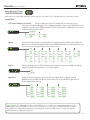
BANK SELECT: Press A & B to select a lower bank. Press B & TAP to select
or clears the loop
a higher bank. While the selected bank is pending it is displayed as “B.A.N.K.”
and starts recording
After the desired bank is selected, press A or B to activate a preset from that
if the looper is
bank.
stopped. Overdubs if
loop is playing.
pg 2