1
GPS&GSM Car alarm system
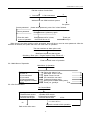
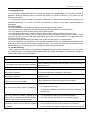
Dial the number of mainframe
2
1. Car control
2. Car connected.
Welcome to use GSM car alarm system.
Car phone
Correct password
please enter password, press “Hex” when finished.
Correct password
Wrong password, please try again.
Enter into main
menu of operation.
Wrong password for 3 times,
the line will be cut off.
Thank you.
Good bye.
When there is an alarm and the call is answered, there will be no need to enter password. After the
sentence is finished, the system will enter into main menu of operation.
The user receives an alarm phone call.
Mainframe reports the alarm types.
(Shocking./ Door open. / Engine started./ Help. /Power off.)
Enter into main menu of operation.
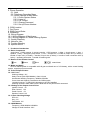
5.2.3 Main Menu of Operation
Main Menu of Operation
1 Check system status
2 Listen in
3 Car connected.
4 Car control
5 Change password
6 Set up phone number
0 Exit
5.2.4 Car Control Menu
Report the status of car
Start listen. Press 0 to exit
Speak. Press 0 to exit.
Car control the car menu
Password change menu
Alarm phone number setting menu
Thank you, goodbye.
End
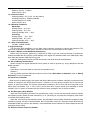
Car Control Menu
1 Arm by phone
3 Disable shock sensor
5 Activate immobilizer
7 Remote start engine
2 Disarm by phone
4 Enable shock sensor
6 Deactivate immobilizer
8 Cancel remote start
0 Exit
(1.2.3.4.5.6.7.8.)
(0)
Report the results of this operation.
Back to the main menu
13