1
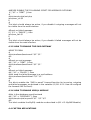
FILE=`/bin/mktemp /mnt/flash/spool/outgoing/send_XXXXXX`
echo "To: $NUMB" >> $FILE
echo "" >> $FILE
echo "$TEXT" >> $FILE
fi
To try this script, copy and paste it inside the form "Custom application applied
to received items".
Then send a message to the device with code "123456" and you will win!
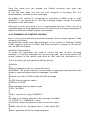
As you can see in this example, we have created a little parser using `/bin/cat
$1 | grep "$SEARCH"` that means: list the content of $1 (that is the full path to
the received message) and match if it contains the pattern $SEARCH (the
winner code).
Then we extract the phone number of the winner with: `/bin/cat $1 | /bin/grep
"From:" | awk '{print $2}'`
this means list the content of $1 search the pattern "From:" and take the
number using awk {print $2} (column 2).
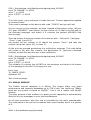
At the end we proceed generating the notification message. The code below
will create a file with this content, the destination To: (previous extracted
number) a blank line and the text of the notification.
FILE=`/bin/mktemp /mnt/flash/spool/outgoing/send_XXXXXX`
echo "To: $NUMB" >> $FILE
echo "" >> $FILE
echo "$TEXT" >> $FILE
The variable $1 contains the full PATH to the message, and what is the format
of the message in this file? It is simply this one:
From: Aaa
To: 390001122333
Alphabet: ISO
Text of the message
4.5. MYSQL MODULE
The FoxBox internal database is in SQLite. This engine offers very good
performance and supports databases up to 2TB in size. You could say: "Really
good but my system is based on MySQL!", this is not a matter with MySQL
module.
The main purpose of this module is to grant you the capability to automatically
divert all of your messages to your favorite database.
As all other processes, also this one is controlled by the main eventhandler.
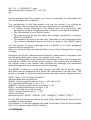
The code below is the call to the module from event handler and it is a portion
of it:
.....
#this is the database mysql backend