1
EN
Assembly Instructions
This chapter describes how you assemble the phone, what the SIM Card is, and how you
handle the battery.
Assemble and
Charge – Four Steps
●
Insert the SIM Card.
●
Attach the battery.
●
Connect the charger to the phone.
●
Connect the charger to the mains.
Removing SIM Card
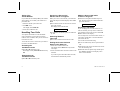
1. Inserting SIM Card
Insert the SIM Card into the SIM Card holder as
described in Figure 1 and lock the holder.
Make sure the cut corner of the SIM Card is
placed as in Figure 1.
2. Lift up the SIM Card holder as described in
Figure 1.
3. Pull out the SIM Card.
1
2
1. Make sure the battery is removed.
4
3
5
Figure 1. Inserting SIM Card
LZT 126 1352/7 R1A
1