1
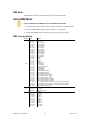
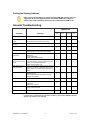
Setting the Starting Address If this is your first time addressing a fixture using the DMX-512 control protocol, we suggest you to go to the Appendix Section and read the DMX Primer section. It contains very useful information that will help you understand how DMX works. General Troubleshooting Applies to Symptom Solution(s) Lights Foggers & Dimmers & Controllers Snow Chaser Auto shut off Check fan thermal switch reset Beam is very dim or not bright Clean optical system or replace lamp Check 220/110 V switch for proper setting Breaker/Fuse keeps blowing Check total load placed on device Chase is too slow Check user’s manual for speed adjustment Device has no power Check for power on Mains. Check device’s fuse. (internal and/or external) Fixture is not responding Check DMX Dip switch settings for correct addressing Check DMX cables Check polarity switch settings Fixture is on but there is no movement to the audio Make sure you have the correct audio mode on the control switches. If audio provided via ¼” jack, make sure a live audio signal exists Adjust sound sensitivity knob Light will not come on after power failure Some discharge lamps require a cooling off period before the electronics in the fixture can kick start it again. Wait 5 to 10 minutes before powering it up again. Loss of signal Use only DMX cables Install terminator Note: Keep DMX cables separated from power cables or black lights. No flash Re-install bulb; it may have shifted in shipping No light output Check slip ring & brushes for contact Install bulb Call service technician Relay will not work Check reset switch Check cable connections Remote does not work Make sure connector is firmly attached to device If you still have a problem after trying the above solutions, please contact CHAUVET Technical Support at the location on the next page. Mega Moon™ User Manual 11 5/26/2009 5:04 PM