1
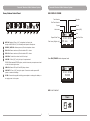
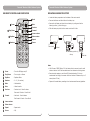
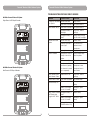
Personal Wireless Public Address System Personal Wireless Public Address System CONTROLS AND INDICATORS CONTROL PANEL AND DISPLAYS 12 22 13 RECEIVER USB 23 0003 ROCK 160 A 0015 CH1 RECEIVER 14 USB 0003 ROCK 160 CH1 6 A 0015 CH2 RF 15 REC ALARM SCAN / ACT PLAY / PAUSE SCAN / ACT RF WAV 01:42 / 03:40 zIYt .wav zIYt RF CH2 PRV / TEN 01:42 / 03:40 zIYt .wav zIYt RF 24 REC 25 ALARM 16 STOP WAV SCAN / A CT NEXT / TEN SCAN / A CT PLAY / PAUSE STOP PRV / TEN NEXT / TEN POWER 17 POWER 26 8 7 OFF MIC IN POWER/ MIC VOL OFF OFF CH1 VOL OFF CH2 VOL LINE VOL LINE IN USB VOL LINE OUT 18 27 19 28 20 29 DC IN 21 9 10 11 Model Shown: MA-303du 6 Display Panels and Screens 7 Power/Volume Control Panel 8 Battery Meter: Displays current & charging battery level. Blinking (charging in progress); Illuminated (battery is fully charged) 9 USB 2.0 Port 10 Rechargeable Battery & Compartment 12 CH2 Channel Screen 13 CH1 Channel Screen 14 CH1 RF indicator: Glows green indicates a RF link from transmitter to receiver. 15 Alarm Siren Button: Provide warning of approaching or presence of threats or situations requiring immediate attention. 16 CH2 RF indicator: Glows green indicates a RF link from transmitter to receiver. 17 Power indicator: Glows red when master power is on and ready for operation 18 CH1 Sync Port: Uploads infrared signal to transmitter. 19 SCAN / ACT CH1: Scans for an interference-free frequency & Synchronizes the receiver and transmitter frequencies. 20 SCAN / ACT CH2: Scans for an interference-free frequency & Synchronizes the receiver and transmitter frequencies. 21 CH2 Sync port: Uploads infrared signal to transmitter. 22 USB Remote Port 23 USB Display Screen 24 REC indicator 25 REC button 26 NEXT / TEN button: Skips to next track & fast forward 10 tracks. 27 PRV / TEN button: Skip to previous track & fast rewind 10 tracks. 28 STOP button: Stops the track. PLAY / PAUSE button: Plays or pauses the track. 29 11 Battery Cover: Protects the rechargeable battery. 4 5