1
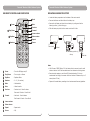
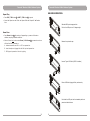
Personal Wireless Public Address System Personal Wireless Public Address System USB REMOTE CONTROLS AND INDICATORS 1 2 Mode Power Play/Pause 3 4 Equalizer Numbers EQ 0 VOLRPT VOL+ U/SD 1 2 3 4 5 6 7 8 9 REPLACING USB REMOTE BATTERY 5 Mode 6 Mute 7 Previous 8 Forward 9 Lowers volume 10 10 Raises volume 11 Repeat 12 Source ! Locate the battery compartment on the bottom of the remote control. ! Press and hold tenon and then slide out the battery tray. ! Remove the old battery and insert the new battery in, making sure that the battery's positive (+) side is facing up. ! Slide the battery tray back into the remote control until it clicks. (1) Press & hold (2) Slide out CR 2025 CR 2025 (3) battery positive (+) side up CR 2025 CR 2025 (4) Slide back Notes: 1 Power : Turns the USB player on/off Play/Pause : Turns on play or Pauses 3 Equalizer : Equalizer effects 4 Numbers : 0 ~ 9 ( 10 numbers) 5 Mode : Mode selection 6 Mute : Mutes the audio 7 Previous : Previous track - Press & release 8 Forward : Next track - Press & release 2 ! MA-100 uses a CR2032 lithium 3.0V coin battery that is commonly used in small electronic devices. You'll find these batteries at most electronics and drug stores. ! Remote control operates on an infrared (IR)-based technology. If it has an unobstructed line-of-sight, the remote control can function at distances of up to 5 meters (about 17 feet). ! Dispose of the used battery according to local environmental laws and guidelines. Fast rewind 10 tracks - Press & hold Fast forward 10 tracks - Press & hold 9 Lowers volume 10 Raises volume 11 Repeat : Repeat mode 12 Source : N/A 10 11