1
76
Maps
Maps shows you what is nearby, guides you where you want to go, and provides you
with weather forecasts and links to the latest travel guides.
•
•
•
•
•
•
Find cities, streets, and services using Maps.
Synchronise your favourite locations and routes between your phone and the
Nokia Maps web service.
Store and share your location in social networks using Check in.
Find your way with turn-by-turn directions using Drive.
Check the current weather and a forecast for the coming days, if available, using
Weather.
Get linked to the latest information on what's there to see and do, where to spend
the night, or how to book a room using Guides.
Some services may not be available in all countries, and may be provided only in
selected languages. The services may be network dependent. For more information,
contact your network service provider.
Using services or downloading content may cause transfer of large amounts of data,
which may result in data traffic costs.
Contents of digital maps may sometimes be inaccurate and incomplete. Never rely
solely on the content or the service for essential communications, such as in
emergencies.
Some content is generated by third parties and not Nokia. The content may be
inaccurate and is subject to availability.
Find and view locations
View your location and the map
See your current location on the map, and browse maps of different cities and
countries.
Select
> Maps.
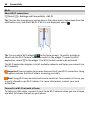
indicates your current position, if available. When searching for your position,
blinks. If your position is not available,
indicates your last known position.
If accurate positioning is not available, a red halo around the positioning icon indicates
the general area you might be in. In densely populated areas, the accuracy of the
estimate increases, and the red halo is smaller than in lightly populated areas.
Browse the map
Drag the map with your finger. By default, the map is oriented north.