1
46
Printer Options
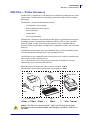
KDU — Printer Accessory
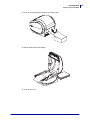
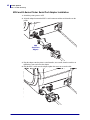
KDU and G-Series Printer Serial Port Adapter Installation
1. Switch the printer power to OFF.
2. Align the adapter between the KDU’s serial connector and the serial interface on the
printer.
KDU
Serial Port
Adapter
3. Plug the adapter onto the printer’s serial interface; use a small, slotted screwdriver to
tighten the screws and secure the adapter.
4. Plug the KDU’s cable onto the adapter; tighten the screws to secure the cable.
v
980608-001 Rev. A
GK420d User Guide
12/14/07