1
Table of Contents
1
Printing Methods
1
About this machine ....................................................................................................................................1
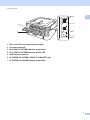
Front view and Back view....................................................................................................................1
Acceptable paper and other print media....................................................................................................3
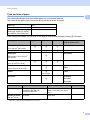
Type and size of paper ........................................................................................................................4
Handling and using special paper .......................................................................................................6
Unprintable area ..................................................................................................................................9
Printing methods......................................................................................................................................10
Printing on plain paper, recycled paper, bond paper, thin paper or thick paper ................................10
Printing on labels or envelopes .........................................................................................................15
Duplex printing.........................................................................................................................................20
Guidelines for printing on both sides of the paper .............................................................................20
Automatic duplex printing (HL-2240D / HL-2242D / HL-2250DN / HL-2270DW only).......................21
Manual duplex printing ......................................................................................................................22
2
Driver and Software
23
Printer driver ............................................................................................................................................23
Features in the printer driver (for Windows®) ....................................................................................25
Features in the printer driver (for Macintosh) ....................................................................................39
Uninstalling the printer driver ...................................................................................................................51
Printer driver for Windows® ...............................................................................................................51
Printer driver for Macintosh ...............................................................................................................51
Software ..................................................................................................................................................52
Software for networks (HL-2135W / HL-2250DN / HL-2270DW only)...............................................52
Remote Printer Console (For Windows® only) ................................................................................52
3
Control Panel
53
LEDs (Light Emitting Diodes)...................................................................................................................53
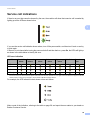
Service call indications ............................................................................................................................58
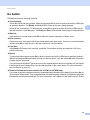
Go button.................................................................................................................................................60
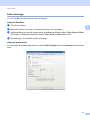
Print a test page ................................................................................................................................61
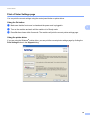
Print a Printer Settings page..............................................................................................................62
Print Fonts (HL-2250DN / HL-2270DW only) ....................................................................................63
Print a WLAN report (HL-2135W / HL-2270DW only) .......................................................................64
Default settings..................................................................................................................................64
4
Routine Maintenance
66
Replacing consumable items...................................................................................................................66
Consumables.....................................................................................................................................66
Before replacing the consumable items ............................................................................................67
Toner cartridge ..................................................................................................................................70
Drum unit ...........................................................................................................................................77
ii