1
Section
Troubleshooting
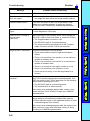
Message
Insufficient work memory.
9
Probable Cause and Remedy
No more regions can be registered because of insufficient
available work memory.
• Either make the model or region to be registered
smaller, or clear unneeded models or regions.
PC is not in monitor mode.*
• Change the mode of the Programmable Controller to
Monitor mode.
Select midpoint between 2
regions for X and Y.
If the relative angle of the 2 regions is set for the position
compensation setting θ, the midpoint of the 2 regions
must be set for X and Y.
• Either set midpoint of 2 regions for X and Y, or change
the θ setting.
Select same region number
for θ, X and Y.
If position compensation region 0 or 1 is set for θ, then X
and Y must be set to the same region number.
• Either set the same region number for X and Y, or
change the θ setting.
Set parameters so that
Output Period y Gate ON
delay + Gate ON time.
The communications specifications for the terminal block
are set incorrectly.
Setting calibration
parameters is failed.
The Camera magnification is outside the permitted setting
range.
• Make the settings so that output period y GATE ON
delay + GATE ON time.
• Re-perform sampling so that the magnification is in the
range 0.01 to 9.999.
Sampling has only been performed once.
• Perform sampling in at least 2 places.
This region is not drawn.
A region that has not been drawn is selected as a
displacement direction setting.
• Either draw the region, or select a region that has been
drawn.
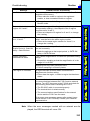
Timeout error.*
Data transfer has been interrupted due to a timeout error
in communications between the F150-2 and an external
device. Turn OFF the power to the F150-2, and check for
the following items before restarting the F150-2.
• The RS-232C cable is connected properly.
• The terminal block is wired correctly.
• The communications specifications for the external
device and the F150-2 are the same.
If the same error message appears after restart, it may
mean that the F150-2 is faulty. Contact your OMRON
representative.
Note When the error messages marked with an asterisk are displayed, the ERR terminal will come ON.
245