1
Section
Troubleshooting
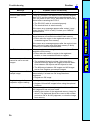
Message
7
Probable Cause and Remedy
Camera is not connected.*
• The Camera Cable is not connected properly.
Incorrect data format
received.*
There is a mistake in the data for which transfer between
the F150-2 and the external device was attempted. Turn
OFF the power to the F150-2, and check for the following
items before restarting the F150-2.
• The RS-232C cable is connected properly.
• The terminal block is wired correctly.
If the same error message appears after restart, it may
mean that the F150-2 is faulty. Contact your OMRON
representative.
Insufficient flash memory.
An error has occurred in flash memory. Data cannot be
saved because of insufficient available flash memory.
• Either make the region to be registered smaller, or clear
unneeded regions from memory.
If the same error message appears after the regions have
been reduced, it may mean that flash memory is faulty.
Contact your OMRON representative.
Insufficient work memory.
No more regions can be registered because of insufficient
available work memory.
• Either make the model or region to be registered
smaller, or clear unneeded models or regions.
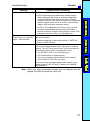
Measurement conditions
cannot be set for current
images.
Check for one of the following:
• The registered image is unclear. Using one of the
optional functions, adjust the images so that the difference between OK objects and NG objects is clear.
• The differences between OK images and NG images
are too few. Register new sample images.
Register at least one OK
sample image.
The measurement conditions can only be set
automatically if at least one OK image has been
registered.
• Register an OK image.
Register images before
inspection regions setting.
An image has not been registered.
Set all images to OK or NG.
There is a registered memory image for which an OK or
NG judgement has not been made.
• Register OK and NG images before using the optional
functions.
• Identify the number of the registered memory image for
which ?? is displayed. Move the cursor to that number
and set an OK or an NG judgement, or clear the image
from memory.
96