1
Section
Troubleshooting
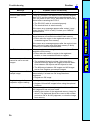
Message
Set all regions to OK or NG.
7
Probable Cause and Remedy
Check for one of the following:
• Has an NG image been added as a sample image?
When adding an NG image as a sample image and
re-performing automatic setting, the scene must be
cleared first. Even if the scene is cleared, the registered
sample images will be saved. Set OK or NG for those
images, and re-perform automatic setting.
• An OK or NG judgement has not been set for a measurement region drawn with the optional functions.
Move the cursor to number of the region for which ?? is
displayed, and set an OK or an NG judgement.
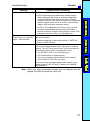
Set parameters so that
Output Period y Gate ON
delay + Gate ON time.
The communications specifications for the terminal block
are set incorrectly.
Timeout error.*
Data transfer has been interrupted due to a timeout error
in communications between the F150-2 and an external
device. Turn OFF the power to the F150-2, and check for
the following items before restarting the F150-2.
• Make the settings so that output period y GATE ON
delay + GATE ON time.
• The RS-232C cable is connected properly.
• The terminal block is wired correctly.
• The communications specifications for the external
device and the F150-2 are the same.
If the same error message appears after restart, it may
mean that the F150-2 is faulty. Contact your OMRON
representative.
Note When the error messages marked with an asterisk are displayed, the ERR terminal will come ON.
97