1
Section 1
ACCESSORIES
Accessory attachments
DDBattery pack
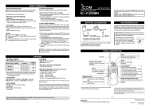
Attach or remove the battery pack, as illustrated to the
right.
To attach
To remove
Battery release
buttons
To attach the battery pack:
qqPlace the tabs on the bottom of the battery pack into
the slots at the bottom of the transceiver. (q)
wwPush the battery pack until the battery release buttons make a ‘click’ sound. (w)
To remove the battery pack:
qqPush the battery release buttons in the direction of
the arrow as shown to the right. (e)
wwThe battery pack is then released, and you can remove it. (r)
w
e
r
q
DDBelt clip
NOTE: Before attaching or detaching the belt clip,
remove the battery pack from the transceiver, if it is
attached.
To attach
To detach
w
To attach the belt clip:
➥➥Slide the belt clip in the direction of the arrow until
the belt clip locks in place, and makes a ‘click’ sound.
(q)
e
Tab
q
To detach the belt clip:
➥➥Lift the tab up (w), and slide the belt clip in the direction of the arrow (e).
1
e