1
Advanced functions
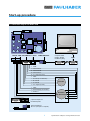
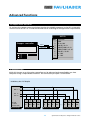
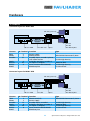
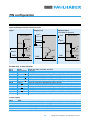
MINIMOTOR RS485easy
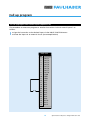
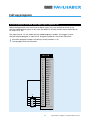
BUS CONVERTER
2x RJ45 1:1
swiss made
MCBL 3603
RS 485
swiss made
MCBL 3603
HOST
COMPUTER
MINIMOTOR RS485easy
BUS CONVERTER
2x RJ45 1:1
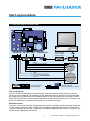
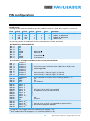
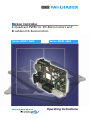
To simplify the connection Minimotor offers a special RS485 easy-Bus adapter and RJ45 cables.
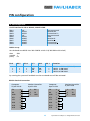
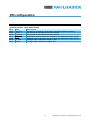
Cable specification:
Modular RJ45 round shielded cable configuration 1:1. Twisted pairs 1&2, 3&6, 4&5, 7&8
Start-up Procedure
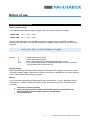
Attention: function only available with software version ≥ 3.00
1) Assign an adress (number) to each motion controller (axis).
This operation is made by connecting the single motion controller to the RS232
interface and using the CI (card identifier) command.
Example: CI 5 <CR> to assign the number 5 to a motion controller.
The number can be checked using the command CI ? <CR>
Attention: Each motion controller in the system must have a different number. Once the
number is assigned it is memorized even if the power supply is switched off. The CI value
goes from 0-99. The number 0 is used as a default value for single axis application.
For multi-axis operation a number from 1-99 should be used, Number 1 must always be
used (see below).
2) Realise an RS485 connections and set the baud rate in the terminal emulator
software to 19 200. To use the RS485 it is necessary to have a RS232/RS485
converter since PCs usually only offer a RS232 interface.
3) To operate a motion controller it is first necessary to adress it using the RI (request
identifier) command.
Example: RI 5 <CR>. To make the prompt appear.
If it does not appear check the RS485 connection and baud rate.
Using the RI 0 command the host computer can control all the axis at the same time. In this
case the echo from Motion Controller number 1 (in multi-axis the number 1 must always be
used) will appear on the computer screen.
19
Specifications subject to change without notice