1
OPERATION
NOTES
AND MAINTENANCE
What to do before operation
■
Before initiating operation, contact your Daikin dealer
to get the service manual that corresponds to your
system.
■
For the chiller unit and the EKACPG address card
refer to the dedicated manual.
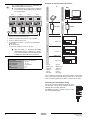
Operation and display signals
EKLONPG
EKBNPG
TX (1)
RX (1)
TX (1)
RX (1)
LA
TX (2)
RX (2)
RA0
PWR
(*)
PWR
PWR
PWR
LON
Colour
LED
PWR (2x) green
Lights up when power is connected
RX (1)
green
Flashes when receiving data via RS485 Modbus
TX (1)
green
Flashes when transmitting data via RS485 Modbus
only for Lon Gateway (EKLONPG)
LA
green
Flashes when the PCB is in normal operation
LON
red
Lights up when the Lon service pin(*) is pushed
green
Flashes when receiving data via LonTalk® network
RX (2)
TX (2)
green
Flashes when transmitting data via LonTalk® network
only for BACnet/IP Gateway (EKBNPG)
red
Flashes when the PCB is in normal operation
RA0
(*) Lon service pin: The network integrator will need to push the Lon service pin
during commissioning the LonTalk® network.
TROUBLESHOOTING
Consult the design guide of your system and contact your Daikin
dealer.
The system must be repaired by a qualified service
person.
MAINTENANCE
■
Only a qualified service person is allowed to perform
maintenance.
■
Before obtaining access to terminal devices, all power
supply circuits must be interrupted.
■
Water or detergent may deteriorate the insulation of
electronic components and result in burn-out of these
components.
EKLONPG + EKBNPG
Gateway option box
4PW40333-1A
Installation manual
4