1
Deleting messages
Protecting answering machine against access by strangers
Deleting individual messages
By entering an access code you can prevent other persons
from hearing the personal messages, or from changing the
settings of the answering machine.
1 Press MENU several times until PRINT TAD SETUP appears on the display.
2 Confirm using o.
3 Using [ select ACCESS CODE (=access code)
4 Confirm using o.
5 Enter a new access code or confirm the displayed access
code.
6 The display shows e.g.: PLAY UNLOCK.
During the playback of message, press C to delete the current message. Delete further messages using C or exit using
j.
Deleting all messages
1 Press C. DELETE OLD MSG? appears on the display.
2 Confirm using C. The messages are deleted.
Recording Internal Memos
Internal Memos
You can record voice messages (= memos), which can be
played as messages. The limit on duration of recording set
for messages applies even to the recording duration of
memos.
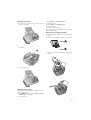
1 Press æ. LIFT HANDSET appears on the display.
2 Lift the telephone handset off and press o to record the
voice message.
The configured recording length for incoming
messages also limits the length of the internal
memos.
3 Press o to end the recording. The recording is played
back.
4 Hang up the handset.
The voice message is displayed as a new message.
Setting up remote access
7 Using u select PLAY LOCK to prevent the messages from being heard.
8 Confirm using o.
9 Using u select SET-UP LOCK to prevent the settings from being changed.
10 Confirm using o.
11 You can exit with j.
Access by entering the access code
You can hear the messages or change the settings only
after entering the saved code.
Using remote access
You can hear and delete new messages, record a new outgoing message or switch answering machine on or off with
a telephone call.
Tone Dialling
Entering access code
Access Code
In order that you can receive forwarded messages as well as
check or control the answering machine from other telephones, you must enter an access code.
Default access code 1234
The default access code is 1234.
1
2
The telephone on this connection must be set to tone
dialling. Press a button within 50 seconds, otherwise
the connection is cut-off (country and network dependent).
Call your number.
Wait, until the answering machine switches on and
plays the outgoing message.
Enter the access code (default 1234).
You hear a confirmation tone.
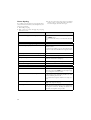
The functions listed below are available using the numeric keys.
Hang up to end the remote access.
1 Press MENU several times until PRINT TAD SETUP appears on the display.
2 Confirm using o.
3 Using [ select ACCESS CODE.
4 Confirm using o. The programmed access code appears on the display.
5 Enter the new access code using the numeric keys.
3
4
5
You can delete the access code by pressing C.
Note that when the access code is deleted, everyone has an access to the stored messages.
6 Confirm using o.
7 You can exit with j.
Listening to messages
6
Remote Control Functions
Listening to new messages: Press 1.
Hearing current message again: Press 3.
Listening to all messages: Press 2.
Listening to next message: Press 4.
Deleting messages
After hearing all messages, press 5 and 5.
15