1
III.
Adjust the wireless card to access WiFi EDUROAM
1.
2.
3.
4.
5.
6.
7.
8.
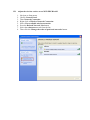
Navigate to Start menu.
Choose Control Panel.
Then Network Connection .
Right click at Wireless Network Connection.
Select View available wireless networks.
Press the Refresh Network List button.
Select the eduroam network from the list.
Then click the Change the order of preferred networks button.