1
Quick Start
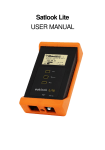
Power On/Off Button
Menu Knob and Button
LNB-A connector
LNB-B connector
Power Input for charging
RS232 Port
Reset Button
Power On
The Satlook HD is turned on by pressing and
holding the power on button for one second.
Power on tones indicate that firmware loading
has started. This takes about six seconds and
is shown by a progress bar on the display and
a pattern on the blue LEDs.
The Satlook HD initial mode can be set by the
user for convenience. Pressing and holding
the power button also turns off the Satlook
HD. The button must be held for more than
one second in order to turn the unit off. The Satlook HD also has an automatic
power down that is adjustable which will turn the unit off when there is no
activity. This can be set using the Setup Menu.
Navigation
The Menu Button and Menu Knob are the two controls used for navigation
through the menus and selection of functions. When the menu is off, pressing
the Menu Button shows the Menu. It is shown at the active mode, so if the
Satlook HD is in Digital mode, the menu is shown with the Digital entry at the
top.
Using the knob, the function that is to be executed is shown highlighted.
Pressing the Menu Button causes the function to be performed. For simple
functions such as switching the LNB Voltage with the 13V/18V function, the
Satlook HD performs this function, turns off the menu, and immediately returns
to the current mode.
4