1
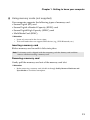
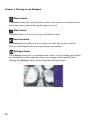
Chapter 1. Getting to know your computer Using memory cards (not supplied) Your computer supports the following types of memory card: • Secure Digital (SD) card • Secure Digital eXtended Capacity (SDXC) card • Secure Digital High Capacity (SDHC) card • MultiMediaCard (MMC) Attention: • • Insert only one card in the slot at a time. This card reader does not support SDIO devices (e.g., SDIO Bluetooth, etc.). Inserting a memory card Slide a memory card in until it clicks into place. Note: If a dummy card is shipped with the computer, push the dummy card and then remove it before inserting a memory card. Removing a memory card Gently pull the memory card out of the memory card slot. Attention: • Before removing a memory card, disable it through Safely Remove Hardware and Eject Media to avoid data corruption. 11