1
Panasonic Electric Works Fire & Security Technology Europe AB
MEW00509
Rev: 2
EBL128 Operating Instructions V1.0.x
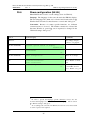
23.4
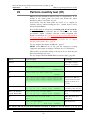
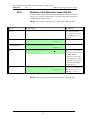
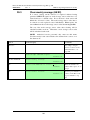
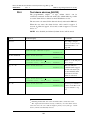
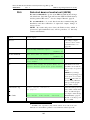
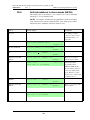
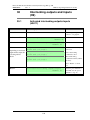
Disable all control, extinguishing, ventilation and alarm device outputs (H2/B4)
Outputs programmed as type 0 = control (general), type 1 = fire
ventilation, type 2 = extinguishing system and type 3 = alarm devices
can for the type respectively be disabled all at the same time.
Disabled output means that even if the control expression (trigger
condition) for the output respectively is fulfilled, the output will not be
activated. Disabled outputs are shown in menu H4/U1.
The outputs will be disabled until re-enabled again (via H2/B8).
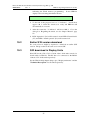
NOTE! This function for alarm devices is not the same as push
button "Silence alarm devices" (P3), see chapter "Silence Alarm
devices", page 22. This function has higher priority than "Silence
alarm devices".
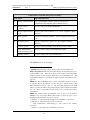
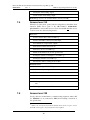
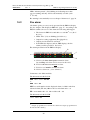
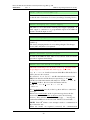
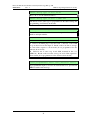
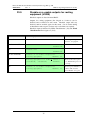
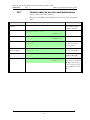
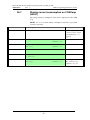
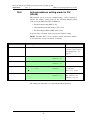
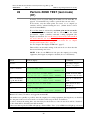
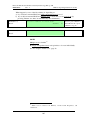
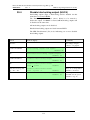
Action
Text in display
Comments
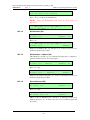
"Access"
Scroll to menu H2.
According to chapter
"Access", see page 62.
Disable or re-enable
ACCEPT? H2
"A"
Disable zone
ACCEPT? B1
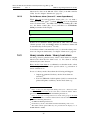
Scroll to menu B4.
Disable all control, exting, ventilation
or alarm device outputs
ACCEPT? B4
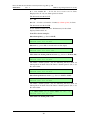
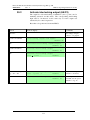
"A"
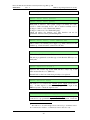
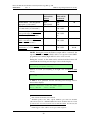
Disable type of output: 0
0=control
1=exting 2=ventilation 3=alarm
ACCEPT?
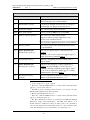
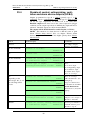
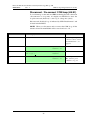
Press:
"0"=control output
"1"=extinguishing output
"2"=ventilation output
"3"=alarm devise output.
Press "A" to accept.
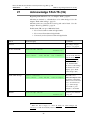
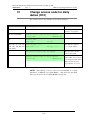
"A"
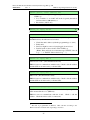
Depending on the
chosen type, 0, 1, 2 or 3
the following will be
shown:
Disable all control outputs
Press "A" to accept.
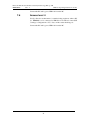
LED "Disablements" (L8)
will light up.
If type 3 = alarm devices
are disabled also the LED
"Fault / Disablements
Alarm devices" (L13) will
light up.
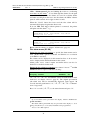
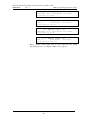
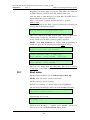
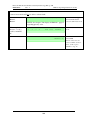
ACCEPT?
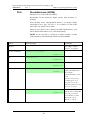
Disable all extinguishing outputs
ACCEPT?
Disable all ventilation outputs
ACCEPT?
Disable all alarm device outputs
ACCEPT?
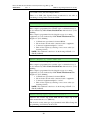
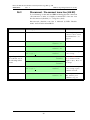
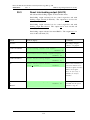
"A"
Disable type of output: 0
0=control
1=exting 2=ventilation 3=alarm
ACCEPT?
Press "0", "1", "2" or "3"
and press "A" to accept or
"Return" to menu B4.
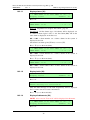
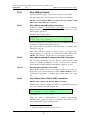
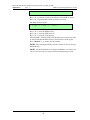
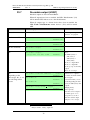
"Return"
Disable all control, exting, ventilation
or alarm device outputs
ACCEPT? B4
Scroll or press "Return" to
menu H2. Scroll or press
"Return" to log off.
69