1
User’s M anual of VDSL 2 Switch
TABLE OF CONTENTS
1. INTRODUCTION .......................................................................................................... 7
1.1 Package Contents ................................................................................................................................7
1.2 Product Description.............................................................................................................................8
1.3 How to Use This Manual......................................................................................................................9
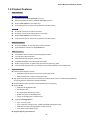
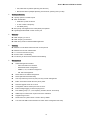
1.4 Product Features............................................................................................................................... 10
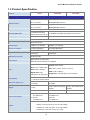
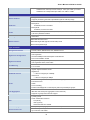
1.5 Product Specification ....................................................................................................................... 12
2. INSTALLATION.......................................................................................................... 15
2.1 Hardware Description ....................................................................................................................... 15
2.1.1 Switch Front Panel .................................................................................................................... 15
2.1.2 LED Indications.......................................................................................................................... 17
2.1.3 Switch Rear Panel ..................................................................................................................... 20
2.2 Install the Switch............................................................................................................................... 22
2.2.1 Desktop Installation ................................................................................................................... 22
2.2.2 Rack Mounting........................................................................................................................... 23
2.2.3 Installing the SFP transceiver.................................................................................................... 25
2.3 Wiring for VDSL2 Ports .................................................................................................................... 27
3. SWITCH MANAGEMENT........................................................................................... 30
3.1 Requirements .................................................................................................................................... 30
3.2 Management Access Overview ....................................................................................................... 31
3.3 Web Management.............................................................................................................................. 32
3.4 SNMP-Based Network Management ............................................................................................... 33
3.5 Administration Console.................................................................................................................... 33
3.6 Protocols............................................................................................................................................ 35
3.6.1 Virtual Terminal Protocols ......................................................................................................... 35
3.6.2 SNMP Protocol .......................................................................................................................... 35
3.6.3 Management Architecture ......................................................................................................... 35
4. WEB-BASED MANAGEMENT................................................................................... 36
4.1 About Web-based Management ...................................................................................................... 36
4.1.1 Requirements ............................................................................................................................ 37
4.1.2 Logging on the switch................................................................................................................ 37
4.1.3 Main WEB PAGE....................................................................................................................... 39
4.2 System................................................................................................................................................ 40
4.2.1 System Information.................................................................................................................... 41
2