1
Adding message attachments
7
0
7
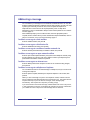
To add an attachment to a message
You can attach one or more voice, fax, or mixed voice and fax messages currently in
your mailbox to your message before sending it. You cannot attach a message marked
Private.
1
Before or after recording a message, press 7 0 for Message Options, then 7 for
Add Attachment.
2 Enter the message number or fax ID of the message that you want to attach to
your unsent message, then press #.
If you enter a number for a voice/fax message, both voice and fax are attached.
If you enter an ID number for a fax, just the fax is attached.
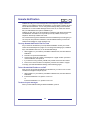
To add a fax message attachment at a faxphone
You can send a fax by logging in to your mailbox from a faxphone using the faxphone
access number. This method allows you to send a fax that is not currently in your
mailbox to other mailboxes or addresses. Place your document in the fax feeder first.
When you are logged in at a faxphone, print faxes at the end of your mailbox session.
CallPilot disconnects when fax printing starts.
1
2
3
4
5
6
Log in to your mailbox from a faxphone using the faxphone access number.
Press 7 5, then address your message, then:
Record a message if required.
Or select an unsent message from your mailbox.
Press 7 0 for Message Options, then 7 for Add Attachment.
Press 0 # when prompted for the fax number.
Tell CallPilot when to send the message:
Press 1 to send the message as soon as the fax is received.
Or press 2 to save it in your mailbox until you manually send it.
Press Send or Start on the faxphone.
21