1
iOS
ENGLISH
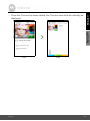
• It will take a few minutes for the Camera to connect to the Wi-Fi® network
before showing the connection status (Pictures i11, i12). If connection fails,
please tap on the Retry button and repeat Step 3.3.4 as instructed above.
i11
i12
• Tap on Watch Live Camera to view the Camera video. (Picture i13)
• Tap on the Hubble logo to go back to the Camera tab for a list of available
Cameras. (Picture i14)
i13
Getting Started - Connecting Devices
i14
21