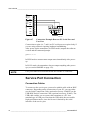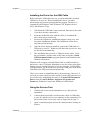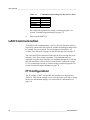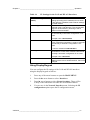
1
USER'S GUIDE
®
Vaisala HUMICAP Humidity and
Temperature Transmitter Series
HMT330
M210566EN-F
PUBLISHED BY
Vaisala Oyj
P.O. Box 26
FIN-00421 Helsinki
Finland
Phone (int.): +358 9 8949 1
Fax:
+358 9 8949 2227
Visit our Internet pages at http://www.vaisala.com/
© Vaisala 2008
No part of this manual may be reproduced in any form or by any means, electronic or
mechanical (including photocopying), nor may its contents be communicated to a third
party without prior written permission of the copyright holder.
The contents are subject to change without prior notice.
Please observe that this manual does not create any legally binding obligations for
Vaisala towards the customer or end user. All legally binding commitments and
agreements are included exclusively in the applicable supply contract or Conditions of
Sale.
________________________________________________________________________________
Table of Contents
CHAPTER 1
GENERAL INFORMATION.......................................................................... 11
About This Manual ................................................................. 11
Contents of This Manual ..................................................... 11
Version Information ............................................................. 12
General Safety Considerations ........................................... 12
Feedback............................................................................. 13
Product Related Safety Precautions .................................... 13
ESD Protection.................................................................... 13
Regulatory Compliances ....................................................... 14
Transmitters with LAN or WLAN Interface..................... 14
Transmitters with WLAN Interface ................................. 14
Recycling ................................................................................ 15
Trademarks ............................................................................. 15
License Agreement ................................................................ 15
Warranty.................................................................................. 16
CHAPTER 2
PRODUCT OVERVIEW................................................................................ 17
Introduction to HMT330 ......................................................... 17
Basic Features and Options................................................ 18
Structure of the Transmitter ................................................ 19
Probe Options ..................................................................... 21
Warmed Probe HMT337 ..................................................... 22
CHAPTER 3
INSTALLATION............................................................................................ 23
Mounting the Housing ........................................................... 23
Standard Mounting without Mounting Plate ........................ 23
Wall Mounting with Wall Mounting Kit................................. 24
Mounting with DIN Rail Installation Kit ................................ 25
Pole Installation with Installation Kit for Pole or Pipeline .... 26
Mounting Rain Shield with Installation Kit ........................... 28
Panel Mounting Frame........................................................ 28
Wiring ...................................................................................... 30
Cable Bushings ................................................................... 30
Grounding the Cables ......................................................... 31
Grounding the Transmitter Housing.................................... 32
Signal and Power Supply Wiring......................................... 33
Connections to a 24 VAC Power Supply ............................ 34
Probe Mounting ...................................................................... 36
General Instructions for Probes with a Cable ..................... 37
HMT333 for Ducts and Tight Spaces.................................. 39
HMT334 for High Pressure and Vacuum Applications ....... 39
VAISALA_____________________________________________________________________ 1
User's Guide ______________________________________________________________________
HMT335 for High Temperatures..........................................41
HMT337 for High Humidity Applications..............................42
Temperature Probe (Optional) ............................................42
HMT338 for Pressurized Pipelines......................................42
Tightening the Clasp Nut.....................................................44
Optional Modules ...................................................................45
Power Supply Module .........................................................45
Installation ......................................................................46
Warnings ........................................................................47
Galvanic Isolation for Output ...............................................50
Third Analog Output ............................................................50
Installation and Wiring ....................................................51
Relays..................................................................................52
Installation and Wiring ....................................................52
Selecting the Activation State of the Relay ....................52
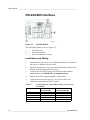
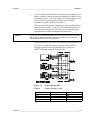
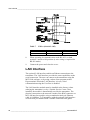
RS-422/485 Interface ..........................................................54
Installation and Wiring ....................................................54
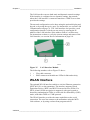
LAN Interface.......................................................................56
WLAN Interface ...................................................................57
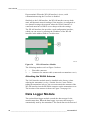
Attaching the WLAN Antenna ........................................58
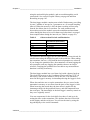
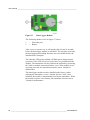
Data Logger Module............................................................58
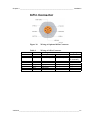
8-Pin Connector...................................................................61
CHAPTER 4
OPERATION.................................................................................................63
Getting Started........................................................................63
Display/Keypad (Optional).....................................................63
Basic Display .......................................................................63
Graphic History....................................................................64
Menus and Navigation.........................................................66
Changing the Language .................................................67
Rounding Setting............................................................68
Display Backlight Setting................................................68
Display Contrast Setting.................................................68
Keypad Lock (Key guard)...............................................68
Menu PIN Lock...............................................................69
Factory Settings .............................................................69
Display Alarms.....................................................................70
Configuring a Display Alarm...........................................70
MI70 Link Program for Data Handling ..................................72
Serial Line Communication ...................................................72
User Port Connection ..........................................................73
Service Port Connection......................................................74
Connection Cables .........................................................74
Installing the Driver for the USB Cable ..........................75
Using the Service Port....................................................75
LAN Communication ..............................................................76
IP Configuration...................................................................76
Using Display/Keypad ....................................................77
Using Serial Line ............................................................78
Wireless LAN Configuration ................................................80
Using Display/Keypad ....................................................80
Using Serial Line ............................................................82
2 ________________________________________________________________ M210566EN-F
________________________________________________________________________________
Telnet Settings .................................................................... 83
Web Configuration for LAN and WLAN............................... 83
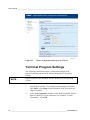
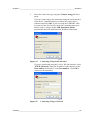
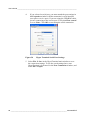
Terminal Program Settings ................................................. 84
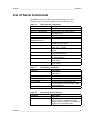
List of Serial Commands ....................................................... 87
Getting Measurement Message from Serial Line................ 89
Starting Continuous Outputting...................................... 89
R................................................................................ 89
Stopping Continuous Outputting .................................... 90
S................................................................................ 90
Outputting Reading Once .............................................. 90
SEND ........................................................................ 90
SEND D .................................................................... 90
Formatting Serial Line Message ......................................... 91
FTIME and FDATE......................................................... 91
FST ................................................................................ 91
General Settings..................................................................... 92
Changing Quantities and Units ........................................... 92
Using Display/Keypad.................................................... 92
Using Serial Line ............................................................ 93
FORM........................................................................ 93
UNIT.......................................................................... 95
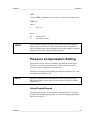
Pressure Compensation Setting ......................................... 95
Using Display/Keypad.................................................... 95
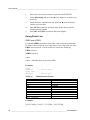
Using Serial Line ............................................................ 96
PRES and XPRES .................................................... 96
Date and Time..................................................................... 97
Using Display/Keypad.................................................... 97
Using Serial Line ............................................................ 97
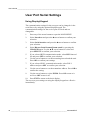
User Port Serial Settings..................................................... 98
Using Display/Keypad.................................................... 98
Using Serial Line ............................................................ 99
SERI............................................................................... 99
SMODE .......................................................................... 99
INTV ............................................................................. 100
ECHO........................................................................... 100
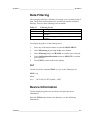
Data Filtering ..................................................................... 101
FILT.............................................................................. 101
Device Information ............................................................ 101
? ................................................................................... 102
HELP............................................................................ 103
ERRS ........................................................................... 103
VERS ........................................................................... 104
Resetting Transmitter Using Serial Line ........................... 104
RESET ......................................................................... 104
Locking Menu/Keypad by Using Serial Line ..................... 104
LOCK ........................................................................... 104
Data Recording..................................................................... 105
Selecting Data Recording Quantities ................................ 105
DSEL............................................................................ 105
View Recorded Data ......................................................... 106
DIR ............................................................................... 106
PLAY ............................................................................ 107
Deleting the Recorded Files.............................................. 109
UNDELETE .................................................................. 109
VAISALA_____________________________________________________________________ 3
User's Guide ______________________________________________________________________
Analog Output Settings .......................................................109
Changing Output Mode and Range...................................109
Analog Output Quantities ..................................................111
AMODE/ASEL ..............................................................112
Analog Output Tests..........................................................113
ITEST ...........................................................................113
Analog Output Fault Indication Setting..............................114
AERR............................................................................114
Operation of Relays..............................................................115
Quantity for Relay Output..................................................115
Measurement-Based Relay Output Modes .......................115
Relay Setpoints ............................................................115
Hysteresis.....................................................................116
Relay Indicating Transmitter Error Status .........................116
Enabling/Disabling Relays.................................................118
Setting Relay Outputs .......................................................118
RSEL ............................................................................119
Testing Operation of Relays..............................................120
RTEST..........................................................................121
Operation of the RS-485 Module .........................................121
Networking Commands .....................................................122
SDELAY .......................................................................122
SERI .............................................................................122
ECHO ...........................................................................123
SMODE ........................................................................123
INTV .............................................................................124
ADDR ...........................................................................124
SEND............................................................................125
OPEN ...........................................................................125
CLOSE .........................................................................125
Sensor Functions .................................................................126
Chemical Purge (Optional) ................................................126
Automatic Chemical Purge (Interval Purge).................127
Manual Chemical Purge ...............................................127
Chemical Purge in Power Up .......................................127
Starting and Configuring Chemical Purge.........................128
Using Buttons on Motherboard ....................................128
Using Display/Keypad (Optional) .................................128
Using Serial Line ..........................................................129
PURGE....................................................................129
PUR.........................................................................130
Sensor Heating..................................................................131
Setting Humidity Sensor Heating .................................131
XHEAT ....................................................................131
CHAPTER 5
MAINTENANCE..........................................................................................133
Periodic Maintenance...........................................................133
Cleaning ............................................................................133
Changing the Probe Filter .................................................133
Changing the Sensor ...........................................................134
Error States .......................................................................135
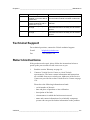
Technical Support ................................................................137
4 ________________________________________________________________ M210566EN-F
________________________________________________________________________________
Return Instructions .............................................................. 137
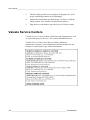
Vaisala Service Centers....................................................... 138
CHAPTER 6
CALIBRATION AND ADJUSTMENT......................................................... 139
Opening and Closing the Adjustment Mode ..................... 139
Relative Humidity Adjustment ............................................ 141
Using Push-Buttons .......................................................... 141
Using Display/Keypad ....................................................... 142
Using Serial Line ............................................................... 143
CRH ............................................................................. 143
Relative Humidity Adjustment after Sensor Change........ 144
Using Display/Keypad ....................................................... 144
Using Serial Line ............................................................... 144
FCRH ........................................................................... 145
Temperature Adjustment..................................................... 145
Using Display/Keypad ....................................................... 145
Using Serial Line ............................................................... 146
Analog Output Adjustment.................................................. 147
Using Display/Keypad ....................................................... 147
Using Serial Line ............................................................... 147
ACAL............................................................................ 147
Feeding Adjustment Information........................................ 148
Using Display/Keypad ....................................................... 148
Using Serial Line ............................................................... 148
CTEXT ......................................................................... 148
CDATE ......................................................................... 148
CHAPTER 7
TECHNICAL DATA .................................................................................... 149
Specifications ....................................................................... 149
Performance...................................................................... 149
Relative Humidity ......................................................... 149
Temperature (+ Operating Pressure Ranges) ............. 150
Optional Temperature Probe ....................................... 151
Calculated Variables .................................................... 151
Accuracies of Calculated Variables .................................. 151
Accuracy of Dewpoint Temperature °C ....................... 151
Accuracy of Mixing Ratio g/kg (Ambient Pressure 1013
mbar)............................................................................ 152
Accuracy of Wet Bulb Temperature °C........................ 152
Accuracy of Absolute Humidity g/m³ ............................ 152
Dewpoint Temperature (HMT337 Warmed Probe Option)153
Operating Environment ..................................................... 153
Inputs and Outputs............................................................ 154
Mechanics ......................................................................... 154
Transmitter Weight....................................................... 155
Technical Specifications of Optional Modules .................. 155
Power Supply Module .................................................. 155
Analog Output Module ................................................. 155
Relay Module ............................................................... 156
RS-485 Module ............................................................ 156
VAISALA_____________________________________________________________________ 5
User's Guide ______________________________________________________________________
LAN Interface Module...................................................156
WLAN Interface Module ...............................................156
Data Logger Module.....................................................157
Options and Accessories ....................................................158
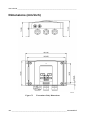
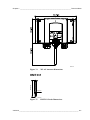
Dimensions (mm/inch) .........................................................160
HMT331.............................................................................161
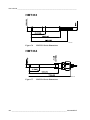
HMT333.............................................................................162
HMT334.............................................................................162
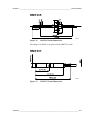
HMT335.............................................................................163
HMT337.............................................................................163
HMT338.............................................................................164
Temperature Probe ...........................................................164
APPENDIX A
PROBE INSTALLATION KITS AND INSTALLATION EXAMPLES .........165
Duct Installation Kits (for HMT333/337/335).......................165
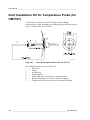
Duct Installation Kit for Temperature Probe (for HMT337)166
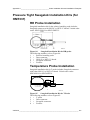
Pressure Tight Swagelok Installation Kits (for HMT337)..167
RH Probe Installation.........................................................167
Temperature Probe Installation .........................................167
Examples of Vapor Tight Installations with Cable Gland.168
RH-Probe Installations (for HMT333/337).........................168
T- Probe Installations (HMT337) .......................................169
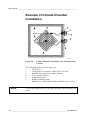
Example of Climate Chamber Installation .........................170
Example of Installation Through Roof ...............................171
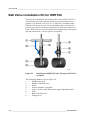
Ball Valve Installation Kit for HMT338 ................................172
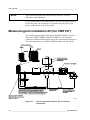
Meteorological Installation Kit (for HMT337) .....................174
APPENDIX B
CALCULATION FORMULAS.....................................................................175
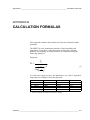
6 ________________________________________________________________ M210566EN-F
________________________________________________________________________________
List of Figures
Figure 1
Figure 2
Figure 3
Figure 4
Figure 5
Figure 6
Figure 7
Figure 8
Figure 9
Figure 10
Figure 11
Figure 12
Figure 13
Figure 14
Figure 15
Figure 16
Figure 17
Figure 18
Figure 19
Figure 20
Figure 21
Figure 22
Figure 23
Figure 24
Figure 25
Figure 26
Figure 27
Figure 28
Figure 29
Figure 30
Figure 31
Figure 32
Figure 33
Figure 34
Figure 35
Figure 36
Figure 37
Figure 38
Figure 39
Figure 40
Figure 41
Figure 42
Figure 43
Figure 44
Figure 45
Figure 46
Figure 47
Figure 48
Figure 49
Figure 50
Transmitter Body ...................................................................... 19
Inside the Transmitter............................................................... 20
Probe Options .......................................................................... 21
Standard Mounting ................................................................... 23
Mounting with Wall Mounting Kit .............................................. 24
Dimensions of the Plastic Mounting Plate (mm/inch)............... 24
Mounting with the DIN Rail Installation Kit ............................... 25
Vertical Pole ............................................................................. 26
Horizontal Pole ......................................................................... 26
Mounting with Metal Wall Mounting Plate ................................ 27
Dimensions of the Metal Mounting Plate (mm/inch) ................ 27
Mounting the Rain Shield with the Installation Kit .................... 28
Panel Mounting Frame ............................................................. 29
Panel Mounting Dimensions (mm/inch) ................................... 29
Cable Bushings ........................................................................ 30
Grounding the Screen of Electrical Cable ................................ 31
Screw Terminal Block on Motherboard .................................... 33
Connections to 24 VAC Power Supply..................................... 35
Measurement Error at 100 %RH.............................................. 36
Horizontal Mounting of Probe................................................... 37
Vertical Mounting of Probe ....................................................... 38
HMT344 Probe ......................................................................... 40
Tightening the Nut .................................................................... 40
Cleaning of Tightening Cone.................................................... 41
HMT338 Probe ......................................................................... 43
Sealing of Fitting Body into Process ........................................ 43
Tightening the Clasp Nut.......................................................... 44
Power Supply Module .............................................................. 45
Galvanic Output Isolation Module ............................................ 50
Third Analog Output ................................................................. 50
Third analog output selection ................................................... 51
Relay Module ........................................................................... 53
RS-485 Module ........................................................................ 54
4-Wire RS-485 Bus .................................................................. 55
LAN Interface Module............................................................... 57
WLAN Interface Module ........................................................... 58
Data Logger Module................................................................. 60
Wiring of Optional 8-Pin Connector.......................................... 61
Basic Display............................................................................ 64
Graphical Display ..................................................................... 64
Graphical Display with Data Logger......................................... 65
Main Menus.............................................................................. 67
Display Alarm Active ................................................................ 70
Display Alarms ......................................................................... 71
Modifying an Alarm Limit .......................................................... 71
Service Port Connector and User Port Terminal on Mother
Board ........................................................................................ 73
Connection Example Between PC Serial Port and User Port.. 74
Network Interface Menu ........................................................... 78
IP Configuration Menu.............................................................. 78
Wireless LAN Settings.............................................................. 81
VAISALA_____________________________________________________________________ 7
User's Guide ______________________________________________________________________
Figure 51
Figure 52
Figure 53
Figure 54
Figure 55
Figure 56
Figure 57
Figure 58
Figure 59
Figure 60
Figure 61
Figure 62
Figure 63
Figure 64
Figure 65
Figure 66
Figure 67
Figure 68
Figure 69
Figure 70
Figure 71
Figure 72
Figure 73
Figure 74
Figure 75
Figure 76
Figure 77
Figure 78
Figure 79
Figure 80
Figure 81
Figure 82
Figure 83
Figure 84
Figure 85
Figure 86
Figure 87
Figure 88
Figure 89
Figure 90
Figure 91
Figure 92
Figure 93
Entering Network SSID.............................................................81
Selecting the Wireless Network Type.......................................81
Web Configuration Interface for WLAN ....................................84
Connecting Using Serial Interface ............................................85
Connecting Using a Network ....................................................85
Hyper Terminal Serial Port Settings .........................................86
Device Information on Display...............................................102
Current/Voltage Switches of Output Modules ........................110
Measurement-Based Relay Output Modes ............................115
FAULT/ONLINE STATUS Relay Output Modes.....................117
Relay Indicators on Display ....................................................118
Decrease of Sensor Gain .......................................................126
Purge Buttons on Motherboard ..............................................128
Chemical Purge Settings ........................................................128
Performing Chemical Purge ...................................................129
Changing the Sensor..............................................................134
Error Indicator and Error Message .........................................135
Adjustment and Purge Buttons...............................................140
Adjustment Menu....................................................................140
Selecting Point 1 Reference Type ..........................................142
Accuracy over Temperature Range........................................150
Accuracy in Dewpoint Measurement......................................153
Transmitter Body Dimensions ................................................160
WLAN Antenna Dimensions ...................................................161
HMT331 Probe Dimensions ...................................................161
HMT333 Probe Dimensions ...................................................162
HMT334 Probe Dimensions ...................................................162
HMT335 Probe Dimensions ...................................................163
HMT337 Probe Dimensions ...................................................163
HMT338 Probe Dimensions ...................................................164
Optional Temperature Probe Dimensions ..............................164
Duct Mounting Installation Kit .................................................165
Duct Mounting Installation Kit for T-Probe..............................166
Swagelok Installation Kit for RH-probe...................................167
Swagelok Installation Kit for T-Probe .....................................167
Cable Installation with Cable Gland .......................................168
Probe Installation with Cable Gland .......................................168
Vapor Tight Installation...........................................................169
Wall Mounting Installation.......................................................169
Climate Chamber Installation (not Available from Vaisala) ....170
Example of Installation through Roof .....................................171
Installing the HMT338 Probe Through a Ball Valve
Assembly ................................................................................172
Meteorological Installation Kit for Outdoor Installation ...........174
8 ________________________________________________________________ M210566EN-F
________________________________________________________________________________
List of Tables
Table 1
Table 2
Table 3
Table 4
Table 5
Table 6
Table 7
Table 8
Table 9
Table 10
Table 11
Table 12
Table 13
Table 14
Table 15
Table 16
Table 17
Table 18
Table 19
Table 20
Table 21
Table 22
Table 23
Table 24
Table 25
Table 26
Table 27
Table 28
Table 29
Table 30
Table 31
Manual Revisions ..................................................................... 12
Quantities Measured by HMT330 ............................................ 17
Optional Quantities Measured by HMT330 .............................. 18
HMT338 Probe Dimensions ..................................................... 43
Connecting the Twisted Pair Wires to the Screw Terminals .... 54
4-Wire (Switch 3: On) ............................................................... 55
2-Wire (Switch 3: Off) ............................................................... 56
Observartion Periods and Resolution ...................................... 59
Wiring of 8-Pin Connector ........................................................ 61
Periods for Trend and Max/Min Calculations ........................... 65
Graph Information Messages in Cursor Mode ......................... 66
Default Serial Communication Settings for the User Port ........ 73
Communication Settings for the Service Port .......................... 76
IP Settings for the LAN and WLAN Interfaces ......................... 77
Wireless LAN Settings.............................................................. 80
Measurement Commands ........................................................ 87
Formatting Commands............................................................. 87
Data Recording Commands ..................................................... 87
Chemical Purge Commands .................................................... 88
Calibration and Adjustment Commands................................... 88
Setting and Testing the Analog Outputs .................................. 88
Setting and Testing the Relays ................................................ 88
Other Commands ..................................................................... 89
FORM Command Modifiers...................................................... 94
Multiplication Factors................................................................ 96
Selection of Output Modes ..................................................... 100
Filtering Levels ....................................................................... 101
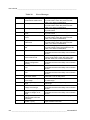
Error Messages ...................................................................... 136
Indicator Led Functions .......................................................... 140
Calculated Variables (Typical Ranges) .................................. 151
Transmitter Weight (in kg/lb) .................................................. 155
VAISALA_____________________________________________________________________ 9
User's Guide ______________________________________________________________________
This page intentionally left blank.
10 _______________________________________________________________ M210566EN-F
Chapter 1 ________________________________________________________ General Information
CHAPTER 1
GENERAL INFORMATION
This chapter provides general notes for the manual and the product.
About This Manual
This manual provides information for installing, operating, and
maintaining Vaisala HUMICAP® Humidity and Temperature
Transmitter Series HMT330.
Contents of This Manual
This manual consists of the following chapters:
- Chapter 1, General Information, provides general notes for the
manual and the product.
- Chapter 2, Product Overview, introduces the features, advantages,
and the product nomenclature of HMT330.
- Chapter 3, Installation, provides you with information that is
intended to help you install the product.
- Chapter 4, Operation, contains information that is needed to
operate this product.
- Chapter 5, Maintenance, contains information that is needed in
basic maintenance of the product.
- Chapter 6, Calibration and Adjustment, provides information and
instructions concerning calibration and adjustment of HMT330.
- Chapter 7, Technical Data, provides the technical data of the
product.
VAISALA____________________________________________________________________ 11
User's Guide ______________________________________________________________________
- Appendix A, Probe Installation Kits and Installation Examples,
presents the installation kits available for HMT330 and provides
some installation examples.
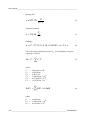
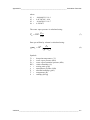
- Appendix B, Calculation Formulas, presents the equations used in
HMT330 to calculate values of dewpoint, mixing ratio, absolute
humidity and enthalpy in normal pressure.
Version Information
Table 1
Manual Code
M210566EN-A
M210566EN-B
M210566EN-C
M210566EN-D
M210566EN-E
M210566EN-F
Manual Revisions
Description
September 2004 - First release.
November 2004
September 2005
November 2006
June 2007 - New options added: Data logger
module, USB-RJ45 cable, new sensors
HUMICAP® 180R and HUMICAP® 180RC.
Support for Chinese language.
May 2008 – New options added: LAN Interface,
WLAN Interface. Display Alarm feature added.
General Safety Considerations
Throughout the manual, important safety considerations are
highlighted as follows:
WARNING
Warning alerts you to a serious hazard. If you do not read and follow
instructions very carefully at this point, there is a risk of injury or
even death.
CAUTION
Caution warns you of a potential hazard. If you do not read and
follow instructions carefully at this point, the product could be
damaged or important data could be lost.
NOTE
Note highlights important information on using the product.
12 _______________________________________________________________ M210566EN-F
Chapter 1 ________________________________________________________ General Information
Feedback
Vaisala Customer Documentation Team welcomes your comments
and suggestions on the quality and usefulness of this publication. If
you find errors or have other suggestions for improvement, please
indicate the chapter, section, and page number. You can send
comments to us by e-mail: [email protected]
Product Related Safety Precautions
The Vaisala HUMICAP® Humidity and Temperature Transmitter
Series HMT330 delivered to you has been tested for safety and
approved as shipped from the factory. Note the following precautions:
WARNING
Ground the product, and verify outdoor installation grounding
periodically to minimize shock hazard.
CAUTION
Do not modify the unit. Improper modification can damage the
product, lead to malfunction, or make the product noncompliant with
applicable legislation.
ESD Protection
Electrostatic Discharge (ESD) can cause immediate or latent damage
to electronic circuits. Vaisala products are adequately protected
against ESD for their intended use. However, it is possible to damage
the product by delivering electrostatic discharges when touching,
removing, or inserting any objects inside the equipment housing.
To make sure you are not delivering high static voltages yourself:
- Handle ESD sensitive components on a properly grounded and
protected ESD workbench. When this is not possible, ground
yourself to the equipment chassis before touching the boards.
Ground yourself with a wrist strap and a resistive connection cord.
When neither of the above is possible, touch a conductive part of
the equipment chassis with your other hand before touching the
boards.
- Always hold the boards by the edges and avoid touching the
component contacts.
VAISALA____________________________________________________________________ 13
User's Guide ______________________________________________________________________
Regulatory Compliances
Transmitters with LAN or WLAN Interface
This equipment has been tested and found to comply with the limits
for a Class B digital device, pursuant to Part 15 of the FCC Rules.
These limits are designed to provide reasonable protection against
harmful interference in a residential installation. Operation is subject
to the following two conditions: (1) this device may not cause
interference, and (2) this device must accept any interference,
including interference that may cause undesired operation of the
device.
This equipment generates, uses and can radiate radio frequency energy
and, if not installed and used in accordance with the instructions, may
cause harmful interference to radio communications. However, there
is no guarantee that interference will not occur in a particular
installation. If this equipment does cause harmful interference to radio
or television reception, which can be determined by turning the
equipment off and on, the user is encouraged to try to correct the
interference by one or more of the following measures:
- Reorient or relocate the receiving antenna.
- Increase the separation between the equipment and receiver.
- Connect the equipment into an outlet on a circuit different from
that to which the receiver is connected.
- Consult the dealer or an experienced radio/TV technician for help.
Transmitters with WLAN Interface
This device has been designed to operate with a 2 dBi half-wave
antenna. Antennas with a gain greater than 2 dB are strictly prohibited
for use with this device. The required antenna impedance is 50 ohms.
To reduce potential radio interference to other users, the antenna type
and its gain should be so chosen that the equivalent isotropically
radiated power (e.i.r.p.) is not more than that permitted for successful
communication.
This Class [B] digital apparatus complies with Canadian ICES-003.
Cet appareil numérique de la classe [B] est conforme à la norme
NMB-003 du Canada.
14 _______________________________________________________________ M210566EN-F
Chapter 1 ________________________________________________________ General Information
Recycling
Recycle all applicable material.
Dispose of batteries and the unit according to statutory regulations.
Do not dispose of with regular household refuse.
Trademarks
HUMICAP® is a registered trademark of Vaisala. Microsoft®,
Windows®, Windows® 2000, Windows Server® 2003, Windows® XP,
and Windows® Vista are registered trademarks of Microsoft
Corporation in the United States and/or other countries.
License Agreement
All rights to any software are held by Vaisala or third parties. The
customer is allowed to use the software only to the extent that is
provided by the applicable supply contract or Software License
Agreement.
VAISALA____________________________________________________________________ 15
User's Guide ______________________________________________________________________
Warranty
Vaisala hereby represents and warrants all Products
manufactured by Vaisala and sold hereunder to be
free from defects in workmanship or material
during a period of twelve (12) months from the date
of delivery save for products for which a special
warranty is given. If any Product proves however to
be defective in workmanship or material within the
period herein provided Vaisala undertakes to the
exclusion of any other remedy to repair or at its
own option replace the defective Product or part
thereof free of charge and otherwise on the same
conditions as for the original Product or part
without extension to original warranty time.
Defective parts replaced in accordance with this
clause shall be placed at the disposal of Vaisala.
Vaisala also warrants the quality of all repair and
service works performed by its employees to
products sold by it. In case the repair or service
works should appear inadequate or faulty and
should this cause malfunction or nonfunction of the
product to which the service was performed Vaisala
shall at its free option either repair or have repaired
or replace the product in question. The working
hours used by employees of Vaisala for such repair
or replacement shall be free of charge to the client.
This service warranty shall be valid for a period of
six (6) months from the date the service measures
were completed.
This warranty is however subject to following
conditions:
a) A substantiated written claim as to any alleged
defects shall have been received by Vaisala
within thirty (30) days after the defect or fault
became known or occurred, and
b) The allegedly defective Product or part shall,
should Vaisala so require, be sent to the works
of Vaisala or to such other place as Vaisala may
indicate in writing, freight and insurance
prepaid and properly packed and labelled,
unless Vaisala agrees to inspect and repair the
Product or replace it on site.
This warranty does not however apply when the
defect has been caused through
a) normal wear and tear or accident;
b) misuse or other unsuitable or unauthorized use
of the Product or negligence or error in storing,
maintaining or in handling the Product or any
equipment thereof;
c) wrong installation or assembly or failure to
service the Product or otherwise follow
Vaisala's service instructions including any
repairs or installation or assembly or service
made by unauthorized personnel not approved
by Vaisala or replacements with parts not
manufactured or supplied by Vaisala;
d) modifications or changes of the Product as well
as any adding to it without Vaisala's prior
authorization;
e) other factors depending on the Customer or a
third party.
Notwithstanding the aforesaid Vaisala's liability
under this clause shall not apply to any defects
arising out of materials, designs or instructions
provided by the Customer.
This warranty is expressly in lieu of and excludes
all other conditions, warranties and liabilities,
express or implied, whether under law, statute or
otherwise, including without limitation any implied
warranties of merchantability or fitness for a
particular purpose and all other obligations and
liabilities of Vaisala or its representatives with
respect to any defect or deficiency applicable to or
resulting directly or indirectly from the Products
supplied hereunder, which obligations and
liabilities are hereby expressly cancelled and
waived. Vaisala's liability shall under no
circumstances exceed the invoice price of any
Product for which a warranty claim is made, nor
shall Vaisala in any circumstances be liable for lost
profits or other consequential loss whether direct or
indirect or for special damages.
16 _______________________________________________________________ M210566EN-F
Chapter 2 __________________________________________________________ Product Overview
CHAPTER 2
PRODUCT OVERVIEW
This chapter introduces the features, advantages, and the product
nomenclature of the Vaisala HUMICAP® Humidity and Temperature
Transmitter Series HMT330.
Introduction to HMT330
The HMT330 transmitter provides reliable humidity measurement in a
wide range of applications. Analog outputs can be chosen between
current and voltage signals. Alternatively, digital outputs RS-232
(standard) or RS-422/485 (optional) can be selected.
The quantities measured and calculated by HMT330 are presented in
Table 2 below. The quantities available as an option are presented in
Table 3 below.
Table 2
Quantities Measured by HMT330
Quantity
Relative humidity (RH)
Temperature (T)
Abbreviati
on
RH
T
Metric Unit Non Metric
Unit
%RH
%RH
ºC
ºF
VAISALA _______________________________________________________________________ 17
User's Guide ______________________________________________________________________
Table 3
Optional Quantities Measured by HMT330
Quantity
Dewpoint / Frostpoint
Temperature (Td/f)
Dewpoint Temperature (Td)
Absolute humidity (a)
Mixing ratio (x)
Wetbulb temperature (Tw)
Humid air volume/ dry air
volume
(by volume or by weight) (H2O)
Water vapor pressure (Pw)
Water vapor saturation
pressure (Pws)
Enthalpy (h)
Difference of T and Td/f (∆T)
Abbreviati
on
TDF
Metric Unit Non Metric
Unit
ºC
ºF
TD
A
X
TW
H2O
ºC
g/m3
g/kg
ºC
ppmv/ppmw
ºF
gr/ft3
gr/lb
ºF
ppmv/ppmw
PW
PWS
hPa
hPa
lb/in2
lb/in2
H
DT
kJ/kg
ºC
Btu/lb
ºF
Basic Features and Options
- Several probes for various applications
- User friendly display
- Calculated output quantities available
- Different probe mounting kits, sensor protection options and probe
cable lengths
- Transmitter mounting kits for multiple installation purposes
- Chemical purge for applications where interfering chemicals in the
measuring environment pose a risk
- Warmed probe and sensor heating for high humidity conditions
(HMT337)
- Additional temperature sensor (HMT337)
- USB connectivity for service connections via the optional
USB-RJ45 cable
- Optional modules:
- isolated power supply
- power supply module
- RS-422/485-module
- LAN and WLAN interfaces
- data logger module with real time clock
- additional analog output module
- relay module
18 __________________________________________________________________ M210566EN-F
Chapter 2 __________________________________________________________ Product Overview
Structure of the Transmitter
0604-005
Figure 1
Transmitter Body
The numbers refer to Figure 1:
1
2
=
=
3
4
5
6
=
=
=
=
Signal + powering cable gland
Cable gland for optional module, or WLAN antenna
connector
Cable gland for optional module
Cover screw (4 pcs)
Display with keypad (optional)
Cover LED
VAISALA _______________________________________________________________________ 19
User's Guide ______________________________________________________________________
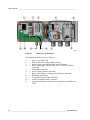
0508-010
Figure 2
Inside the Transmitter
The following numbers refer to Figure 2:
1
2
3
4
=
=
=
=
5
6
7
8
9
10
11
=
=
=
=
=
=
=
Service port (RS-232)
DIP switches for analog output settings
Power supply and signal wiring screw terminals
Relay, data logger, RS-422/485, LAN, or WLAN module
(optional)
Grounding connector
Power supply module (optional)
Relay, data logger, or analog output module (optional)
Humidity probe cable
Temperature probe cable (optional)
Output isolation module (optional)
Adjustment buttons (chemical purge buttons) with indicator
LED
20 __________________________________________________________________ M210566EN-F
Chapter 2 __________________________________________________________ Product Overview
Probe Options
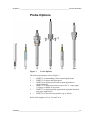
0507-033
Figure 3
Probe Options
The following numbers refer to Figure 3:
1
2
3
=
=
=
4 =
5
=
6
=
HMT331 for demanding wall-mounted applications
HMT333 for ducts and tight spaces
HMT334 for high pressure and vacuum applications
(up to 100 bars)
HMT335 for high temperatures (up to 180 ºC, vapor tight)
*) Flange available as an option
HMT337 for high humidity applications (optional warmed
and vapor tight probe)
HMT338 for pressurized pipelines (up to 40 bar)
Probe cable lengths are 2 m, 5 m and 10 m.
VAISALA _______________________________________________________________________ 21
User's Guide ______________________________________________________________________
Warmed Probe HMT337
Temperature difference between the probe and external environment
can cause a risk of condensation on the sensor. A wet probe cannot
observe the actual humidity in the ambient air. If the condensed water
is contaminated, the life span of the probe may shorten and calibration
may change.
HMT337 probe shall be used in applications where condensation can
occur due to high humidity and rapid humidity changes. The warmed
probe is heated continuously so that its temperature is always higher
than in environment. This prevents condensation on the probe. The
power consumption of the warmed probe is slightly higher than other
probes.
22 __________________________________________________________________ M210566EN-F
Chapter 3 _______________________________________________________________ Installation
CHAPTER 3
INSTALLATION
This chapter provides you with information that is intended to help
you install the product.
Mounting the Housing
The housing can be mounted either without the mounting plate or with
optional mounting plates.
Standard Mounting without
Mounting Plate
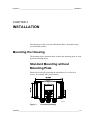
Mount the housing by attaching the transmitter to a wall with 4
screws, for example M6 (not provided).
0804-066
Figure 4
Standard Mounting
VAISALA _______________________________________________________________________ 23
User's Guide ______________________________________________________________________
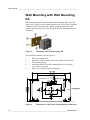
Wall Mounting with Wall Mounting
Kit
When mounting with wall mounting kit the mounting plate (Vaisala
order code 214829) can be installed directly on wall or onto a standard
wall box (also US junction box). When wiring through back wall,
remove the plastic plug from the wiring hole in the transmitter before
mounting.
0503-004
Figure 5
Mounting with Wall Mounting Kit
The following numbers refer to Figure 5:
1
2
3
4
=
=
=
=
5
=
Plastic mounting plate
Mount the plate to wall with 4 screws M6 (not provided)
The arched side up
Attach the HMT330 to the mounting plate with 4 fixing
screws M3 (provided)
Holes for wall/junction box mounting
0804-065
Figure 6
Dimensions of the Plastic Mounting Plate (mm/inch)
24 __________________________________________________________________ M210566EN-F
Chapter 3 _______________________________________________________________ Installation
Mounting with DIN Rail Installation
Kit
DIN rail installation kit includes a wall mounting kit, 2 clip-fasteners
and 2 screws M4 × 10 DIN 7985 (Vaisala order code: 215094).
1.
Attach two spring holders to the plastic mounting plate by using
the screws provided in the installation kit.
2.
Attach the HMT330 to the plastic mounting plate with the
4 screws provided for that purpose.
3.
Press the transmitter onto the DIN rail so that the clip-fasteners
snap into the rail.
0503-002
Figure 7
Mounting with the DIN Rail Installation Kit
VAISALA _______________________________________________________________________ 25
User's Guide ______________________________________________________________________
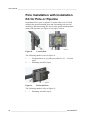
Pole Installation with Installation
Kit for Pole or Pipeline
Installation kit for pole or pipeline (Vaisala order code: 215108)
includes the metal mounting plate and 4 mounting nuts for pole
mounting. When mounting, the arrow in the metal mounting plate
must point upwards; see Figure 10 on page 27 below.
0503-006
Figure 8
Vertical Pole
The following numbers refer to Figure 8:
1
=
2
=
Fixing brackets (2 pcs) M8 (provided) for 30 ... 102 mm
poles.
Mounting nuts M8 (4 pcs)
0503-007
Figure 9
Horizontal Pole
The following number refers to Figure 9:
1
=
Mounting nuts M8 (4 pcs)
26 __________________________________________________________________ M210566EN-F
Chapter 3 _______________________________________________________________ Installation
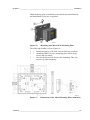
Metal mounting plate is included in rain shield with installation kit
and installation kit for pole or pipeline.
0503-041
Figure 10
Mounting with Metal Wall Mounting Plate
The following numbers refer to Figure 10:
1
2
=
=
3
=
Mount the plate to wall with 4 screws M8 (not provided)
Attach the HMT330 to the mounting plate with 4 fixing
screws M6 (provided)
Note the position of the arrow when mounting. This side
must be up when mounting.
0509-151
Figure 11
Dimensions of the Metal Mounting Plate (mm/inch)
VAISALA _______________________________________________________________________ 27
User's Guide ______________________________________________________________________
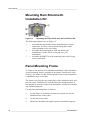
Mounting Rain Shield with
Installation Kit
0503-008
Figure 12
Mounting the Rain Shield with the Installation Kit
The following numbers refer to Figure 12:
1
2
3
= Assemble the rain shield with the installation kit (Vaisala
order code: 215109) to the metal mounting plate with 2
(M6) mounting screws (provided).
= Assemble the mounting plate with rain shield with
installation kit to the wall or to the pole (see pole
installation).
= Assemble the HMT330 to the mounting plate with 4 fixing
screws (provided).
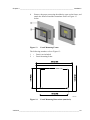
Panel Mounting Frame
To enable a neat and dirt free embedded installation of the transmitter,
a panel mounting frame is available as an option (Vaisala order code:
216038). The frame is a thin, flexible plastic frame for the transmitter,
with adhesive tape on one side.
The frame is used to hide any rough edges of the installation hole, and
provide a more finished look. Note that the panel mounting frame is
not intended to bear the weight of the transmitter, and does not include
any mounting supports.
Use the panel mounting frame as follows:
1.
Use the frame as a template to mark the required size for the
installation hole in the panel.
2.
Cut the hole in the panel.
3.
Mount the transmitter through the panel with suitable supports.
28 __________________________________________________________________ M210566EN-F
Chapter 3 _______________________________________________________________ Installation
4.
Remove the paper protecting the adhesive tape on the frame, and
attach the frame around the transmitter. Refer to Figure 13
below.
0704-002
Figure 13
Panel Mounting Frame
The following numbers refer to Figure 13:
1
2
=
=
Panel (not included)
Panel mounting frame
0804-083
Figure 14
Panel Mounting Dimensions (mm/inch)
VAISALA _______________________________________________________________________ 29
User's Guide ______________________________________________________________________
Wiring
Cable Bushings
A single electrical cable with screen and three to ten wires is
recommended for power and analog/serial connections. The cable
diameter should be 8 ... 11 mm. The number of cable bushings
depends on the transmitter options. See the following
recommendations for the cable bushings:
0503-010
Figure 15
Cable Bushings
The following numbers refer to Figure 15:
1
2
3
NOTE
= Cable for signal/powering Ø8 ... 11 mm
= Cable for optional module Ø8 ... 11 mm
= Cable for optional power supply module Ø8 ... 11 mm
When there is high electric noise level (for example, near a powerful
electric motor) in the operating environment it is recommended to use
shielded cable or take care that the signal cables are separated from
other cables.
30 __________________________________________________________________ M210566EN-F
Chapter 3 _______________________________________________________________ Installation
Grounding the Cables
Ground the screen of the electrical cable properly to achieve the best
possible EMC performance.
0504-049
Figure 16
Grounding the Screen of Electrical Cable
VAISALA _______________________________________________________________________ 31
User's Guide ______________________________________________________________________
1.
Cut back outer sheath to desired length.
2.
Cut back screen braiding or screen foil to dimension X
(see figure 3).
3.
Push the domed cap nut (item 1) and the seal insert with contact
socket of the gland (item 2+3) onto the cable as shown in the
diagram.
4.
Bend over the screen braiding or screen foil by about 90º
(item 4).
5.
Push the seal insert with the contact socket of the gland
(item 2+3) up to the screen braiding or screen foil.
6.
Mount lower part (item 5) on the housing.
7.
Push the seal with the contact socket of the gland and (item 2+3)
flush into the lower part (item 5).
8.
Attach the domed cap nut (item 1) onto the lower part (item 5).
Grounding the Transmitter Housing
In case you need to ground the transmitter housing, the grounding
connector is found inside the housing, see Figure 2 on page 20. Note
that the probe is connected to the same potential as the housing. Make
sure that different groundings are made to the same potential.
Otherwise harmful ground currents may be generated.
If it is needed to have galvanic isolation of the power supply line from
the output signals, the HMT330 can be ordered with an optional
output isolation module. This module prevents harmful grounding
loops.
32 __________________________________________________________________ M210566EN-F
Chapter 3 _______________________________________________________________ Installation
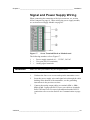
Signal and Power Supply Wiring
When connecting the transmitter with 8-pin connector, see section
8-Pin Connector on page 61. When wiring the power supply module,
see section Power Supply Module on page 45.
0506-028
Figure 17
Screw Terminal Block on Motherboard
The following numbers refer to Figure 17:
1
2
3
WARNING
=
=
=
Power supply terminals 10 ... 35 VDC, 24 VAC
User port (RS-232 terminals)
Analog signal terminals
Make sure that you connect only de-energized wires.
1.
Unfasten the four cover screws and open the transmitter cover.
2.
Insert the power supply wires and signal wires through the cable
bushing in the bottom of the transmitter; see the grounding
instructions in the previous sections.
3.
Connect the analog output cables to terminals: Ch1 +, Ch1-,
Ch2+, Ch2-. Connect the RS-232 user port cables to terminals
RxD, GND and TxD. For more information about the RS-232
connection refer to section Serial Line Communication on page
72.
VAISALA _______________________________________________________________________ 33
User's Guide ______________________________________________________________________
4.
When wiring the optional modules, see the corresponding
section for instructions:
- RS-422/485 Interface on page 54
- Relays on page 52
- Third Analog Output on page 50
- LAN Interface on page 56
- WLAN Interface on page 57
5.
Connect the power supply wires to the connectors: POWER
10 ... 35V+ 24V~ (+) and (-) terminals. If you are using 24 VAC
power supply, see the note below before connecting the supply
wires.
6.
Turn on the power. The indicator led on the cover lit
continuously during normal operation.
7.
Close the cover and fasten the cover screws. The transmitter is
ready for use.
Connections to a 24 VAC Power
Supply
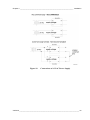
Separate floating supply for each transmitter is recommended (see the
upper part of Figure 18 on page 35). If you have to connect several
transmitters or other instruments to one AC supply, the phase (~) must
always be connected to the (+) connector of each transmitter (see the
lower part of Figure 18).
CAUTION
24 VAC POWER SUPPLY USE
To prevent fire and/or damage, if either 24 VAC wire is grounded or
connected to a "-", "0", or "GND" terminal of any other device,
you must connect the same wire on the "-" terminal also on this
instrument.
34 __________________________________________________________________ M210566EN-F
Chapter 3 _______________________________________________________________ Installation
0703-041
Figure 18
Connections to 24 VAC Power Supply
VAISALA _______________________________________________________________________ 35
User's Guide ______________________________________________________________________
Probe Mounting
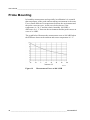
In humidity measurement and especially in calibration it is essential
that temperature of the probe and measuring environment is the same.
Even a small difference in temperature between the environment and
the probe causes an error. As the curve below shows, if the
temperature is +20 °C and the relative humidity 100 %RH, a
difference of ±1 °C between the environment and the probe causes an
error of ±6 %RH.
The graph below illustrates the measurement error at 100 %RH when
the difference between the ambient and sensor temperature is 1 °C.
0507-023
Figure 19
Measurement Error at 100 %RH
36 __________________________________________________________________ M210566EN-F
Chapter 3 _______________________________________________________________ Installation
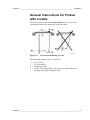
General Instructions for Probes
with a Cable
Mount the probes with a cable horizontally; this way, any water
condensing on the tube cannot flow onto the sensor.
0507-024
Figure 20
Horizontal Mounting of Probe
The following numbers refer to Figure 20:
1
2
3
4
=
=
=
=
To be sealed.
To be insulated.
Insulate the cable.
Let the cable hang loosely. This prevents condensed water
running to the probe along the cable.
VAISALA _______________________________________________________________________ 37
User's Guide ______________________________________________________________________
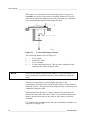
When there is no alternative but to install the probe in the process
vertically, the point of entry must be carefully insulated. The cable
must also be allowed to hang loosely as this prevents any condensed
water from running onto the probe along the cable.
0507-022
Figure 21
Vertical Mounting of Probe
The following numbers refer to Figure 21:
1
2
3
4
NOTE
=
=
=
=
To be sealed.
Insulate the cable.
To be insulated.
Let the cable hang loosely. This prevents condensed water
running to the sensor along the cable.
Please do not attach a heated probe (HMT337) to metal structures to
avoid condensation problems caused by heat conduction along the
metal.
If the process temperature is much higher than that of the
environment, the whole probe and preferably plenty of cable must be
inside the process. This prevents measuring inaccuracy caused by heat
conduction along the cable.
When mounted on the side of a duct or channel, the probe must be
inserted from the side of the duct. If this is not possible and the probe
must be inserted from the top, the point of entry must be carefully
insulated.
For Vaisala probe installation kits and some installation examples, see
Appendix A on page 165.
38 __________________________________________________________________ M210566EN-F
Chapter 3 _______________________________________________________________ Installation
HMT333 for Ducts and Tight
Spaces
The HMT333 is a small size (ø = 12mm) general-purpose probe
suitable for ducts and channels with the installation kit available from
Vaisala.
The HMT333 provides for two measuring range options. The first
probe version is equipped with a flexible cable and can be used when
measuring in environments up to 80 ºC. The second version is suitable
for measuring in environments up to 120 ºC.
See Appendix A on page 165 for the following probe installation kits
for HMT333 and installation examples.
- Duct mounting kit
- Cable gland.
HMT334 for High Pressure and
Vacuum Applications
The HMT334 probe is for the dewpoint measurements in pressurized
rooms and industrial processes. The probe is provided with a nut, a
fitting screw and a sealing washer. Keep the fitting screw and the nut
in place on the body of the probe during handling to prevent damage
to the highly polished surface of the probe. Follow the instructions
below to achieve a leak-tight assembly:
1.
Remove the fitting screw from the nut and the probe.
2.
Attach the fitting screw to the chamber wall with a sealing
washer. Tighten the fitting screw into the threaded sleeve with a
torque spanner. The tightening torque is 150 ± 10 Nm (110 ± 7
ft-lbs).
3.
Insert the body of the probe into the fitting screw and attach the
nut manually to the fitting screw so that the connection feels
tight.
4.
Mark both the fitting screw and the nut hex.
VAISALA _______________________________________________________________________ 39
User's Guide ______________________________________________________________________
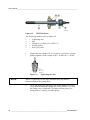
0506-029
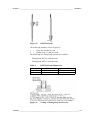
Figure 22
HMT344 Probe
The following numbers refer to Figure 22:
1
2
3
4
5
5.
=
=
=
=
=
Tightening cone
Nut
Fitting screw, M22x1.5 or NPT 1/2"
Sealing washer
Probe; Ø12 mm.
Tighten the nut a further 30º (1/12) turn or if you have a torque
spanner tighten it with a torque of 80 ± 10 Nm (60 ± 7 ft-lbs).
0503-034
Figure 23
NOTE
Tightening the Nut
When re-tightening the nut after detachment the nut must be
tightened without increased effort.
6.
Clean and grease the tightening cone of the fitting screw after
every tenth detachment. Change the sealing washer every time
the fitting screw is detached. Use high-vacuum grease (for
example Dow Corning) or similar grease.
40 __________________________________________________________________ M210566EN-F
Chapter 3 _______________________________________________________________ Installation
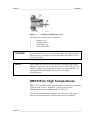
0503-033
Figure 24
Cleaning of Tightening Cone
The following numbers refer to Figure 24:
1
2
3
4
=
=
=
=
Fitting screw
Sealing washer
Tightening cone
Clean cotton stick
CAUTION
In pressurized processes it is essential to tighten the supporting nuts
and screws very carefully to prevent loosening of the probe by the
action of pressure.
NOTE
When installed in a process with a pressure differing from normal
atmospheric pressure, please enter the pressure value of the process
(in hPa or mbar) into the transmitter memory via the serial line (see
command PRES and XPRES on page 96) or by using
display/keypad.
HMT335 for High Temperatures
HMT335 is installed similarly than the HMT333 probe but without the
supporting bar. Refer to Appendix A on page 165 for more
information on the duct installation kit for HMT335.
To avoid incorrect humidity readings, the temperature differences
between inside and outside of the duct must not be remarkable.
VAISALA _______________________________________________________________________ 41
User's Guide ______________________________________________________________________
HMT337 for High Humidity
Applications
The HMT337 is for environment where relative humidity is very high,
near saturation. The warmed probe prevents the saturation of the
sensor. An additional temperature probe is also available.
See Appendix A on page 165 for a presentation of the following probe
installation kits for HMT337 with installation examples:
- Duct mounting kit
- Cable gland
- Pressure tight Swagelok connector
- Vaisala's Meteorological Installation kit
The installation kits are available for both humidity and temperature
probe.
Temperature Probe (Optional)
An additional temperature probe is available to measure the ambient
temperature when the HMT337 (with probe warming) is used. The
additional temperature probe allows you to measure other humidity
quantities apart from dewpoint and mixing ratio. The temperature
probe must be connected to the transmitter at the factory. Do not cut
and re-connect the cable yourself.
You must install the additional temperature probe in the same
measurement environment as the HMT337 probe. Make sure that heat
does not transfer from the warmed probe to the temperature probe. For
an example installation, refer to section Example of Installation
Through Roof on page 171.
HMT338 for Pressurized Pipelines
Due to the sliding fit the HMT338 is easy to install into and remove
from the pressurized process. The probe is especially suitable for the
measurements in pipelines. See section Ball Valve Installation Kit for
HMT338 on page 172.
42 __________________________________________________________________ M210566EN-F
Chapter 3 _______________________________________________________________ Installation
0508-077
Figure 25
HMT338 Probe
The following numbers refer to Figure 25:
1
2
=
=
Clasp nut, 24 mm hex nut
Fitting body, 27 mm hex head
The following two fitting body options are available:
- Fitting Body ISO1/2 solid structure
- Fitting Body NPT1/2 solid structure
Table 4
HMT338 Probe Dimensions
Probe type
Standard
Optional
Probe Dimension
178 mm
400 mm
Adjustment Range
120 mm
340 mm
0507-025
Figure 26
Sealing of Fitting Body into Process
VAISALA _______________________________________________________________________ 43
User's Guide ______________________________________________________________________
Tightening the Clasp Nut
1.
Adjust the probe to a suitable depth according to the type of
installation.
2.
Tighten the clasp nut first manually.
3.
Mark the fitting screw and the clasp nut.
4.
Tighten the nut a further 50 -60º (ca. 1/6 turn) with a wrench. If
you have suitable torque spanner, tighten the nut to max 45 ± 5
Nm (33 ± 4 ft-lbs).
0505-276
Figure 27
Tightening the Clasp Nut
The following numbers refer to Figure 27 on page 44:
1 = Probe
2 = Clasp nut
3 = Fitting screw
4 = Pen
NOTE
Take care not to over tighten the clasp nut to avoid difficulties when
opening it.
CAUTION
Take care not to damage the probe body. A damaged body makes the
probe less tight and may prevent it from going through the clasp nut.
CAUTION
In pressurized processes it is essential to tighten the supporting nuts
and screws very carefully to prevent loosening of the probe by the
action of pressure.
44 __________________________________________________________________ M210566EN-F
Chapter 3 _______________________________________________________________ Installation
NOTE
When installed in a process with a pressure differing from normal
atmospheric pressure, please enter the pressure value of the process
(in hPa or mbar) into the transmitter memory via the serial line (see
command PRES and XPRES on page 96) or by using
display/keypad.
Optional Modules
Power Supply Module
The AC (mains) power connection may be connected to the power
supply module only by an authorized electrician. A readily accessible
disconnect device shall be incorporated in the fixed wiring.
0506-027
Figure 28
Power Supply Module
The following numbers refer to Figure 28:
1
2
3
=
=
=
4
5
=
=
Connect AC (mains) voltage wires to these terminals
Grounding terminal
In case the module is not installed in the factory: Connect
wires from these terminals to the POWER 10 ... 36V 24V
terminals of the mother board.
+
-
VAISALA _______________________________________________________________________ 45
User's Guide ______________________________________________________________________
Installation
1.
Disconnect the power and open the transmitter cover.
2.
Remove the protective plug from the cable gland and thread the
wires. In case the power supply module is installed in the
factory, continue with the step 5.
3.
Attach the power module to the bottom of the housing with four
screws. See the position Figure 2 on page 20.
4.
Connect the wires from the terminals of the power supply
module marked with + and - to the terminals POWER 10 ... 35
V 24V on the motherboard of the transmitter.
5.
Connect the AC mains voltage wires to the power supply
module terminals marked with N and L.
6.
Attach the grounding wire to the grounding terminal on the
right-hand side of the transmitter.
7.
Connect the power. The LED on the cover of the transmitter is
lit continuously during normal operation.
WARNING
Do not detach the power supply module from the transmitter when
the power is on.
WARNING
Do not connect the mains power to power supply module when it is
not installed in the transmitter.
WARNING
Always connect the protective ground terminal.
46 __________________________________________________________________ M210566EN-F
Chapter 3 _______________________________________________________________ Installation
Warnings
Dieses Produkt entspricht der Niederspannungsrichtlinie (73/23 EWG).
-
Das Netzmodul darf nur von einem dazu befugten Elektriker angeschlossen werden.
-
Trennen Sie das Netzmodul nicht vom Messwertgeber, wenn der Strom eingeschaltet ist.
-
Verbinden Sie das Netzmodul nur mit der Spannungsquelle, wenn es im Messwertgeber
HMT330 montiert ist.
-
Das Erdungskabel muss zum Schutz immer angeschlossen sein.
Ce produit est conforme à la Directive relative à la Basse Tension (73/23 EEC).
-
Seul un électricien compétent est habilité à raccorder le module d’alimentation au secteur.
-
Ne pas détacher le module d’alimentation du transmetteur lorsqu’il est en service.
-
Ne pas raccorder le secteur au module d’alimentation lorsque celui-ci n’est pas installé
dans le transmetteur HMT330.
-
Toujours raccorder un bornier de protection à la terre.
Tämä tuote on pienjännitedirektiivin (73/23 EEC) mukainen.
-
Vaihtovirtaliitännän saa kytkeä tehonsyöttömoduuliin ainoastaan valtuutettu
sähköasentaja
-
Älä irrota tehonsyöttömoduulia lähettimestä, kun virta on kytkettynä.
-
Älä kytke verkkovirtaa tehonsyöttömoduuliin, jos kyseistä moduulia ei ole asennettu
HMT330 lähettimeen.
-
Kytke aina maadoitusliittimet.
Denna produkt uppfyller kraven i direktivet om lågspänning (73/23 EEC).
-
Nätanslutningen (växelströmsanslutningen) får bara anslutas till
strömförsörjningsmodulen av en behörig elektriker.
-
Ta inte loss strömförsörjningsmodulen från mätaren när strömmen är på.
-
Anslut inte strömförsörjningsmodulen till nätet när den inte är installerad i HMT330mätaren
-
Anslut alltid en skyddande jordningsplint.
VAISALA _______________________________________________________________________ 47
User's Guide ______________________________________________________________________
Questo prodotto é conforme alla Direttiva sul basso voltaggio (73/23 CEE).
-
La conduttura elettrica puó essere collegata al modulo di alimentazione elettrica soltanto
da un elettricista autorizzato.
-
Non staccare l´alimentazione elettrica dal trasmettitore quando é acceso.
-
Non collegare la corrente elettrica al modulo di alimentazione elettrica se non é installato
nel trasmettitore HMT330.
-
Collegare sempre il morsetto protettivo a terra!
Dette produkt er i overensstemmelse med direktivet om lavspænding (73/23
EØS).
-
Netstrømskoblingen til må kun tilsluttes strømforsyningsmodulet af en autoriseret
elinstallatør
-
Strømforsyningsmodulet må ikke løsgøres fra senderen, mens spændingen er sluttet til.
-
Slut ikke netspændingen til strømforsyningsmodulet, når det ikke er installeret i HMT330senderen
-
Forbind altid den beskyttende jordklemme!
Dit product voldoet aan de eisen van de richtlijn 73/23 EEG
(Laagspanningsrichtlijn).
-
De stroom kan aan de stroomtoevoer module aangesloten worden alleen door een
bevoegde monteur.
-
Het is niet toegestaan de stroomtoevoer module van de transmitter los te koppelen
wanneer de stroom aan is.
-
Het is niet toegestaan de stroom aan de stroomtoevoer module aan te sluiten als deze niet
in een HMT330-transmitter is gemonteerd.
-
Altijd beschermend aardcontact aansluiten!
Este producto cumple con la directiva de bajo voltaje (73/23 EEC).
-
La conexión de la alimentación principal al módulo de alimentación sólo puede realizarla
un electricista autorizado.
-
No desenchufe el módulo de alimentación del transmisor cuando esté encendido.
-
No conecte la alimentación principal al módulo de alimentación cuando no esté instalado
en el transmisor HMT330.
-
Conecte siempre el terminal de protección de conexión a tierra.
See toode vastab madalpinge direktiivile (73/23 EEC).
-
Voolukaabli võib vooluallika mooduli külge ühendada ainult volitatud elektrik.
-
Ärge ühendage vooluallika moodulit saatja küljest lahti, kui vool on sisse lülitatud.
-
Ärge ühendage voolukaablit vooluallika mooduli külge, kui seda pole HMT330-tüüpi
saatjasse paigaldatud.
-
Ühendage alati kaitsev maandusklemm!
48 __________________________________________________________________ M210566EN-F
Chapter 3 _______________________________________________________________ Installation
Ez a termék megfelel a Kisfeszültségű villamos termékek irányelvnek
(73/23/EGK).
-
A hálózati feszültséget csak feljogosított elektrotechnikus csatlakoztathatja a
tápegységmodulra.
-
A bekapcsolt távadóról ne csatolja le a tápegységmodult.
-
Ne csatlakoztassa a hálózati feszültséget a tápegységmodulhoz, ha az nincs beépítve a
HMT330 távadóba.
-
Feltétlenül csatlakoztasson földelő védőkapcsot!
Šis produktas atitinka direktyvą dėl žemos įtampos prietaisų (73/23/EB).
-
Elektros tinklą su energijos tiekimo moduliu sujungti gali tik įgaliotas elektrikas.
-
Niekada neišimkite energijos tiekimo modulio iš siųstuvo, kai maitinimas yra įjungtas.
-
Jei energijos tiekimo modulis nėra įmontuotas HMT330 siųstuve, nejunkite jo į elektros
tinklą.
-
Visada prijunkite prie apsauginės įžeminimo jungties!
Šis produkts atbilst Zemsprieguma direktīvai (73/23 EEC).
-
Strāvas pieslēgumu var pieslēgt pie barošanas avota moduļa tikai autorizēts elektriķis.
-
Neatvienot barošanas avota moduli no raidītāja, kad pieslēgta strāva.
-
Nepievienot strāvu barošanas avota modulim, ja tas nav uzstādēts HMT330 raidītājā
-
Vienmēr pievienot aizsargājošu iezemētu terminālu !
Ten produkt spełnia wymogi Dyrektywy niskonapięciowej (73/23 EEC).
-
Napięcie zasilające powinno zostać podłączone do modułu zasilacza tylko przez
wykwalifikowanego elektryka.
-
Nie wolno odłączać modułu zasilacza od nadajnika, kiedy zasilanie jest włączone.
-
Nie wolno podłączać napięcia zasilającego do modułu zasilacza, kiedy nie jest on
zamontowany w nadajniku HMT330.
-
Zawsze należy podłączać zabezpieczający zacisk uziemiający!
Tento výrobek vyhovuje Směrnici pro nízké napětí (73/23 EEC).
-
Připojení síťového napájení k napájecímu modulu smí provádět pouze oprávněný
elektrikář.
-
Neodpojujte napájecí modul od snímače při zapnutém napájení.
-
Nepřipojujte síťové napájení k napájecímu modulu, pokud není instalován ve snímači
HMT330.
-
Vždy zapojte ochrannou zemnící svorku!
VAISALA _______________________________________________________________________ 49
User's Guide ______________________________________________________________________
Galvanic Isolation for Output
If galvanic isolation of the power supply line from the output signals
is needed, HMT330 can be ordered with optional output isolation
module. This module prevents harmful grounding loops.
NOTE
Output isolation module is not needed when using the power supply
module.
0506-030
Figure 29
Galvanic Output Isolation Module
The following number refers to Figure 29:
1
=
Output isolation module
Third Analog Output
0503-030
Figure 30
Third Analog Output
The following numbers refer to Figure 30:
1
2
3
=
=
=
Flat cable pins
Screw terminals for signal line
DIP switches to select the output mode and range
50 __________________________________________________________________ M210566EN-F
Chapter 3 _______________________________________________________________ Installation
Installation and Wiring
1.
Disconnect the power. In case the analog output module is
installed in the factory, continue with the step 4.
2.
Open the transmitter cover and fasten the analog output module
to the position for MODULE 2 with four screws. Refer to Figure
2 on page 20.
3.
Connect the flat cable between the analog output module and the
motherboard's connector for MODULE 2.
4.
Take out the protective plug from the cable gland and thread the
wires.
5.
Connect the wires to the screw terminals marked with Ch+ and
Ch- .
6.
Select the current/voltage output by setting ON either of the
switches 1 or 2.
7.
Select the range by setting ON one of the switches 3 ... 7.
Only one of the switches 1 and 2 can be ON at a time.
NOTE
Only one of the switches 3 ... 7 can be ON at a time.
0508-029
Figure 31
Third analog output selection
8.
Connect the power.
9.
Select the quantity and scale the channel via the serial line or
display/keypad, see section Analog Output Quantities on page
111. For testing the analog output, see section Analog Output
Tests on page 113. For fault indication setting, see section
Analog Output Fault Indication Setting on page 114.
VAISALA _______________________________________________________________________ 51
User's Guide ______________________________________________________________________
Relays
HMT330 can be equipped with one or two configurable relay
modules. Each module contains two configurable relays. See the
contact ratings in section Technical Specifications of Optional
Modules on page 155.
Installation and Wiring
1.
Disconnect the power and open the transmitter cover. In case the
relay-module is installed in the factory, continue with step 5.
2.
Attach the relay module to the bottom of the housing with four
screws. See the position in Figure 2 on page 20.
3.
When the mains power is in use attach the grounding wire to the
grounding terminal.
4.
Connect the flat cable between the relay module and the
MODULE 1 or MODULE 2 pins of the motherboard.
5.
Take out the protective plug from the cable gland and thread the
relay wires.
6.
Connect the wires to the screw terminals: NO, C, NC. Refer to
section Selecting the Activation State of the Relay below.
7.
Connect the power and close the cover.
Selecting the Activation State of the Relay
The middlemost C terminal and either one of the terminals NO/NC
must be connected. The polarity can be freely selected.
NO Normally open
C
Common relay
NC Normally closed
Relay NOT activated: C and NC outputs are closed, NO is open
Relay IS activated:
C and NO outputs are closed, NC is open.
NOTE
For instructions on how to operate the relay (for example, select
quantity for the relay output and set the relay setpoints) see section
Operation of Relays on page 115.
52 __________________________________________________________________ M210566EN-F
Chapter 3 _______________________________________________________________ Installation
0503-037
Figure 32
Relay Module
The following numbers refer to Figure 32:
1
2
3
4
=
=
=
=
Indication led for the relay 1 or 3
Relay test buttons
Flat cable pins
Indication led for relay 2 or 4
WARNING
The relay module may contain dangerous voltages even if the
transmitter power has been disconnected. Before opening the
transmitter you must switch off both the transmitter and the voltage
connected to the relay terminals.
WARNING
Do not connect the mains power to relay unit without grounding the
transmitter.
VAISALA _______________________________________________________________________ 53
User's Guide ______________________________________________________________________
RS-422/485 Interface
0503-029
Figure 33
RS-485 Module
The following numbers refer to Figure 33:
1
2
3
=
=
=
Flat cable pins
Selection switches
Screw terminals for wiring
Installation and Wiring
1.
Disconnect the power. In case the RS-485-module is installed in
the factory, continue with the item 4.
2.
Open the transmitter cover and attach the RS-485 module to the
bottom of the housing with four screws.
3.
Connect the flat cable between the RS-485 module and the
motherboard's pins MODULE1 (Communications).
4.
Pull the network wirings through the cable gland.
5.
Connect the twisted pair wires (1 or 2 pairs) to the screw
terminals as presented in Table 5 below:
Table 5
Connecting the Twisted Pair Wires to the Screw
Terminals
Screw terminal
Data line
(2-wire RS-485)
Data line
(4-wire RS-485/422)
1
2
3
4
5
(not connected)
(not connected)
Data pair shield
B
A
RxB
RxA
Data pair shield
TxB
TxA
54 __________________________________________________________________ M210566EN-F
Chapter 3 _______________________________________________________________ Installation
6.
If you use RS-485 (or RS-422) to connect just one HMT330 to a
master computer, enable the internal termination of HMT330 by
switching switches 1 and 2 ON. Make sure that the master's end
of the line is also terminated (by using master's internal
termination or with a separate terminator).
If you are connecting many transmitters to the same RS-485 bus,
make sure that switches 1 and 2 are OFF and terminate the bus
with separate terminators at both ends. This allows removing
any transmitter without blocking the bus operation.
NOTE
If you use the internal termination of the transmitter at the end of the
RS-485 bus (instead of using separate terminators) removing that
transmitter will block the bus operation.
7.
Use the bus type (4-wire/2-wire) to select the selection switch 3.
In 4-wire mode RS-485 master sends data to the HMT330
through terminals RxA and RxB and receives data from
HMT330 through terminals TxA and TxB.
Figure 34
4-Wire RS-485 Bus
Table 6
4-Wire (Switch 3: On)
RS-485 master
TxA
TxB
RxA
RxB
Data
→
→
←
←
HMT330
RxA
RxB
TxA
TxB
VAISALA _______________________________________________________________________ 55
User's Guide ______________________________________________________________________
Table 7
2-Wire (Switch 3: Off)
RS-485 master
A
B
Data
↔
↔
HMT330
A
B
8.
When operating in communication mode RS-422, set both
switches 3 and 4 to ON position (4-wire wiring is required for
RS-422 mode).
9.
Connect the power and close the cover.
LAN Interface
The optional LAN interface enables an Ethernet connection to the
transmitter. The LAN interface provides the same capabilities as the
serial connection. The user can connect to the transmitter using the
MI70 Link software, or by using a telnet client program such as
Hyperterminal. When the LAN Interface is in use, serial
communication using the User Port is disabled.
The LAN interface module must be installed at the factory (when
ordering the transmitter), or by a Vaisala Service Center. Once
installed, the module is automatically used by the transmitter. The
physical connection to the network is made to the RJ45 connector on
the LAN interface module, using a standard twisted pair Ethernet
cable (10/100Base-T). Transmitters with the optional LAN interface
are delivered pre-installed with a suitable cable and cable gland.
56 __________________________________________________________________ M210566EN-F
Chapter 3 _______________________________________________________________ Installation
The LAN interface can use both static and dynamic network settings.
If the interface is configured to use dynamic settings, the network
where the LAN interface is connected must have a DHCP server that
provides the settings.
The network configuration can be done using the optional display and
keypad, or by using the service port. For instructions, see section LAN
Communication on page 76. The LAN interface also provides a web
configuration interface, which you can access by entering the IP
address of the LAN interface in the address field of a web browser.
For instructions on how to verify the current settings and status of the
LAN interface, see section Device Information on page 101.
0709-003
Figure 35
LAN Interface Module
The following numbers refer to Figure 35 above:
1
2
=
=
Flat cable connector
RJ45 connector with indicator LEDs for link and activity
WLAN Interface
The optional WLAN interface enables a wireless Ethernet connection
(IEEE 802.11b) to the transmitter. The interface supports Wired
Equivalent Privacy (WEP) and Wi-Fi Protected Access (WPA). For
WEP, 64 and 128 bit encryption is supported, with open system or
shared key authentication. WPA is used in the Pre-Shared Key (PSK)
mode, with either TKIP or CCMP protocol.
The WLAN interface provides the same capabilities as the serial
connection. The user can connect to the transmitter using the MI70
Link software, or by using a telnet client program such as
VAISALA _______________________________________________________________________ 57
User's Guide ______________________________________________________________________
Hyperterminal. When the WLAN Interface is in use, serial
communication using the User Port is disabled.
Similarly to the LAN Interface, the WLAN interface can use both
static and dynamic network settings. If the interface is configured to
use dynamic settings, the network where the WLAN interface is
connected must have a DHCP server that provides the settings.
The WLAN interface also provides a web configuration interface,
which you can access by entering the IP address of the WLAN
interface in the address field of a web browser.
0802-103
Figure 36
WLAN Interface Module
The following numbers refer to Figure 36 above:
1
2
=
=
Flat cable connector
Connector for antenna cable (connected to transmitter cover)
Attaching the WLAN Antenna
The LAN interface module must be installed at the factory (when
ordering the transmitter), or by a Vaisala Service Center. Before
taking the transmitter into use, the user must attach the antenna of the
WLAN interface into the RP-SMA connector on the transmitter cover.
The location of the antenna is shown in Figure 74 on page 161.
Data Logger Module
The optional data logger module extends the data storage for the
measurement data. When the data logger is present, this storage is
automatically used by the transmitter. The stored data can be browsed
58 __________________________________________________________________ M210566EN-F
Chapter 3 _______________________________________________________________ Installation
using the optional display module, and accessed through the serial
connections. See sections Graphic History on page 64 and Data
Recording on page 105.
The data logger module contains non-volatile flash memory providing
4 years 5 months of storage for 3 parameters at a 10 second sampling
interval. When the memory is full, the data recording will not stop.
Instead, the oldest data is overwritten. For each parameter and
observation period, the module stores the minimum and maximum
values during the interval, as well a data trend value that is averaged
from samples taken during the interval (see Table 8 on page 59).
Table 8
Observartion Periods and Resolution
Observation Period
20 minutes
3 hours
1 day
10 days
2 months
1 year
4 years
Period for Trend/Max/Min
Calculations (Resolution)
10 seconds
90 seconds
12 minutes
2 hours
12 hours
3 days
12 days
The quantities that are logged are the same that have been selected for
measurement using the display/keypad or the serial line. When taking
the transmitter into use, verify that the desired quantities are selected.
If you change the quantities later, the transmitter will start logging the
new quantities, and stop logging the quantities that are no longer
selected. Changing the quantities does not delete any measurement
data that is already in memory.
The data logger module has a real time clock with a battery back-up.
The clock has been set to the Coordinated Universal Time (UTC) at
the factory, and its time cannot be set by the user. The data that is
stored in the logger's memory is timestamped using the logger's clock.
When date and time are set on the transmitter, they are stored to the
transmitter's memory as an offset from the time on the logger's clock.
When browsing the stored data, the time offset is applied to the
timestamps shown in the graphical history, and data outputted from
the serial port. The timestamps in the data logger's memory remain as
they were originally stored.
You can compensate for the clock drift (less than ±2 min/year) by
setting the time on the transmitter. This updates the time offset used
on the display and the serial port. You can set the time by using the
keypad/display or the serial commands.
VAISALA _______________________________________________________________________ 59
User's Guide ______________________________________________________________________
0706-068
Figure 37
Data Logger Module
The following numbers refer to Figure 37 above:
1
2
=
=
Flat cable pins
Battery
After a reset or a power up, it will usually take at least 10 seconds
before the data logger module is initialized. The real time clock and
the data logging and reading functions are not available before the
initialization is complete.
The indicator LED on the module will blink green during normal
operation. If the LED is lit in red color, there is a problem with the
module. The transmitter will also indicate the problem by activating
the "Add-on module connection failure" error. If the module is not
operating correctly, the transmitter must be sent to Vaisala for
maintenance.
The data logger module must be installed at the factory (when
ordering the transmitter), or by a Vaisala Service Center. Once
installed, the module is automatically used by the transmitter. When
the module requires a new battery, the transmitter must be sent to
Vaisala for maintenance.
60 __________________________________________________________________ M210566EN-F
Chapter 3 _______________________________________________________________ Installation
8-Pin Connector
0503-026
Figure 38
Wiring of Optional 8-Pin Connector
Table 9
Wiring of 8-Pin Connector
PIN/Terminal Wire
1
2
White
Brown
Serial Signal
RS-232 (EIA-232)
Data out TX
(serial GND)
3
4
5
6
7
8
Green
Yellow
Grey
Pink
Blue
Shield/Red
Supply Supply +
Data in RX
Cable shield
Analog Signal
RS-485 (EIA-485)
A
(serial GND)
Signal GND (for
both channels)
Ch 2+
Ch 1 +
Supply Supply Supply +
Supply +
B
Cable shield
Cable shield
VAISALA _______________________________________________________________________ 61
User's Guide ______________________________________________________________________
This page intentionally left blank.
62 __________________________________________________________________ M210566EN-F
Chapter 4 ________________________________________________________________ Operation
CHAPTER 4
OPERATION
This chapter contains information that is needed to operate this
product.
Getting Started
Within a few seconds after power-up the LED on the cover of the
transmitter is lit continuously indicating normal operation. When
using the optional display and turning the transmitter on the first time,
the language selection menu window opens. Select the language with
▼▲ arrow buttons and press the SELECT button (the left-hand
button).
The pressure has an effect on humidity calculations and accuracy.
Therefore, accurate calculations can be achieved only when the
ambient pressure is taken into consideration. For instructions on how
to set the pressure, see section Pressure Compensation Setting on page
95.
Display/Keypad (Optional)
Basic Display
Display shows you the measurement values of the selected quantities
in the selected units. You can select 1 ... 3 quantities for the numerical
basic display (see section Changing Quantities and Units on page 92.)
VAISALA _______________________________________________________________________ 63
User's Guide ______________________________________________________________________
0705-209
Figure 39
Basic Display
The following numbers refer to Figure 39 above:
NOTE
1
=
2
=
3
=
The Info shortcut button, see section Device Information on
page 101
The Graph shortcut button, see section Graphic History on
page 64
Quantities selected for display
From any view, a four-second press on the right-hand function button
takes you directly to the basic display.
Graphic History
The graphical display shows the data trend or min/max graph of the
selected quantities, one at a time. The graph is updated automatically
while measuring.
0705-210
Figure 40
Graphical Display
Trend graph: Shows you a curve of average values. Each value is a
calculated average over a period. See Table 10 on page 65 below.
64 __________________________________________________________________ M210566EN-F
Chapter 4 ________________________________________________________________ Operation
Max/min graph: Shows you the minimum and maximum values in a
form of curve. Each value is max/min over a time period. See Table
10 below.
Table 10
Periods for Trend and Max/Min Calculations
Observation Period
20 minutes
3 hours
1 day
10 days
2 months
1 year
4 year*
Period for Trend/Max/Min
Calculations (Resolution)
10 seconds
90 seconds
12 minutes
2 hours
12 hours
3 days
12 days
* Shows the maximum logging period of the data logger module
(available when data logger module is installed)
Use the following functions in the graphical display:
- Press the NEXT button to change between the trend graph and
max/min graph for the quantities selected for display.
- Press the EXIT button to return to the basic display.
- Press the ▼▲ arrow buttons to zoom in and out in the graph
window.
- Press the ◄► arrow buttons move the cursor (vertical bar) along
the time axis. The cursor mode allows you to observe individual
measuring points. The numerical value at the cursor position is
shown at the left upper corner. The right upper corner shows the
time from the present to the chosen moment (without the logger
module), or the date and time at the cursor position (when the
logger module is installed).
- If the optional data logger module is installed, you can scroll the
cursor off the screen to move to a new point on the time axis. The
new date will be displayed, and the cursor will be centered at the
date where the cursor scrolled off the screen.
0706-030
Figure 41
Graphical Display with Data Logger
VAISALA _______________________________________________________________________ 65
User's Guide ______________________________________________________________________
The time that is shown below the graph is adjusted with the current
time offset of the transmitter. If you change the transmitter's date and
time setting, the displayed timestamps in the history graph change
accordingly. For an explanation of the effect of changing the date and
time manually, see section Data Logger Module on page 58.
Table 11
Graph Information Messages in Cursor Mode
Message
Power outage
No data
Device failure
T meas. failure
RH meas. failure
Adj. mode active
Interpretation
Power failure (marked also with dashed
vertical line)
Quantity has not been selected for the display
General device failure
Temperature measurement/sensor failure
Humidity measurement/sensor failure
Adjustment mode active (data recorded in the
adjustment mode is not displayed)
A question mark after time tells you that at least one power failure
(dashed vertical line) has occurred after the chosen moment. In this
case, the exact time difference between the present and the cursor
position is not exactly known.
Menus and Navigation
You can change settings and select functions in the menus.
1.
Open the MAIN MENU by pressing any of the ▼▲◄► arrow
buttons in the basic (numeric) display mode.
2.
Move in the menus by using the ▲▼ arrow buttons.
3.
Open a submenu with ► button.
4.
Press ◄ to return to the previous level.
5.
Function button EXIT returns you back to the basic display.
66 __________________________________________________________________ M210566EN-F
Chapter 4 ________________________________________________________________ Operation
0705-208, 0802-040
Figure 42
Main Menus
Some menu items, such as Purge in the Measuring menu, are only
shown if supported by the transmitter and the installed options.
Changing the Language
1.
Go back to the basic display by keeping the right-hand
button pressed for four seconds.
2.
Open the Main menu by pressing any of the ▼▲◄► buttons.
3.
Scroll to the System menu option, and press the ► button. The
menu option is indicated with the wrench symbol.
4.
Scroll to the Language menu option, and the left-hand
button. The menu option is indicated with the flag symbol.
5.
Select the language with the ▼▲ buttons, and confirm the
selection by pressing the left-hand
button.
6.
Press the right-hand
button to exit to the basic display.
VAISALA _______________________________________________________________________ 67
User's Guide ______________________________________________________________________
Rounding Setting
Round off one decimal by using the Rounding function. The default
setting is rounding on. Rounding has no effect on quantities without
decimals.
1.
Open the MAIN MENU by pressing any of the ▼▲◄► arrow
buttons.
2.
Select Display and confirm by pressing the ►arrow button.
3.
Select Rounding and press ON/OFF button.
4.
Press EXIT to return to the basic display.
Display Backlight Setting
As a default the display backlight is always on. In the automatic mode
the backlight stays on for 30 seconds from the last press of any button.
When pressing any button, the light turns on again.
1.
Open the MAIN MENU by pressing any of the ▼▲◄► arrow
buttons.
2.
Select Display, press the ►arrow button.
3.
Select Backlight, press the CHANGE button.
4.
Select On/Off/Automatic, press the SELECT button.
5.
Press EXIT to return to the basic display.
Display Contrast Setting
1.
Open the MAIN MENU by pressing any of the ▼▲◄► arrow
buttons.
2.
Select Display, press the ►arrow button.
3.
Select Contrast, press the ADJUST button.
4.
Adjust the contrast by pressing the ◄► arrow buttons.
5.
Press OK and EXIT to return to the basic display.
Keypad Lock (Key guard)
This function locks the keypad and prevents unintentional key presses.
1.
Keep pressing the left-hand function button for 4 seconds to
lock the keypad (at any display).
2.
To unlock the keypad, press the OPEN button for 4 seconds.
68 __________________________________________________________________ M210566EN-F
Chapter 4 ________________________________________________________________ Operation
Menu PIN Lock
You can prevent unauthorized changes of the device settings by
activating the menu PIN lock. When this function is activated, the
basic display and graphical view are available but access to the menus
is locked. The key symbol indicates the activation of this feature.
1.
Open the MAIN MENU by pressing any of the ▼▲◄► arrow
buttons.
2.
Select System, press the ►arrow button.
3.
Select Menu PIN, press the ON button.
4.
Enter a PIN code by using the ▼▲arrow buttons. Press OK to
confirm the setting. Now the PIN lock is on and a key symbol is
shown in a display.
5.
Press EXIT to return to the basic display. Returning to the menu
is possible only by entering the correct PIN code.
When you want to turn off the PIN lock, go to the menu by giving the
PIN code and select System, Menu PIN, press OFF button.
In case you have forgotten the PIN code, open the transmitter cover
and press the ADJ button once. Wait for a few seconds and the
adjustment menu opens. Select Clear menu PIN, press
CLEAR.
NOTE
You can also disable the keypad completely with serial command
LOCK.
Factory Settings
Use the display/keypad to restore the factory settings. This operation
does not affect the adjustments. Only settings available in the menus
are restored.
1.
Press any of the arrow buttons to open the MAIN MENU.
2.
Select System by pressing the ► arrow button.
3.
Select Factory settings and press the REVERT button to
confirm your selection. Press the YES button to reset all settings
to the factory defaults.
See section General Settings on page 92 for a description of the other
menu options.
VAISALA _______________________________________________________________________ 69
User's Guide ______________________________________________________________________
Display Alarms
The Display Alarm feature provides two independently configurable
alarms for transmitters with the display/keypad option. Each alarm
tracks a selected quantity, with a freely configurable low and high
limit. Each alarm also has a configurable hysteresis value to prevent
unnecessary triggering when the measurement fluctuates around an
alarm limit. The alarms can be configured for any quantity supported
by the transmitter. The configuration of the Display Alarms can only
be done using the display/keypad option.
An alarm is activated when the selected quantity goes higher than the
high limit, or lower than the low limit, much in the same way as the
relays. When an alarm is activated, an alarm note is displayed on the
display, and the lights of the display will blink.
0802-041
Figure 43
Display Alarm Active
Multiple alarms can be active at the same time; the alarm that was
triggered first will be shown on the display. The next active alarm is
revealed when the currently shown alarm is acknowledged by pressing
the OK button.
Note that activated alarms are only shown on the screen. There are no
alarm messages output to the serial line, or markers placed in the
graph data. After an alarm has been acknowledged, you must refer to
the data graphs to see when the measured quantities have exceeded the
limits.
Configuring a Display Alarm
1.
Enter the Main Menu by pressing an arrow key on the keypad.
2.
Use the arrow keys to select Display, followed by Alarms, to
open the Display Alarms menu. The Display Alarms menu
shows the currently enabled and disabled alarms.
70 __________________________________________________________________ M210566EN-F
Chapter 4 ________________________________________________________________ Operation
0802-069
Figure 44
3.
NOTE
Display Alarms
Use the arrow keys to select an alarm to configure. The alarm
editing page opens.
Changes you do on the alarm editing page will take effect
immediately, and may cause an alarm to appear on the screen.
4.
To select a quantity for the alarm, press the Change button and
select the quantity from the list.
5.
To modify or remove the alarm limit values, move the selection
over the Act. above or Act. below field and press the Set
button. You will be prompted to Modify or Remove the value.
0802-070
Figure 45
Modifying an Alarm Limit
When modifying the value, use the arrow up and down buttons
to change the value under the cursor. Left and right arrow
buttons move the cursor. Select the OK button to accept the
modified value, or Cancel to undo the modification.
6.
Set a suitable Hysteresis value to prevent the alarm from being
triggered unnecessarily by small measurement changes that pass
the alarm limit repeatedly.
7.
Set or clear the Alarm enable checkbox to enable or disable the
alarm.
8.
Press the Exit button to leave the alarm configuration screen and
return to the basic view.
VAISALA _______________________________________________________________________ 71
User's Guide ______________________________________________________________________
MI70 Link Program for Data Handling
The recorded data can be transferred to a PC by using MI70 Link
program. You can examine the recorded data easily in Windows
environment and transfer it further to a spreadsheet program (such as
Microsoft Excel) or virtually to any Windows program in numeric or
graphical format. MI70 Link program allows you also to monitor
transmitter readings directly with a PC (real-time window function).
Use a MI70 Link version 1.2, or a newer one, to be able to utilize all
the functions of HMT330.
1.
Connect your PC to the transmitter using the serial interface,
LAN interface, or the WLAN interface. Refer to sections Serial
Line Communication on page 72, and LAN Communication on
page 76.
2.
Check that the HMT330 is powered.
3.
Start the MI70 Link program.
4.
If you are connecting through the LAN or WLAN interface, you
must enter the IP address of the transmitter. You can check the
IP address using the device information display; see section
Device Information on page 101. If you do not have the
display/keypad option, you can use the NET command on the
serial line; see section IP Configuration on page 76.
If you are connecting through the serial interface, the program
detects the connection type automatically; there is usually no
need to select a COM port manually.
The MI70 Link program, and the optional connection cables, are
available from Vaisala. See list of accessories in section Options and
Accessories on page 158.
Serial Line Communication
Connect the serial interface by using either the user port or the service
port.
For permanent interfacing to host system, use the user port. You can
change the serial settings and operate in RUN, STOP and POLL
modes.
For temporary connections, use the service port. The service port is
always available with fixed serial settings.
72 __________________________________________________________________ M210566EN-F
Chapter 4 ________________________________________________________________ Operation
0605-039
Figure 46
Service Port Connector and User Port Terminal on
Mother Board
The following numbers refer to Figure 46 above:
1
2
=
=
Service port connector
User port terminals
User Port Connection
Use a suitable serial cable between the user port RxD, GND and TxD
screw terminals and the PC serial port, see Figure 47 on page 74.
Table 12
Parameter
Bauds
Parity
Data bits
Stop bits
Flow control
Default Serial Communication Settings for the User
Port
Value
4800
Even
7
1
None
VAISALA _______________________________________________________________________ 73
ANALOG OUTPUTS USER PORT POWER
RS-232
10…36 V=
24 V~
User's Guide ______________________________________________________________________
+
–
RxD
GND
TxD
Ch1+
1 2 3 4 5
6 7 8 9
Ch1–
Ch2+
Ch2–
IOIOI
0506-033
Figure 47
Connection Example Between PC Serial Port and
User Port
Connections to pins 4, 6, 7 and 8 on PC serial port are required only if
you are using software requiring hardware handshaking.
After power-up the transmitter (in STOP-mode) outputs the software
version and the command prompt.
HMT330/5.00
>
In RUN mode a measurement output starts immediately after powerup.
In POLL mode, the transmitter does not output anything after powerup (see section SMODE on page 123).
NOTE
User port cannot be used when the RS-485 module is connected.
Service Port Connection
Connection Cables
To connect to the service port, you need a suitable cable with an RJ45
connector. Depending on the connections of your PC, you can either
use the Serial Connection Cable (optional accessory 19446ZZ) or the
USB-RJ45 Serial Connection Cable (optional accessory 219685). The
USB cable enables you to connect the transmitter to a PC via a
standard type A USB port. Note that the USB cable does not enable
high speed data transfer, since the bit rate is limited by the serial
interface of the service port.
74 __________________________________________________________________ M210566EN-F
Chapter 4 ________________________________________________________________ Operation
Installing the Driver for the USB Cable
Before taking the USB cable into use, you must install the provided
USB driver on your PC. When installing the driver, you must
acknowledge any security prompts that may appear. The driver is
compatible with Windows 2000, Windows XP, Windows Server
2003, and Windows Vista.
1.
Check that the USB cable is not connected. Disconnect the cable
if you have already connected it.
2.
Insert the media that came with the cable, or download the
driver from www.vaisala.com.
3.
Execute the USB driver installation program (setup.exe), and
accept the installation defaults. The installation of the driver
may take several minutes.
4.
After the driver has been installed, connect the USB cable to a
USB port on your PC. Windows will detect the new device, and
use the driver automatically.
5.
The installation has reserved a COM port for the cable. Verify
the port number, and the status of the cable, using the Vaisala
USB Instrument Finder program that has been installed in the
Windows Start menu.
Windows will recognize each individual cable as a different device,
and reserve a new COM port. Remember to use the correct port in the
settings of your terminal program. If you are using the Vaisala MI70
Link application, you do not need to check the COM port, as the MI70
Link detects the USB connection automatically.
There is no reason to uninstall the driver for normal use. However, if
you wish to remove the driver files and all Vaisala USB cable devices,
you can do so by uninstalling the entry for Vaisala USB Instrument
Driver from the Add or Remove Programs (Programs and
Features in Windows Vista) in the Windows Control Panel.
Using the Service Port
1.
Unfasten the screws on the transmitter cover, and open the
transmitter.
2.
Connect the desired cable (serial interface cable or USB cable)
to your PC and the service port connector on the transmitter. For
the location of the service port, refer to Figure 46 on page 73.
3.
Open a terminal program and set the communication settings as
follows:
VAISALA _______________________________________________________________________ 75
User's Guide ______________________________________________________________________
Table 13
Parameter
Bauds
Parity
Data bits
Stop bits
Flow control
Communication Settings for the Service Port
Value
19200
None
8
1
None
For a detailed explanation of using a terminal program, see
section Terminal Program Settings on page 78.
4.
Power-up the HMT330.
LAN Communication
To enable LAN communication, a LAN or WLAN interface must be
physically connected to the network, and the networking settings must
be suitable for your network. For a description of interfaces, see
sections LAN Interface on page 56 and WLAN Interface on page 57.
The LAN and WLAN interfaces both operate by accessing the serial
interface (User Port) of the transmitter. All commands that are
available using the serial interface are available through the LAN and
WLAN interfaces; refer to section List of Serial Commands on page
87. For instructions on how to connect using a terminal program, see
section Terminal Program Settings on page 78.
IP Configuration
The IP settings of the LAN and WLAN interfaces are described in
Table 14. The current settings can be viewed on the serial line or using
the device information display; see section Device Information on
page 101.
76 __________________________________________________________________ M210566EN-F
Chapter 4 ________________________________________________________________ Operation
Table 14
IP Settings for the LAN and WLAN Interfaces
Parameter
Automatic configuration
(DHCP)
Web configuration
IP Address
Netmask
Gateway
MAC
Description
If enabled, the transmitter will retrieve its network
settings (including the IP Address) from a server
in the network. If disabled, static network settings
are used instead.
If enabled, the settings of the interface can be
changed using a web browser. The configuration
page can be accessed by browsing to the IP
address of the transmitter.
The four part network ID of the transmitter. Must
be set manually if automatic configuration is not
used.
Example value: 192.168.0.222
Used together with the IP address to determine
which network the transmitter is a part of. Must be
set manually if automatic configuration is not
used.
A common netmask is 255.255.255.0.
IP address of the server that enables the
transmitter to access other networks. Must be set
manually if automatic configuration is not used.
Example value: 192.168.0.1
The MAC address is the unique hardware
address of the LAN or WLAN interface. Cannot be
changed.
Using Display/Keypad
You can configure the IP settings of the LAN and WLAN interfaces
using the display/keypad as follows:
1.
Press any of the arrow buttons to open the MAIN MENU.
2.
Press the ► arrow button to select Interfaces.
3.
Press ► arrow button to select Network settings. There will be
a delay as the transmitter refreshes the network information.
4.
You are now in the Network Interface menu. Selecting the IP
configuration option opens the IP configuration menu.
VAISALA _______________________________________________________________________ 77
User's Guide ______________________________________________________________________
0802-113
Figure 48
Network Interface Menu
The Network Interface menu also allows you to enable or
disable the Web configuration option, or Disconnect all users
that are currently accessing the LAN or WLAN interface.
5.
In the IP configuration menu, select Automatic configuration
(DHCP), or enter the IP address, Netmask and Gateway
manually. If automatic configuration is enabled, manual
configuration cannot be done.
0709-004
Figure 49
IP Configuration Menu
To enter a value manually, use the the ▲▼ arrow buttons to
select the parameter to change, and press Change. A cursor will
appear in the first digit. Move the cursor using the ◄► arrow
buttons, and change the value under the cursor using the ▲▼
arrow buttons. Confirm the selection by pressing OK.
6.
After configuring the desired parameters, press EXIT to return
to the basic display.
Using Serial Line
Use the serial line command NET to view or set the network settings
for the LAN and WLAN interfaces. You can also refresh the network
information or disconnect all active connections.
78 __________________________________________________________________ M210566EN-F
Chapter 4 ________________________________________________________________ Operation
NET [REFRESH] [DISCONNECT] [DHCP WEB] [DHCP IP
SUBNET GATEWAY WEB]
where
REFRESH
= Updates the network information and displays it
DISCONNECT = Disconnects all current sessions
DHCP
= ON or OFF. Enables or disables the automatic IP
configuration.
WEB
= ON or OFF. Enables or disables the Web
Configuration page.
IP
= The four part network ID of the transmitter.
Must be set manually if automatic configuration
is not used.
SUBNET
= Used together with the IP address to determine
which network the transmitter is a part of. Must
be set manually if automatic configuration is not
used.
GATEWAY
= IP address of the server that enables the
transmitter to access other networks. Must be set
manually if automatic configuration is not used.
Examples:
>net refresh
OK
DHCP
:
IP address
:
Subnet mask
:
Default gateway:
Web config.
:
MAC address
:
Telnet
:
>
>net on off
DHCP
:
IP address
:
Subnet mask
:
Default gateway:
Web config.
:
MAC address
:
Telnet
:
OK
>
OFF
192.168.0.101
255.255.255.0
192.168.0.1
OFF
00:40:9d:2c:d2:05
Not connected
ON
192.168.0.104
255.255.255.0
192.168.0.1
OFF
00:40:9d:2c:d2:05
Connected
VAISALA _______________________________________________________________________ 79
User's Guide ______________________________________________________________________
>net off 192.168.0.101 255.255.255.0 192.168.0.1 off
DHCP
: OFF
IP address
: 192.168.0.101
Subnet mask
: 255.255.255.0
Default gateway: 192.168.0.1
Web config.
: OFF
MAC address
: 00:40:9d:2c:d2:05
Telnet
: Connected
OK
>
Wireless LAN Configuration
The settings of the WLAN interface are described in Table 15. The
current settings can be viewed on the serial line or using the device
information display; see section Device Information on page 101.
Table 15
Wireless LAN Settings
Parameter
SSID
Security type
Description
The service set identifier (i.e. network name)
of the wireless network to connect to. 1 … 32
characters.
The security type of the wireless network. The
options are:
OPEN
OPEN/WEP
WPA-PSK/TKIP
WPA-PSK/CCMP
Security key
All other choices except OPEN require a
security key; see below.
The encryption key or passphrase that is used
with an encrypted network.
Using Display/Keypad
You can configure the Wireless LAN settings using the
display/keypad as follows:
1.
Press any of the arrow buttons to open the MAIN MENU.
2.
Press the ► arrow button to select Interfaces.
3.
Press the ► arrow button to select Network settings. There will
be a delay as the transmitter refreshes the network information.
4.
Press the ► arrow button to select Wireless LAN settings.
80 __________________________________________________________________ M210566EN-F
Chapter 4 ________________________________________________________________ Operation
0802-111
Figure 50
5.
Wireless LAN Settings
The Name entry on the page shows the SSID of the currently
selected wireless network. To change the SSID, press the SET
button. Use the ▲▼ arrow buttons to change the character
under the cursor, and ◄► arrow buttons to more the cursor.
Press the OK button when done.
0802-110
Figure 51
6.
Entering Network SSID
To change the currently selected Network type, select the Type
entry and press the Change button. Select the new type from the
list and press the Select button.
0802-112
Figure 52
7.
Selecting the Wireless Network Type
If you have selected an encrypted network type (WEP or WPA),
you must enter the security key to be used. Select the
Key/passphrase entry and press the Set button. Enter the key in
the same way as the SSID, and press the OK button. With the
WEP encryption you must enter the encryption key in
hexadecimal (10 hexdecimals for 64-bit encryption or 26
hexadecimals for 128-bit encryption). A WPA key must be
8 … 63 ASCII characters.
VAISALA _______________________________________________________________________ 81
User's Guide ______________________________________________________________________
8.
After setting the wireless network parameters, press the Exit
button in the Wireless Network Settings menu. You will be
asked to confirm the new settings. Note that when new settings
are saved, all currently active WLAN connections are
disconnected.
Using Serial Line
Use the serial line command WLAN to view or set the wireless
network settings. If you set an encrypted network type, you will be
asked to enter the security key. With the WEP encryption you must
enter the encryption key in hexadecimal (10 hexdecimals for 64-bit
encryption or 26 hexadecimals for 128-bit encryption) or with plain
ASCII characters (5 characters for 64-bit encryption or 13 characters
for 128-bit encryption). A WPA key must be 8 … 63 ASCII
characters.
WLAN [SSID TYPE]
Where
SSID
TYPE
= The network name in 1 … 32 characters
= The security type of the wireless network. The
options are:
OPEN
OPEN/WEP
WPA-PSK/TKIP
WPA-PSK/CCMP
Examples:
>wlan ?
Network SSID
Type
>
: WLAN-AP
: OPEN
>wlan accesspoint wpa-psk/tkip
Network SSID
: accesspoint
Type
: WPA-PSK/TKIP
WPA-PSK phrase ? thequickbrownfox
Warning: Active connection will be disconnected.
Save changes (Y/N) ? y
OK
>
82 __________________________________________________________________ M210566EN-F
Chapter 4 ________________________________________________________________ Operation
Telnet Settings
When a telnet connection is established via the LAN or WLAN
interface, the session has the same communication mode, run interval,
poll address and echo settings as the serial port (user port) session
would have.
These settings can be changed using the display/keypad, using the
serial line (user port or service port), or on-the-fly during the telnet
session.
The display menu path to the telnet settings is:
Main menu ► Interfaces ► Network Interface ► Telnet settings.
The commands for changing the settings are SMODE, INTV, ADDR,
and ECHO.
Web Configuration for LAN and
WLAN
The LAN and WLAN interfaces both have a web configuration page
that is accessible using a browser. If you have not disabled the page
from the network settings, you can access it with a web browser at the
IP address of the interface.
When accessing the web configuration page, you must first log in.
Username: user
Password: vaisala
The web configuration page provides similar network configuration
options as the serial line and the display/keypad. It also has additional
options for advanced users. For example, there are more options for
securing the wireless network.
If these additional options are used, they will appear as custom
configurations when viewed from the serial line or the display/keypad.
VAISALA _______________________________________________________________________ 83
User's Guide ______________________________________________________________________
0802-114
Figure 53
Web Configuration Interface for WLAN
Terminal Program Settings
The following instructions show a connection example with
HyperTerminal program for the Microsoft Windows® operating
system.
NOTE
HyperTerminal is not included with the Windows Vista operating
system.
1.
Start HyperTerminal. To get help for starting HyperTerminal,
click Start, select Help to open Windows help, and search for
"HyperTerminal".
2.
In the New Connection window of the HyperTerminal, define a
name for HMT330 serial connection, for example "Vaisala
Transmitter". Click OK.
84 __________________________________________________________________ M210566EN-F
Chapter 4 ________________________________________________________________ Operation
3.
Select the connection type using the Connect using pull down
menu.
If you are connecting to the transmitter using the serial interface,
select the PC communications port where the serial cable is
connected and click OK. If you are using the USB-RJ45 cable
to connect to the Service Port, check the communications port
that the cable is using with the USB Instrument Finder
program that has been installed in the Windows Start menu.
0709-005
Figure 54
Connecting Using Serial Interface
If you are connecting using the LAN or WLAN interface, select
TCP/IP (Winsock). Enter the IP address of the interface in the
Host address field, and 23 as the Port number. Click OK to
connect to the transmitter.
0709-007
Figure 55
Connecting Using a Network
VAISALA _______________________________________________________________________ 85
User's Guide ______________________________________________________________________
4.
If you selected a serial port, you must match the port settings in
the Properties window with the transmitter’s serial interface
(user port or service port). If you are using the USB-RJ45 cable,
you are connecting to the service port. Verify that Flow control
is set to None. Click OK to start using the serial connection.
0709-006
Figure 56
Hyper Terminal Serial Port Settings
5. Select File Æ Save in the HyperTerminal main window to save
the connection settings. To use the saved settings later, start
HyperTerminal, click cancel in the New Connection window, and
select File Æ Open.
86 __________________________________________________________________ M210566EN-F
Chapter 4 ________________________________________________________________ Operation
List of Serial Commands
The bold text in the brackets is the default setting. To issue a
command, type it on your computer and press the Enter key.
Table 16
Measurement Commands
Command
R
S
INTV [0 ... 255 S/MIN/H]
SEND [0 ... 99]
SEND D
SMODE
[STOP/RUN/POLL]
SDELAY
SERI [baud p d s]
ADDR [0 ... 99]
NET
WLAN
OPEN [0 ... 99]
CLOSE
Table 17
View or set user port (RS232 or RS485)
answer minimum delay
User Port settings (Default: 4800 E 7 1)
baud: 300 ... 115200
Set the transmitter address (for POLL
mode)
View or set networking parameters for LAN
and WLAN interfaces
View or set wireless network parameters
for WLAN interface
Open a temporary connection to a POLL
mode device
Close the temporary connection (Back to
POLL mode)
Formatting Commands
Command
FORM
TIME
DATE
FTIME [ON/OFF]
FDATE [ON/OFF]
FST [ON/OFF]
UNIT
Table 18
Description
Start the continuous outputting
Stop the continuous outputting
Set the continuous output interval
(for RUN mode)
Output the reading once
Outputting the reading with the raw data
Set the serial interface mode
Description
Set the output format of SEND and R
commands
Set the time
Set the date
Add time to SEND and R outputs
Add date to SEND and R outputs
Add the state of probe heating and
chemical purge in connection with SEND
and R commands
Select the metric or non-metric output units
Data Recording Commands
Command
DIR
PLAY [0 ... 21] [START END]
Description
Display recorded files
Output recorded data file. Start and end
times can only be specified if the data
logger module is installed. The times must
be given in the following format:
VAISALA _______________________________________________________________________ 87
User's Guide ______________________________________________________________________
Command
DSEL
DELETE
UNDELETE
Table 19
Command
PUR
PURGE
Table 20
Command
CRH
CT
CTA
FCRH
CTEXT
CDATE
ACAL
Table 21
Command
AMODE
ASEL
ITEST
AERR
Table 22
Command
RSEL
RTEST
Description
yyyy-mm-dd hh:mm:ss
Select data recording and display
quantities.
Delete all data files, including the memory
of the optional data logger module
Recover the deleted files that have not
been overwritten
Chemical Purge Commands
Description
Set the automatic chemical purge
Start the manual chemical purge
Calibration and Adjustment Commands
Description
Relative humidity calibration
Temperature calibration
Additional temperature probe calibration
Relative humidity calibration after sensor
change
Give the text to calibration information field
Set the calibration date
Analog output calibration
Setting and Testing the Analog Outputs
Description
View the analog output modes
Select the parameters for the analog
outputs
Test the analog outputs
Change the analog error output values
Setting and Testing the Relays
Description
Set and view the relays
Test the relays
88 __________________________________________________________________ M210566EN-F
Chapter 4 ________________________________________________________________ Operation
Table 23
Other Commands
Command
?
??
ECHO [ON/OFF]
ERRS
FILT
FIND
HELP
LOCK
PRES [hPa]
VERS
XHEAT
XPRES [hPa]
Description
Output information about the device
Output information about the device in
POLL mode
Turn the serial interface echo ON/OFF
List present transmitter errors
Set the result filtering
All devices in POLL mode send their
addresses
List the most common commands
Lock the menu and disable the keypad
Set the value for pressure compensations
Display the software version information
Sensor heating
Set the value for pressure compensations,
temporarily
Getting Measurement Message
from Serial Line
Starting Continuous Outputting
R
Enter the R command to start the continuous output of measurements.
Example:
>r
RH= 60.5 %RH T= 23.7 'C Tdf= 15.6 'C Td= 15.6 'C a= 13.0
g/m3
x= 11.1 g/kg Tw= 18.5 'C H2O= 17889 ppmV pw=
17.81 hPa pws= 29.43 hPa h= 52.3 kJ/kg dT= 8.1 'C
If a value is too long to fit to the allocated space in the output, or if
there is an error in outputting the quantity, the value is displayed with
stars ‘*’.
Example:
RH=***.* %RH T= 31.0 'C
You can change the format of the output with the following
commands:
VAISALA _______________________________________________________________________ 89
User's Guide ______________________________________________________________________
- Outputting interval can be changed with the INTV command.
- Output message format can be changed with the FORM command.
- Status of chemical purge and probe heating can be added with the
FST command.
- Date and time information can be added with commands FDATE
and FTIME
Stopping Continuous Outputting
S
Use the S command to end the RUN mode. After this command all
other commands can be used. You can also press the Esc button or
reset the transmitter to stop the outputting.
See command SMODE to change the default (power-up) operation
mode.
Outputting Reading Once
SEND
Use the SEND command to output the reading once in STOP mode.
The output format depends on which parameters the transmitter can
output.
Examples:
RH= 98.4 %RH T= 31.1 'C
RH= 98.4 %RH T= 31.1 'C Td= 36.0 'C Tdf= 36.0 'C a= 42.4
g/m3
x= 38.8 g/kg Tw= 30.8 'C ppm= 62414 pw= 59.53
hPa pws= 60.52 hPa h= 130.7 kJ/kg
Outputting Reading with Raw Data
SEND D
Example:
>send d
24.1720
23.9765
15.0399
-3.5743 189.2324
15.0709
15.0399
90 __________________________________________________________________ M210566EN-F
Chapter 4 ________________________________________________________________ Operation
Where the readings (from the left) are:
24.1720
15.0399
-3.5743
189.2324
15.0709
15.0399
23.9765
=
=
=
=
=
=
=
Temperature of the humidity probe ( ºC)
RH (%RH)
Tdf (C)
Capacitance (pF)
RH raw: calculated from scaled capacitance (%RH)
Enhancement factor corrected RH (%RH)
Temperature of the additional temperature probe
(optional) (ºC)
Formatting Serial Line Message
FTIME and FDATE
FTIME and FDATE commands will enable/disable output of time
and date to the serial line. To add time to R and SEND outputs enter:
FTIME [x]
To add date to R and SEND outputs enter:
FDATE [x]
where
x
=
ON or OFF
Example:
>send
RH= 98.4 %RH T= 31.0 'C
>ftime on
Form. time
: ON
>send
03:47:59 RH= 98.4 %RH T= 31.0 'C
>fdate on
Form. date
: ON
>send
2004-07-05 03:48:03 RH= 98.4 %RH T= 31.0 'C
>
FST
To output the state of optional probe heating and chemical purge in
connection with SEND and R commands enter:
FST [x]
VAISALA _______________________________________________________________________ 91
User's Guide ______________________________________________________________________
Where
x
=
ON or OFF (default)
Example:
>fst on
Form. status
: ON
>send
N
0 RH= 40.1 %RH T= 24.0 'C Td= 9.7
a= 8.7 g/m3
x=
7.5
g/kg Tw= 15.6 'C ppm= 11980 pw= 12.00
hPa h= 43.2 kJ/kg
>purge
Purge started, press any key to abort.
>send
S 134 RH= 40.2 %RH T= 24.1 'C Td= 9.8
a= 8.8 g/m3
x=
7.5
g/kg Tw= 15.7 'C ppm= 12084 pw= 12.10
hPa h= 43.5 kJ/kg
>
'C Tdf=
9.7 'C
hPa pws=
29.91
'C Tdf=
9.8 'C
hPa pws=
30.11
For more information on chemical purge, see section Chemical Purge
(Optional) on page 126.
Where the state of the probe is indicated by the following letters and values:
N ... xxx
X ... xxx
H ... xxx
S ... xxx
=
=
=
=
Normal operation
Sensor heating
Chemical purge
Sensor cooling
after purge
where h xxx=
where xxx =
where xxx =
where xxx =
Probe heat power
Sensor temperature (ºC)
Sensor temperature (ºC)
Sensor temperature (ºC)
General Settings
Changing Quantities and Units
To change quantities and units use serial commands or the optional
display/keypad. See Table 2 on page 17 for available quantities and
Table 3 on page 18 for optional quantities.
NOTE
Only the quantities selected when ordering the device can be selected
as a display output quantity.
Using Display/Keypad
Use display/keypad to select the display output quantities.
1.
Press any of the arrow buttons to open the MAIN MENU.
92 __________________________________________________________________ M210566EN-F
Chapter 4 ________________________________________________________________ Operation
2.
Press the ► arrow button to select Display.
3.
Press ► arrow button to select Quantities.
4.
Select the quantity by using the ▲▼ arrow buttons. Confirm the
selection by pressing SELECT. You can select 1 ... 3 display
quantities at a time.
5.
Press EXIT to return to the basic display.
To select display units:
NOTE
1.
Press any of the arrow buttons to open the MAIN MENU.
2.
Press the ► arrow button to select Display.
3.
Use the ▲▼arrow buttons to select Units. Confirm the
selection by pressing the right-hand arrow button.
4.
Use the ▲▼ arrow buttons to select display units. Confirm the
selection by pressing CHANGE. The unit changes from metric
to non-metric or the other way round.
5.
Press EXIT to return to the basic display.
Changing the display quantities/units (by using the display/keypad)
has no effect on the serial output data.
Using Serial Line
Use the serial line command FORM to change the format or select a
certain quantities for the output commands SEND and R. Use the
serial line command UNIT to select metric or non-metric output units.
FORM
Use the serial line command FORM to change the format or select a
certain quantities for the output commands SEND and R.
FORM [x]
where
x
=
Formatter string
Formatter string consists of quantities and modifiers.
When entering the command, use the abbreviations of the quantities.
For more information on quantities, see Table 2 and Table 3 on page
17.
VAISALA _______________________________________________________________________ 93
User's Guide ______________________________________________________________________
The modifiers are presented in Table 24 below.
Table 24
Modifier
x.y
#t
#r
#n
“"
#xxx
U5
ADDR
ERR
STAT
SN
TIME
DATE
OK
CS2
CS4
CSX
A3H
FORM Command Modifiers
Description
Length modifier (number of digits and decimal places)
Tabulator
Carriage-return
Line feed
String constant
Special character, code "xxx" (decimal), for example
#027 for ESC
Unit field and length
Transmitter address with two characters [00...99]
Error flags for P, T, Ta, RH [0000 ... 1111], 0 = no error
Transmitter status in 7 character field, for example:
N
0
no heating
h 115
probe heating active, power 115/255
H 159.0
purge heating active, temperature 159ºC
S 115.0
purge cooling active, temperature 115ºC
X 95.0
sensor heating active, temperature 95ºC
Transmitter serial number
Time [hh:mm:ss]
Date [yyyy-mm-dd]
Pressure stability indicator, two characters [OK or " "]
Modulus-256 checksum of message sent so far, ascii
encoded hexadecimal notation
Modulus-65536 checksum of message sent so far, ascii
encoded hexadecimal notation
NMEA xor-checksum of message sent so far, ascii
encoded hexadecimal notation
Pressure tendency [* or 0...8]
Example:
>form "RH=" 4.2 rh U5 #t "T=" t U3 #r #n
RH= 14.98%RH
T= 74.68'F
>send
RH= 16.03%RH
T=
74.66'F
>form "Tfrost=" tdf U3 #t "Temp=" t U3 #r#n
Tfrost=
36.0'C
Temp=
31.0'C
>
Command ‘FORM /’ will return the default output format. The
default output format depends on the device configuration.
>form /
>send
RH= 98.4 %RH T= 31.1 'C
>
94 __________________________________________________________________ M210566EN-F
Chapter 4 ________________________________________________________________ Operation
UNIT
Use the UNIT command to select metric or non-metric output units:
UNIT [x]
where
x
=
M or N
where
M =
N =
NOTE
Metric units
Non-metric units
This command changes both the serial output and display units to
either metric or non-metric units. When you want to output both
metric and non-metric units simultaneously on the display, select the
display units later by using the display/keypad.
Pressure Compensation Setting
The pressure has an effect on humidity calculations and accuracy.
Therefore, accurate calculations can be achieved only when the
process pressure is taken into consideration.
Note that conversions from mmHg and inHg are defined at 0°C and
for mmH2O and inH2O at 4°C.
NOTE
Pressure compensation is intended to be used in normal air only.
When measuring in other gases, please contact Vaisala for further
information.
Using Display/Keypad
Use display/keypad to set the pressure compensation. To select the
pressure unit using display/keypad, see section Changing Quantities
and Units on page 92.
VAISALA _______________________________________________________________________ 95
User's Guide ______________________________________________________________________
1.
Press any of the arrow buttons to open the MAIN MENU.
2.
Select Measuring and press the ►arrow button to confirm your
selection.
3.
Select Pressure compensation and press the ►arrow button to
confirm you selection.
4.
Press SET and enter the pressure value in the chosen unit by
using the arrow buttons.
5.
Press OK and EXIT to return to the basic display.
Using Serial Line
PRES and XPRES
Command XPRES should be used if the value is changed frequently.
Its value is not retained at reset, and when set to 0; last value set with
PRES is used instead. Use the serial line and do the following:
PRES [aaaa.a]
XPRES [aaaa.a]
where
aaaa.a =Absolute process pressure (hPa)
Example:
>pres
Pressure
>pres 2000
Pressure
>
Table 25
: 1013.00 hPa ?
: 2000.00 hPa
Multiplication Factors
From
mbar
Pa N/m2
mmHg torr
inHg
mmH2O
inH2O
atm
at
bar
psia 1)
1) psia = psi absolute.
To: hPa
1
0.01
1.333224
33.86388
0.09806650
2.490889
1013.25
980.665
1000
68.94757
Example:
29.9213 inHg = 29.9213 × 33.86388 = 1013.25 hPa
96 __________________________________________________________________ M210566EN-F
Chapter 4 ________________________________________________________________ Operation
Date and Time
Using Display/Keypad
If the optional Data Logger Module is installed, you can change the
time and date using the display/keypad.
1.
Press any of the arrow buttons to open the MAIN MENU.
2.
Select System and press the ►arrow button to confirm your
selection.
3.
Select Date and time and press the ►arrow button.
4.
Press the SET button to enter the adjustment mode, and use the
arrow buttons to select and change the values.
5.
You can also change the date and time formats that are shown in
the graphs. The selected formats are only used in graphical
display, they do not change the formats that are used in the serial
communication.
6.
Press EXIT to return to the basic display.
Using Serial Line
To set time enter the TIME command. To set date enter the DATE
command.
TIME
DATE
These time and date settings are shown on the timestamps of PLAY
command. When you want to include time and date in the R and
SEND commands, use the FTIME and FDATE commands.
Example:
NOTE
>TIME
Time
: 13:42:49 ?
>DATE
Date
: 2007-05-31 ?
If the optional Data Logger Module is not installed, time and date are
cleared to 2000-01-01 00:00:00 at reset or at power failure.
VAISALA _______________________________________________________________________ 97
User's Guide ______________________________________________________________________
User Port Serial Settings
Using Display/Keypad
The communication settings for the user port can be changed via the
serial line or by using the optional display/keypad. The
communication settings for the service port are fixed and not
changeable.
1.
Press any of the arrow buttons to open the MAIN MENU.
2.
Select Interfaces and press the ►arrow button to confirm your
selection.
3.
Select Serial interface and press the ►arrow button to confirm
your selection.
4.
Select Bit rate/Serial format/Comm. mode by pressing the
CHANGE button. Use the ▲▼ arrow buttons to select and
press SELECT to confirm your selection.
5.
If you selected RUN communication mode, select RUN interval
for and press SET to confirm your selection.
6.
Use the arrow buttons to set the measuring interval and the unit.
Press OK to confirm your settings.
7.
If you selected POLL communication mode, select POLL
address and press SET to confirm your selection.
8.
Use the arrow buttons to set the transmitter address. Press OK to
confirm the setting.
9.
Use the arrow buttons to select ECHO. Press ON to turn to it
on. Press OFF to turn it off.
10.
Press EXIT to return to the basic display.
The new user port settings set using the display/keypad are effective
immediately.
98 __________________________________________________________________ M210566EN-F
Chapter 4 ________________________________________________________________ Operation
Using Serial Line
SERI
Use the serial line command SERI [b p d s] to set communication
settings for the user port.
SERI [b p d s]
where
b
=
p
d
s
=
=
=
Bit rate (110, 150, 300, 600, 1200, 2400, 4800, 9600,19200,
38400, 57600, 115200)
Parity (n = none, e = even, o = odd)
Data bits (7 or 8)
Stop bits (1 or 2)
Example:
>SERI 600 N 8 1
600 N 8 1
>
You need to reset the transmitter to activate the new communication
settings set with command SERI.
The settings can be changed one parameter at a time or all parameters
at once:
>SERI O
4800 O 7 1
>SERI 600 N 8 1
600 N 8 1
>
changing parity only
changing all parameters
SMODE
Use the command SMODE to set the user port start-up operating
mode.
SMODE [xxxx]
where
xxx =
STOP, RUN or POLL
VAISALA _______________________________________________________________________ 99
User's Guide ______________________________________________________________________
Table 26
Mode
STOP
RUN
POLL
Selection of Output Modes
Output
Only with the SEND command
Automatic output
Only with the SEND [addr]
command
Available Commands
All (default mode)
Only command S
Use with RS-485 buses, see
Operation of the RS-485 Module
on page 121.
Selected output mode will be activated after power outages.
INTV
Use the command INTV to set the outputting interval for the RUN
mode.
INTV [xxx yyy]
where
xxx =
yyy =
Output interval (0 ... 255). 0: the fastest possible output rate.
Unit (s, min or h)
Example:
>INTV 10 min
Output intrv. :
>
10 min
ECHO
Use the command ECHO to set the user port echo. The command
either enables or disables echo of characters received.
ECHO [x]
where
x
NOTE
=
=
ON (default) or
OFF
You can use the SERI, SMODE, INTV and ECHO commands to
change/view the user port settings even if you are currently connected
to the service port.
100 _________________________________________________________________ M210566EN-F
Chapter 4 ________________________________________________________________ Operation
Data Filtering
The averaging data filter calculates an average over a certain period of
time. The lowest measurement noise is achieved with the extended
filtering. There are three filtering levels available.
Table 27
Setting
OFF
ON (default)
EXTENDED
Filtering Levels
Filtering level
No filtering
Standard = short filtering (approximately 15 s moving
average)
Extended filtering (default: approximately 1 min
average)
Use display/keypad to set the filtering level.
1.
Press any of the arrow buttons to open the MAIN MENU.
2.
Select Measuring by pressing the ► arrow button.
3.
Select Filtering and press CHANGE to confirm your selection.
4.
Select Off/Standard/Extended and press SELECT to confirm
your selection.
5.
Press EXIT to return to the basic display.
FILT
Use the serial line command FILT [xxx] to set the filtering level.
FILT [xxx]
where
xxx =
OFF, ON or EXT (default = OFF)
Device Information
Use the display/keypad or the serial line to display the device
information.
Press the INFO button in the basic display to see the following
information:
VAISALA ______________________________________________________________________ 101
User's Guide ______________________________________________________________________
- Current sensor operation (for example, chemical purge), if any, in
progress
- Present or past unacknowledged errors, if any
- Device information
- Adjustment information fed by the user
- Measuring settings
- Information on chemical purge settings (when applicable)
- Display Alarm settings
- Serial interface information
- Network settings and status of the LAN and WLAN interfaces
- Analog output information
- Relay output information (when applicable)
0706-002
Figure 57
Device Information on Display
Proceed in the information views by pressing the MORE button as
many times as you get the desired information. You can browse
through the information displays also with arrow buttons. Press OK to
return to the basic display.
?
Use the serial line command ? to check the current transmitter
configuration. Command ?? is similar but can also be used if the
transmitter is in POLL mode.
Example:
>?
HMT330 / 4.03
Serial number
Batch number
Adjust. date
Adjust. info
Date
Time
Serial mode
Baud P D S
:
:
:
:
:
:
:
:
B2930015
B2350091
2006-07-19
Helsinki / FIN
2007-05-30
13:41:55
STOP
4800 E 7 1
102 _________________________________________________________________ M210566EN-F
Chapter 4 ________________________________________________________________ Operation
Output interval:
Address
:
Echo
:
Pressure
:
Filter
:
Ch1 output
:
Ch2 output
:
Ch1 RH
low :
Ch1 RH
high :
Ch2 T
low :
Ch2 T
high :
Module 1
:
Module 2
:
>
0 s
0
ON
1013.25 hPa
OFF
4...20mA
4...20mA
0.00 %RH
100.00 %RH
-40.00 'C
60.00 'C
LOGGER-1
not installed
HELP
Use the command HELP to list the commands.
Example:
>help
?
ASCL
CRH
DELETE
ERRS
FST
MODS
R
TEST
WLAN
>
ACAL
ASEL
CT
DIR
FCRH
FTIME
NET
RESET
TIME
XPRES
ADDR
CDATE
CTA
DSEL
FDATE
HELP
OPEN
SEND
UNDELETE
AERR
CLOSE
CTEXT
DSEND
FILT
INTV
PLAY
SERI
UNIT
ALSEL
CODE
DATE
ECHO
FORM
ITEST
PRES
SMODE
VERS
ERRS
Use the command ERRS to display transmitter error messages, see
Table 28 on page 136.
Example:
>ERRS
NO ERRORS
>
Example:
>ERRS
FAIL
Error: Temperature measurement malfunction
Error: Humidity sensor open circuit
>
VAISALA ______________________________________________________________________ 103
User's Guide ______________________________________________________________________
VERS
Use the command VERS to display software version information.
Example:
>vers
HMT330 / 5.00
>
Resetting Transmitter Using Serial
Line
RESET
This command resets the device. The user port switches to start-up
output mode selected with command SMODE.
Locking Menu/Keypad by Using
Serial Line
LOCK
Use the LOCK command to prevent the user from entering the menu
using the keypad, or to lock the keypad completely. You can
optionally set a 4-digit PIN code, for example 4444.
If a PIN code has been set, the user will be prompted to enter the code
when trying to access the menu. Entering the code correctly will
disable the lock until the user returns back to the basic view.
LOCK [x] [yyyy]
where
x
= Keypad locking level, range 0...2. The options are:
0 - No lock (enables full access)
1 - Menu locked, but graphs are accessible
2 - Keypad completely disabled
yyyy = 4-digit PIN code. The code can only be set when keypad
locking level is 1.
104 _________________________________________________________________ M210566EN-F
Chapter 4 ________________________________________________________________ Operation
Examples:
>lock 1 4444
Keyboard lock
>
: 1 [4444]
>lock 1
Keyboard lock
>
: 1
Data Recording
Data recording function is always on and collects data automatically
into the memory of the device. If the optional data logger module is
installed, the transmitter uses it automatically. Recorded data does not
disappear from the memory when the power is switched off. Collected
data can be observed in a form of a graph in the graphical view of the
display or it can be listed out by using the serial line or MI70 Link
program.
Selecting Data Recording
Quantities
If the device is provided with the optional display, the recorded
quantities are always those selected for the display. Up to three
quantities can be recorded at a time. For instructions on how to select
the display quantities with the keypad, see section Changing
Quantities and Units on page 92.
DSEL
Use the serial line command DSEL to select the quantities to be
recorded if the transmitter is not equipped with display/keypad.
DSEL [xxx]
where
xxx =
Data recording quantity. See Table 2 on page 17 and Table 3
on page 18 for the quantities.
Example:
>dsel rh t tdf
RH T Tdf
>
Enter the command without parameters and press ENTER to display
the current recording parameters.
VAISALA ______________________________________________________________________ 105
User's Guide ______________________________________________________________________
View Recorded Data
If the device is provided with the optional display, the graphical
display shows the data of the selected quantities, one at a time. See
section Graphic History on page 64 for details about graphical display.
You may also dump the logged data to the serial line in numeric form
with the following commands.
DIR
Use the serial line and enter the DIR command to check the available
files.
Without the data logger module, the device records six files (six
observation periods) for each selected quantity. The data logger raises
the number of recorded files to seven for each quantity. Thus, the total
amount of the files varies between 6 and 21. See Table 10 on page 65.
Select, for example, three quantities (RH, T, and Tdf). The last
column illustrates the number of data points that has been stored in the
file.
Example (data logger module installed):
>dir
File
1 RH
2 RH
3 RH
4 RH
5 RH
6 RH
7 RH
8 T
9 T
10 T
11 T
12 T
13 T
14 T
15 Tdf
16 Tdf
17 Tdf
18 Tdf
19 Tdf
20 Tdf
21 Tdf
>
description
(10 s intervals)
(90 s intervals)
(12 min intervals)
(2 h intervals)
(12 h intervals)
(3 d intervals)
(12 d intervals)
(10 s intervals)
(90 s intervals)
(12 min intervals)
(2 h intervals)
(12 h intervals)
(3 d intervals)
(12 d intervals)
(10 s intervals)
(90 s intervals)
(12 min intervals)
(2 h intervals)
(12 h intervals)
(3 d intervals)
(12 d intervals)
Oldest data available
2007-05-30 08:26:50
2007-05-30 05:25:30
2007-05-29 05:48:00
2007-05-19 02:00:00
2007-03-23 12:00:00
2006-04-20 00:00:00
2002-12-16 00:00:00
2007-05-30 08:26:50
2007-05-30 05:25:30
2007-05-29 05:48:00
2007-05-19 02:00:00
2007-03-23 12:00:00
2006-04-20 00:00:00
2002-12-16 00:00:00
2007-05-30 08:26:50
2007-05-30 05:25:30
2007-05-29 05:48:00
2007-05-19 02:00:00
2007-03-23 12:00:00
2006-04-20 00:00:00
2002-12-16 00:00:00
No. of points
13996800
1555200
194400
19440
3240
540
135
13996800
1555200
194400
19440
3240
540
135
13996800
1555200
194400
19440
3240
540
135
106 _________________________________________________________________ M210566EN-F
Chapter 4 ________________________________________________________________ Operation
Example (without data logger module):
>dir
File
1 RH
2 RH
3 RH
4 RH
5 RH
6 RH
7 T
8 T
9 T
10 T
11 T
12 T
13 Tdf
14 Tdf
15 Tdf
16 Tdf
17 Tdf
18 Tdf
>
description
(10 s intervals)
(90 s intervals)
(12 min intervals)
(2 h intervals)
(12 h intervals)
(3 d intervals)
(10 s intervals)
(90 s intervals)
(12 min intervals)
(2 h intervals)
(12 h intervals)
(3 d intervals)
(10 s intervals)
(90 s intervals)
(12 min intervals)
(2 h intervals)
(12 h intervals)
(3 d intervals)
Oldest data available
2008-04-11 23:41:10
2008-04-11 20:41:11
2008-04-10 21:03:41
2008-03-31 18:03:41
2008-02-04 12:03:41
2007-03-04 00:03:41
2008-04-11 23:41:11
2008-04-11 20:41:11
2008-04-10 21:03:41
2008-03-31 18:03:41
2008-02-04 12:03:41
2007-03-04 00:03:41
2008-04-11 23:41:11
2008-04-11 20:41:11
2008-04-10 21:03:41
2008-03-31 18:03:41
2008-02-04 12:03:41
2007-03-04 00:03:41
No. of points
135
135
135
135
135
135
135
135
135
135
135
135
135
135
135
135
135
135
PLAY
Use the PLAY command to output the selected file to the serial line.
If the data logger module is installed, you can specify an interval to be
outputted.
Data in the output is <TAB> delimited. This is compatible with most
spreadsheet programs. Before giving the command, set the local date
and time with TIME and DATE commands, if needed.
PLAY [x] [start_date start_time end_date end_time]
where
x
start_date
start_time
end_date
end_time
= Number of the data file that will be outputted, range 0...21.
The numbers correspond to the output of the DIR command;
refer to the example on page 106.
Selecting number 0 will output all data files.
= Starting date of the interval to be outputted. Must be given in
the following format: yyyy-mm-dd
= Starting time of the interval to be outputted. Must be given in
the following format: hh:mm:ss
= Ending date of the interval to be outputted. Must be given in
the following format: yyyy-mm-dd
= Ending time of the interval to be outputted. Must be given in
the following format: hh:mm:ss
VAISALA ______________________________________________________________________ 107
User's Guide ______________________________________________________________________
Example:
>play 3 2007-05-05 00:00:00 2007-05-06 00:00:00
RH
(12 min intervals) 2007-05-05 00:00:00
121
Date
Time
trend
min
max
yyyy-mm-dd hh:mm:ss
%RH
%RH
%RH
2007-05-05 00:00:00
19.16
18.99
19.33
2007-05-05 00:12:00
19.30
19.09
19.55
2007-05-05 00:24:00
20.01
19.28
21.17
2007-05-05 00:36:00
21.21
20.98
21.44
2007-05-05 00:48:00
19.57
17.72
21.11
2007-05-05 01:00:00
19.09
18.62
19.84
...
The <ESC> key can be used to interrupt the output listing.
NOTE
Output of large amounts of recorded data can result in huge data files
and take a long time, up to several days for the entire memory of the
data logger at 10 second resolution. To make it easier to process the
data it is recommended to select the largest suitable data interval, and
to specify the start and end times carefully.
108 _________________________________________________________________ M210566EN-F
Chapter 4 ________________________________________________________________ Operation
Deleting the Recorded Files
You can delete the recorded data files using the keypad/display, or the
DELETE command on the serial line. The deletion is always done for
all data; you cannot delete individual files.
Note that the transmitter automatically overwrites the old data when
the memory is full, so manual deletion of the recorded files is not
necessary in normal use.
To delete the data files using the keypad/display:
CAUTION
1.
Press any of the arrow buttons to open the MAIN MENU.
2.
Select System by pressing the ► arrow button.
3.
Select Clear graph memories by pressing the CLEAR button.
Press the YES button to confirm the selection.
This function clears the entire data history of the transmitter,
including all graphs and the content of the optional data logger
module.
UNDELETE
Similarly to the DELETE command, the UNDELETE command is
used without any arguments. It will recover all deleted data that has
not been overwritten yet.
Analog Output Settings
The analog outputs are set in the factory according to the order form.
In case you want to change the settings, follow these instructions. See
section Third Analog Output on page 50.
Changing Output Mode and Range
Both output channels have their own DIP switch module with 8
switches; see the position in Figure 2 on page 20 (DIP switches for
analog output settings).
VAISALA ______________________________________________________________________ 109
User's Guide ______________________________________________________________________
1.
Select the current/voltage output; switch ON either of the
switches, 1 or 2.
2.
Select the range; switch ON one of the switches from 3 to 7.
0503-045
Figure 58
Current/Voltage Switches of Output Modules
The following numbers refer to Figure 58 above:
NOTE
1
2
=
=
3
=
Current/voltage selection output switches (from 1 to 2)
Current/voltage range selection switches (from 3 to 7) in
analog output 1 and 2.
Switches for service use only. Keep in OFF position always.
Only one of the switches 1 or 2 must be ON at a time.
Only one of the switches 3 to 7 must be ON at a time.
110 _________________________________________________________________ M210566EN-F
Chapter 4 ________________________________________________________________ Operation
Example: 0 ... 5 V voltage output selected for channel 1 and 4 ... 20
mA selected for channel 2.
1 2 3 4 5 6 7 8
1 2 3 4 5 6 7 8
NOTE
OFF ON
█
█
█
█
█
█
█
█
Selection
Voltage output selected
0 ... 5 V selected
█
Current output selected
█
4 ... 20 mA selected
█
█
█
█
█
█
If you have customized the error output setting (AERR), check that
the set error values are still valid after changing the output
mode/range, see section Analog Output Fault Indication Setting on
page 114.
Analog Output Quantities
Use the display/keypad to change and scale the analog output
quantities.
1.
Press any of the arrow buttons to open the MAIN MENU.
2.
Select Interfaces by pressing the ► arrow button.
3.
Select Analog outputs by pressing the ► arrow button.
4.
Select Output 1/2/3 by pressing the ► arrow button.
5.
Select Quantity by pressing the ▲▼ arrow buttons. Confirm
your selection by pressing CHANGE.
6.
Select the quantity by using the arrow buttons. Press SELECT
to confirm your selection.
VAISALA ______________________________________________________________________ 111
User's Guide ______________________________________________________________________
7.
Select Scale, lower limit, by pressing the ▲▼arrow buttons.
Press SET to confirm your selection. Press OK to confirm your
setting.
8.
Select the upper limit by pressing the ▲▼arrow buttons. Use
the arrow buttons to set the upper limit value. Press SET to
confirm your selection. Press OK to confirm your setting.
9.
Press EXIT to return to the basic display.
AMODE/ASEL
Use the serial line to select and scale the analog output quantities.
Connect the transmitter to the PC. Open the terminal connection
between your PC and the transmitter.
1.
Check the analog output modes with the AMODE command.
Example:
>amode
Ch1 output
Ch2 output
>
2.
: 0...1V
: 0...1V
Select and scale the quantities for the analog outputs with the
command ASEL. Note that the optional quantities can be
selected only if they have been selected when ordering the
device.
ASEL [xxx yyy zzz]
where
xxx =
yyy =
zzz =
Quantity of channel 1
Quantity of channel 2
Quantity of the optional analog output channel 3
Enter always all the quantities for all outputs. For quantities and their
abbreviations see Table 2 on page 17 and Table 3 on page 18.
Use the command ASEL [xxx yyy] as shown in the example below
when using a device with two analog outputs.
Example:
>asel rh t
Ch1 (RH ) low
Ch1 (RH ) high
Ch2 (T ) low
Ch2 (T ) high
>
:
:
:
:
0.00 %RH ? 0
100.00 %RH ? 100
-40.00 'C ? -50
60.00 'C ? 80
112 _________________________________________________________________ M210566EN-F
Chapter 4 ________________________________________________________________ Operation
Analog Output Tests
Use the display/keypad for testing to test the operation of the analog
by forcing the outputs to known values. Measure then the outputs with
a current/voltage meter.
1.
Press any of the arrow buttons to open the MAIN MENU.
2.
Select System by pressing the ► arrow button.
3.
Select Diagnostics by pressing the ► arrow button.
4.
Select Analog output tests by pressing the ► arrow button.
5.
Select one of the testing options Force 0%/50%/100% of scale.
Press TEST to confirm your selection. All outputs are tested
simultaneously. The actual output value depends on the selected
range.
6.
Press OK to stop testing. Press EXIT to return to the basic
display.
ITEST
Use the serial line to test the operation of the analog outputs. Use the
command ITEST to force the analog outputs to entered values. The
set values remain valid until you enter the command ITEST without
parameters or RESET the transmitter.
ITEST [aa.aaa bb.bbb]
where
aa.aaa = Current or voltage value to be set for channel 1 (mA or V)
bb.bbb = Current or voltage value to be set for channel 2 (mA or V)
Example:
>itest 20 5
Ch1 (Td )
Ch2 (T )
>itest
Ch1 (Td )
Ch2 (T )
>
:
:
:
:
*
*
-23.204 'C
22.889 'C
20.000 mA
5.000 mA
H'672A
H'34F9
16.238 mA
8.573 mA
H'FFFE
H'5950
VAISALA ______________________________________________________________________ 113
User's Guide ______________________________________________________________________
Analog Output Fault Indication
Setting
Factory default state for analog outputs during error condition is 0 V/
0 mA. Please be careful when selecting the new error value. The error
state of the transmitter should not cause unexpected problems in
process monitoring.
Use the display/keypad to set the analog output fault indication.
1.
Press any of the arrow buttons to open the MAIN MENU.
2.
Select Interfaces by pressing the ► arrow button.
3.
Select Analog Outputs by pressing the ► arrow button.
4.
Select Output 1/2/3 by pressing the ► arrow button.
5.
Select Fault indication. Press SET to confirm your selection.
Enter the fault indication value by using the arrow buttons. Press
OK to confirm your setting. This value is outputted if a
transmitter error occurs.
6.
Press EXIT to return to the basic display.
AERR
Use the serial line AERR command to change the error output.
AERR
Example:
>aerr
Ch1 error out
Ch2 error out
>
: 0.000V ? 5.0
: 0.000V ? 5.0
NOTE
The error output value must be within a valid range of the output
mode.
NOTE
The error output value is displayed only when there are minor
electrical faults such as humidity sensor damage. When there is a
severe device malfunction, the error output value is not necessarily
shown.
114 _________________________________________________________________ M210566EN-F
Chapter 4 ________________________________________________________________ Operation
Operation of Relays
Quantity for Relay Output
A relay monitors the quantity chosen for the relay output. Any of the
quantities available can be chosen.
Measurement-Based Relay Output
Modes
Relay Setpoints
When the measured value is in between the "above" and "below"
values, the relay is passive. When choosing lower value as "above"
value and higher value as "below" value, the relay is passive when the
measured value is not between the setpoints. You can also set only
one setpoint. See Figure 59 below for illustrative examples of the
different measurement-based relay output modes.
0610-076
Figure 59
Measurement-Based Relay Output Modes
VAISALA ______________________________________________________________________ 115
User's Guide ______________________________________________________________________
Mode 4 is usually used if an alarm needs to be triggered when the
measured value exceeds a safe range. The relay is active when
measurement is in range, and is released if the value goes out of range
or the measurement fails.
NOTE
If the measurement of the selected quantity fails or the transmitter
loses its power, the relay is released.
Hysteresis
Hysteresis function is to prevent the relay switching back and forth
when the measured value is near to the setpoint values.
Relay is activated when the measured value passes the exact value of
the setpoint. When returning and passing the setpoint again relay is
not released before the value reaches the setpoint increased/decreased
by the hysteresis value.
Hysteresis should be smaller than difference of the setpoints.
Example: When the 'active above' value is 60 %RH and the hysteresis
value is 5 %RH, relay activates when the relative humidity reaches 60
%RH. As the humidity decreases, relay releases at 55 %RH.
NOTE
If both setpoints are specified and "above" setpoint is lower than
"below" setpoint, the hysteresis works in the opposite direction, that
is, relay is released when the measured value passes the exact value
of the setpoint.
Relay Indicating Transmitter Error
Status
You can set a relay to follow the operation status of the device. By
selecting FAULT/ONLINE STATUS for output quantity a relay
changes state on the basis of the operation status as follows:
FAULT STATUS
Normal operation: relay active (C and NO outputs are closed)
Not measuring state (error state or power off): relay released (C and
NC outputs are closed)
116 _________________________________________________________________ M210566EN-F
Chapter 4 ________________________________________________________________ Operation
ONLINE STATUS
Live measurement (data available): relay active (C and NO outputs are
closed)
No live data (for example: error state, chemical purge or adjustment
mode): relay released (C and NC outputs are closed)
See Figure 60 below for illustrative examples of the FAULT/ONLINE
STATUSrelay output modes.
0610-077
Figure 60
FAULT/ONLINE STATUS Relay Output Modes
FAULT/ONLINE STATUS relays are usually used in conjunction
with an analog output to obtain validity information for the output
value.
NOTE
If transmitter loses its power, all status-based relays are released
similarly to the case of an instrument failure.
VAISALA ______________________________________________________________________ 117
User's Guide ______________________________________________________________________
Enabling/Disabling Relays
You can deactivate the relay outputs for example for service purposes
of your system.
Setting Relay Outputs
NOTE
When having only one relay module installed, its relays are called
'relay 1' and 'relay 2'.
When having two relay modules, the relays of the module connected
to slot MODULE 1 are called 'relay 1' and relay 2' and relays
connected to slot MODULE 2 are called 'relay 3' and 'relay 4'
0706-003
Figure 61
Relay Indicators on Display
The following number refers to Figure 61 above:
1
=
Lists enabled relays. Activation state shown in black.
Disabled relays are not shown.
Use the display/keypad to set the relay outputs.
1.
Press any of the arrow buttons to open the MAIN MENU.
2.
Select Interfaces, confirm by pressing the ►arrow button.
3.
Select Relay outputs, confirm by pressing the ►arrow button.
4.
Select Relay 1/2/3/4, confirm by pressing the ►arrow button.
5.
Select the Quantity, confirm by pressing Change. Select the
Quantity by using the arrow buttons. Confirm your selection by
pressing Select.
6.
Select Act. above / Act. below. Press SET to confirm your
selection. (If asked, select MODIFY if you want to set the
setpoint by using the arrow buttons. Select REMOVE if you
want to remove the setpoint.)
118 _________________________________________________________________ M210566EN-F
Chapter 4 ________________________________________________________________ Operation
7.
Select Hysteresis by using the arrow buttons. Press SET to set
the hysteresis. Press OK.
8.
Select Relay enable by using the arrow buttons, press ON/OFF
to enable/disable the relay.
RSEL
Use the serial line to select the quantity, setpoints and hysteresis or
enable/disable the relay outputs. Enter the RSEL command.
RSEL [q1 q2 q3 q4]
where
q1
q2
q3
q4
=
=
=
=
quantity for the relay 1 or Fault/Online
quantity for the relay 2 or Fault/Online
quantity for the relay 3 or Fault/Online
quantity for the relay 4 or Fault/Online
Factory setting: all relays disabled.
Use the quantity abbreviations presented above. See Table 2 on page
17 and Table 3 on page 18.
Example of window limit switch: Selecting relay 1 to follow
dewpoint/frost point temperature measurement and relay 2 to follow
temperature measurement. Two relay setpoints are set for both relays.
>rsel rh t
Rel1 RH
above:
Rel1 RH
below:
Rel1 RH
hyst :
Rel1 RH
enabl:
Rel2 T
above:
Rel2 T
below:
Rel2 T
hyst :
Rel2 T
enabl:
>
0.00 %RH ? 30
0.00 %RH ? 40
0.00 %RH ? 2
OFF ? ON
0.00 'C ? 30
0.00 'C ? 40
0.00 'C ? 3
OFF ? ON
VAISALA ______________________________________________________________________ 119
User's Guide ______________________________________________________________________
Example of normal limit switch: Selecting relay 1 to follow relative
humidity, relay 2 to follow temperature, relay 3 to follow dewpoint
and relay 4 to follow dewpoint. One setpoint is chosen for all the
outputs.
>rsel rh t td td
Rel1 RH
above:
Rel1 RH
below:
Rel1 RH
hyst :
Rel1 RH
enabl:
Rel2 T
above:
Rel2 T
below:
Rel2 T
hyst :
Rel2 T
enabl:
Rel3 Td
above:
Rel3 Td
below:
Rel3 Td
hyst :
Rel3 Td
enabl:
Rel4 Td
above:
Rel4 Td
below:
Rel4 Td
hyst :
Rel4 Td
enabl:
>
60.00 %RH ? 70
70.00 %RH ? 2.00 %RH ? 2
ON ? on
50.00 'C ? 60
40.00 'C ? 2.00 'C ? 2
ON ? on
5.00 'C ? 10
0.00 'C ? 1.00 'C ? 1
OFF ? on
0.00 'C ? 20
0.00 'C ? 0.00 'C ? 2
OFF ? on
Example of using relay 1 as fault alarm: selecting relay 1 to follow
the fault status and relay 2 to follow the temperature measurement.
>rsel fault t
Rel1 FAUL above:
Rel1 FAUL below:
Rel1 FAUL hyst :
Rel1 FAUL enabl:
Rel2 T
above:
Rel2 T
below:
Rel2 T
hyst :
Rel2 T
enabl:
>
ON ?
0.00 'C ? 30
0.00 'C ? 0.00 'C ? 2
OFF ? ON
Testing Operation of Relays
Testing activates relays even if they are disabled.
Use the module push buttons to activate the relays. Press the REL 1 or
REL 2 button to activate the corresponding relay.
Relay is activated:
Relay is not activated:
led is lit
led is not lit
120 _________________________________________________________________ M210566EN-F
Chapter 4 ________________________________________________________________ Operation
Use the display/keypad to test the operation of relays.
1.
Open the MAIN MENU by pressing any of the arrow buttons.
2.
Select System, press the ►arrow button.
3.
Select Diagnostics, press the ►arrow button.
4.
Select Relay tests, press the ►arrow button.
5.
Select Invert relay 1... , press TEST. Now the selected relay
output is forced to opposite state. Press OK to return to normal
operation.
6.
Press EXIT to return to the basic display.
RTEST
Use the serial line command RTEST to test the operation of the
relays.
RTEST [x1 x2 x3 x4]
where
x
=
ON/OFF
Example: Activate and then release all four relays.
>rtest on on on on
ON ON ON ON
>
>rtest off off off off
OFF OFF OFF OFF
>
Enter the command RTEST without parameters to stop testing.
Operation of the RS-485 Module
The RS-485 interface enables communication between RS-485
network and HMT330 transmitter. The RS-485 interface is isolated
and offers a maximum communications rate of 115 200 bits/s. (For
maximum bus length of 1 km, use bit rate 19200 b/s or less.)
VAISALA ______________________________________________________________________ 121
User's Guide ______________________________________________________________________
When selecting an RS-232-RS-485 converter for the network, avoid
self powered converters as they don't necessarily support the needed
power consumption.
Echo function shall be always disabled (OFF) when using the 2-wire
connection. When using the 4-wire connection you can disable/enable
the echo setting.
NOTE
User port on HMT330 main board cannot be used and connected
when RS-485 module is connected. Service port is operating
normally.
Networking Commands
Set the RS-422/485 interface by using the following commands. The
other serial line commands are presented in section List of Serial
Commands on page 87.
RS-485 configuration commands SERI; ECHO; SMODE; INTV
and ADDR may be entered by using either the service port or RS422/485 port. Also the optional display/keypad can be used, see
section User Port Serial Settings on page 98.
SDELAY
With the SDELAY command you can set delay (response time) for
user port (RS232 or RS485), or view currently set delay value. Value
corresponds to tens of milliseconds (eg. 5 = 0.050s minimum answer
delay). The value can be set between 0...254.
Example:
>sdelay
Serial delay
: 0 ? 10
>sdelay
Serial delay
: 10 ?
SERI
Use the SERI command to input RS-485 bus settings.
SERI [b p d s]
where
122 _________________________________________________________________ M210566EN-F
Chapter 4 ________________________________________________________________ Operation
where
b
=
p
d
s
=
=
=
bit rate (300, 600, 1200, 2400, 4800, 9600, 19200, 38400,
57600, 115200)
parity (n = none, e = even, o = odd)
data bits (7 or 8)
stop bits (1 or 2)
ECHO
Use the ECHO command to enable/disable echo of characters
received over the serial line.
ECHO [x]
where
x
=
ON/OFF (default = OFF)
When using 2-wire connection, echo must be always disabled.
SMODE
Use the SMODE command to set the default serial interface mode.
SMODE [xxxx]
where
xxxx = STOP, RUN or POLL
In STOP mode: measurements output only by command SEND, all
commands can be used
In RUN mode:
outputting automatically, only command S can be
used to stop.
In POLL mode: measurements output only with command SEND
[addr].
When several transmitters are connected to the same line, each
transmitter must be entered an own address in the initial configuration,
and POLL mode must be used.
VAISALA ______________________________________________________________________ 123
User's Guide ______________________________________________________________________
INTV
Use the INTV command to set the RUN mode output interval.
INTV [n xxx]
where
n =
xxx =
1 - 255
S, MIN or H
This command sets the RUN mode output interval. The time interval
is used only when the RUN mode is active. For example, the output
interval is set to 10 minutes.
>INTV 10 min
Output intrv. :
>
10 min
Setting RUN output interval to zero enables the fastest possible output
rate.
ADDR
Addresses are required only for POLL mode (see serial line command
SMODE on page 99). Use the ADDR command to input the RS-485
transmitter address.
OPEN [aa]
where
aa =
address (0 ... 99) (default = 0)
Example: the transmitter is configured to address 99.
>ADDR
Address : 2 ?
>
99
124 _________________________________________________________________ M210566EN-F
Chapter 4 ________________________________________________________________ Operation
SEND
Use the SEND command to output the reading once in POLL mode:
SEND [aa]
where
aa =
address of the transmitter
OPEN
When all transmitters on the RS-485 bus are in POLL mode the
OPEN command sets one transmitter temporarily to STOP mode so
that other commands can be entered.
OPEN [aa]
where
aa =
address of the transmitter (0 ... 99)
CLOSE
The CLOSE command switches the transmitter back to the POLL
mode.
Example:
>OPEN 2
>CRH
...
>CLOSE
(opens the line to transmitter 2, other
transmitters stay in POLL mode)
(for example, calibration performed)
(line closed)
VAISALA ______________________________________________________________________ 125
User's Guide ______________________________________________________________________
Sensor Functions
Chemical Purge (Optional)
In some specific applications the sensor gain may decrease gradually
due to an interference caused by a particular chemical present in the
measured gas, for example. The decrease of sensor gain due to an
interfering chemical and the effect of the chemical purge process are
illustrated below, see Figure 62 below. The sensor polymer absorbs
the interfering chemical; and this reduces the ability of the polymer to
absorb water molecules and consequently the sensor gain decreases. In
chemical purge, heating the humidity sensor to a temperature level of
approximately +160 °C for several minutes evaporates the interfering
chemical.
The purge function starts with heating stage, continues with settling
and when the temperature of the sensor is decreased the transmitter
returns to normal mode. The whole cycle takes about 6 minutes.
NOTE
Chemical purge function locks the output values for about 6 minutes.
0508-035
Figure 62
Decrease of Sensor Gain
126 _________________________________________________________________ M210566EN-F
Chapter 4 ________________________________________________________________ Operation
Before starting the chemical purge note the following:
- The sensor is protected with a PPS grid with stainless steel netting,
a stainless steel sintered filter or with membrane SST filter.
- The sensor temperature must be below 100 °C. At higher
temperatures the chemicals evaporate spontaneously from the
sensor and the chemical purge is not necessary.
Automatic Chemical Purge (Interval Purge)
When HMT330 leaves the factory the automatic chemical purge (if
chosen) takes place repeatedly with the time intervals set in the
factory. User can change the interval in which the purge takes place by
using serial commands or with the optional display/keypad. This can
be needed if the measuring environment contains high concentrations
of interfering chemicals. The automatic chemical purge can also be
turned off if necessary.
Manual Chemical Purge
The chemical purge should be performed always before calibration
(see section Calibration and Adjustment on page 139) or when there is
a reason to believe that a sensor has become exposed to an interfering
chemical. Make sure that the temperature of the sensor has come
down to normal temperature before starting a calibration.
Chemical Purge in Power Up
Chemical purge (start-up purge) can be set to start within 10 seconds
from the power-up of the device.
VAISALA ______________________________________________________________________ 127
User's Guide ______________________________________________________________________
Starting and Configuring Chemical
Purge
Using Buttons on Motherboard
Start manual chemical purge by pressing simultaneously two PURGE
buttons on the motherboard inside the transmitter for a few seconds.
Indicator led flashes until purge is complete (up to 6 minutes).
0508-011
Figure 63
Purge Buttons on Motherboard
Using Display/Keypad (Optional)
Set the automatic and manual chemical purge by using the
display/keypad.
1.
Open the MAIN MENU by pressing any of the ▼▲◄► arrow
buttons.
2.
Select ►Measuring, press ►button.
3.
Select ►Chemical purge, press ►button.
0706-006
Figure 64
Chemical Purge Settings
128 _________________________________________________________________ M210566EN-F
Chapter 4 ________________________________________________________________ Operation
-
Turn on/off the automatic purge by selecting Automatic purge,
press ►ON/OFF button.
-
Set the automatic purge interval by selecting Interval: ..., press
SET. Set the purge interval and the unit (hour/day) by using the
arrow buttons. The interval must be 1 hour ... 10 days. Press OK.
- Select Start-up purge by using the arrow buttons. Press On/Off to
turn the start-up purge on/off.
- Start manual purge by selecting Manual purge and pressing
START.
4.
Press EXIT to return to the basic display.
0706-004
Figure 65
Performing Chemical Purge
Using Serial Line
PURGE
Enter the PURGE command to start chemical purge immediately.
>purge
Purge started, press any key to abort.
>
The prompt '>' appears when the heating period is over. However, the
transmitter outputs are locked to the values measured before
performing chemical purge until the settling time is over.
With PUR command you can enable or disable automatic and powerup chemical purge and set the interval for automatic purge. If the
sensor is exposed to chemicals it is recommended to have the
chemical purge done at least once in 720 min (=12 hours). In
applications where the chemical exposure is not likely, the interval
can be longer.
It is not recommended to change duration, settling, temperature or
temperature difference.
VAISALA ______________________________________________________________________ 129
User's Guide ______________________________________________________________________
PUR
Type PUR and press ENTER to proceed. The maximum interval is
14400 minutes (=10 days).
Example:
>pur
Interval Purge
Interval
Power-up Purge
Duration
Settling
Temperature
Temp. diff.
>
:
:
:
:
:
:
:
OFF
720
OFF
120
240
160
0.5
?
min ?
?
s ?
s ?
'C ?
'C ?
NOTE
To activate the new interval settings immediately, reset the
transmitter.
NOTE
When chemical purge in power-up is enabled, wait about 6 min after
power-up before taking measurements. The output channels are
locked for the first operation minutes to the initial measured values
130 _________________________________________________________________ M210566EN-F
Chapter 4 ________________________________________________________________ Operation
Sensor Heating
This function is optionally available only in transmitters with
HUMICAP®180C or HUMICAP®180RC sensor. It should be used only
with the warmed probe.
The sensor heating is recommended for the high humidity
environments where even a small temperature differences can cause
water to condense on the sensor. The sensor heating speeds up the
recovery of the humidity sensor from condensation.
Sensor heating starts-up when the relative humidity of the measuring
environment reaches the RH-value set by a user (RH-limit). The user
can define the RH-sensor heating temperature as well as the duration
of the heating.
After the heating cycle the humidity conditions are checked and new
sensor heating is performed if the predefined conditions are reached
again.
NOTE
During the sensor heating the outputs are locked to the values
measured before the heating cycle.
Setting Humidity Sensor Heating
When the HMT330 leaves the factory the sensor heating follows the
factory default values. You can enable/disable the function, change the
RH-limit and define the heating temperature and duration of this
function.
XHEAT
Enables/disables the sensor heating.
XHEAT [xx]
where:
xx =
ON / OFF
>xheat on
Extra heat
>xheat off
Extra heat
>
: ON
: OFF
VAISALA ______________________________________________________________________ 131
User's Guide ______________________________________________________________________
To configure the sensor heating use the XHEAT command without
parameters. Enter the values after question mark. The available ranges
include the following:
Extra heat RH -limit (heating
function starts-up above the
setpoint)
Extra heating temperature
Extra heating time
0 ... 100 %RH (default: 95 %RH)
0 ... 200 ºC (default: 100 ºC)
0 ... 255 s (default: 30 s)
Example:
>xheat
Extra heat
:
Extra heat RH :
Extra heat temp:
Extra heat time:
>xheat on
Extra heat
:
>
OFF
95 ? 90
100 ? 85
30 ? 10
ON
132 _________________________________________________________________ M210566EN-F
Chapter 5 ______________________________________________________________ Maintenance
CHAPTER 5
MAINTENANCE
This chapter contains information that is needed in basic maintenance
of the product.
Periodic Maintenance
Cleaning
Clean the transmitter enclosure with a soft, lint-free cloth moistened
with mild detergent.
Changing the Probe Filter
1.
Turn the filter counter-clockwise to loosen it.
2.
Remove the filter from the probe. Be careful not to touch the
sensor with the filter. Without the filter in place, the sensor is
easily damaged – handle the probe carefully.
3.
Install a new filter on the probe. When using the stainless steel
filter (for oil and fuel cell), take care to tighten the filter properly
(recommended force 5 Nm).
New filters can be ordered from Vaisala, see section Options and
Accessories on page 158.
VAISALA ______________________________________________________________________ 133
User's Guide ______________________________________________________________________
Changing the Sensor
The user can change the HUMICAP180, HUMICAP180L2, and
HUMICAP180R sensors. If the transmitter has the chemical purge
and/or warmed probe option (which utilize the HUMICAP180C or
HUMICAP180RC sensor), the sensor cannot be changed by the user.
Changing the sensor should be considered corrective maintenance,
and it is not necessary in normal operation. If the accuracy of the
transmitter does not seem to be within specification, it is more likely
that the transmitter is in need of calibration and adjustment, and not
sensor replacement. Refer to chapter Calibration and Adjustment on
page 139.
NOTE
When replacing the sensor, the new sensor must be of the same type
as the old sensor (for example, HUMICAP180R). The sensor type
can only be changed at a Vaisala Service Center.
1.
Remove the filter from the probe. See the instructions in section
Changing the Probe Filter on page 133.
2.
Remove the damaged sensor and insert a new one. Handle the
new sensor by the plastic socket. DO NOT TOUCH THE
SENSOR PLATE.
3.
Perform a calibration and adjustment as instructed in section
Relative Humidity Adjustment after Sensor Change on page
144.
4.
Attach a new filter on the probe. When using the stainless steel
filter, take care to tighten the filter properly (recommended force
5 Nm).
0508-079
Figure 66
Changing the Sensor
The following numbers refer to Figure 66 above:
1
2
=
=
Pull out the sensor
Plastic socket
134 _________________________________________________________________ M210566EN-F
Chapter 5 ______________________________________________________________ Maintenance
Error States
In error state the quantity is not measured and the output is shown as
follows:
- Analog channel outputs 0 mA or 0 V (you can use the serial line
command AERR or display/keypad to change this fault indication
value, see section Analog Output Fault Indication Setting on page
114.)
- The serial port outputs stars (***)
- The cover LED is blinking
- Optional display: error indicator is lit.
0706-008
Figure 67
Error Indicator and Error Message
The following number refers to Figure 67 above:
1
-
= Error Indicator
The error indicator disappears when the error state is over and you
have checked the error message. Press the INFO button to display
the error message.
You can also check the error message via the serial interface by using
the command ERRS. In case of constant error, please contact Vaisala,
see Vaisala Service Centers on page 138.
VAISALA ______________________________________________________________________ 135
User's Guide ______________________________________________________________________
Table 28
Error Messages
Error Code Error Message
0
Humidity sensor
measurement malfunction.
1
Humidity sensor short circuit
2
Humidity sensor open circuit
3
Temperature sensor open
circuit.
Temperature sensor short
circuit.
4
5
Temperature measurement
malfunction
6
Temperature sensor current
leak.
7
Internal ADC read error
8
Additional temperature
sensor short circuit
9
Checksum error in the
internal configuration
memory
Internal EEPROM read
error
10
11
Internal EEPROM write
error
12 … 13
Add-on module 1 (or 2)
connection failure
Device internal temperature
out of range
Operating voltage out of
range
Internal ADC reference
voltage out of range
14
15
18
19
20 … 23
24 … 25
Internal analog output
reference voltage out of
range
Configuration switches for
analog output 1/2/3 set
incorrectly
EEPROM failure on add-on
module 1 (or 2)
Action
Check the integrity of the humidity probe and
the probe cable. Clean the probe from dirt,
water, ice or other contaminants.
Check the integrity of the humidity probe and
the probe cable. Clean the probe from dirt,
water, ice or other contaminants.
Check the integrity of the humidity probe and
the probe cable.
Check the integrity of the humidity probe and
the probe cable.
Check the integrity of the humidity probe and
the probe cable. Clean the probe from dirt
water, ice or other contaminants.
Check the integrity of the humidity probe and
the probe cable. Clean the probe from dirt
water, ice or other contaminants.
Check the integrity of the humidity probe and
the probe cables. Clean the probes from dirt,
water, ice or other contaminants.
Internal transmitter failure. Remove the
transmitter and return the faulty unit to Vaisala
Service.
Check the integrity of the temperature probe
and the probe cable. Clean the probe cable
from dirt, water, ice or other contaminants.
Internal transmitter failure. Remove the
transmitter and return the faulty unit to Vaisala
Service.
Internal transmitter failure. Remove the
transmitter and return the faulty unit to Vaisala
Service.
Internal transmitter failure. Remove the
transmitter and return the faulty unit to Vaisala
Service.
Turn off the power and check the module
connection. Turn on the power.
Ensure that the operating temperature is within
the valid range.
Ensure that the operating voltage is within the
valid range.
Internal transmitter failure. Remove the
transmitter and return the faulty unit to Vaisala
Service.
Internal transmitter failure. Remove the
transmitter and return the faulty unit to Vaisala
Service.
Check and re-set the switches, see page 55.
Disconnect the power and check the analog
output module connection.
136 _________________________________________________________________ M210566EN-F
Chapter 5 ______________________________________________________________ Maintenance
Error Code Error Message
26
Communication module
installed in incorrect add-on
module slot
28 … 29
Unknown/incompatible
module installed in add-on
module slot 1 (or 2)
30
Internal analog voltage out
of range
31
Internal system voltage out
of range
Action
Disconnect the power and change the
communication module to another module slot.
Ensure that the module is compatible with the
HMT330.
Internal transmitter failure. Remove the
transmitter and return the faulty unit to Vaisala
Service.
Internal transmitter failure. Remove the
transmitter and return the faulty unit to Vaisala
Service.
Technical Support
For technical questions, contact the Vaisala technical support:
E-mail
[email protected]
Fax
+358 9 8949 2790
Return Instructions
If the product needs repair, please follow the instructions below to
speed up the process and to avoid extra costs to you.
1.
Read the section Warranty on page 16.
2.
Contact a Vaisala Service Center or a local Vaisala
representative. The latest contact information and instructions
are available from www.vaisala.com. Addresses of the Service
Centers are provided in section Vaisala Service Centers on page
138.
Please have the following information on hand:
- serial number of the unit
- date and place of purchase or last calibration
- description of the fault
- circumstances in which the fault occurs/occurred
- name and contact information of a technically competent
person who can provide further information on the problem
VAISALA ______________________________________________________________________ 137
User's Guide ______________________________________________________________________
3.
Pack the faulty product in a strong box of adequate size, with
proper cushioning material to avoid damage.
4.
Include the information specified in step 2 in the box with the
faulty product. Also include a detailed return address.
5.
Ship the box to the address specified by your Vaisala contact.
Vaisala Service Centers
Vaisala Service Centers perform calibrations and adjustments as well
as repair and spare part services. See contact information below.
Vaisala Service Centers also offer accredited calibrations,
maintenance contracts, and a calibration reminder program. Do not
hesitate to contact them to get further information.
138 _________________________________________________________________ M210566EN-F
Chapter 6 ___________________________________________________Calibration and Adjustment
CHAPTER 6
CALIBRATION AND ADJUSTMENT
The HMT330 is fully calibrated and adjusted as shipped from factory.
Typical calibration interval is one year. Depending on the application
it may be good to make more frequent checks. Calibration must be
done always when there is a reason to believe that the device is not
within the accuracy specifications.
It is recommended that calibration and adjustment should be carried
out by Vaisala. See section Vaisala Service Centers on page 138.
Calibration and adjustment is carried out either by using the push-keys
on the motherboard, through the serial port or with the optional
display/keypad.
(Vaisala portable instruments HM70 and HMI41 can also be used).
Opening and Closing the Adjustment Mode
1.
Open the transmitter cover. The buttons needed in adjustment
are on the left-hand side of the motherboard.
2.
If the chemical purge option is available, it should be carried out
always before calibration. To start chemical purge press
simultaneously two PURGE push-keys (on the motherboard)
for a few seconds. Red indicator led flashes with short pulses
until purge is complete (up to 6 minutes).
3.
Press the ADJ key to open the adjustment mode.
4.
Press the ADJ key again to close the adjustment mode.
VAISALA ______________________________________________________________________ 139
User's Guide ______________________________________________________________________
0508-013
Figure 68
Adjustment and Purge Buttons
The following numbers refer to Figure 68 above:
1
2
3
=
=
=
Indicator led
Adjustment button
Press the purge buttons simultaneously to start chemical
purge (if available)
Adjustment menu is displayed only when ADJ button (on the
motherboard inside the transmitter) is pressed.
0706-007
Figure 69
Adjustment Menu
Table 29
Indicator Led Functions
Indicator Led Function
LED off
LED on
LED blinking evenly
LED blinking with short pulses
NOTE
Description
adjustment locked
adjustment available
measurement not stabilized
performing chemical purge
If using a warmed probe (HMT337 option), probe heating will be
interrupted when ADJ key is pressed. Allow sufficient time for the
probe to reach ambient temperature before starting the adjustment
procedure.
140 _________________________________________________________________ M210566EN-F
Chapter 6 ___________________________________________________Calibration and Adjustment
NOTE
Fixed pressure compensation value of 1013.25 hPa is used when in
adjustment mode
Relative Humidity Adjustment
Using Push-Buttons
A simple push-button adjustment is carried out by using two relative
humidity references: 11 % RH (LiCl) and 75 % RH (NaCl).
1.
Carry out the chemical purge (if available).
LiCl reference
2.
Press the ADJ button (see Figure 68 on page 140) on the
motherboard to open the adjustment mode. The indicator led
starts flashing.
3.
Remove the filter from the probe and insert the probe into a
measurement hole of the 11 % RH (LiCl) in the humidity
calibrator HMK15. Use the adapter fitting for the probes of
HMT334, HMT335, HMT337 and HMT338.
4.
Wait at least 30 minutes for the sensor to stabilize (the indicator
led is lit continuously). Adjustment cannot be done if the
conditions are not stabilized (indicator led is flashing).
5.
When the indicator led is lit continuously, press the button
LiCl~11% to adjust the 11 % RH condition. After adjustment
transmitter returns to normal operation mode (indicator LED is
unlit).
NaCl reference
6.
When adjusting in the second reference 75 % RH, press the
ADJ button to open the adjustment mode. The indicator led
starts flashing.
7.
Insert the probe into a measurement hole of the 75 % RH (NaCl)
reference chamber of the humidity calibrator HMK15. Use the
adapter fitting for the probes of HMT334, HMT335, HMT337
and HMT338.
VAISALA ______________________________________________________________________ 141
User's Guide ______________________________________________________________________
8.
Wait at least 30 minutes for the sensor to stabilize (the indicator
led is lit continuously). Adjustment cannot be done if the
conditions are not stabilized (indicator led is flashing).
9.
Press the button NaCl 75 % to adjust the 75 % RH condition.
After adjustment transmitter returns to normal operation mode
(indicator led is unlit).
Using Display/Keypad
Note that the difference between the two humidity references must be
at least 50% RH.
1.
Carry out the chemical purge (if available).
2.
Press the ADJ button (opens the ADJUSTMENT MENU).
3.
Select Adjust RH measurement, press ► button.
4.
Select 1-point/ 2-point adjustment, press. Press START.
5.
Select the reference as guided by the display, press SELECT.
0706-005
Figure 70
Selecting Point 1 Reference Type
6.
Remove the filter from the probe and insert the probe into a
measurement hole of the dry end reference chamber (for
example, LiCl: 11 % RH in the humidity calibrator HMK15.)
Use the adapter fitting for the probes of HMT334, HMT335,
HMT337 and HMT338.
7.
Wait at least 30 minutes for the sensor to stabilize. Follow the
stabilization from the GRAPH display.
8.
Press READY when stabilized. If you have chosen the Other
reference value, enter now the reference value by using the
arrow buttons.
When carrying out the 2-point adjustment proceed to the next
adjustment point and carry out the procedure as described in the
previous items.
9.
Answer YES to confirm the adjustment. Press OK to return to
the adjustment menu.
142 _________________________________________________________________ M210566EN-F
Chapter 6 ___________________________________________________Calibration and Adjustment
10.
Press EXIT to close the adjustment mode and return to the basic
display. Before closing the adjustment mode, feed the
adjustment information into the device, see section Feeding
Adjustment Information on page 148.
Using Serial Line
Note that the difference between the two humidity references must be
at least 50% RH.
1.
Connect the HMT330 to a PC. See section Serial Line
Communication on page 72. Open a terminal program.
2.
Carry out the chemical purge (if available).
3.
Press the ADJ button.
4.
Remove the filter from the probe and insert the probe into a
measurement hole of the dry end reference chamber (for
example, LiCl: 11 % RH in the humidity calibrator HMK15).
Use the adapter fitting for the probes of HMT334, HMT335,
HMT337 and HMT338.
5.
Enter the CRH command and press ENTER.
CRH
6.
Wait at least 30 minutes for the sensor to stabilize.
7.
Type C and press ENTER a few times to check if the reading is
stabilized.
8.
When the reading is stabilized, give the reference humidity after
the question mark and press ENTER.
>crh
RH :
11.25 Ref1 ? c
RH :
11.25 Ref1 ? c
RH :
11.25 Ref1 ? c
RH :
11.24 Ref1 ? c
RH :
11.24 Ref1 ? 11.3
Press any key when ready ...
9.
Now the device is waiting for the high end reference. Insert the
probe into the measurement hole of the high end reference
chamber (for example, NaCl: 75 % RH chamber in the humidity
calibrator HMK15). Use the adapter fitting for the HMT334,
HMT335, HMT337 and HMT338 probes. Press any key when
ready.
VAISALA ______________________________________________________________________ 143
User's Guide ______________________________________________________________________
10.
Let the probe stabilize for about 30 minutes. You can follow the
stabilization by typing C and pressing ENTER.
11.
When stabilized, type the high end reference value after the
question mark and press ENTER.
>crh
RH :
11.25 Ref1 ? c
RH :
11.24 Ref1 ? c
RH :
11.24 Ref1 ? 11.3
Press any key when ready ...
RH
RH
RH
RH
OK
>
:
:
:
:
75.45
75.57
75.55
75.59
Ref2
Ref2
Ref2
Ref2
?
?
?
?
c
c
c
75.5
12.
OK indicates that the adjustment has succeeded and the new
calibration coefficients are calculated and stored. Enter the
adjustment information (date and text) to the memory of the
transmitter; see the commands CTEXT and CDATE.
13.
Press the ADJ button on the motherboard to close the
adjustment mode.
14.
Take the probe out of the reference conditions and replace the
filter.
Relative Humidity Adjustment after Sensor
Change
Using Display/Keypad
When using the optional display/keypad, follow the instructions on
Using Display/Keypad on page 142 but select Adj. for new RH
sensor (instead of 1-point/ 2-point adjustment).
Using Serial Line
After sensor change, carry out the procedure as described in previous
sections. Just replace the CRH command with the FCRH command.
144 _________________________________________________________________ M210566EN-F
Chapter 6 ___________________________________________________Calibration and Adjustment
FCRH
Example:
>FCRH
RH
:
1.82 1. ref
?
0
Press any key when ready...
RH
:
74.22
2. ref
? 75
OK
>
The OK indicates that the calibration has succeeded.
Temperature Adjustment
Using Display/Keypad
1.
Press the ADJ button on the motherboard to open the
ADJUSTMENT MENU. If using a warmed probe for
measuring, probe heating will be interrupted when ADJ key is
pressed. Wait some time for the probe to reach ambient
temperature.
2.
Select ►Adjust T measurement, press ►key.
3.
Select 1-point/ 2-point adjustment, press. Press START.
4.
Remove the filter from the probe and insert the probe into the
reference temperature.
5.
Wait at least 30 minutes for the sensor to stabilize. Follow the
stabilization from the GRAPH display.
6.
Press READY when stabilized. Give the reference temperature
by using the arrow buttons.
When carrying out the 2-point adjustment proceed to the next
adjustment point and carry out the procedure as described in the
previous item. Please, note that the difference between the two
temperature references must be at least 30 ºC.
7.
Press OK. Press YES to confirm the adjustment.
8.
Press OK to return to the adjustment menu.
9.
Press EXIT to close the adjustment mode and return to the basic
display.
VAISALA ______________________________________________________________________ 145
User's Guide ______________________________________________________________________
Using Serial Line
1.
Press the ADJ key on the motherboard to open the adjustment
mode. If using a warmed probe for measuring, probe heating
will be interrupted when ADJ key is pressed. Wait some time
for the probe to reach ambient temperature.
2.
Remove the probe filter and insert the probe into the reference
temperature.
3.
Enter the command CT or (CTA for additional T probe) and
press ENTER.
CT
or for additional T probe:
CTA
4.
Type C and press ENTER a few times to check if the reading is
stabilized. Let the reading stabilize, give the reference
temperature after the question mark and press ENTER three
times.
When using two reference temperatures (2-point calibration)
press ENTER only twice and insert the probe to the second
reference. When the reading is stabilized, give the second
reference temperature after the question mark and press
ENTER. Please, note that the difference between the two
temperature references must be at least 30 ºC.
Example (1-point adjustment):
>ct
T
:
16.06 Ref1 ? c
T
:
16.06 Ref1 ? c
T
:
16.06 Ref1 ? c
T
:
16.06 Ref1 ? c
T
:
16.06 Ref1 ? c
T
:
16.06 Ref1 ? 16.0
Press any key when ready ...
T
:
16.06 Ref2 ?
OK
>
5.
OK indicates that the calibration has succeeded. Enter the
calibration information (date and text) to the transmitter's
memory; see the serial commands CTEXT and CDATE.
6.
Press the ADJ button on the motherboard to close the
adjustment mode.
146 _________________________________________________________________ M210566EN-F
Chapter 6 ___________________________________________________Calibration and Adjustment
7.
Take the probe out of the reference conditions and replace the
filter.
Analog Output Adjustment
In the analog output calibration the analog output is forced to the
following values:
- Current output: 2 mA and 18 mA
- Voltage output: 10 % and 90 % of the range
Connect HMT330 to a calibrated current/voltage meter in order to
measure either current or voltage depending on the selected output
type.
Using Display/Keypad
1.
Press the ADJ button to open the ADJUSTMENT MENU.
2.
Select Adjust analog outputs, press ► button.
3.
Select the output to be adjusted Adjust analog output 1/2, press
START.
4.
Measure the first analog output value with a multimeter. Give
the measured value by using the arrow buttons. Press OK.
5.
Measure the second analog output value with a multimeter. Give
the measured value by using the arrow buttons. Press OK.
6.
Press OK to return to the adjustment menu.
7.
Press EXIT to close the adjustment mode and to return to the
basic display.
Using Serial Line
Enter the ACAL command and type the multimeter reading for each
case. Continue by pressing ENTER.
ACAL
Example (current outputs):
>ACAL
Ch1 I1
Ch1 I2
(mA) ?
(mA) ?
2.046
18.087
VAISALA ______________________________________________________________________ 147
User's Guide ______________________________________________________________________
Ch2
Ch2
>
I1
I2
(mA) ?
(mA) ?
2.036
18.071
Feeding Adjustment Information
This information is shown on the device information fields (see
section Device Information on page 101.)
Using Display/Keypad
1.
If you are not in the adjustment menu, press the ADJ button on
the motherboard (opens the ADJUSTMENT MENU).
2.
Select Adjustment info, press the ► button.
3.
Select Date, press SET. Give the date by using the arrow
buttons. Press OK.
4.
Select i, press SET. Enter information text including 17
characters at maximum by using the arrow buttons. Press OK.
5.
Press EXIT to return to the basic display.
Using Serial Line
CTEXT
Use the CTEXT command to enter text to the adjustment information
field.
Example:
>ctext
Adjust. info
>
: (not set) ? HMK15
CDATE
Use the CDATE command to enter date to adjustment information
field. Set the adjustment date in format YYYY-MM-DD.
Example.
>cdate
Adjust. date
>
: (not set) ? 2004-05-21
148 _________________________________________________________________ M210566EN-F
Chapter 7 ____________________________________________________________ Technical Data
CHAPTER 7
TECHNICAL DATA
This chapter provides the technical data of the product.
Specifications
Performance
Relative Humidity
Measurement range
0 ... 100 %RH
Accuracy (including non-linearity, hysteresis and repeatability)
with
HUMICAP®180
HUMICAP®180R
HUMICAP®180C
HUMICAP®180RC
at +15 ... 25 °C
at -20 ... +40 °C
at -40 ... + 180 °C
with
®
HUMICAP 180L2
at -10 ... +40 °C
at -40 ... +180 °C
for typical applications
for typical applications
for applications with chemical purge
and/or warmed probe
for applications with chemical purge
and/or warmed probe
± 1 % RH (0 ... 90 % RH)
± 1.7 % RH (90 ... 100 %RH)
± (1.0 + 0.008 × reading) % RH
± (1.5 + 0.015 × reading) % RH
for applications with demanding chemical
environment
± (1.0 + 0.01 × reading) % RH
± (1.5 + 0.02 × reading) % RH
Factory calibration uncertainty (+20 °C)
±0.6 % RH (0 ... 40 % RH)
±1.0 % RH (40 ... 97 % RH)
(Defined as ± 2 standard deviation limits.
Small variations possible, see also
calibration certificate.)
VAISALA ______________________________________________________________________ 149
User's Guide ______________________________________________________________________
Response time (90 %) for HUMICAP®180, HUMICAP®180C and
HUMICAP®180L2 at 20 °C in still air
8 s with grid filter
20 s with grid + steel netting filter
40 s with sintered filter
Response time (90 %) for HUMICAP®180R and HUMICAP®180RC
at 20 °C in 0.1 m/s air flow
17 s with grid filter
50 s with grid + steel netting filter
60 s with sintered filter
Temperature (+ Operating Pressure Ranges)
HMT331
HMT333 80 ºC
HMT333 120 ºC
HMT334
-40 ... +60 °C (-40 ... +140 °F)
-40 ... +80 °C (-40 ... +176 °F)
-40 ... +120 °C (-40 ... +248 °F)
-70 ... +180 °C (-94 ... +356 °F),
0 ... 10 MPa (0 ... 100 bar)
-70 ... +180 °C (-94 ... +356 °F)
-70 ... +180 °C (-94 ... +356 °F)
-70 ... +180 °C (-94 ... +356 °F), 0 ... 4
MPa (0 ... 40 bar)
HMT335 (vapor tight)
HMT337 (vapor tight)
HMT338
Accuracy at +20 °C (+68 °F)
± 0.2 °C
Accuracy over temperature range (see graph below):
∆ °C
0.7
0.6
0.5
0.4
0.3
0.2
0.1
°C
0
-0.1
-0.2
-0.3
-0.4
-0.5
-0.6
-0.7
-80
-60
-40
-20
0
20
40
60
80
100
120
140
160
180
0507-021
Figure 71
Accuracy over Temperature Range
Temperature sensor
Pt 100 RTD 1/3 Class B IEC 751
150 _________________________________________________________________ M210566EN-F
Chapter 7 ____________________________________________________________ Technical Data
Optional Temperature Probe
Temperature measurement
range:
Typical accuracy:
Sensor:
Cable length:
Pressure tight:
Probe material:
-70 ... + 180 ºC (-94 ... +356 ºF)
0.1 ºC (0.18 ºF)
Pt100 PRT DIN IEC 751 class 1/4 B
2 m, 5 m, and 10 m
up to 7 bar
stainless steel
Calculated Variables
Table 30
Calculated Variables (Typical Ranges)
Variable
HMT331 probe
HMT333 probe
Dewpoint temperature
Mixing ratio
Absolute humidity
Wet bulb temperature
Enthalpy
Water vapor pressure
-20 ... +60 ºC
0 ... 160 g/kg dry air
0 ... 160 g/m3
0 ... 60 ºC
-40 ... +1500 kJ/kg
0 ... 1000 hPa
-20 ... +80 ºC
0 ... 500 g/kg dry air
0 ... 500 g/m3
0 ... +100 ºC
-40 ... +1500 kJ/kg
0 ... 1000 hPa
HMT334/335/337/338
probes
-20 ... +100 ºC
0 ... 500 g/kg dry air
0 ... 500 g/m3
0 ... +100 ºC
-40 ... +1500 kJ/kg
0 ... 1000 hPa
Accuracies of Calculated Variables
Accuracies of the calculated variables depend on the calibration
accuracy of the humidity and temperature sensors; here the accuracies
are given for ± 2 %RH and ± 0.2 °C.
Accuracy of Dewpoint Temperature °C
Temp.
-40
-20
0
20
40
60
80
100
120
140
160
Relative humidity
10
20
30
1.86 1.03
0.76
2.18 1.19
0.88
2.51 1.37
1.00
2.87 1.56
1.13
3.24 1.76
1.27
3.60 1.96
1.42
4.01 2.18
1.58
4.42 2.41
1.74
4.86 2.66
1.92
5.31 2.91
2.10
5.80 3.18
2.30
40
0.63
0.72
0.81
0.92
1.03
1.14
1.27
1.40
1.54
1.69
1.85
50
0.55
0.62
0.70
0.79
0.88
0.97
1.08
1.19
1.31
1.44
1.57
60
0.50
0.56
0.63
0.70
0.78
0.86
0.95
1.05
1.16
1.26
1.38
70
0.46
0.51
0.57
0.64
0.71
0.78
0.86
0.95
1.04
1.14
1.24
80
0.43
0.48
0.53
0.59
0.65
0.72
0.79
0.87
0.96
1.05
1.14
90
—
—
0.50
0.55
0.61
0.67
0.74
0.81
0.89
0.97
1.06
100
—
—
0.48
0.53
0.58
0.64
0.70
0.76
0.84
0.91
0.99
VAISALA ______________________________________________________________________ 151
User's Guide ______________________________________________________________________
Accuracy of Mixing Ratio g/kg (Ambient Pressure
1013 mbar)
Temp.
-40
-20
0
20
40
60
80
100
120
Relative humidity
10
20
30
0.003 0.003 0.003
0.017 0.018 0.019
0.08 0.09
0.09
0.31 0.33
0.35
0.97 1.03
1.10
2.68 2.91
3.16
6.73 7.73
8.92
16.26 21.34 28.89
40.83 74.66 172.36
40
0.003
0.021
0.10
0.37
1.17
3.43
10.34
40.75
—
50
0.003
0.022
0.10
0.39
1.24
3.72
12.05
60.86
—
60
0.004
0.023
0.11
0.41
1.31
4.04
14.14
98.85
—
70
0.004
0.025
0.11
0.43
1.38
4.38
16.71
183.66
—
80
0.004
0.026
0.12
0.45
1.46
4.75
19.92
438.56
—
90
—
—
0.13
0.47
1.54
5.15
24.01
—
—
100
—
—
0.13
0.49
1.62
5.58
29.29
—
—
90
—
—
0.31
0.42
0.54
0.63
0.72
0.80
0.88
0.97
1.05
100
—
—
0.31
0.42
0.52
0.60
0.68
0.75
0.83
0.91
0.99
90
—
—
0.16
0.53
1.49
3.63
7.83
15.3
27.8
46.9
74.9
100
—
—
0.17
0.55
1.54
3.74
8.05
15.7
28.4
47.9
76.4
Accuracy of Wet Bulb Temperature °C
Temp.
-40
-20
0
20
40
60
80
100
120
140
160
Relative humidity
10
20
30
0.20 0.20
0.20
0.21 0.21
0.22
0.27 0.28
0.28
0.45 0.45
0.45
0.84 0.77
0.72
1.45 1.20
1.03
2.23 1.64
1.32
3.06 2.04
1.58
3.85 2.40
1.81
4.57 2.73
2.03
5.25 3.06
2.25
40
0.20
0.22
0.29
0.44
0.67
0.91
1.13
1.31
1.48
1.65
1.82
50
0.20
0.22
0.29
0.44
0.64
0.83
0.99
1.14
1.28
1.41
1.55
60
0.20
0.22
0.29
0.44
0.61
0.76
0.89
1.01
1.13
1.25
1.37
70
0.20
0.23
0.30
0.43
0.58
0.71
0.82
0.92
1.03
1.13
1.24
80
0.20
0.23
0.30
0.43
0.56
0.67
0.76
0.85
0.95
1.04
1.13
Accuracy of Absolute Humidity g/m³
Temp.
-40
-20
0
20
40
60
80
100
120
140
160
Relative humidity
10
20
30
0.004 0.004 0.005
0.023 0.025 0.027
0.10 0.11
0.12
0.37 0.39
0.41
1.08 1.13
1.18
2.73 2.84
2.95
6.08 6.30
6.51
12.2 12.6
13.0
22.6 23.3
23.9
39.1 40.0
41.0
63.5 64.9
66.4
40
0.005
0.029
0.13
0.43
1.24
3.07
6.73
13.4
24.6
42.0
67.8
50
0.005
0.031
0.13
0.45
1.29
3.18
6.95
13.8
25.2
43.0
69.2
60
0.006
0.032
0.14
0.47
1.34
3.29
7.17
14.2
25.8
44.0
70.7
70
0.006
0.034
0.15
0.49
1.39
3.40
7.39
14.6
26.5
45.0
72.1
80
0.006
0.036
0.15
0.51
1.44
3.52
7.61
15.0
27.1
45.9
73.5
152 _________________________________________________________________ M210566EN-F
Chapter 7 ____________________________________________________________ Technical Data
Dewpoint Temperature (HMT337
Warmed Probe Option)
Find the intersection of the dewpoint temperature curve and the
dewpoint difference reading (process temperature-dewpoint
temperature) on the x-axis and read the accuracy in dewpoint
measurement on the y-axis.
0508-017
Figure 72
Accuracy in Dewpoint Measurement
Operating Environment
Operating temperature range
for humidity measurement
for transmitter body electronics
with display
-70 ... +180 °C (-94 ... +356 °F) see probe
specifications
-40 ... +60 °C (40 ... +140 °F)
0 ... +60 °C (+32 ... +140 °F)
Storage temperature
-55 … +80 °C (-67 … +176 °F)
Electromagnetic compatibility
EN61326-1:1997+ Am1:1998 +
Am2:2001 Industrial environment
VAISALA ______________________________________________________________________ 153
User's Guide ______________________________________________________________________
Inputs and Outputs
Operating voltage
with optional power supply module
Start-up time after power-up
Power consumption @ 20 °C (Uin 24VDC)
RS-232
Uout 2 × 0 ... 1V / 0 ... 5V / 0 ... 10V
Iout 2 × 0 ... 20 mA
display and backlight
during sensor purge
Analog outputs (2 standard, 3rd optional)
current output
voltage output
Accuracy of analog outputs at 20 °C
Temperature dependence of the analog outputs
External loads
current outputs
0 ... 1V output
0 ... 5V and 0 ... 10V outputs
Max wire size
Digital outputs
Relay outputs (optional)
Display (optional)
Menu languages
10 ... 35 VDC, 24 VAC
100 ... 240 VAC, 50/60 Hz
3s
max 25 mA
max 25 mA
max 60 mA
+ 20 mA
+ 110 mA max
0 ... 20 mA, 4 ... 20 mA
0 ... 1 V, 0 ... 5 V, 0 ... 10 V
± 0.05 % full scale
± 0.005 %/°C full scale
RL < 500 ohm
RL > 2 kohm
RL > 10 kohm
0.5 mm2 (AWG 20) stranded
wires recommended
RS-232, RS-485 (optional)
0.5 A, 250 VAC, SPDT
LCD with backlight, graphic
trend display
English, French, Spanish,
German, Japanese, Russian,
Swedish, Finnish, Chinese.
Mechanics
Cable bushing
Conduit fitting
User cable connector (optional)
option 1
option 2
Probe cable diameter
HMT333 80ºC
Other probes
Probe cable lengths
Probe tube material
HMT331
Other probes
Housing material
Housing classification
M20x1.5 for cable diameter
8 ... 11mm/0.31..0.43"
1/2"NPT
M12 series 8- pin (male)
with plug (female) with 5 m /
16.4 ft black cable
with plug (female) with screw
terminals
6.0 mm
5.5 mm
2 m, 5 m or 10 m
Chromed ABS plastic
AISI 316L
G-AlSi 10 Mg (DIN 1725)
IP 65 (NEMA 4)
154 _________________________________________________________________ M210566EN-F
Chapter 7 ____________________________________________________________ Technical Data
Transmitter Weight
Table 31
Transmitter Weight (in kg/lb)
Probe Type
Probe Cable Length
2m
5m
HMT333
1.1/2.4
1.2/2.6
HMT334
1.4/3.1
1.6/3.5
HMT335
1.3/2.9
1.4/3.1
HMT337
1.2/2.6
1.3/2.9
HMT338 178 mm 1.3/2.9
1.5/3.3
HMT338 400 mm 1.4/3.1
1.6/3.5
10 m
1.5/3.3
1.9/4.2
1.7/3.7
1.5/3.3
1.7/3.7
1.9/4.2
Technical Specifications of
Optional Modules
Power Supply Module
Operating voltage
Connections
Bushing
Operating temperature
Storage temperature
100 ... 240 VAC 50/60 Hz
screw terminals for
0.5 ... 2.5 mm2 wire
(AWG 20 ... 14)
for 8 ... 11 mm diameter cable
-40 ... +60 °C (-40 ... +140 °F)
-40 ... +70°C (-40 ... +158 °F)
Analog Output Module
Outputs
Operating temperature range
Power consumption
Uout 0 ... 1 V
Uout 0 ... 5V/0 ... 10V
Iout 0 ... 20 mA
External loads
current outputs
Max load + cable loop resistance
0 ... .1 V
0 ... 5 V and 0 ... 10 V
Storage temperature range
3-pole screw terminal
Max wire size
0 ... 20 mA, 4 ... 20 mA,
0 ... 1 V, 0 ... 5 V, 0 ... 10 V
-40 ... +60 °C (-40 ... +140 ºF)
max 30 mA
max 30 mA
max 60 mA
RL< 500 ohms
540 ohms
RL> 2000 ohms
RL> 10 000 ohms
-55 ... +80 °C (-67 ... +176 ºF)
1.5 mm2 (AWG16)
VAISALA ______________________________________________________________________ 155
User's Guide ______________________________________________________________________
Relay Module
Operating temperature range
Operating pressure range
Power consumption @ 24 V
Contacts SPDT (change over), for example,
Contact arrangement Form C
Imax
Imax
Safety standard for the relay component
Storage temperature range
3-pole screw terminal / relay
Max wire size
-40 ... +60 ºC (-40 ... +140 ºF)
500 ... 1300 mmHg
max 30 mA
0.5 A 250 VAC
0.5 A 30 VDC
IEC60950 UL1950
-55 ... +80 ºC (-67 ... +176 ºF)
2.5 mm2 (AWG14)
RS-485 Module
Operating temperature range
Operating modes
Operating speed max
Bus isolation
Power consumption @ 24V
External loads
standard loads
Storage temperature range
Max wire size
-40 ... +60 ºC (-40 ... +140 ºF)
2-wire (1-pair) half duplex
4-wire (2-pair) full duplex
115.2 kbaud
300VDC
max 50 mA
32 RL> 10kohm
-55 ... +80 ºC (-67 ... +176 ºF)
1.5 mm2 (AWG16)
LAN Interface Module
Operating temperature range
Storage temperature range
Operating humidity range
Power consumption @ 24V
Ethernet type
Connector
Supported protocols
-40 ... +60 ºC (-40 ... +140 ºF)
-40 ... +85 ºC (-40 ... +185 ºF)
5 … 95 %RH
max 60 mA
10/100Base-T
RJ45
Telnet, HTTP
WLAN Interface Module
Operating temperature range
Storage temperature range
Operating humidity range
Power consumption @ 24V
Connector
Supported protocols
Security
-20 ... +60 ºC (-4 ... +140 ºF)
-40 ... +85 ºC (-40 ... +185 ºF)
5 … 95 %RH
max 80 mA
RP-SMA
Telnet, HTTP
WEP 64/128,WPA
156 _________________________________________________________________ M210566EN-F
Chapter 7 ____________________________________________________________ Technical Data
Data Logger Module
Operating temperature range
Storage temperature range
Power consumption @ 24V
Logged parameters
Logging interval
Maximum logging period
Logged points
Accuracy of the clock
Battery lifetime
at -40 ... +30 ºC (-40 ... +86 ºF)
at +30 ... +60 ºC (+86 ... +140 ºF)
-40 ... +60 ºC (-40 ... +140 ºF)
-55 ... +80 ºC (-67 ... +176 ºF)
max 10 mA
up to three with trend/min/max
values for each
10 s (fixed)
4 years 5 months
13.7 million points / parameter
better than ±2 min/year
7 years
5 years
VAISALA ______________________________________________________________________ 157
User's Guide ______________________________________________________________________
Options and Accessories
Description
Item code
MODULES
Relay Module
RELAY-1
Analog Output Module
AOUT-1
Isolated RS485 Module
RS485-1
Power Supply Module
POWER-1
Galvanic Isolation Module
DCDC-1
SENSORS
HUMICAP180
HUMICAP180
HUMICAP180L2
HUMICAP180L2
HUMICAP180R
HUMICAP180R
PT100 Sensor
10429SP
FILTERS
PPS Plastic Grid with Stainless Steel
DRW010281SP
Netting
PPS Plastic Grid Filter
DRW010276SP
Sintered Filter AISI 316L
HM47280SP
Stainless Steel Filter
HM47453SP
Stainless Steel Filter with Membrane
214848SP
TRANSMITTER MOUNTING ACCESSORIES
Wall Mounting Kit
214829
Installation Kit for Pole or Pipeline
215108
Rain Shield with Installation Kit
215109
DIN Rail Clips with
215094
Installation Plate
Meteorological Installation Kit
HMT330MIK
Panel Mounting Frame
216038
PROBE MOUNTING ACCESSORIES
HMT334
Fitting Body M22x1.5
17223SP
Fitting Body NPT1/2
17225SP
HMT335
Mounting Flange For HMT335
210696
HMT337
Swagelok for 12mm Probe 3/8" ISO
SWG12ISO38
Thread
Swagelok for 12mm Probe 1/2" ISO
SWG12ISO12
Thread
Swagelok for 12mm Probe 1/2" NPT
SWG12NPT12
Thread
Swagelok for 6mm Probe 1/2" ISO
SWG6ISO12
Thread
Swagelok for 6mm Probe 1/8" ISO
SWG6ISO18
Thread
Swagelok for 6mm Probe 1/8" NPT
SWG6NPT18
Thread
Cable Gland M20x1.5 with Split Seal
HMP247CG
Duct Installation Kit for HMT333 and
210697
HMT337
158 _________________________________________________________________ M210566EN-F
Chapter 7 ____________________________________________________________ Technical Data
Description
Item code
Duct Installation Kit for Temperature
215003
Probe
HMT338
Ball Valve ISO1/2 with Welding Joint
BALLVALVE-1
Fitting Body ISO1/2 Solid Structure
DRW212076SP
Fitting Body NPT1/2 Solid Structure
NPTFITBODASP
Thread Adapter ISO1/2 to NPT1/2
210662SP
Manual Press
HM36854SP
Plug Kit (ISO 1/2)
218773
CONNECTION CABLES
Serial Interface Cable
19446ZZ
USB-RJ45 Serial Interface Cable
219685
MI70 Connection Cable with RJ45
211339
Connector
HMI41 Connection Cable with RJ45
25917ZZ
Connector
OUTPUT CABLES FOR 8-PIN CONNECTOR
Connection Cable 5m 8-pin M12
212142
Female, Black
Female Connector 8-pin M12 with
212416
Screw Terminals
Male Connector 8-pin M12 with Cable
214806SP
and Adapter
CABLE BUSHINGS
Cable Gland M20x1.5 for 8 ... 11mm
214728SP
Cable
Cable Gland M20x1.5 for 11 ... 14mm
214729
Cable
Cable Gland M16x1.5 for Wall Mounting 216681SP
Plate Pass-Through
Conduit Fitting M20x1.5 for NPT1/2
214780SP
Conduit
Dummy Plug M20x1.5
214672SP
WINDOWS SOFTWARE
Software Interface Kit
215005
OTHER
HMK15 Calibration Adapter for
211302SP
12 mm Probes with >7 mm Sensor Pins
HMK15 Calibration Adapter for
218377SP
12 mm Probes with <3 mm Sensor Pins
VAISALA ______________________________________________________________________ 159
User's Guide ______________________________________________________________________
Dimensions (mm/inch)
0506-035
Figure 73
Transmitter Body Dimensions
160 _________________________________________________________________ M210566EN-F
Chapter 7 ____________________________________________________________ Technical Data
0804-035
Figure 74
WLAN Antenna Dimensions
120 (4.72)
HMT331
12 (0.47)
0508-030
Figure 75
HMT331 Probe Dimensions
VAISALA ______________________________________________________________________ 161
User's Guide ______________________________________________________________________
HMT333
0804-060
Figure 76
HMT333 Probe Dimensions
HMT334
0804-059
Figure 77
HMT334 Probe Dimensions
162 _________________________________________________________________ M210566EN-F
Chapter 7 ____________________________________________________________ Technical Data
HMT335
0508-020
Figure 78
HMT335 Probe Dimensions
The flange is available as an option for the HMT335 probe.
HMT337
0804-061
Figure 79
HMT337 Probe Dimensions
VAISALA ______________________________________________________________________ 163
User's Guide ______________________________________________________________________
HMT338
0508-078
Figure 80
HMT338 Probe Dimensions
Temperature Probe
0804-062
Figure 81
Optional Temperature Probe Dimensions
164 _________________________________________________________________ M210566EN-F
Appendix A _________________________________ Probe Installation Kits and Installation Examples
APPENDIX A
PROBE INSTALLATION KITS AND
INSTALLATION EXAMPLES
Duct Installation Kits (for HMT333/337/335)
Duct installation kit includes a flange, a sealing ring, a supporting bar,
a probe attaching part, and screws for attaching the flange to the duct
wall. Vaisala order codes: 210697 (for HMT333 and HMT337),
210696 (for HMT335, no supporting bar), and 215003 for temperature
probe.
0508-021
Figure 82
Duct Mounting Installation Kit
The following numbers refer to Figure 82:
1
2
3
4
5
6
NOTE
=
=
=
=
=
=
Duct wall
Flange
Sealing ring
Supporting bar (not included in the kit for HMT335)
Probe attaching part (to be fixed with the supporting bar)
Relative humidity probe
When the temperature difference between the duct and the air outside the
duct is remarkable, the supporting bar must be installed as deep in the duct
as possible. This prevents errors caused by the heat conduction in the bar
and cable.
VAISALA ______________________________________________________________________ 165
User's Guide ______________________________________________________________________
Duct Installation Kit for Temperature Probe (for
HMT337)
Vaisala duct installation kit for the T-probe includes flange,
supporting bar, probe attaching part, sealing ring and the fixing screws
(4 pcs). Vaisala order code: 215003.
0507-018
Figure 83
Duct Mounting Installation Kit for T-Probe
The following numbers refer to Figure 83:
1
2
3
4
5
6
7
=
=
=
=
=
=
=
Duct wall
Flange
Sealing ring
Supporting bar
Probe support (to be fixed to the supporting bar)
Retainer bushing (to be fixed to the probe support)
Temperature probe (to be fixed to the retainer bushing)
166 _________________________________________________________________ M210566EN-F
Appendix A _________________________________ Probe Installation Kits and Installation Examples
Pressure Tight Swagelok Installation Kits (for
HMT337)
RH Probe Installation
Swagelok installation kit for the relative humidity probe includes
Swagelok connector with ISO3/8" or NPT1/2" thread. Vaisala order
codes: SWG12ISO38 or SWG12NPT12.
0508-032
Figure 84
Swagelok Installation Kit for RH-probe
The following numbers refer to Figure 84:
1 = Relative humidity probe
2 = Duct connector
3 = ISO3/8" or NPT1/2" thread
4 = Swagelok connector
5 = Ferrules
Temperature Probe Installation
Swagelok installation kit for T-probe includes Swagelok connector
with either ISO1/8" or NPT1/8" thread. Vaisala order codes:
SWG6ISO18 or SWG6NPT18.
135 mm
33 mm
18 mm min
P = max 10 bar
T = max 180 ºC
max 30 mm
1 2 3
4
0508-016
Figure 85
Swagelok Installation Kit for T-Probe
The following numbers refer to Figure 85:
1 = T-probe
2 = Duct connector
3 = Swagelok connector
4 = Ferrules
VAISALA ______________________________________________________________________ 167
User's Guide ______________________________________________________________________
Examples of Vapor Tight Installations with
Cable Gland
RH-Probe Installations (for
HMT333/337)
Cable gland AGRO is available from Vaisala (order code:
HMP247CG.)
1
3
2
0508-026
Figure 86
Cable Installation with Cable Gland
The following numbers refer to Figure 86:
1 = Nut (to be tightened to the body)
2 = Seal
3 = Body and O-ring
0508-018
Figure 87
Probe Installation with Cable Gland
Probe installation with cable gland is not available from Vaisala.
The following numbers refer to Figure 87:
1 = AGRO 1160.20.145 (T= -40 ... +100 ºC) Not available from
Vaisala.
2 = In pressurized places, use a locking ring (for example: 11× 1
DIN471).
168 _________________________________________________________________ M210566EN-F
Appendix A _________________________________ Probe Installation Kits and Installation Examples
T- Probe Installations (HMT337)
0508-015
Figure 88
Vapor Tight Installation
Vapor Tight Installation is not available from Vaisala.
The following numbers refer to Figure 88:
1
=
2
=
Cable gland. For example AGRO 1100.12.91.065
(T= -25 ... +200 ºC)
In pressurized processes, use a locking ring
(example: 6x 0.7 DIN471)
0508-022
Figure 89
Wall Mounting Installation
Wall Mounting Installation is not available from Vaisala.
The following numbers refer to Figure 89:
1
2
3
4
5
=
=
=
=
=
Cable gland. For example AGRO 1100.12.91.065
Compacted PTFE sleeve
Silicon glue between the PTFE sleeve and the cable
Temperature probe
Recommended support to keep the probe in horizontal
position
VAISALA ______________________________________________________________________ 169
User's Guide ______________________________________________________________________
Example of Climate Chamber
Installation
0507-016
Figure 90
Climate Chamber Installation (not Available from
Vaisala)
The following numbers refer to Figure 90:
1
2
3
4
5
6
7
NOTE
=
=
=
=
=
=
=
PTFE sleeve
Cable gland, for example: AGRO 1100.12.91.065
Stainless steel cable tie or similar fastenerl
To be sealed (silicone)
Temperature probe
Relative humidity probe
HMP247CG, Cable gland AGRO (available from Vaisala)
Let the cables hang loosely to prevent condensed water running to the
probe.
170 _________________________________________________________________ M210566EN-F
Appendix A _________________________________ Probe Installation Kits and Installation Examples
Example of Installation Through
Roof
2
1
12
3
Outdoor
environment
11
10
9
8
4
5
Process:
For example
+85 ºC, 85 %RH
7
6
0507-015
Figure 91
Example of Installation through Roof
The following numbers refer to Figure 91:
1
2
3
4
5
6
7
8
=
=
=
=
=
=
=
=
9
10
11
12
=
=
=
=
Insulated probe cables
Sealings
Roof
Cable gland for temperature probe (for example: AGRO 1100.12.91.065)
Temperature probe
Relative humidity probe
Cable gland for relative humidity probe (for example: AGRO 1160.20.145)
Plastic adapter to protect probes from condensation water coming from the
pipe. Diameter slightly smaller than tube diameter.
Plastic tube for probe (2 pcs)
Stainless steel tube coming through the roof.
Two thread bars holding the plastic adapter.
Insulated pipe ending.
VAISALA ______________________________________________________________________ 171
User's Guide ______________________________________________________________________
Ball Valve Installation Kit for HMT338
The ball valve installation kit (Vaisala order code: BALLVALVE-1)
is preferred when connecting the probe to a pressurized process or
pipeline. Use the ball valve set or a 1/2" ball valve assembly with a
ball hole of ø14 mm or more. If you install the probe (ø12 mm) in a
process pipe, please note that the nominal size of the pipe must be at
least 1 inch (2.54 cm). Use the manual press handle to press the probe
into the pressurized (< 10 bar) process or pipeline.
0507-043
Figure 92
Installing the HMT338 Probe Through a Ball Valve
Assembly
The following numbers refer to Figure 92:
1
2
3
4
5
6
7
8
=
=
=
=
=
=
=
=
Manual press tool
Handle of the ball valve
Probe
Process chamber or pipeline
Groove on the probe indicates the upper adjustment limit
Filter
Ball of the ball valve
Fitting screw
172 _________________________________________________________________ M210566EN-F
Appendix A _________________________________ Probe Installation Kits and Installation Examples
NOTE
The probe can be installed in the process through the ball valve
assembly provided that the process pressure is less than 10 bars. This
way, the process does not have to be shut down when installing or
removing the probe. However, if the process is shut down before
removing the probe, the process pressure can be max. 20 bars.
NOTE
When measuring temperature dependent quantities make sure that the
temperature at the measurement point is equal to that of the process,
otherwise the moisture reading may be incorrect.
Follow the steps below to install the HMT338 probe through a ball
valve assembly. After the installation, the probe should be sitting in
the process chamber or pipeline as shown in Figure 92 on page 172.
1.
Shut down the process if the process pressure is more than 10
bars. If the pressure is lower there is no need to shut down the
process.
2.
Close the ball valve.
3.
Seal the threads on the fitting body; refer to Figure 26 on page
43.
4.
Attach the fitting body to the ball valve and tighten it.
5.
Slide the clasp nut of the probe toward the filter, as far as it will
go.
6.
Insert the probe to the fitting body, and manually tighten the
clasp nut to the fitting body.
7.
Open the ball valve.
8.
Push the probe through the ball valve assembly into the process.
If the pressure is high, use the pressing handle that is provided
with the probe. If you push the probe hard without using the
handle, you may damage the cable.
Note that the probe must be pushed so deep that the filter is
completely inside the process flow.
9.
Mark the fitting screw and the clasp nut.
10.
Tighten the clasp nut with a fork spanner a further 50 ... 60º
(ca. 1/6 turn). If you have a suitable torque spanner, tighten the
nut to max 45 ± 5 Nm (33 ± 4 ft-lbs). Refer to Figure 27 on
page 44.
VAISALA ______________________________________________________________________ 173
User's Guide ______________________________________________________________________
NOTE
Take care not to tighten the clasp nut more than 60° to avoid
difficulties when opening it.
If you wish to remove the probe from the process, note that you have
to pull the probe out far enough. You cannot close the valve if the
groove on the probe body is not visible.
Meteorological Installation Kit (for HMT337)
The Vaisala meteorological Installation Kit HMT330MIK (Vaisala
order code: HMT330MIK) enables the HMT337 to be installed
outdoors to obtain reliable measurements for meteorological purposes.
For more information, see HMT330MIK brochure and order form.
0804-063
Figure 93
Meteorological Installation Kit for Outdoor
Installation
174 _________________________________________________________________ M210566EN-F
Appendix B ______________________________________________________ Calculation Formulas
APPENDIX B
CALCULATION FORMULAS
This Appendix contains the formulas used for the calculated output
quantities.
The HMT330 series transmitters measure relative humidity and
temperature. From these values dewpoint, mixing ratio, absolute
humidity and enthalpy in normal pressure are calculated using the
following equations:
Dewpoint:
Td =
Tn
m
−1
⎛ Pw ⎞
log⎜
⎟
⎝ A ⎠
(1)
Pw is the water vapor pressure. The parameters A, m, and Tn depend on
temperature according to the following table:
t
<0 °C *
0 ... 50 °C
50 ... 100 °C
100 ... 150 °C
150 ... 180 °C
A
6.1134
6.1078
5.9987
5.8493
6.2301
m
9.7911
7.5000
7.3313
7.2756
7.3033
Tn
273.47
237.3
229.1
225.0
230.0
1) Used for frostpoint calculation if the dewpoint is negative
VAISALA ______________________________________________________________________ 175
User's Guide ______________________________________________________________________
Mixing ratio:
x = 621.99 ⋅
P
p-P
w
(2)
w
Absolute humidity:
a = 216.68 ⋅
Pw
T
(3)
Enthalpy:
h = (T − 273.15) ⋅ (1.01 + 0.00189 ⋅ x) + 2.5 ⋅ x
(4)
The water vapor saturation pressure Pws is calculated by using two
equations (5 and 6):
3
Θ = T − ∑ CiT i
(5)
i =o
where:
T
Ci
C0
C1
C2
C3
=
=
=
=
=
=
temperature in K
coefficients
0.4931358
-0.46094296 * 10-2
0.13746454 * 10-4
-0.12743214 * 10-7
3
ln Pws = ∑ bi Θ i + b4 ln Θ
(6)
i = −1
where:
bi =
b-1 =
b0 =
coefficients
-0.58002206 * 104
0.13914993 * 101
176 _________________________________________________________________ M210566EN-F
Appendix B ______________________________________________________ Calculation Formulas
where:
b1
b2
b3
b4
=
=
=
=
-0.48640239 * 10-1
0.41764768 * 10-4
-0.14452093 * 10-7
6.5459673
The water vapor pressure is calculated using:
Pw = RH ⋅
Pws
100
(7)
Parts per million by volume is calculated using:
ppmv = 106 ⋅
Pw
( p − Pw )
(8)
Symbols:
Td
Pw
Pws
RH
x
p
A
T
h
=
=
=
=
=
=
=
=
=
dewpoint temperature (°C)
water vapor pressure (hPa)
water vapor saturation pressure (hPa)
relative humidity (%)
mixing ratio (g/kg)
atmospheric pressure (hPa)
absolute humidity (g/m3)
temperature (K)
enthalpy (kJ/kg)
VAISALA ______________________________________________________________________ 177
www.vaisala.com